


|
|

This appendix contains the specifications, regulatory-agency approvals (see Table A-1), and descriptions of the connectors supported by the switch and their pinouts.
This section describes the following connectors used by the switch:
Ports 1 through 25 use standard RJ-45 connectors and 10BaseT pinouts with internal crossovers, as indicated by an X. These 10BaseT ports have their transmit (TD) and receive (RD) signals internally crossed for attachment of an adapter using a straight-through cable. Figure A-1 shows the connector and the pinout.
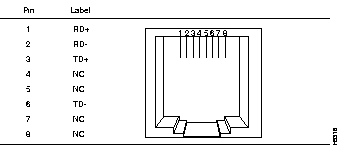
100BaseTX ports use an RJ-45 connector and pinout equivalent to the one shown in Figure A-1.
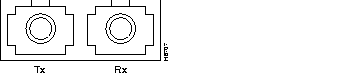
The Catalyst 1900 with a fixed 100BaseFX port uses a duplex SC connector, as shown in Figure A-2.
The AUI connector is a 15-pin female receptacle, as shown in Figure A-3 and described in Table A-2.

1 | GND | Ground |
| 2 | CI+ | Positive AUI differential collision-data input |
| 3 | TX+ | Positive AUI differential transmit-data input |
| 4 | GND | Ground |
| 5 | RX+ | Positive AUI differential receive-data output |
| 6 | GND | Ground |
| 7 | NC | |
| 8 | GND | Ground |
| 9 | CI- | Negative AUI differential collision data |
| 10 | TX- | Negative AUI differential transmit-data input |
| 11 | GND | Ground |
| 12 | RX- | Negative AUI differential receive data output |
| 13 | +12V | 12V supply for external MAU |
| 14 | GND | Ground |
| 15 | NC |
The serial RS-232 connector is a male 9-pin D-Sub connector, as shown in Figure A-4.
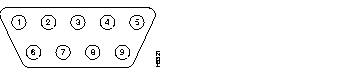
The pinout is shown in Table A-3.
1 | DCD |
| 2 | RD |
| 3 | TD |
| 4 | DTR |
| 5 | GND |
| 6 | DSR |
| 7 | RTS |
| 8 | CTS |
| 9 | RI |
The shell is connected to the chassis ground. Use a standard modem cable to connect to a modem. Use a null-modem cable to connect to a terminal.
Either piece of equipment can come with either 9- or 25-pin connectors, as shown in Figure A-5 and Figure A-6.
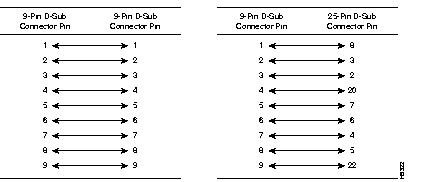
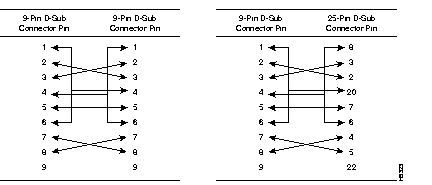
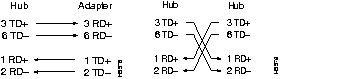
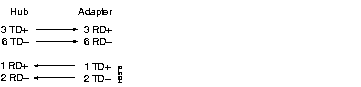
The schematics of crossover and straight-through cables are shown in Figure A-7 and Figure A-8, respectively.
|
|