


|
|

This chapter describes the Catalyst 2820 ATM module, lists its key features, and provides installation and configuration requirements.
The Catalyst 2820 supports four types of ATM modules--the ATM 155 multimode (MM) Fiber module, the ATM 155 single-mode (SM) medium-reach (MR) Fiber module, the ATM 155 single-mode (SM) long-reach (LR) Fiber module, and the ATM 155 UTP. Each module provides a physical-layer interface between the ATM module and an ATM switch. You can use the ATM module to connect workstations, hubs, and other switches to the following ATM devices:
Figure 1-1 shows a typical ATM-to-LAN topology. Two Catalyst 2820 switches are connected to other ATM-supported devices through the Catalyst 2820 ATM modules. The link between the LightStream 1010 ATM switch provides 155 Mbps of bandwidth over a 2-kilometer MM fiber-optic cable, 15-kilometer medium-reach SM fiber-optic cable, 40-kilometer long-reach SM fiber-optic cable, or 100-meter UTP cable.

Each ATM module includes the following features:
Each ATM module supports the following ATM management features:
Each ATM module complies with the following standards:
This section describes the physical characteristics of the Catalyst 2820 ATM modules. LED descriptions and connector and cable requirements for all models are included.
The ATM 155 MM Fiber module (shown in Figure 1-2) is a multimode ATM module that has one LED and one SC fiber-optic connector.
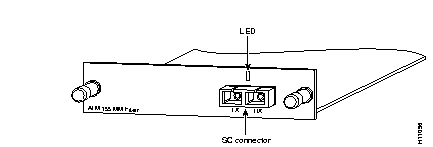
The indicator on the front panel of the MM Fiber module uses a two-color illumination to indicate the operating status of the module. The LED is described in Table 1-1.
| Color | Operating Status of the Module |
|---|---|
| Solid green | The port of the module is connected to an operational ATM switch at the remote end. |
| Flashing green | The module is transmitting or receiving data. The LED flashes rapidly when the traffic level is high; it is solid green when there is no activity. |
| Solid amber | The module is disabled because it did one of the following:
|
|
Off | The module is not connected to the ATM network of the Catalyst 2820 switch or another ATM device. |
The ATM 155 MM Fiber module requires an SC connector and fiber-optic cable as shown in Figure 1-3. The maximum distance for multimode fiber-optic network connections is 2 kilometers.

The module transmits data through the transmit (Tx) fiber-optic port and receives data from the receive (Rx) fiber-optic port. The fiber-optic port transmits on a 1300-nanometer wavelength.
The ATM 155 SM Fiber modules (shown in Figure 1-4 and Figure 1-5) consist of two single-mode ATM modules: a medium-reach version (SM-MR) and a long-reach version (SM-LR). Like the ATM 155 MM Fiber module, the ATM 155 SM Fiber modules also have one LED and one SC fiber-optic connector.
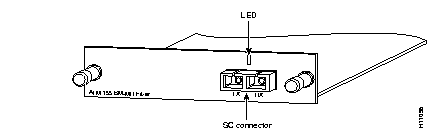
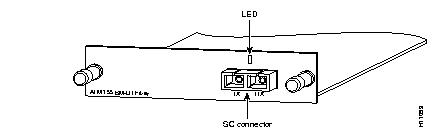
The indicator on the front panels of the SM-MR and SM-LR Fiber modules use a two-color illumination to indicate the operating status of the modules. The LED is described in Table 1-2.
| Color | Operating Status of the Module |
|---|---|
| Solid green | The port of the module is connected to an operational ATM switch at the remote end. |
| Flashing green | The module is transmitting or receiving data. The LED flashes rapidly when the traffic level is high; it is solid green when there is no activity. |
| Solid amber | The module is disabled because it did one of the following:
|
|
Off | The module is not connected to the ATM network of the Catalyst 2820 switch or another ATM device. |
The ATM 155 SM-MR and SM-LR Fiber modules require an SC connector and fiber-optic cable as shown in Figure 1-6. The maximum distance for single-mode fiber-optic network connections is 15 kilometers for medium reach and 40 kilometers for long reach.
The module transmits data through the transmit (Tx) fiber-optic port and receives data from the receive (Rx) fiber-optic port. The fiber-optic port transmits on a 1300-nanometer wavelength.
The ATM 155 UTP module (shown in Figure 1-2) has one LED indicator and one RJ-45 connector.
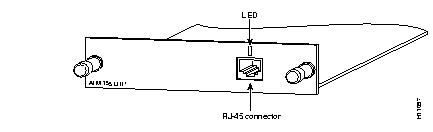
The indicator on the front panel of the ATM 155 UTP module uses a two-color illumination to indicate the operating status of the module. The LED is described in Table 1-3.
| Color | Operating Status of the Module |
|---|---|
| Solid green | The port of the module is connected to an operational ATM switch at the remote end. |
| Flashing green | The module is transmitting or receiving data. The LED flashes rapidly when the traffic level is high; it is solid green when there is no activity. |
| Solid amber | The module is disabled because it did one of the following:
|
|
Off | The module is not connected to the ATM network of the Catalyst 2820 switch or another ATM device. |
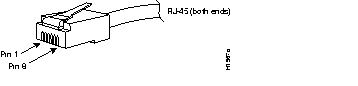
The ATM 155 UTP module requires an RJ-45 connector and Category 5 UTP straight-through cable as shown in Figure 1-8. The maximum distance for UTP network connections is 328 feet (100 meters).
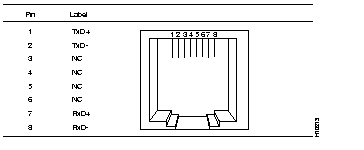
The RJ-45 connector shown in Figure 1-9 is on the ATM 155 UTP module front panel. The figure also lists the pin assignments.
|
|