


|
|

The Catalyst 2900 series XL modules can add port density and fiber-optic connectivity to a Catalyst 2900 series XL network. When installed in a Catalyst 2916M XL switch, these modules support switched 10BaseT, 100BaseTX, or 100BaseFX connections. The 10BaseT/100BaseTX module autonegotiates the duplex and speed settings of each port to match that of the attached device.
This chapter contains the following topics:
This section describes the two modules in detail. They have the following key features:
The 10BaseT/100BaseTX module, hereafter referred to as the 10/100 module, has four switched, 10/100 autosensing ports. The ports can autonegotiate the transmission speed, or they can be set to 10 Mbps or 100 Mbps. Ports can also be set to half duplex, full duplex, or autonegotiate. Figure 1-1 shows the 10/100 module.
The 10/100 module is compatible with the IEEE 802.3 10BaseT standard and the
IEEE 802.3u 100BaseT standard. The ports use RJ-45 connectors and two-pair Category 5 unshielded twisted-pair (UTP) cabling. The "10BaseT/100BaseTX Module Cabling" section in the "Connectors and Cables" appendix describes the required connectors.
The 100BaseFX module has two switched 100BaseFX ports for 100-Mbps fiber-optic connectivity. The ports can run in half-duplex or full-duplex modes. The ports support the IEEE 802.3u 100BaseT standard and use standard duplex SC connectors. Figure 1-1 shows the 100BaseFX module.
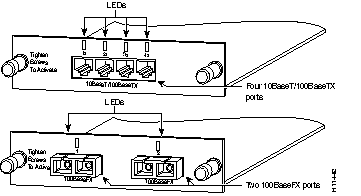
An LED above each port reflects the port status, as described in Table 1-1.
This section describes the cabling guidelines you need to consider when planning your network.
The 10/100 ports require Category 5 UTP cabling. Attached devices must be within 100 meters of the port and be either 10BaseT- or 100BaseTX-compatible.
The 10/100 ports are numbered 1X through 4X. The X indicates that the pins on the port connector are internally crossed. If you are connecting to a device with ports marked with an X, such as another switch or hub, use a crossover cable. If you are connecting to devices with ports not marked with an X, such as a PC, workstation, or server, use a straight-through cable.
For the connector pinouts and schematics, see the section "10BaseT/100BaseTX Module Cabling" in the "Connectors and Cables" appendix.
The 100BaseFX ports use 50/125- or 62.5/125-micron multimode fiber-optic cabling with duplex SC connectors. When set to run in full-duplex mode, 100BaseFX module ports can connect to other 100BaseFX-compatible devices over distances of up to 2 kilometers.
This section describes three networks that use Catalyst 2900 modules:
Figure 1-2 shows a high-performance client-server workgroup. A Catalyst 2916M XL with a 10/100 module installed connects the PCs and creates a four-port Fast EtherChannel link to a high-performance server supporting Fast EtherChannel.

Figure 1-3 shows a Catalyst 2916M XL aggregating traffic from shared 100BaseT, switched 100BaseTX, and switched 10BaseT networks. A 100BaseFX module passes the traffic to a backbone switch or router, and a 10/100 module links the switch via Fast EtherChannel to a high-performance server supporting Fast EtherChannel.

Figure 1-4 shows three Catalyst 2916M XL switches creating a high-speed backbone for 10BaseT/100BaseTX PCs, Catalyst 2820/1900 switches, and stacked FastHub 100BaseTX repeaters.

|
|