


|
|

Product Numbers: CAB-HSI1=, CAB-HNUL=
This document describes how to install High-Speed Serial Interface (HSSI) cables for Cisco 7000 series, Cisco 7200 series, Cisco 7500 series, and Cisco 4000 series routers; and Cisco uBR7200 series universal broadband routers.
These cables connect directly to the following hardware:
Use this publication in conjunction with the following publications:
Cisco documentation and additional literature are available in a CD-ROM package, which ships with your product. The Documentation CD-ROM, a member of the Cisco Connection Family, is updated monthly; therefore, it might be more up to date than printed documentation. To order additional copies of the Documentation CD-ROM, contact your local sales representative or call customer service. The CD-ROM package is available as a single package or as an annual subscription. You can also access Cisco documentation on the World Wide Web at http://www.cisco.com, http://www-china.cisco.com, or http://www-europe.cisco.com.
If you are reading Cisco documentation on the World Wide Web, you can submit comments electronically. Click Feedback on the toolbar, and then select Documentation. After you complete the form, click Submit to send it to Cisco. We appreciate your comments.
To obtain general information about documentation, call customer service at 800 553-6387 or 408 526-7208. Customer service hours are 5:00 a.m. to 6:00 p.m. Pacific time, Monday through Friday (excluding Cisco-observed holidays). You can also send e-mail to cs-rep@cisco.com, or you can refer to the Cisco Information Packet that shipped with your router.
Sections in this publication include the following:
Each HSSI port on the HIP, PA-H, PA-2H, or NP-1HSSI uses a female, 50-pin, SCSI-II-type connector.
 | Caution Although the HSSI connector and the HSSI cable are similar to SCSI-II format, they are not identical. The HSSI cable specification is more stringent than that for SCSI-II. If you use a SCSI-II cable instead of an HSSI cable, proper operation cannot be guaranteed. |
Two types of cables are available for use with an HSSI:
Figure 1 shows the HSSI cable CAB-HSI1= (Part Number 72-0710-xx). Table 1 provides pinouts. The cable has a male DB-50 (SCSI) connector on each end. Refer to "Connecting the HSSI Cable," page 5 for connection instructions.

Signal Name | Pin No. + Side (Router End) | Direction1 | Pin No. - Side (DSU End) |
|---|---|---|---|
| SG (Signal Ground) | 1 | -- | 26 |
| RT (Receive Timing) | 2 | <-- | 27 |
| CA (DCE Available) | 3 | <-- | 28 |
| RD (Receive Data Reserved) | 4 | <-- | 29 |
| LC (Loopback circuit C) | 5 | <-- | 30 |
| ST (Send Timing) | 6 | <-- | 31 |
| SG (Signal Ground) | 7 | -- | 32 |
| TA (DTE Available) | 8 | --> | 33 |
| TT (Terminal Timing) | 9 | --> | 34 |
| LA (Loopback Circuit A) | 10 | --> | 35 |
| SD (Send Data) | 11 | --> | 36 |
| LB (Loopback Circuit B) | 12 | --> | 37 |
| SG (Signal Ground) | 13 | -- | 38 |
| 5 (Ancillary to DCE) | 14-18 | --> | 39-43 |
| SG (Signal Ground) | 19 | -- | 44 |
| 5 (Ancillary from DCE) | 20-24 | <-- | 45-49 |
| SG (Signal Ground) | 25 | -- | 50 |
Figure 2 shows the HSSI null-modem cable CAB-HNUL= (Part Number 72-0727-xx). Table 2 provides pinouts. The cable has a male DB-50 (SCSI) connector on each end. Refer to "Connecting the HSSI Cable," page 5 for connection instructions.

| Signal Name | From Pins | Direction1 | To Pins | Signal Name |
|---|---|---|---|---|
| RT (Receive Timing) | 2, 27 | --> | 9, 34 | TT (Terminal Timing) |
| CA (DCE Available) | 3, 28 | --> | 8, 33 | TA (DTE Available) |
| RD (Receive Data) | 4, 29 | --> | 11, 36 | SD (Send Data) |
| LC (Loopback C) | 5, 30 | --> | 10, 35 | LA (Loopback A) |
| ST (Send Timing) | 6, 31 | --> | 6, 31 | ST (Send Timing) |
| TA (DTE Available) | 8, 33 | --> | 3, 28 | CA (DCE Available) |
| TT (Terminal Timing) | 9, 34 | --> | 2, 27 | RT (Receive Timing) |
| LA (Loopback A) | 10, 35 | --> | 5, 30 | LC (Loopback C) |
| SD (Send Data) | 11, 36 | --> | 4, 29 | RD (Receive Data) |
| GND (Ground) | 1, 26, 7, 32, 13, 38, 19, 44, 25, 50 | 1, 26, 7, 32, 13, 38, 19, 44, 25, 50 | GND (Ground) | |
| Loopback (not connected) | 12, 37 | |||
| 12, 37 | Loopback (not connected) | |||
| Not used | 14-18, 20-24, 39-43, 45-49 | 14-18, 20-24, 39-43, 45-49 | Not used |
Connect the HSSI cable between the router and a T3, E3, or SONET DSU as shown in Figure 3 (HIP), Figure 4 (PA-H), or Figure 5 (NP-1HSSI).
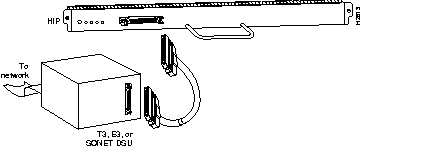
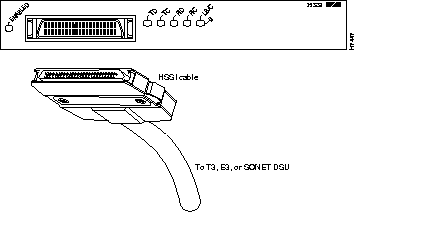
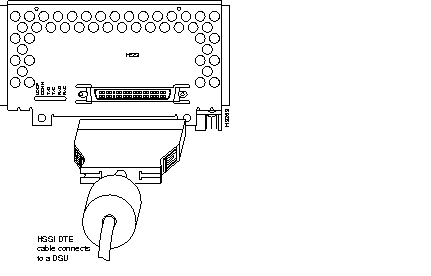
For additional information, such as how to configure the interface, refer to the configuration note that shipped with your HIP, PA-H, PA-2H, or NP-1HSSI.
Cisco documentation and additional literature are available in a CD-ROM package, which ships with your product. The Documentation CD-ROM, a member of the Cisco Connection Family, is updated monthly; therefore, it might be more up to date than printed documentation. To order additional copies of the Documentation CD-ROM, contact your local sales representative or call customer service. The CD-ROM package is available as a single package or as an annual subscription. You can also access Cisco documentation on the World Wide Web at http://www.cisco.com, http://www-china.cisco.com, or http://www-europe.cisco.com.
If you are reading Cisco documentation on the World Wide Web, you can submit comments electronically. Click Feedback on the toolbar, and then select Documentation. After you complete the form, click Submit to send it to Cisco. We appreciate your comments.
To obtain general information about documentation, call customer service at 800 553-6387 or 408 526-7208. Customer service hours are 5:00 a.m. to 6:00 p.m. Pacific time, Monday through Friday (excluding Cisco-observed holidays). You can also send e-mail to cs-rep@cisco.com, or you can refer to the Cisco Information Packet that shipped with your router.
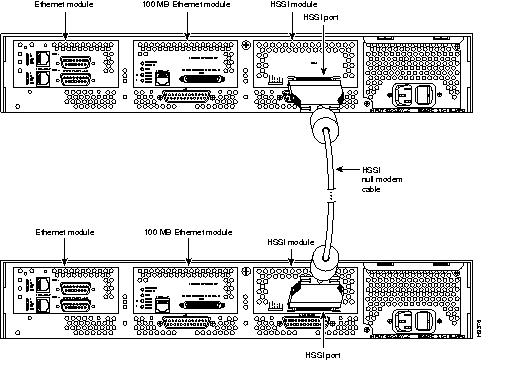
To connect two routers directly, back-to-back, connect the null modem cable between the HSSI ports in two separate routers. The two routers must be in the same location and can be two Cisco 4000 series routers, two Cisco 7000 series routers, two Cisco 7200 series routers, two Cisco 7500 series, two Cisco uBR7200 series universal broadband routers, or any two routers of each router series listed. A null modem connection allows you to verify the operation of the HSSI or to link the routers directly in order to build a larger node.
Figure 6 shows cable connection for two HIP boards, and Figure 7 shows cable connection for two NP-1HSSI network processor modules.

Cisco Connection Online (CCO) is Cisco Systems' primary, real-time support channel. Maintenance customers and partners can self-register on CCO to obtain additional information and services.
Available 24 hours a day, 7 days a week, CCO provides a wealth of standard and value-added services to Cisco's customers and business partners. CCO services include product information, product documentation, software updates, release notes, technical tips, the Bug Navigator, configuration notes, brochures, descriptions of service offerings, and download access to public and authorized files.
CCO serves a wide variety of users through two interfaces that are updated and enhanced simultaneously: a character-based version and a multimedia version that resides on the World Wide Web (WWW). The character-based CCO supports Zmodem, Kermit, Xmodem, FTP, and Internet e-mail, and it is excellent for quick access to information over lower bandwidths. The WWW version of CCO provides richly formatted documents with photographs, figures, graphics, and video, as well as hyperlinks to related information.
You can access CCO in the following ways:
For a copy of CCO's Frequently Asked Questions (FAQ), contact cco-help@cisco.com. For additional information, contact cco-team@cisco.com.
|
|