


|
|

This appendix presents information on the CiscoSecure Access Control Server (ACS) database structure. It provides programmers and system administrators with database information they can use to write custom programs which access the ACS.
This appendix includes the following sections:
The database structure consists of three main entities: group or user profile, accounting information, and internal dictionary data. (The internal dictionary data is not provided here because the information it contains cannot be changed.)
The database structure provides valuable data regarding the location of passwords, attributes, accounting data, and other related information, as shown in the data models in this appendix. This appendix also provides information you need to locate key information so that you can act on it later (modify, sort, redistribute it, and so forth), as your needs determine. For example, you might want to extract information contained in the accounting file and transfer it to a spreadsheet for billing purposes.
This section provides the structure of the database tables stored in a database, such as SQLAnywhere, that came bundled with your CiscoSecure ACS. Other supported databases include Oracle and Sybase SQL Server.
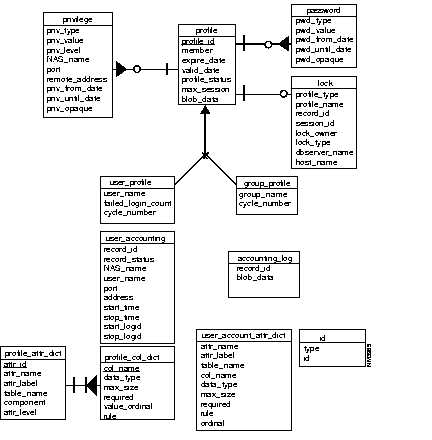
Because the group profile and user profile share a common set of attributes, a parent entity "profile" is created to factor out the common set. Group profiles and user profiles exist to store an attribute that could be unique to a particular profile, or to store an attribute that could be accessed frequently.
Password and privilege are treated as separate entities, because they are both multivalued attributes. They form a dependent relationship to the profile. Each profile could have any number (including zero) of instances of each dependent entity.
Any attribute not stored as a separate column in the database is stored in a blob column. The attributes in the blob column have limitations in that they cannot be used in a query condition.
A lock entity keeps track of locks on group or user profiles. The data table cs_user_profile stores user profile information. See .
The data table cs_group_profile stores group profile attributes. See Table F-1.
The data table cs_profile stores group and user profile attribute values. This table represents a super entity profile that is used to factor out the common set of attributes in users and groups. See Table F-2.
The data table cs_password stores password information of a user or a group profile. See Table F-4. Note that multiple entries can exist for a user or a group profile.
| Column | Description |
|---|---|
| profile_id | Unique identification number for a user or a group profile. The number is a 4-byte signed integer number greater than 0. Unique composite index is created on profile_id and pwd_type. |
| pwd_type | Password type. Variable length column up to 32 bytes. Should be specified. |
| pwd_value | Password itself or external file specification. Variable length column up to 255 bytes. NULL if not specified. |
| pwd_from_date | Date on which the password becomes valid. NULL if no date is specified. |
| pwd_until_date | Last date the password is valid. NULL if no date is specified. |
| pwd_opaque | Any other data specified after password until date on the password attribute value list. Up to 255 bytes. NULL if nothing specified. |
The data table cs_privilege stores privilege information of a group or a user profile. See Table F-5.
| Column | Description |
|---|---|
| profile_id | Unique identification number for a user or a group profile. The number is a 4-byte signed integer number greater than 0. Unique composite index is created on profile_id, priv_type, and priv_value. |
| priv_type | Privilege password type. Variable length column up to 32 bytes. Required. |
| priv_value | Privilege password or external file specification. Variable length column up to 255 bytes. NULL if not specified. |
| priv_level | Privilege level. Integer between 0 and 15. Required. |
| nas_name | NAS name. Variable length column up to 255 bytes. NULL if not specified. |
| port | Port name. Variable length column up to 255 bytes. NULL if not specified. |
| remote_address | Remote address. Variable length column up to 255 bytes. NULL if not specified. |
| priv_from_date | Date on which the privilege password becomes valid. NULL if not specified. |
| priv_until_date | Last date the privilege password is valid. NULL if not specified. |
| priv_opaque | Any other data specified after privilege until date on the privilege attribute value list. Up to 255 bytes. NULL if nothing is specified. |
The data table cs_lock keeps track of all locks held on group or user profiles. See Table F-6.
Two entities exist for storing accounting data. The first, the accounting_log entity, contains each accounting record as it is passed to the database server. The blob_data attribute, contains the actual accounting record.
The user_accounting entity contains user accounting information for start and stop time as well as other information extracted from the raw accounting data. This entity maintains start_logid and stop_logid to the actual accounting log records in the accounting_log.
The data table cs_accounting_log stores all the accounting raw data as passed to the database server. See Table F-7. This includes user accounting data as well as system accounting data.
When accounting records in the cs_user_accounting and cs_accounting_log tables are exported and deleted by the 'AcctExport' tool, a temporary table - cs_accnt_tmp - is created if there are any active sessions. The temporary table is removed when the export is done.
The data table cs_user_accounting stores accounting information related to start time and stop time of a user session. It also stores log_ids of the raw accounting data in the cs_accounting_log table for start or stop events. See Table F-8.
| Column | Description | ||||||||||
|---|---|---|---|---|---|---|---|---|---|---|---|
| record_id | Unique identification number for an accounting raw record. The number is a signed 4-byte integer greater than 0. Primary key is created on this column. | ||||||||||
| record_status | Status in short integer value:
Index is created on this column. | ||||||||||
| nas_name | NAS name. Variable length column up to 255 bytes. | ||||||||||
| user_name | User name. Variable length column up to 255 bytes. | ||||||||||
| port | Port name. Variable length column up to 255 bytes. | ||||||||||
| address | Protocol address information. Variable length column up to 255 bytes. | ||||||||||
| start-time | Timestamp for session start. | ||||||||||
| stop_time | Timestamp for session stop. | ||||||||||
| task_id | Task ID. Variable length column up to 255 bytes. | ||||||||||
| start_logid | Log_id of raw accounting record in cs_accounting_log table for start event. | ||||||||||
| stop_logid | Log_id of raw accounting record in cs_accounting_log table for stop event. |
The dictionary tables listed in this section identify the mapping between attributes and database objects. Only the table names of the dictionary entities are listed here because the data contained in them is internal to CiscoSecure ACS and cannot be modified. The dictionary data tables are:
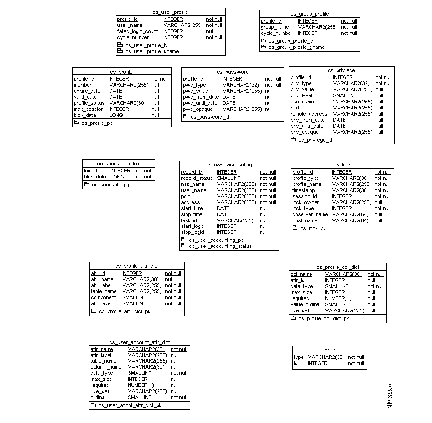
Figure F-1 shows the conceptual data model and Figure F-2 shows the physical tables and columns that are created on a supported database.
This section defines the separate procedures to perform an offline and online backup of the SQLAnywhere database.
As an offline solution, the SQLAnywhere database file can be copied to any standard backup media, or to a directory designated for backup files as follows:
Step 1 Shut down the database by entering the following command:
Step 2 Copy the database file, csecure.db, to your specified backup media or directory.
The csecure.db file is located within the database directory that you specified when you initially installed the CiscoSecure ACS. For example, if you specified the database directory as /usr/CiscoSecure/database, you would copy /usr/CiscoSecure/database/csecure.db to your designated backup location.
Step 3 Copy the transaction log file, csecure.log, to your specified backup media or directory.
Like the database file, the csecure.log file is located within the database directory that you specified when you initially installed the CiscoSecure ACS.
Step 4 After backing up the transaction log (csecure.log), delete it; otherwise the log file will continue to record transactions and grow indefinitely.
The transaction log is written by SQLAnywhere and is used for recovery purposes. However, because the database is already successfully shut down, the log file can be removed without any consequences.
This section defines the procedure to back up the SQLAnywhere database while the CiscoSecure ACS is up and running by executing the dbbackup command. The environment variables can be set once in the user's shell startup file like .profile to avoid setting them repeatedly, as follows:
Step 1 Set the proper SATMP environment variable as follows:
Step 2 Add SATMP to the $SQLANY/tmp path.
Step 3 Set the proper environmental variable, as follows:
Step 4 Add $SQLANY/lib to the LD_LIBRARY_PATH environment variable.
Step 5 Add $SQLANY/bin to the PATH environment variable.
Step 6 Execute the dbbackup command, as shown in the following example:
dbbackup -c "ENG=csecure;UID=DBA;PWD=SQL" -x target directory
SQL is the default password for the database access account when the database was created. If this password has changed, then provide the new password. The target directory refers to the backup directory where you want to save the database. The -x option truncates the transaction log.
|
|