


|
|

The Cisco 90 Series family of products provides telecommunications carriers with a more cost-effective solution to deliver high-speed data services for Internet and intranet access applications. The Cisco 90 Series provides connection to the Internet, private corporate networks, and much more. It also extends fast packet access using Frame Relay to the telephone company end office. The resulting service is ideal for small business users, telecommuters and residential Internet access.
Cisco provides the industry's most cost-effective digital access solution; a new channel unit for D4 DSL Frame Multiplexers, the Cisco 90i. The Cisco 90i is unique in that it turns existing Time Division Multiplexing (TDM) D4 channel banks, which are deployed in nearly all North American Central Offices (COs), into frame multiplexers. Given this approach, the Cisco 90i provides the lowest capital and operational cost solution for large-scale digital access.
The Cisco 90i channel unit is based on ISDN Digital Subscriber Line (IDSL) technology. Key carrier benefits are:
When carriers offer IDSL services over the Cisco 90i, users can achieve the following benefits:
The Cisco 90 Series system is composed of the following:
The Cisco 90 Series provides access to Frame Relay and ATM networks using Cisco 90i Integrated Services Digital Network (ISDN) Digital Subscriber Line (IDSL) Channel Units installed in standard D4-compliant channel banks. The D4 channel bank, traditionally used to provide Time Division Multiplexing (TDM) service, is turned into a high-performance Frame Relay concentrator.
The Cisco 90i has four 144 kbps ISDN 2B1Q access loops, each supporting up to eight Frame Relay Permanent Virtual Circuits (PVCs) or one Point-to-Point Protocol (PPP) circuit. The Cisco 90i supports data speeds between 56 kbps and 128 kbps. As many as 96 IDSL ports can be supported on the D4 DSL Frame Mux with a single economic T1 Frame Relay uplink.
The Cisco 90i complements Cisco's existing dial offload solution, which is based on the Cisco AS5200 universal access server, and a virtual dial solution using the L2F protocol. Whereas the Cisco AS5200 provides support for existing users of dial-up modems and ISDN, the Cisco 90i is targeted at users looking for higher speed or dedicated access. These two products can be combined to form a single solution providing complete heterogeneous access capability. Cisco is also making available customer premises offerings that support IDSL. These products include the Cisco 770 series SOHO router and the Cisco 1600 series modular access router.
In a typical application (see Figure 1-1), a standard D4 channel bank using Cisco 90i IDSL Channel Units is connected to a Frame Relay network through a T1 line. The frames are routed through a Frame Relay network, which connects to an Internet service provider (ISP) using, for example, a T1 or T3 connection.
The Cisco 90i IDSL Channel Unit is connected to an ISDN router or terminal adapter on the customer premises.
The Cisco 90 Series DSL Management Agent is connected to the Frame Relay network and communicates with the Cisco 90i IDSL Channel Units installed in the network. It can remotely manage a network of up to 992 Cisco 90i IDSL Channel Units.

The Cisco 90i IDSL Channel Units are circuit cards that are installed in a standard D4 channel bank to provide ISDN access to subscribers. Figure 1-2 shows the front panel of a Cisco 90i IDSL Channel Unit.
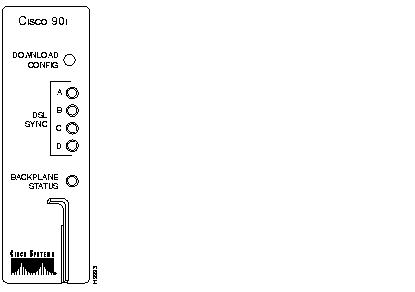
The Cisco 90i is a single-width D4 channel unit that is compatible with existing D4 channel banks, using standard common equipment. It supports four Integrated Services Digital Network (ISDN) Digital Subscriber Loops (IDSLs) running user data at either 56, 64, 128, or 144 kbps. Each of the four subscriber interfaces supports standard twisted pair 2B1Q loops of up to 18 kilofeet.
The Cisco 90i converts a standard D4 time-division multiplexer (TDM) channel bank into a D4 DSL frame multiplexer. By converting incoming data to a Frame Relay format, the Cisco 90i supports up to 96 subscriber circuits on each 24 channel digroup on a D4 DSL frame multiplexer with a single T1 Frame Relay uplink.
The Cisco 90i supports both Frame Relay and Point-to-Point Protocol (PPP) on the IDSL per ANSI and CCITT standards. It is compatible with standard ISDN customer premises equipment (CPE) with leased-line support. Low-end customer premises equipment (CPE) such as terminal adapters and personal routers use PPP to establish a single permanent virtual circuit (PVC) to the network. Frame Relay-capable routers can support multiple users with up to eight PVCs over IDSL to connect to both Internet service provider (ISP) and corporate locations for Internet and intranet access.
The Cisco 90i handles forward and backward congestion control and data discard per specification. Traffic management rules are enforced based on Committed Information Rate (CIR) set per PVC. It also supports Annex D of ANSI T1.617 to communicate with both the CPE and the Frame Relay switch regarding the health of the Frame Relay link and the PVC assignments. To support PPP from the subscriber side, the Cisco 90i encapsulates PPP in Frame Relay using RFC 1973.
The Cisco 90i has a built-in bit error rate test (BERT) set and the ability to loop itself back, remotely loop a Network Termination 1 (NT1) device or any downstream ISDN channel unit to run performance tests. It also maintains an extensive set of statistics for the physical and data link layers for the channel unit and uses the Embedded Operations Channel (EOC) as specified in the Bellcore TR-TSY-000829 ISDN protocol format to retrieve loop performance data for downstream units.
Features of the Cisco 90i IDSL Channel Unit are as follows:
The Cisco 90i IDSL Channel Units must be managed in order to configure them, monitor performance, and isolate faults. Cisco 90i configuration, monitoring, and maintenance functions are accessible through the Cisco 90 Series DSL Management Agent (see Figure 1-3) using the Simple Network Management Protocol (SNMP). Through the Cisco 90 Series DSL Management Agent, up to 992 Cisco 90i IDSL Channel Units can be managed remotely from a centralized location. A redundant Cisco 90 Series DSL Management Agent can also be installed to protect against failure.
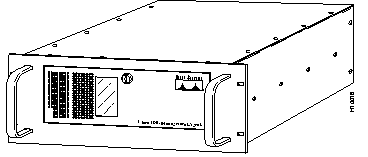
The Cisco 90 Series DSL Management Agent has an embedded SNMP agent built into it, which provides efficient management, troubleshooting, and diagnostic tools to control and monitor the system through the SNMP manager application and the Cisco 90 Series MIB.
The Cisco 90 Series DSL Management Agent is a rack-mounted system that can be located anywhere in the network that has Frame Relay access. It allows remote management of up to 992 T1 digroups populated by Cisco 90i IDSL Channel Units, limited by the number of available DLCIs. It communicates to each D4 DSL frame multiplexer through a Frame Relay PVC connection over a synchronous T1 port. It requires a V.35 or EIA/TIA-530 connection to the Frame Relay network and a TCP/IP connection to the network where an SNMP manager, such as HP OpenView, resides.
The Cisco 90 Series DSL Management Agent shipping carton contains the following:
Installing the Cisco 90 Series system is a simple three-step process.
When installing a new network, the first step is to install the Cisco 90 Series DSL Management Agent. The DSL Management Agent allows the entire network to be remotely managed through the Frame Relay network. There is no need to run Ethernet to each channel bank in every local central office or to configure each bank with IP addresses or any other parameters. You may also wish to install a redundant backup Cisco 90 Series DSL Management Agent.
The second step is to install the D4 channel banks. Because the Cisco 90 Series uses ordinary D4-compliant channel banks, this step should be easy. The physical installation follows standard operation and maintenance procedures.
The final step is to install Cisco 90i IDSL Channel Units for new subscribers. At the subscriber's central office, this involves little more than inserting the card and connecting the loop wiring. All of the configuration and testing is done from the centralized SNMP manager.
These three steps are described in detail in the next chapters.
|
|