


|
|

This chapter provides cabling guidelines for determining how to build networks using FastHubs and describes how to connect the FastHub to network devices.
The IEEE 802.3u standard defines two different classes of 100BaseT repeaters, Class I and Class II. Networks using Class I repeaters are limited to a single repeater (or stack). Class II repeaters allow networks to be built with more than one repeater (or stack). In addition, Class II repeaters allow longer cable distances in single repeater configurations than do Class I repeaters. The FastHub is a Class II repeater. Moreover, the FastHub exceeds the specifications for Class II repeaters, allowing the use of longer cable lengths than standard Class II repeaters.
 | Caution Many switches have "built-in" repeaters or plug-in repeater modules. In these devices, the switch is actually attached to a port on the internal repeater. When connecting to a switch, determine if the port is a repeater port or not, and, if so, what type of repeater is present. If it is not a repeater port, then the switch is treated as an ordinary end-station. If the port is a Class I repeater port, do not connect a FastHub or any other repeater to the port. If it is a Class II repeater port, refer to the "Extended and Multivendor Configurations" section in this chapter for configuration guidelines. |
The IEEE 802.3u standard specifies four simple network configurations using Class II repeaters. These configurations were designed to satisfy the requirements of most networks that are built to the EIA/TIA-568 wiring standard. This standard specifies 100-meter Category 5 UTP connections from wiring closets to desktops. If your network requirements cannot be met with one of these configurations, or if you are building networks mixing FastHubs with other Class II repeaters, see the "Extended and Multivendor Configurations" section in this chapter.
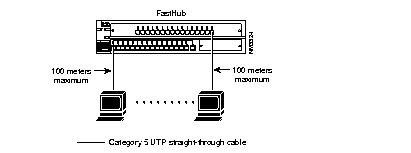
With only Cat 5 UTP cable segments, the maximum length for any cable segment is 100 meters, as shown in Figure 3-1.
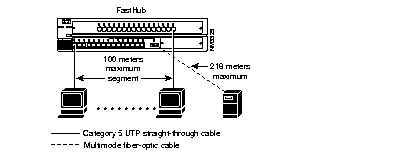
The maximum Cat 5 UTP cable segment length is 100 meters (see Figure 3-2).
The maximum fiber-cable segment length is 218 meters.
If all of the Cat 5 UTP-cable segments connected to the FastHub are less than 100 meters, the length of the fiber cable segment can be increased. See the "Extended and Multivendor Configurations" section for more information.
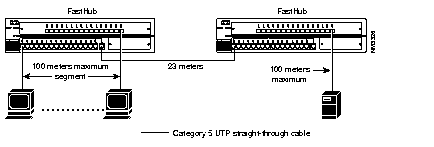
The maximum Cat 5 UTP cable segment length is 100 meters. When stations are connected to the FastHubs with 100-meter Cat 5 UTP cable segments, the Cat 5 UTP cable connecting the two FastHubs is limited to a distance of 23 meters, as illustrated in Figure 3-3.
If all of the Cat 5 UTP cable segments connecting stations to one or both of the FastHubs are less than 100 meters, the length of the Cat 5 UTP cable segment connecting the two FastHubs can be increased. See the "Extended and Multivendor Configurations" section for more information.
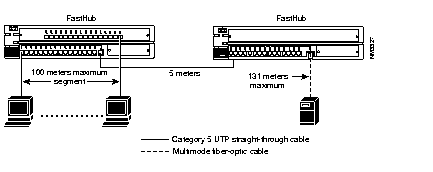
With 100-meter Cat 5 UTP cable segments connecting the stations to the FastHubs and a 5-meter Cat 5 UTP cable connecting the two FastHubs, the maximum length fiber-cable segment length is 131 meters, as illustrated in Figure 3-4.
If all of the Cat 5 UTP cable segments connecting stations to the FastHub are less than 100 meters, the length of the fiber-cable segment or the length of the Cat 5 UTP cable segment connecting the two FastHubs can be increased. See the "Extended and Multivendor Configurations" section for more information.
The previous cabling examples applied to configurations of one or two FastHub stacks with Cat 5 UTP segments assumed to be at their worst case distance, 100 meters. When the maximum Cat 5 UTP segment length is less than 100 meters, longer fiber segments, longer inter-repeater links, or more repeaters can be deployed. On the other hand, when FastHubs are deployed with standard Class II repeaters (Class II repeaters that meet but do not exceed the IEEE 802.3u specification), the maximum span is decreased.
A specific calculation of maximum cable length is required in the following cases:
Allowable repeater configurations are determined by the longest path between any two stations. This path constraint is determined by cable segment lengths, cable types, number of repeaters, and repeater types. The arithmetic underlying this determination can be reduced to a constraint on the sum of the segment lengths between the two furthest stations. The constraint is expressed in total meters and assumes that all segments are Cat 5 UTP. Therefore, fiber segments must be converted to their Cat 5 UTP equivalents.
Step 1 Confirm that no Cat 5 UTP segment is greater than 100 meters.
Step 2 Convert every fiber segment to its Cat 5 UTP equivalent by multiplying the fiber-segment length by 0.9 (these segments can be longer than 100 meters).
Step 3 Confirm that the sum of the Cat 5 UTP-equivalent segment lengths between any two end-stations (including bridges, switches, or routers) is less than the maximum value specified in Table 3-1. For multirepeater networks, it is critical to evaluate not just the paths passing through the most repeaters but also the stations-to-station paths (if applicable) passing through one, two, or three repeaters.
Step 4 Divide by 0.9 to get fiber segment length.
| Number and Type of Repeaters in the Path | Maximum Total Cable Distance in Path (Cat 5 UTP Equivalents, in Meters) |
|---|---|
| 1 FastHub | 296 |
| 1 other Class II repeater | 287 |
| 2 FastHubs | 223 |
| 1 FastHub and 1 other Class II repeater | 214 |
| 3 FastHubs | 149 |
| 2 FastHubs and 1 other Class II repeater | 140 |
| 1 FastHub and 2 other Class II repeaters | 131 |
In this example, a 250-meter fiber segment is required to connect a FastHub to a server located 250 meters away. What are the maximum permissible Cat 5 UTP station connections in this configuration (see Figure 3-5)?
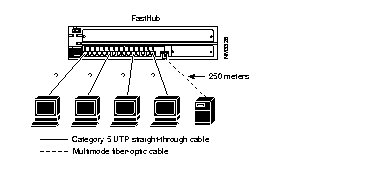
Perform the following steps to determine the maximum permissible Cat 5 UTP cable segment lengths:
Step 1 Convert the fiber distance to its UTP equivalent by multiplying by 0.9. This gives us a UTP equivalent of 225 meters (250 x 0.9 = 225 meters).
Step 2 Using Table 3-1, we see that the maximum Cat 5 UTP equivalent distance between any two stations on a single FastHub is 296 meters. Subtracting 225 meters from 296 meters gives us the maximum Cat 5 UTP cable segment length of 71 meters.
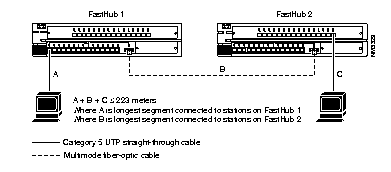
It is possible to increase the distance between two FastHubs by reducing the maximum cable segments connecting stations to the FastHubs. Using Table 3-1, we see that the maximum Cat 5 UTP equivalent distance between any two stations separated by two FastHubs is 223 meters.
In the following example, it is necessary to separate the two repeaters by 120 meters (see Figure 3-6). First, since this distance is greater than 100 meters, we must use fiber cable. Convert the fiber distance to its UTP equivalent by multiplying by 0.9. This gives us a UTP equivalent of 108 meters (120 x 0.9 = 108 meters). Using A + B + C = 223 meters and substituting 108 meters for segment B, we arrive at A + C £ 115 meters.
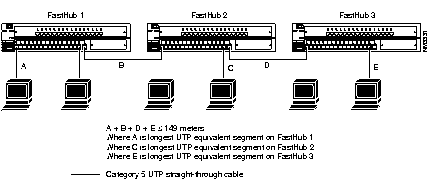
It is possible to add a third FastHub stack in the same collision domain to increase the total number of connected stations to 380. Using Table 3-1, we see that the maximum Cat 5 UTP equivalent distance between any two stations connected by three FastHubs is 149 meters.
In the following example, all three hub stacks are in the same wiring closet, separated by
1-meter Cat 5 UTP cable segments. Substituting this information into the formula shown in Figure 3-7, we see that B + D = 2 meters, A + (2 meters) + E £ 149 meters, and therefore
A + E £ 147 meters. If A is 60 meters, then E would be 87 meters.
Note that after assigning cable lengths to A and E, we must check to see if the configuration rules for stations separated by two FastHubs have been violated. That is, A + B + C
£ 223 meters and C + D + E £ 223 meters. For the first configuration, we get: A (60 meters) + B (1 meter) + C £ 223. In this case, C must be £ 162. For the second configuration (C + D + E £ 223) we get: D (1 meter) + E (87 meters) + C £ 223. In this case, C must be £ 135.
To satisfy both paths (A, B, C and C, D, E), C must be less than or equal to 135 meters. Note that these are Cat 5 UTP equivalent meters. If fiber cable is used, C must be £ 135 x 1.11, or C £ 150.
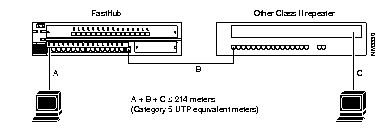
It is possible to build networks combining FastHubs with other Class II repeaters from Cisco or other vendors (see Figure 3-8).
Using Table 3-1, we see that A + B + C £ 214 meters. Note that these are Cat 5 UTP equivalent meters.
This section provides procedures to connect devices to the 100BaseTX and 100BaseFX ports.
| Caution Do not connect to both the uplink port (port 16) and port 16x; this disables both ports. |
The 100BaseTX ports are compatible with the 100BaseTX IEEE-802.3u specification and can connect to any 100BaseTX device.
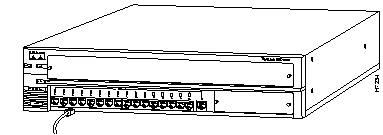
All FastHub 100BaseTX ports use RJ-45 type connectors and require Cat 5 UTP cable (see Figure 3-9). The 100BaseTX ports (excluding the uplink port, port 16) are internally crossed, enabling the use of straight-through cables when connecting to a server or workstation. Attached servers or workstations must have a 100BaseTX-compatible adapter installed. When using the 100BaseTX ports (excluding the uplink port) to connect to another hub, switch, or router, a crossover cable must be used (unless you are connecting to the uplink port on another FastHub or 100BaseT hub).
The 100BaseTX uplink port is not internally crossed, enabling the use of standard straight-through cable when connecting to another FastHub 100BaseTX port or to the 100BaseTX port on another hub, switch, or router. Note that the port on the device you are connecting to must be an X port.
See "Connectors and Cabling" in Appendix B for connector pinouts.
Warning 
Avoid exposure to the laser beam.
The 100BaseFX ports are compatible with the 100BaseFX IEEE-802.3u specification and can connect to any 100BaseFX device.
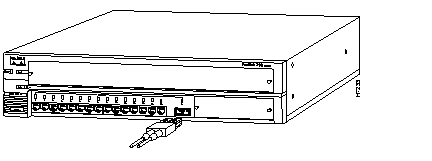
The FastHub 316C 100BaseFX port uses an SC type connector and requires 62.5/125- or 50/125-micron multimode, fiber cable (see Figure 3-10). The 100BaseFX port can be used to connect to compatible ports on switches, routers, or other hubs. Attached servers or workstations must be equipped with a 100BaseFX adapter.
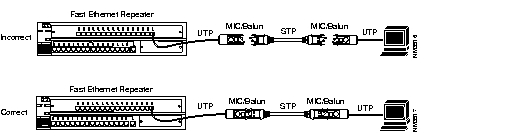
The media interface connectors (MICs) and baluns that are used to make network connections with STP cabling create a loopback when disconnected; the loopback might cause anomalies with a Fast Ethernet repeater.
To prevent potential loopback problems on your network, make sure that the MIC connectors and baluns are never left unconnected when they are part of a link connected to a Fast Ethernet repeater (see Figure 3-11).
The port LEDs indicate port status as follows:
|
|