


|
|

This chapter describes how to configure your communication server to act as an AppleTalk Remote Access server. It does not describe how to configure or use the client Macintosh. Refer to Apple Computer's AppleTalk Remote Access User's Guide for information about how to use AppleTalk Remote Access software on your Macintosh.
Cisco's implementation of AppleTalk Remote Access connectivity gives Macintosh users direct access to information and resources at a remote location. Macintosh users can connect to another Macintosh computer or AppleTalk network over standard telephone lines: For example, if you have a PowerBook at home and need to get a file from your Macintosh at the office, AppleTalk Remote Access software can make the connection between your home and office computers.
You can configure your communication server to act as an AppleTalk Remote Access server by enabling AppleTalk and AppleTalk Remote Access Protocol (ARAP). Configuring your communication server to act as an AppleTalk Remote Access server allows remote Macintosh users to dial in, become a network node, and connect to devices on other networks. ARAP support on the communication server is transparent to the Macintosh end user.
The following Macintosh and communication server software support is required for AppleTalk Remote Access connectivity:
Figure 1-1 shows how your communication server can act as an AppleTalk Remote Access server between remote Macintosh computers (in Figure 1-1, a Macintosh SE and a PowerBook) and devices on another network.
Enabling ARAP on your communication server allows it to support ARAP on the Macintosh and, therefore, to act as an AppleTalk Remote Access server.
AppleTalk is a client-server, or distributed, protocol. AppleTalk users share network resources, such as files and printers, with other users. Interactions with different servers are transparent to users, because the computer determines the location of the requested material and accesses it without requesting information from the user.
AppleTalk identifies several network entities, starting with a node. A node is any device connected to an AppleTalk network. The most common nodes are Macintosh computers and laser printers, but many other types of computers are also capable of AppleTalk communication, including IBM PCs, Digital VAX/VMS systems, and a variety of workstations. A Cisco communication server, which provides only one network interface, is considered a node on the network. In the section, the term router refers to any device that routes AppleTalk packets.
The next entity defined by AppleTalk is a network. An AppleTalk network is a single logical cable. Finally, an AppleTalk zone is a logical group of one or more (possibly noncontiguous) networks.
Apple Computer has produced a variety of internetworking products with which to connect AppleTalk local-area networks.Apple supports Ethernet, Token Ring, Fiber Distributed Data Interface (FDDI), and its own proprietary twisted-pair media access system (called LocalTalk).
Figure 1-2 compares the AppleTalk protocols with the standard seven-layer OSI model and illustrates how AppleTalk works with a variety of physical and link access mechanisms.

The Cisco AppleTalk implementation provides the following standard services, in addition to the ability to transmit any AppleTalk packet:
The DDP and AARP protocols provide end-to-end connectivity between internetworked nodes. NBP maps network names to AppleTalk internet addresses. NBP relies on ZIP to help determine which networks belong to which zones. File and print access is provided through AFP and PAP, respectively, which work with applications such as AppleShare and print servers.
The Cisco AppleTalk implementation also includes the following enhancements:
AppleTalk, like many network protocols, makes no provision for network security. The AppleTalk protocol architecture requires that security measures be executed at higher application levels. The communication server software supports AppleTalk network access lists, providing filters at the packet level.
AppleTalk was designed for local work groups. With the installation of over 1.5 million Macintosh computers in the first five years of the product's life, Apple found that some large corporations were exceeding the design limits of AppleTalk. Apple's solution was to create extended AppleTalk. The extended AppleTalk architecture increases the number of nodes per AppleTalk internetwork to over 16 million and an unlimited number of zones per cable.
The introduction of the extended AppleTalk architecture also introduced the concept of nonextended and extended networks. Nonextended AppleTalk networks are sometimes called "Phase 1," and extended networks are called "Phase 2." Nonextended networks refer to the nonextended AppleTalk Ethernet 1.0 networks (no longer supported by Apple but still supported by Cisco), and to the nonextended serial line-based networks, including those configured using X.25 and LocalTalk.
Extended networks refer to the extended AppleTalk-compliant networks configured on Ethernet (EtherTalk 2.0) and Token Ring media. Examples of nonextended and extended AppleTalk network configurations can be found in the section "Configuration Examples" later in this chapter.
The AppleTalk extended-network architecture provides extensions compatible with nonextended AppleTalk internetworks. The AppleTalk extended architecture was designed to remove the previous limits of 254 concurrently active AppleTalk nodes per cable, as well as the previous limit of one AppleTalk zone per cable. Extended AppleTalk contains better algorithms for choosing the best routers for traffic and is designed to minimize the amount of broadcast traffic generated for routing updates.
Another important feature in extended AppleTalk is the ability of a single AppleTalk cable to be assigned more than one network number. The size of the range of network numbers assigned to a cable determines the maximum number of concurrently active AppleTalk devices that can be supported on that cable, which is 254 devices per network number.
AppleTalk addresses are 24 bits long. They consist of two components: a 16-bit network number and an 8-bit node number. The Cisco AppleTalk software parses and displays these addresses as a sequence of two decimal numbers, first the network number, then the node number, separated by a period. For example, node 45 on network 3 is written as 3.45. A node is any AppleTalk-compatible device attached to the network. Each enabled AppleTalk interface on a router is a node on its connected network.
When a router is used to join two or more AppleTalk networks into an internetwork, the component physical networks remain independent of each other. A network manager may assign nodes on each physical network to a conceptual grouping known as a zone.
There are two main reasons to create zones in an AppleTalk internetwork: to simplify the process of locating and selecting network devices, and to allow for the creation of departmental work groups that may exist on several different and possibly geographically separated networks.
For example, consider a large AppleTalk internetwork that contains hundreds or thousands of shared resources and devices. Without a method of dividing this large number of resources and devices into smaller groups of devices, a user might have to scroll through hundreds or thousands of node names in the Chooser to select the one node to be used. By creating small conceptual groups of nodes, users can choose the resources they need much more quickly and easily than if they were sorting through a very long list of names.
A zone can include many networks that need not be located together physically. A zone is not limited by geographical area. The partitioning afforded by zone names is conceptual, not physical.
The network manager defines zones when he or she configures a router. For nonextended networks, each AppleTalk-configured interface must be associated with exactly one zone name, and for extended networks, each AppleTalk-configured interface can be associated with one or more zone names. Until a zone name has been assigned, AppleTalk capability is disabled for that interface. The section "Configure AppleTalk" later in this chapter describes the subcommands to use in the zone-naming process.
The Name Binding Protocol (NBP) maps network entity names to internetwork addresses. It allows users to specify descriptive or symbolic names; software processes refer to numerical addresses for the same entities. With NBP, almost all user-level programs respond to names instead of numbers. When users select an AppleTalk device, they are using the NBP protocol to translate the device's entity name to the entity's network address. Numerical addresses dynamically assigned to nodes are primarily used by the router software and by network managers in the ping process.
NBP provides four basic services for binding names to nodes and zones:
The nature of the AppleTalk addressing scheme is inherently volatile, and node addresses change frequently. Therefore, NBP associates numerical addresses with aliases that continue to reference the correct address if the address changes.
NBP uses the Zone Information Protocol (ZIP) to determine which networks belong to which zones. A router uses ZIP to maintain the network-number-to-zone-name mapping of the AppleTalk internet.
Each communication server or router maintains a data structure known as the zone information table (ZIT). The table provides a listing of network numbers for each network in every zone. Each entry is a tuple (an inseparable network number-hop number set) that matches a network number with a zone name as supplied by the network manager.
AppleTalk supports dynamic configuration. Not all fields of an AppleTalk address need to be specified to configure an AppleTalk router. If there is another AppleTalk communication server or router on the network, it might be able to supply the network number and zone name. A preconfigured router on an AppleTalk network acts as a seed router or communication server, responding to configuration queries from other nodes on its network.
Seed routers come up and verify the configuration with an operational router. If the configuration is valid, they start functioning. Seed routers come up even if no other routers are on the network. On the other hand, a nonseed router must first communicate with a seed router before it can begin operation. A nonseed router must obtain and verify the configuration with another functioning router. The configuration of the nonseed router must match exactly with the configuration of the seed router for the nonseed router to function.
An end node always behaves in a manner similar to discovery mode. It uses any previous configuration as a starting point for initialization.
Unspecified parts of the AppleTalk address are entered as zero. Table 1-1 illustrates AppleTalk addresses that feature unspecified addressing.
| AppleTalk Address | Description |
|---|---|
| 34.5 | Completely specified (network 34, node 5) |
| 0.5 | Partially qualified (network unspecified, node 5) |
| 122.0 | Partially qualified (network 122, node unspecified) |
| 0.0 | Completely unspecified |
AppleTalk automatically assigns node numbers. When the specified address is in use, the node randomly chooses its node number. The node will first try the node number that was its most recent address. If that number is unavailable, the node then searches for the next available address. If it reaches 254 without finding an available number, it cycles back to 1 and continues until it finds a free address. LocalTalk address restrictions are as follows: user node numbers are from 1 to 127, and server/printer node numbers are from 128 to 254. Nonextended Ethernet and extended media do not observe the server/user node distinction. The protocol reserves node numbers 0 and 255. Extended media also reserves the node number of 254.
For nonseed communication servers, an interface will behave as an AppleTalk end node. If zero has been specified for a network number, that interface will not route any packets until it receives its network number from a seed router.
As long as one fully configured communication server or router exists on a physical network segment (or cable), other routers directly attached to that cable can use discovery mode to determine their configuration; they can take their information from an operational communication server or router. However, once the configuration process has stabilized for a particular AppleTalk internet, all communication servers and routers thereafter should be configured as seed routers. Note that synchronous X.25 network interfaces must be explicitly configured on each communication server or router to be used as AppleTalk transports.
Node address information is maintained by tables appropriate to the media (usually AARP tables).
AppleTalk addresses, as explained in the section "Nonextended AppleTalk Addressing" earlier in this chapter, are composed of a 16-bit network and an 8-bit node number. In nonextended AppleTalk, nodes within a single cable can communicate using only their
8-bit node numbers.
A node in extended AppleTalk is always identified by its network and node number. Dynamic address resolution when a communication server or router is not present includes the assignment of a random network number within a small range, as well as a node number. When a communication server or router is present in the network, a node starts up using its newly acquired address for a short period of time. It then immediately requests the range of valid network numbers from an operational router. The node then uses this to determine its actual AppleTalk address by selecting an unassigned address.
A new concept of cable ranges is introduced with the extended AppleTalk. Ranges of network numbers and multiple zones that can exist on cables, so a node can access any device that is in any of the zones that are on the same cable as the node itself. But the node can exist in only one zone and on only one network.
In an extended AppleTalk network, the mapping of a physical cable to a zone name is no longer valid. End nodes are expected to know the zone to which they belong or to choose from the list of available zones provided by a router. The router maintains a default zone that new nodes will use automatically if they have not chosen a zone previously.
Cisco communication servers and routers with active AppleTalk interfaces register each interface separately. A unique interface name is generated by appending the interface type name and unit number to the communication server or router name. For example, if a communication server is named mycommserver and has AppleTalk enabled on Ethernet 0 in zone Engineering, the NBP registered name will be as follows:
mycommserver.Ethernet0:ciscoRouter@Engineering
The NBP name is deregistered in the event that AppleTalk is disabled on an interface by configuration or due to interface errors.
Registering each interface on the communication server provides the AppleTalk site administrator with a positive indication that the communication server and router is properly configured and operating.
One name is registered per interface; other service types are registered once for every zone name on the communication server. The following display output from the show apple nbp command shows that each interface is uniquely identified, but that only one SNMP Agent is generated per zone.
  Net Adr Skt Name                    Type            Zone
 4042   8 254 brown.Ethernet0         ciscoRouter				  Engineering
 4028   8 254 brown.Async1          	  ciscoRouter  Engineering
The communication server answers AppleTalk responder requests. The listener is installed on the AppleTalk interface name registration socket.
The response packet generated supplies the bootstrap firmware version string, followed by the router operating software version string. These are displayed in the position of the Macintosh system version and the Macintosh printer driver version, respectively, in such applications as Apple's Inter·Poll.
The response packet contains strings similar to those displayed by the show version EXEC command.
The information returned is as follows:
Figure 1-3 illustrates a typical output display for Inter·Poll that lists this information.

To set up your communication server as an ARAP server, complete the following tasks:
The following tasks are optional:
Figure 1-4 shows how to connect a Macintosh directly to the communication server and how to connect a Macintosh by means of internal and external modems. The directly connected Macintosh can be used as a terminal from which you can configure the communication server.

To connect a Macintosh directly to the communication server, use the FDTE version of the RJ-45-to-DB-25 adapter (Cisco Part Number: 29-FDTE-02) to connect the "rolled" RJ-45 cable from the communication server to the Mini 8-to-DB-25 cable from the Macintosh.
To connect a modem to the communication server, use the MMOD version of the RJ-45-to-DB-25 adapter to connect the "rolled" RJ-45 cable from the communication server to the modem. You can also use a Cisco MDCE adapter that you have modified by moving the DB-25 pin in position 6 to position 8.
Figure 1-5 shows the pins of a Mini 8 connector, the pins of a DB-25 connector, and how they are connected.
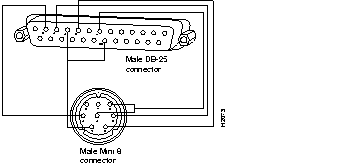
Table 1-2 explains the pin functions.
| Din-8 Pin Number | Din-8 Pin Function | DB-25 Pin Number | DB-25 Pin Function |
|---|---|---|---|
| 1 | Output handshake | 4, 20 | RTS, DTR |
| 2 | Input handshake/external clock | 5 | CTS |
| 3 | TxD | 2 | TxD |
| 4, 8 | Ground, RxD(-) | 7 | Ground |
| 5 | RxD(+) | 3 | RxD |
Configure the line on the communication server as follows:
Configure the modem as follows:
If your modem does not support this configuration, see the Communication Server Configuration and Reference for information about configuring a line to support your modem.
To configure ARAP on your communication server, you need to enable AppleTalk, configure an AppleTalk interface, and enable ARAP. This section describes each task.
To perform the following task in global configuration mode:
| Task | Command |
|---|---|
| Enable AppleTalk. | appletalk service |
You can manually configure an interface for AppleTalk or, if an interface is connected to a network that has at least one other communication server or router configured for AppleTalk, you can dynamically configure the interface using discovery mode.
If the internet already exists, the zone and cable range must match the existing configuration. To identify existing cable ranges and zone names, configure the communication server for discovery mode.
You can also configure an AppleTalk interface on a segment for which there are no AppleTalk routers.
To manually configure an interface for extended AppleTalk, perform the following tasks:
If you assign more than one zone name, the first name you assign is the default zone.
You can define up to 255 unique zone names.
After you assign the address and zone name(s), the interface will attempt to verify them with another operational communication servers or routers on the connected network. If there are any discrepancies, the interface will not become operational. If there are no neighboring operational communication servers or routers, the communication server will assume the configuration is correct, and the interface will become operational.
If an AppleTalk interface is connected to a network that has at least one other operational AppleTalk router or communication server, you can dynamically configure the interface using discovery mode. In discovery mode, an interface acquires information about the attached network from an operational communication server or router and then uses this information to configure itself. Once the interface has been configured, you can stabilize the interface by setting the dynamically acquired information.
Using discovery mode to configure interfaces saves time if the network numbers, cable ranges, or zone names change. You need to make the changes on only one operational communication server or router.
Discovery mode is useful when you are changing a network configuration or when you are adding a communication server to an existing network.
If there is no operational communication server or router on the attached network, you must manually configure the interface as described in the previous sections. Also, if a discovery-mode interface is restarted, another operational communication server or router must be present before the interface will become operational.
An interface that is not configured for discovery mode starts up as follows. The communication server acquires its configuration from memory. If the interface is not configured with the appletalk address or appletalk cable-range command and the appletalk zone command, the interface will not start up. If the interface is configured, the interface will attempt to verify the stored configuration with another communication server or router on the attached network. If there is any discrepancy, the interface will not start up. If there are no neighboring operational communication servers or routers, the communication server will assume the stored configuration is correct, and the interface will become operational.
Using discovery mode does not affect an interface's ability to respond to configuration queries from other communication servers on the connected network once the interface becomes operational.
When activating discovery mode, you do not need to assign a zone name. The interface will acquire the zone name from another interface.
 | Caution Do not enable discovery mode on all of the communication servers and routers on a network. If you do and all communication servers restart simultaneously (for instance, after a power failure), the network will be inaccessible until you manually configure at least one communication server. |
You can activate discovery mode on an extended interface in one of two ways, depending on whether you know the cable range of the attached network.
In the first method, you immediately put the interface into discovery mode by specifying a cable range of 0-0. Use this method when you do not know the network number of the attached network. To do configure an interface for discovery mode using the first method, perform the following tasks:
| Task | Command |
|---|---|
| Specify an interface. | interface type unit |
| Put the interface into discovery mode by assigning it the cable range 0-0. | appletalk cable-range 0-0 |
In the second method, you first assign cable ranges and then explicitly enable discovery mode. Use this method when you know the cable range of the attached network. To configure an interface for discovery mode using the second method, perform the following tasks:
You can also configure an AppleTalk interface on a LAN segment that does not have any AppleTalk routers by performing the following tasks:
| Task | Command |
|---|---|
| Turn on AppleTalk, but do not enable routing. | appletalk service |
| Specify an interface. | interface e 0 |
| Specify the AppleTalk address as 1, which is the default address when there are no routers. | appletalk address 1.1 |
| Specify the name of the local zone. | appletalk zone * |
Note that you cannot use discovery mode for this configuration.
To enable ARAP on a line, perform the following tasks:
| Task | Command |
|---|---|
| Specify a line or lines. | line {number |[start-number end-number]} |
| Enable ARAP on a line. | arap enable |
The commands in this section can be used to customize ARAP support. Some of the described in this section are required for certain configurations. Possible functions include the following:
To configure the communication server to automatically start an ARAP session, perform the following tasks in global configuration mode:
| Task | Command |
|---|---|
| Specify a line in global configuration mode. | line {number |[start-number end-number]} |
| Configure a line to automatically start an ARAP session. | autoselect |
The autoselect command allows the communication server to automatically start an appropriate process when a starting character is received. The communication server detects either a Return character, which is the start character for an EXEC session, or the start character for ARAP.
This command is required for all ARAP-enabled lines that are not configured as dedicated ARAP lines and that are not configured for TACACS logins.
To set a line to function only as an AppleTalk Remote Access connection, perform the following task in line configuration mode:
| Task | Command |
|---|---|
| Configure a line for ARAP only. | arap dedicated |
Alternatives are to set the line for autoselect or TACACS logins.
To set the maximum length of an ARAP session for a line, perform the following task in line configuration mode:
| Task | Command |
|---|---|
| Set the maximum length of an ARAP session. | arap timelimit [time-in-minutes] |
The default is to have unlimited length connections. This task is optional.
To configure when to display a disconnect warning, perform the following task in line configuration mode:
| Task | Command |
|---|---|
| Set when a disconnect warning message will be displayed, in number of minutes before the line is set to disconnect. | arap warningtime [time-in-minutes] |
This command is only valid if a session time limit is set.
A guest is a person who connects to the network without having to give a name or a password. To prohibit Macintosh guests from logging on through the communication server, perform the following task in line configuration mode:
| Task | Command |
|---|---|
| Prohibit guests from logging on to the ARAP network. | arap noguest |
| Caution Do not enter the arap noguest command if TACACS is enabled. |
You can control Macintosh access to zones and networks by using arap commands to reference access control lists configured using AppleTalk access-list commands.
To control what zones the Macintosh user will see, perform the following task in line configuration mode:
| Task | Command |
|---|---|
| Limit the zones the Macintosh user will see. | arap zonelist zone-access-list-number |
To control traffic from the Macintosh to networks, perform the following task in line configuration mode:
| Task | Command |
|---|---|
| Control access to networks. | arap net-access-list net-access-list-number |
To customize the AppleTalk configuration, complete the following tasks:
This section describes how to perform these configuration tasks.
Figure 1-6 shows a configuration in which a communication server acting as an AppleTalk Remote Access server is serving a local network that is not connected to an internet.

By default, the communication server generates checksums for all ARAP traffic that requests them. You might want to disable checksum generation and verification is if you have an older LaserWriter printer or other device that cannot receive packets with checksums.
To disable checksum generation and verification, perform the following global configuration task:
| Task | Command |
|---|---|
| Disable the generation and verification of checksums for all AppleTalk packets. | no appletalk checksum |
The communication server implements MacIP, a protocol that routes IP datagrams to IP clients using AppleTalk Datagram Delivery Protocol (DDP) low-level encapsulation. MacIP allows the communication server to assign an ID number to a Macintosh computer that dials in. The ID number allows the Macintosh computer to run MacTCP applications.
Cisco communication servers implement the MacIP address management and routing services described in the draft Internet RFC, A Standard for the Transmission of Internet Packets over AppleTalk Networks. This implementation of MacIP conforms to the September 1991 draft RFC with the following exceptions:
MacIP is required to provide access to IP network servers for those users. It is also required for environments in which Macintosh users use AppleTalk Remote Access or are connected to the network using LocalTalk or PhoneNet cabling systems.
MacIP services also can be useful when you are managing IP address allocations for a large, dynamic Macintosh population. There are several advantages to using MacIP in this situation:
However, there is an important disadvantage in implementing MacIP on a communication server: Memory usage in the communication server increases in direct proportion to the total number of active MacIP clients (about 80 bytes per client).
To configure MacIP on the Cisco communication server, AppleTalk must be configured on the communication server as follows:
When setting up MacIP routing, keep the following address-range issues in mind:
To configure MacIP, perform the following tasks:
Step 1: Establish a MacIP server for a specific zone.
Step 2: Allocate IP addresses for Macintosh users by specifying at least one dynamic or static resource address assignment command for each MacIP server.
To establish a MacIP server for a specific zone, perform the following global configuration task:
| Task | Command |
|---|---|
| Establish a MacIP server for a zone. | appletalk macip server ip-address zone server-zone |
A MacIP server is not registered using NBP until at least one MacIP resource is configured.
Dynamic clients are those that accept any IP address assignment within the dynamic range specified. Dynamic addresses are for users who do not require a fixed address, but can be assigned addresses from a pool.
To allocate IP addresses for Macintosh users if you are using dynamic addresses, perform the following global configuration task:
| Task | Command |
|---|---|
| Allocate an IP address to a MacIP client. | appletalk macip dynamic ip-address [ip-address] zone server-zone |
For an example of configuring MacIP with dynamic addresses, see the section "Configuring MacIP."
Static addresses are for users who require fixed addresses for IP DNS services and for administrators who do not want addresses to change so they always know the IP addresses of the devices on their network.
To allocate IP addresses for Macintosh users if you are using static addresses, perform the following global configuration task:
| Task | Command |
|---|---|
| Allocate an IP address to be used by a MacIP client that has reserved a static IP address. | appletalk macip static ip-address [ip-address] zone server-zone |
For an example of configuring MacIP with static addresses, see the section
"Configuring MacIP."
In general, you should not use fragmented address ranges in configuring ranges for MacIP. However, if this is unavoidable, use the appletalk macip dynamic command to specify as many addresses or ranges as required, and use the appletalk macip static command to assign a specific address or address range.
An access list is a list of AppleTalk network numbers or zones that is maintained by the communication server and used to control access to or from specific zones or networks.
The communication server supports two general types of AppleTalk access lists:
AppleTalk-style access lists use zone names to regulate access to the internetwork. Zone names are good control points, because they are the only network-level abstraction that users can access. You can express zones names either explicitly or by using generalized argument keywords.Thus, using AppleTalk access lists simplifies network management and allows for greater flexibility when adding segments because reconfiguration requirements are minimal.
The main advantage of AppleTalk-style access lists is that they allow you to define access regardless of the existing network topology or any changes in future topologies--because they are based on zones. A zone access list is effectively a dynamic list of network numbers. The user specifies a zone name but the effect is as if the user had specified all the network numbers belonging to that zone.
IP-style access lists control network access based on network numbers. This feature is useful for defining access lists that control the disposition of networks that overlap, are contained by, or exactly match a specific network number range.
You can combine zone and network entries in a single access list. Network filtering is performed first, then zone filtering is applied to the result. However, for optimal performance, access lists should not include both zones and numeric network entries.
There are two types of filters you can use on AppleTalk networks:
AppleTalk network access control differs from that of other protocols in that the order of the entries in an access list is unimportant. However, there are still some constraints you need to keep in mind when defining access lists:
You perform the following tasks to control access to AppleTalk networks. These tasks are described in the sections that follow.
An access list defines the conditions used to filter packets sent out of the interface. (These conditions are sometimes also used to filter incoming packets.) Each access list is identified by a number. All access-list commands that specify the same access list number create a single access list.
A single access list can contain any number and any combination of access-list commands. You can include network and cable range access-list commands and zone access-list commands in the same access list. However, you can only specify one each of the commands that specify default actions to take if none of the access conditions are matched (that is, a single access list can include only one access-list other-access command to handle networks and cable ranges that do not match the access conditions and only one access-list additional-zones command to handle zones that do not match the access conditions).
To create access lists that define access conditions for networks and cable ranges, perform one or more of the following tasks in global configuration mode:
The access list number can be a decimal value from 600 to 699.
To create access lists that define access conditions for zones, perform one or more of the following tasks in global configuration mode:
The access list number can be a decimal value from 600 to 699.
Two types of security can be used on your communication server when it is acting as an AppleTalk Remote Access server:
To configure your communication server for internal username authentication, perform the following task in global configuration mode:
| Task | Command |
|---|---|
| Specify a username and password. | username name password password |
Enter this information for each supported user.
You can use TACACS security if you have configured a TACACS server and have a CCL script that allows you to use TACACS security. This section tells you how modify your CCL script so that you can use TACACS security and how to configure a line to use a TACACS server for user authentication.
To use AppleTalk Remote Access with TACACS, you must modify your CCL scripts. For a number of popular modems, Cisco provides CCL files that you can use to modify your CCL scripts to support TACACS security. This section explains how to use the CCL files provided by Cisco to modify AppleTalk Remote Access CCL scripts to work with TACACS security.
Cisco recommends using the Appletalk Remote Access Modem Toolkit provided through the AppleTalk Programmers and Developers Association (APDA); it provides both syntax checking and a script player.
Appletalk Remote Access CCL scripts are primarily used to work with modems to make connections to remote machines. When the connection has been established, the script ends and the Appletalk Remote Access Protocol is activated. TACACS authentication occurs after the connection is established but before the protocol becomes active.
Insert TACACS logic just before the end of a script. The CCL TACACS logic performs the following user authentication tasks:
The script ends and the Appletalk Remote Access Protocol begins.
CCL scripts control logical flow by jumping to labels. The labels are the numbers 1 through 128, and will not necessarily be in sequential order in the script file. The TACACS logic in CCL files provided by Cisco have label numbers from 100 through 127. In most environments, copy the complete TACACS logic from an existing file.
The steps for creating a new TACACS CCL file are as follows:
Step 1: Copy the TACACS logic from the CCL file provided by Cisco into the file being modified.
Step 2: Locate the logical end of the script and insert the command jump 100.
In most cases, you can simply insert the TACACS logic at the appropriate place in your CCL script. The one case that requires extra attention is when the original CCL script has labels that conflict with the Cisco logic. The labels must be resolved on a case-by-case basis, usually by changing the label numbers used by the original script. This is a fairly simple programming job, but you should read and understand the manual that comes with the Modem Toolkit before beginning.
You can locate the logical end of the script by following its flow. Most scripts have the following basic structure:
The characteristic logical end of the script is as follows:
@label N
! N is any integer between 1 and 128
if ANSWER N+1
! If we're answering the phone, jump directly
! to the label N+1
pause 30
! We're not answering the phone, therefore we
! must be calling. Wait three seconds for the
! modems to sync up.
@label N+1
exit 0
! quit and start up ARAP
It is common in this case to replace "pause 30" with "jump 100." In fact, this is usually the only change made to the logic of the original script.
To configure a line to use a TACACS server for user authentication, perform the following tasks:
| Task | Command |
|---|---|
| Specify line or lines. | line {number |[start-number end-number]} |
| Use a TACACS server for user authentication. | login tacacs |
Figure 1-7 shows the TACACS login screen on the Macintosh.

Figure 1-8 shows the TACACS password screen on the Macintosh.

See Chapter 5 of the Communication Server Configuration and Reference for more information about configuring TACACS security.
To display information about a running ARAP connection, perform the following task in privileged EXEC mode (reached by entering the enable command and a password):
| Task | Command |
|---|---|
| Display information about a running ARAP connection. | show arap [line-number] |
The show arap command with no arguments displays a summary of ARAP traffic since the communication server was last booted. The show arap command with a specified line number displays information about the connection on that line.
The communication server software provides several commands you can use to monitor an AppleTalk network. In addition, you can use Apple Computer's Inter·Poll, which is a tool to verify that a communication server is configured and operating properly. Use the commands described in this section to monitor an AppleTalk network using both communication server commands and Inter·Poll.
To monitor the AppleTalk network, perform one or more of the following tasks:
To debug ARAP connections, perform the following tasks in privileged EXEC mode:
This section contains examples of ARAP configuration on the communication server.
The following example configures the interface for an extended AppleTalk network. It defines the zones Orange and Brown. The cable range of one allows compatibility with nonextended AppleTalk networks.
appletalk service
interface ethernet 0
appletalk cable-range 69-69 69.128
appletalk zone Orange
appletalk zone Brown
The following example configures an extended network in discovery mode.
In Figure 1-9, communication server A provides the zone and network number information to the interface when it starts.

Use the following commands to configure this extended network in discovery mode:
appletalk service
interface ethernet 0
appletalk cable-range 0-0 0.0
The following example configures the communication server for ARAP support, as described in the comments (lines beginning with an exclamation point (!)).
! Enable AppleTalk on the communication server
appletalk service
!
interface Ethernet 0
ip address 128.66.1.1 255.255.255.0
!
! On interface Ethernet 0, assign network number 103 to the physical cable and
! assign zone name "Marketing Lab" to the interface. Assign a zone name if
! you are creating a new AppleTalk internet. If the internet already exists,
! the zone and cable range must match exactly, or you can leave the cable
! range at 0 to enter discovery mode. The suggested AppleTalk
! address for the interface in this example is 103.1
interface Ethernet 0
appletalk cable-range 103-103 103.1
appletalk zone Marketing Lab
! Configure a username and password for the communication server.
username jake password sesame
! On lines 4 through 8, InOut modems are specified, the lines are configured
! to automatically start an EXEC session or enable AppleTalk, AppleTalk Remote ! Access Protocol is enabled, the modem speed is specified as 38400 bps, and ! hardware flow control is enabled.
line 4 8
modem InOut
autoselect
arap enabled
speed 38400
flowcontrol hardware
Note that must set your terminal emulator to match the speed that you set for the line.
In the following example, the cable range is changed and the zone name is reentered.
The initial configuration is as follows:
appletalk cable-range 100-103
appletalk zone Twilight Zone
The cable range is expanded as follows:
appletalk cable-range 100-109
At this point, you must reenter the zone name as follows:
appletalk zone Twilight Zone
The following example illustrates MacIP support for dynamically addressed MacIP clients with dynamically allocated IP addresses in the range 131.108.8.2 to 131.108.8.10:
! Specify server address and zone
appletalk macip server 131.108.8.1 zone Snark
! Specify dynamically addressed clients
appletalk macip dynamic 131.108.8.2 131.108.8.10 zone Snark
!
! Assign the address and subnet mask for Ethernet interface 0
interface ethernet 0
ip address 131.108.8.1 255.255.255.0
!
! Enable AppleTalk service
appletalk service
!
interface ethernet 0
appletalk cable range 69-69 69.128
appletalk zone Snark
!
! Specify server address and zone
appletalk macip server 131.108.8.1 zone Snark
!
! Specify dynamically addressed clients
appletalk macip dynamic 131.108.8.2 131.108.8.10 zone Snark
The following example illustrates MacIP support for MacIP clients with statically allocated IP addresses:
! Assign the address and subnet mask for Ethernet interface 0
interface ethernet 0
ip address 131.108.8.1 255.255.255.0
!
! Enable AppleTalk
appletalk service
!
interface ethernet 0
appletalk cable range 69-69 69.128
appletalk zone Snark
! Specify the server address and zone
appletalk macip server 131.108.8.1 zone Snark
!
Specify statically addressed clients
appletalk macip static 131.108.8.11 131.108.8.20 zone Snark
appletalk macip static 131.108.8.31 zone Snark
appletalk macip static 131.108.8.41 zone Snark
appletalk macip static 131.108.8.49 zone Snark
In the following example, line 1 is configured for ARAP and username authentication will be performed on a TACACS server.
line 1
login tacacs
arap enable
| Caution Do not use the autoselect command if TACACS is enabled. |
In the following example, line 2 is configured as a dedicated ARAP line, user authentication information is configured on the AppleTalk Remote Access server, and guests are disallowed from making ARAP sessions.
username jsmith password woof
line 2
arap dedicated
arap noguest
In the following configuration, ARAP is enabled on lines 2 through 16, username authentication is configured on the AppleTalk Remote Access server, and the lines are configured to automatically start an ARAP session when an AppleTalk Remote Access user on a Macintosh attempts a connection.
username jsmith password woof
line 2 16
autoselect
arap enabled
arap noguest
The following example shows the steps required to set up ARAP functionality on a communication server.
Log into the communication server, use the enable command to enter your password if one is set, use the configure command to enter configuration mode, and add the following commands to your configuration:
appletalk service
interface ethernet 0
appletalk cable-range 0-0 0.0
! sets 500-CS into discovery mode
line 5 6
modem inout
speed 38400
arap enabled
autoselect
If you already know the cable-range and the zone names you need, include the information in the configuration file. If you do not know this information, let the communication server learn about the AppleTalk network in discovery mode. The communication server will monitor to the line for a few minutes. Then log in and enable configuration mode. Show the configuration again (using the show config command), and note the
appletalk cable-range and appletalk zone variables. Manually add the information in those two entries, add any user accounts, and save the configuration.
appletalk cable-range 105-105 105.222
appletalk zone Marketing Lab
! Do not use quotation marks in this entry
username arauser password arapasswd
! Add as many users as you need
Finally, show the configuration again (using the show config command) to make sure the configuration is correct.
The following example describes how to set up a Telebit T-3000 modem that you are attaching to a 500-CS communication server, which supports hardware flow control. The Macintosh will use a CCL script to configure the attached modem.
Start with the modem at factory defaults. (AT&F9 is the preferred configuration for hardware flow control. Use the direct command if you have a terminal attached to the modem, or use the T/D Reset sequence described in Chapter 3 of the Telebit T-3000 manual to reset the modem to the &F9 defaults.)
Attach a hardware flow control-capable cable between the modem and the device with which you are configuring the modem. (At this point, the modem is in hardware flow control mode, with auto-baudrate-recognition, and can detect your speed between 300 and 38,400 bps at 8-N-1. However, the modem must receive the flow control signals from the device to which you have the modem attached.)
Send the modem the following commands:
ATS51=6 E0 Q1 S0=2 &D3 &R3 S58=2 &W
This sequence tells the modem to perform the following tasks:
At this point, if you press the carriage return or type characters, you will not see any characters on your screen because the result codes are turned off.You can determine that the modem is functioning by obtaining a list of its configuration registers by entering the following command:
AT&V
After the modem is configured, connect it to the communication server with a
modem-to-RJ45 adapter (Cisco Part Number: CAB-5MODCM) and an RJ-45 cable to the lines(s) that you plan to use.
The following commands are compatible with the Telebit 3000 settings described in this section:
arap enable
autoselect
no escape-character
flowcontol hardware
modem ri-is-cd
speed 38400
If you are attaching a Telebit T-3000 modem to an ASM-CS communication server, use an RJ-11 adapter and a straight cable. See the ASM-CS Hardware Installation and Maintenance publication.
This section provides a full description of the commands presented in this chapter, including command syntax and usage guidelines. Commands are presented in alphabetical order.
To define the default action for access checks that apply to zones, use the access-list additional-zones global configuration command.
access-list access-list-number {deny | permit} additional-zones| access-list-number | Number of the access list. This is a decimal number from 600 to 699. |
| deny | Denies access if the conditions are matched. |
| permit | Permits access if the conditions are matched. |
To deny other access
Global configuration
The access-list additional-zones command defines the action to take for access checks not explicitly defined with the access-list zone command. If you do not specify this command, the default action is to deny other access.
The following example creates an access list based on AppleTalk zones:
access-list 610 deny zone Twilight
access-list 610 permit additional-zones
access-list cable-range
access-list includes
access-list network
access-list other-access
access-list within
access-list zones
To define an AppleTalk access list for a cable range (for extended networks only), use the access-list cable-range global configuration command. To remove an access list, use the no form of this command.
access-list access-list-number {deny | permit} cable-range start-end| access-list-number | Number of the access list. This is a decimal number from 600 to 699. |
| deny | Denies access if the conditions are matched. |
| permit | Permits access if the conditions are matched. |
| start-end | Cable range value. The start argument specifies the beginning of the cable range, and the end argument specifies the end of the range. These arguments are decimal numbers from 1 to 65279. The starting network number must be less than or equal to the ending network number. |
None
Global configuration
The access-list cable-range command affects matching on extended networks only. The conditions defined by this access list are used only when the packet's cable range exactly matches the cable range specified in the access-list network command. The conditions are never used to match a network number (for a nonextended network) even if the cable range has the same starting and ending number as the nonextended network number.
To delete an access list, specify the minimum number of keywords and arguments needed to delete the proper access list. For example, to delete the entire access list, use the following command:
no access-list access-list-numberTo delete the access list for a specific network, use the following command:
no access-list access-list-number {deny | permit} cable-range start-endThe access list created by the following commands allows all packets to be forwarded except those destined to cable range 10 to 20:
access-list 600 deny cable-range 10-20
access-list 600 permit other-access
access-list additional-zones
access-list network
access-list includes
access-list other-access
access-list within
access-list zone
To define an AppleTalk access list that overlaps any part of a range of network numbers or cable ranges (for both extended and nonextended networks), use the access-list includes global configuration command. To remove an access list, use the no form of this command.
access-list access-list-number {deny | permit} includes start-end| access-list-number | Number of the access list. This is a decimal number from 600 to 699. |
| deny | Denies access if the conditions are matched. |
| permit | Permits access if the conditions are matched. |
| start-end | Cable range or network number. The start argument specifies the beginning of the cable range, and the end argument specifies the end of the range. These arguments are decimal numbers from 1 to 65279. The starting network number must be less than or equal to the ending network number. To specify a network number, set the starting and ending network numbers to the same value. |
None
Global configuration
The access-list includes command affects matching on extended and nonextended AppleTalk networks. The conditions defined by this access list are used when the packet's cable range or network number overlaps, either partially or completely, one (or more) of those specified in the access-list network command.
To delete an access list, specify the minimum number of keywords and arguments needed to delete the proper access list. For example, to delete the entire access list, use the following command:
no access-list access-list-numberTo delete the access list for a specific network, use the following command:
no access-list access-list-number {deny | permit} includes start-endThe following example defines an access list that permits access to packets destined to any nonextended or extended network whose network number or cable range overlaps any part of the range 10 to 20. This means, for example, that packets whose cable ranges are 13 to 16 and 17 to 25 will be forwarded. This access list also allows all other packets to be forwarded.
access-list 600 permit includes 10-20
access-list 600 permit other-access
access-list additional-zones
access-list cable-range
access-list network
access-list other-access
access-list within
access-list zone
To define an AppleTalk access list for a single network number (that is, for a nonextended network), use the access-list network global configuration command. To remove an access list, use the no form of this command.
access-list access-list-number {deny | permit} network network| access-list-number | Number of the access list. This is a decimal number from 600 to 699. |
| deny | Denies access if the conditions are matched. |
| permit | Permits access if the conditions are matched. |
| network | AppleTalk network number. |
None
Global configuration
The access-list network command affects matching on nonextended networks only. The conditions defined by this access list are used only when the packet's network number matches a network number specified in one of the access-list network commands. The conditions are never used to match a cable range (for an extended network) even if the cable range has the same starting and ending number.
Use the no access-list command with the access-list number only to remove an entire access list from the configuration. Specify the optional arguments to remove a particular network.
To delete an access list, specify the minimum number of keywords and arguments needed to delete the desired access list. For example, to delete an entire access list, use the following command:
no access-list access-list-numberTo delete the access list for a specific network, use the following command:
no access-list access-list-number {deny | permit} network networkThe following example defines an access list that forwards all packets except those destined for networks 1 and 2:
access-list 650 deny network 1
access-list 650 deny network 2
access-list 650 permit other-access
access-list additional-zones
access-list cable-range
access-list includes
access-list other-access
access-list within
access-list zone
To define the default action to take for access checks that apply to networks or cable ranges, use the access-list other-access global configuration command.
access-list access-list-number {deny | permit} other-access| access-list-number | Number of the access list. This is a decimal number from 600 to 699. |
| deny | Denies access if the conditions are matched. |
| permit | Permits access if the conditions are matched. |
To deny other access
Global configuration
The access-list other-access command defines the action to take for access checks not explicitly defined with an access-list network, access-list cable-range, access-list includes, or access-list within command. If you do not specify this command, the default action is to deny other access.
The following example defines an access list that forwards all packets except those destined for networks 1 and 2:
access-list 650 deny network 1
access-list 650 deny network 2
access-list 650 permit other-access
access-list additional-zones
access-list cable-range
access-list includes
access-list network
access-list within
access-list zone
To define an AppleTalk access list for an extended or a nonextended network whose network number or cable range is included entirely within the specified cable range, use the access-list within global configuration command. To remove this access list, use the no form of this command.
access-list access-list-number {deny | permit} within start-end| access-list-number | Number of the access list. This is a decimal number from 600 to 699. |
| deny | Denies access if the conditions are matched. |
| permit | Permits access if the conditions are matched. |
| start-end | Cable range or network number. The start argument specifies the beginning of the cable range, and the end argument specifies the end of the range. These arguments are decimal numbers from 1 to 65279. The starting network number must be less than or equal to the ending network number. To specify a network number, set the starting and ending network numbers to the same value. |
None
Global configuration
The access-list within command affects matching on extended and nonextended AppleTalk networks. The conditions defined by this access list are used when the packet's cable range or network number is completely included in one (or more) of those specified in the access-list network command.
To delete an access list, specify the minimum number of keywords and arguments needed to delete the desired access list. For example, to delete the entire access list, use the following command:
no access-list access-list-numberTo delete the access list for a specific network, use the following command:
no access-list access-list-number {deny | permit} within start-endThe following example defines an access list that permits access to packets destined to any nonextended or extended network whose network number or cable range is completely included in the range 10 to 20. This means, for example, that packets whose cable range is 13 to 16 will be forwarded, but those whose cable range is 17 to 25 will not be forwarded. The second line of the example causes all other packets to be forwarded.
access-list 600 permit within 10-20
access-list 600 permit other-access
access-list additional-zones
access-list cable-range
access-list includes
access-list network
access-list other-access
access-list zone
To define an AppleTalk access list that applies to a zone, use the access-list zone global configuration command. To remove an access list, use the no form of this command.
access-list access-list-number {deny | permit} zone zone-name| access-list number | Number of the access list. This is a decimal number from 600 to 699. |
| deny | Denies access if the conditions are matched. |
| permit | Permits access if the conditions are matched. |
| zone-name | Name of the zone. The name can include special characters from the Apple Macintosh character set. To include a special character, type a colon followed by two hexadecimal numbers. The zone name cannot have leading or trailing space characters. |
None
Global configuration
To delete an access list, specify the minimum number of keywords and arguments needed to delete the proper access list. For example, to delete the entire access list, use the following command:
no access-list access-list-numberTo delete the access list for a specific network, use the following command:
no access-list access-list-number {deny | permit} zone zone-nameUse the access-list additional-zones command to define the action to take for access checks not explicitly defined with the access-list zone command.
The following example creates an access list based on AppleTalk zones:
access-list 610 deny zone Twilight
access-list 610 permit additional-zones
access-list additional-zones
access-list cable-range
access-list includes
access-list network
access-list other-access
access-list within
To enable nonextended AppleTalk on an interface, use the appletalk address interface configuration command. To disable nonextended AppleTalk, use the no form of this command.
appletalk address network.node| network.node | AppleTalk network address assigned to the interface. The argument network is the 16-bit network number in the range 0 to 65280. The argument node is the 8-bit node number in the range 0 to 254. Both numbers are decimal. |
Disabled
Interface configuration
You must enable AppleTalk on the interface before assigning zone names.
Specifying an address of 0.0, 0.node, or network.0 puts the interface into discovery mode. When in this mode, the communication server attempts to determine network address information from another communication server or router on the network. You also can enable discovery mode with the appletalk discovery command. Note that discovery mode does not run over synchronous serial lines.
The following example enables nonextended AppleTalk on Ethernet interface 0:
appletalk service
interface ether 0
appletalk address 1.129
appletalk cable-range
appletalk discovery
appletalk zone
To assign a range of networks to a cable, use the appletalk cable-range interface subcommand. Use the no form of this command to disable a cable-range setting.
appletalk cable-range start-end [network.node]| start-end | Range of network numbers. The start argument specifies the beginning of the cable range, and the end argument specifies the end of the range. These arguments are decimal number from 1 to 65,279. The starting network number must be less than or equal to the ending network number. |
| network.node | Suggested AppleTalk address for the interface. The argument network is the 16-bit network number, and the argument node is the 8-bit node number. Both numbers are decimal. The suggested network number must fall within the specified range of network numbers. |
Disabled (no appletalk cable-range)
Interface subcommand
The communication server needs both a valid cable range and a zone list to use AppleTalk. This command must be entered before the appletalk zone command.
Whenever you change the cable range, the communication server clears the internal zone list and you must enter a new zone list.
Configure the communication server for discovery mode if you want to find out what the current cable range is. To configure the communication server for discovery mode, use the appletalk cable-range 0-0 0.0 command. This causes the communication server to learn about the AppleTalk network. After saving the command in your configuration file, log back in and enable configuration mode. When you display the configuration, will see the AppleTalk cable range and the AppleTalk zone variables. Then, add those two entries to the configuration and save the configuration file.
The following example shows how to use discovery mode:
appletalk service
interface ether 0
appletalk cable-range 0-0 0.0
line 5 6
modem inout
speed 38400
arap enabled
autoselect
After you learn the cable range values, add them to the configuration file. For example:
appletalk cable-range 105-105 105.222
appletalk zone Marketing
username arauser password arapasswd
This example assigns a cable range of 2-2 to the interface:
interface async 1
appletalk cable-range 2-2
appletalk zone
To enable the generation and verification of checksums for all AppleTalk packets, use the appletalk checksum global configuration command. To disable checksum generation and verification, use the no form of this command.
appletalk checksumThis command has no arguments or keywords.
Enabled
Global
When the appletalk checksum command is enabled, the communication server discards incoming DDP packets when the checksum is nonzero and is incorrect and when the communication server is the final destination for the packet.
You might want to disable checksum generation and verification if you have older LaserWriter printers or other devices that cannot receive packets that contain checksums.
The following example disables the generation and verification of checksums:
no appletalk checksum
show appletalk global
To put an interface into discovery mode, use the appletalk discovery interface configuration command. To disable discovery mode, use the no form of this command.
appletalk discoveryThis command has no arguments or keywords.
Disabled
Interface configuration
If an interface is connected to a network that has at least one other operational AppleTalk communication server or router, you can dynamically configure the interface using discovery mode. In discovery mode, an interface acquires network address information about the attached network from an operational communication server or router and then uses this information to configure itself.
If you enable discovery mode on an interface, that interface must configure itself by acquiring information from another operational communication server or router on the attached network when the communication server is starting up that interface. If no operational communication server or router is present on the connected network, the interface will not start up.
If you do not enable discovery mode, the interface must acquire its configuration from memory when the communication server is starting up. If the stored configuration is not complete, the interface will not start up. If there is another operational communication server on the connected network, the communication server will verify the stored interface configuration with that communication server. If there is any discrepancy, the interface will not start up. If there are no neighboring operational communication servers, the communication server will assume the stored interface configuration is correct and will start up.
Once an interface is operational, it can seed the configurations of other communication servers on the connected network regardless of whether you have enabled discovery mode on any of the communication servers.
If you enable appletalk discovery and the interface is restarted, you must have another operational communication server or router on the directly connected network or the interface will not start up.
It is not advisable to have all communication servers and routers on a network configured with discovery mode enabled. If all communication servers were to restart simultaneously (for instance, after a power failure), the network would become inaccessible until at least one communication server or router were restarted with discovery mode disabled.
You also can enable discovery mode by specifying an address of 0.0. in the appletalk address command or a cable range of 0-0 in the appletalk cable-range command.
Discovery mode is useful when you are changing a network configuration or when you are adding a communication server to an existing network.
Discovery mode does not run over synchronous serial lines.
Use the no appletalk discovery command to disable discovery mode and allow the interface to be a seed port. If the interface is not operational when you issue this command, you must configure the zone name before the interface will be operational. If you are reconfiguring an operational interface by issuing the no appletalk discovery command, the command will have no effect because the network configuration is already established.
The following example enables discovery mode on Ethernet interface 0:
interface ethernet 0
appletalk cable-range 0-0
appletalk discovery
appletalk address
appletalk cable-range
appletalk zone
show appletalk interface
To allocate IP addresses to dynamic MacIP clients, use the appletalk macip dynamic global configuration command. To delete a MacIP dynamic address assignment, use the no form of this command.
appletalk macip dynamic ip-address [ip-address] zone server-zone| ip-address | IP address, in four-part dotted decimal notation. To specify a range, enter two IP addresses, which represent the first and last addresses in the range. |
| server-zone | Zone in which the MacIP server resides. The argument server-zone can include special characters from the Apple Macintosh character set. To include a special character, specify a colon followed by two hexadecimal numbers. For a list of Macintosh characters, refer to the Apple Computer, Inc. specification Inside AppleTalk. Zone names cannot have leading or trailing space characters. |
None
Global
Use the appletalk macip dynamic command when configuring MacIP.
Dynamic clients are those that accept any IP address assignment within the dynamic range specified.
In general, it is recommended that you do not use fragmented address ranges in configuring ranges for MacIP. However, if this is unavoidable, use the appletalk macip dynamic command to specify as many addresses or ranges as required and use the appletalk macip static command to assign a specific address or address range.
To shut down all running MacIP services, use the following command:
no appletalk macipTo delete a particular dynamic address assignment from the configuration, use the following command:
no appletalk macip dynamic ip-address [ip-address] zone server-zoneThe following example illustrates MacIP support for dynamically addressed MacIP clients with IP addresses in the range 131.108.1.28 to 131.108.1.44.
! This global statement specifies the MacIP server address and zone:
appletalk macip server 131.108.1.27 zone Engineering
!
! This global statement identifies the dynamically addressed clients:
appletalk macip dynamic 131.108.1.28 131.108.1.44 zone Engineering
!
! These statements assign the IP address and subnet mask for Ethernet
! interface 0:
interface ether 0
ip address 131.108.1.27 255.255.255.0
!
! This global statement enables AppleTalk on the communication server.
appletalk service
!
! These statements enable AppleTalk on the interface and
! set the zone name for the interface
interface ether 0
appletalk cable-range 69-69 69.128
appletalk zone Engineering
appletalk macip server
appletalk macip static
ip address (See the Communication Server Configuration and Reference publication.)
show appletalk macip-servers
To establish a MacIP server for a zone, use the appletalk macip server global configuration command. To shut down a MACIP server, use the no form of this command.
appletalk macip server ip-address zone server-zone| ip-address | IP address, in four-part dotted decimal notation. It is suggested that this address match the address of an existing IP interface. |
| server-zone | Zone in which the MacIP server resides. The argument server-zone can include special characters from the Apple Macintosh character set. To include a special character, specify a colon followed by two hexadecimal numbers. For a list of Macintosh characters, refer to the Apple Computer, Inc. specification Inside AppleTalk. Zone names cannot have leading or trailing space characters. |
None
Global
Use the appletalk macip server command when configuring MacIP.
You can configure multiple MacIP servers for a communication server, but you can assign only one MacIP server to a particular zone and only one IP interface to each MacIP server. In general, you must be able to establish an alias between the IP address you assign with the appletalk macip server command and an existing IP interface. For implementation simplicity, it is suggested that the address specified in this command match an existing IP interface address.
A MacIP server is not registered using NBP until at least one MacIP resource is configured.
To shut down all active MacIP servers, use the following command:
no appletalk macipTo delete a specific MacIP server from the MacIP configuration, use the following command:
no appletalk macip server ip-address zone server-zoneThe following example establishes a MacIP server on Ethernet interface 0 in AppleTalk zone Engineering. It then assigns an IP address to the Ethernet interface and enables AppleTalk on the communication server and the Ethernet interface.
appletalk macip server 131.108.1.27 zone Engineering
ip address 131.108.1.27 255.255.255.0
appletalk service
interface ether 0
appletalk cable-range 69-69 69.128
appletalk zone Engineering
appletalk macip dynamic
appletalk macip static
ip address (See the Communication Server Configuration and Reference publication.)
show appletalk macip-servers
To allocate an IP address to be used by a MacIP client that has reserved a static IP address, use the appletalk macip static global configuration command. To delete a MacIP static address assignment, use the no form of this command.
appletalk macip static ip-address [ip-address] zone server-zone| ip-address | IP address, in four-part dotted decimal format. To specify a range, enter two IP addresses, which represent the first and last addresses in the range. |
| server-zone | Zone in which the MacIP server resides. The argument server-zone can include special characters from the Apple Macintosh character set. To include a special character, specify a colon followed by two hexadecimal numbers. For a list of Macintosh characters, refer to the Apple Computer, Inc. specification Inside AppleTalk. Zone names cannot have leading or trailing space characters. |
None
Global
Use the appletalk macip static command when configuring MacIP.
Static addresses are for users who require fixed addresses for IP name domain name service and for administrators who do want addresses to change so they can always know who has what IP address.
In general, it is recommended that you do not use fragmented address ranges in configuring ranges for MacIP. However, if this is unavoidable, use the appletalk macip dynamic command to specify as many addresses or ranges as required, and then use the appletalk macip static command to assign a specific address or address range.
To shut down all running MacIP services, use the following command:
no appletalk macipTo delete a particular static address assignment from the configuration, use the following command:
no appletalk macip static ip-address [ip-address] zone server-zoneThe following example illustrates MacIP support for MacIP clients with statically allocated IP addresses. The IP addresses range is from 131.108.1.50 to 131.108.1.66. The three nodes that have the specific addresses are 131.108.1.81, 131.108.1.92, and 131.108.1.101.
! This global statement specifies the MacIP server address and zone:
appletalk macip server 131.108.1.27 zone Engineering
!
! These global statements identify the statically addressed clients:
appletalk macip static 131.108.1.50 131.108.1.66 zone Engineering
appletalk macip static 131.108.1.81 zone Engineering
appletalk macip static 131.108.1.92 zone Engineering
appletalk macip static 131.108.1.101 zone Engineering
!
! These statements assign the IP address and subnet mask for Ethernet
! interface 0:
interface ether 0
ip address 131.108.1.27 255.255.255.0
!
! This global statement enables AppleTalk on the communication server.
appletalk service
!
! These statements enable AppleTalk on the interface and
! set the zone name for the interface
interface ethernet 0
appletalk cable-range 69-69 69.128
appletalk zone Engineering
appletalk macip dynamic
appletalk macip server
ip address (See the Communication Server Configuration and Reference publication.)
show appletalk macip-servers
To enable AppleTalk connections, use the appletalk service global configuration command. To disable AppleTalk, use the no form of this command.
appletalk serviceThis command has no arguments or keywords.
Disabled (no appletalk service)
Global
The following example enables AppleTalk protocol processing on the communication server:
appletalk service
appletalk cable-range
appletalk zone
To set the zone name for the connected AppleTalk network, use the appletalk zone interface subcommand. To delete a zone, use the no form of this command.
appletalk zone zone-nameNone
Interface subcommand
The communication server needs both a valid cable range and zone list to use AppleTalk.
The appletalk zone command accepts spaces in zone names. Do not use quotation marks in the command entry. When you have completed the entry, use the show config command to display the configuration file.
The appletalk cable-range command must be entered before the appletalk zone command.
The first zone specified in the list is the default zone.
The no form of the command deletes a zone name from a zone list or, if you do not specify a zone name, it deletes the entire zone list. Before configuring a new zone list, delete any existing zone-name list using the no appletalk zone interface subcommand.
The internal zone list is cleared automatically when you issue an appletalk cable-range command. The list also is cleared if you issue the appletalk zone command on an existing network.
AppleTalk communication servers maintain a complete list of zone names and associated network numbers. AppleTalk network protocols assume that the list of zones is stable as long as the associated networks remain reachable. The only way to make an old zone name disappear throughout your network is to cause the associated routes to disappear. If you change a zone name and keep the network numbers the same, you might need to wait for the next general power failure for parts of your network to acquire new zone lists and flush the old entry.
The following example assigns the zone name Twilight to an interface:
interface ether 0
appletalk cable-range 10-20
appletalk zone Twilight
The following example uses a colon and two hexadecimal numbers to specify a Macintosh special character in the zone name Cisco·Zone.
appletalk zone Cisco:A5Zone
appletalk cable-range
show appletalk zone
To configure a line to be used only as an ARAP connection, use the arap dedicated line. Use the no form of the command to return the line to interactive mode.
arap dedicatedThis command has no arguments or keywords.
Disabled (no arap dedicated)
Line subcommand
The following example configures line 3 to be used only for ARAP connections:
line 3
arap dedicated
To enable ARAP for a line, use the arap enable command. Use the no form of this command to disable ARAP.
arap enableThis command has no arguments or keywords.
Disabled (no arap enable)
Line subcommand
The following example enables ARAP on a line:
line 3
arap enable
autoselect
To enable logging of user names and addresses each time a new AppleTalk Remote Access Protocol session starts, use the arap logging command.
arap loggingThis command has no arguments or keywords.
Disabled (no arap logging)
Global
The following example enables AppleTalk Remote Access Protocol logging:
arap logging
logging (See the Communication Server Configuration and Reference publication.)
To control Macintosh control access to networks, use the arap net-access-list command. Use the no form of this command to return to the default setting.
arap net-access-list net-access-list-number| net-access-list number | One of the list values configured using the AppleTalk access-list {permit | deny} network, access-list {permit | deny} cable-range, access-list {permit | deny} includes, access-list {permit | deny} within, and the access-list {permit | deny} other-access commands. |
Disabled. The Macintosh has access to all networks.
You can use the arap net-access-list command to apply access lists defined by the access-list cable-range, access-list includes, access-list network, access-list within, and access-list other-access commands.
You cannot use the arap net-access list command to apply access lists defined by the access-list zone and access-list additional-zones commands.
In the following example, ARAP is enabled on line 3 and the Macintosh will have access to the AppleTalk access list numbered 650.
line 3
arap enable
arap net-access-list 650
arap zonelist zone-access-list-number
access-list list {permit | deny} network
access-list list {permit | deny} cable-range
access-list list {permit | deny} includes
access-list list {permit | deny} within
access-list list {permit | deny} other-access
To prevent Macintosh guests from logging on to the communication server, use the arap noguest command. Use the no form of this command to remove this restriction.
arap noguestThis command has no arguments or keywords.
Disabled (no arap noguest)
Line subcommand
A guest is a person who connects to the network without having to give a name or a password.
| Caution Do not use the arap noguest command if TACACS is enabled. |
The following example prohibits guests from logging in to the communication server:
line 3
arap enable
arap noguest
To set the maximum length of an ARAP session for a line, use the arap timelimit command. Use the no form of the command to return to the default of unlimited session length.
arap timelimit [time-in-minutes]
| time-in-minutes | Maximum length of time, in minutes, for a session. |
Unlimited session length
Line subcommand
After the specified length of time, the session will be terminated.
The following example specifies a maximum length of 20 minutes for ARAP sessions:
line 3
arap enable
arap timelimit 20
arap warningtime
To set when a disconnect warning message is displayed, use the arap warningtime command. Use the no form of the command to return to disable this function.
arap warningtime [time-in-minutes]| time-in-minutes | Amount of time, in minutes, before the configured session time limit. At the configured amount of time before a session is to be disconnected, the communication server sends a message to the Macintosh client, which causes a warning message to appear on the user's screen. |
Disabled
Line subcommand
This command can only be used if a session time limit has been configured on the line.
The following example shows a line configured for twenty-minute ARAP sessions, with a warning seventeen minutes after the session is started:
line 3
arap enable
arap dedicated
arap timelimit 20
arap warningtime 3
arap timelimit
To control what zones the Macintosh client will see, use the arap zonelist command. Use the no form of this command to return to the default setting.
arap zonelist zone-access-list-number| zone-access-list number | One of the list values configured using the AppleTalk access-list {permit | deny} zone or access-list {permit | deny} additional-zones commands. |
Disabled. The Macintosh will see all defined zones.
You can use the arap zonelist command to apply access lists defined by the access-list zone and access-list additional-zones command.
You cannot use the arap zonelist command to apply access lists defined by the access-list network command.
In the following example, ARAP is enabled on line 3 and the Macintosh will see only zones permitted by access list 650.
line 3
arap enable
arap zonelist 650
access-list list {permit | deny} zone
access-list list {permit | deny} additional-zones
arap net-access-list net-access-list-number
To configure a line to automatically start either an ARAP session or an EXEC session, use the autoselect command. Use the no form of this command to disable this function on a line.
autoselectThis command has no arguments or keywords.
Disabled. The default behavior for a line is to ignore any character other than 13, which starts an EXEC session.
Line subcommand
This command eliminates the need for Macintosh users to enter an EXEC command to start an ARAP session. The autoselect command configures the communication server to identify the type of connection being requested. In other words, when a user on a Macintosh running AppleTalk Remote Access presses the "Connect" button, the communication server automatically starts an ARAP session. If, on the other hand, the user is running SLIP or PPP, the communication server starts an EXEC session that requires the user to enter the slip or ppp command to start a session. This command is used on lines used for making different types of connections.
The autoselect command is required on all lines configured with arap enabled, except for lines configured for arap dedicated or lines configured for TACACS logins. The autoselect command should not be used with TACACS. A line that does not have autoselect configured will see an attempt to open an ARAP connection as noise and the communication server will not respond and the user client will time out.
| Caution Do not use the autoselect command if TACACS is enabled. |
Example
The following example enables ARAP on a line:
line 3
arap enable
autoselect
To debug ARAP sessions, use the debug arap command. Use the no form of the command to turn off the debugging function.
debug arap {internal | memory | mnp4 | v42bis}| internal | Debug internal ARAP packets. |
| memory | Debug memory allocation for ARAP. |
| mnp4 | Debug low-level asynchronous serial protocol. |
| v42bis | Debug compression. |
Disabled
Privileged EXEC
The following example activates debugging internal ARAP packets on line 3:
CS# debug arap internal
To configure your communication server to use TACACS user authentication, use the login tacacs command. The no form of the command disables TACACS user authentication for a line.
login tacacsThis command has no arguments or keywords.
Disabled
Line subcommand
You can use TACACS security if you have configured a TACACS server and you have a CCL script that allows you to use TACACS security. See the "Configure TACACS Security" section for information about using files provided by Cisco to modify CCL scripts to support TACACS user authentication.
In the following example, lines 1 through 16 are configured for TACACS user authentication:
line 1 16
login tacacs
To display the entries in the AppleTalk ARP (AARP) cache, use the show appletalk arp EXEC command.
show appletalk arpThis command has no arguments or keywords.
EXEC
ARP establishes associates between network addresses and hardware (MAC) addresses. This information is maintained in the communication server's ARP cache.
The following is sample output from the show appletalk arp command:
CS# show appletalk arp
Address      Age (min)  Type      Hardware Addr   Encap     Interface
2000.1               -  Hardware  0000.0c04.1111  SNAP      Ethernet1
Table 1-3 describes the fields shown in the display.
| Field | Description |
|---|---|
| Address | AppleTalk network address of the interface. |
| Age (min) | Time, in minutes, that this entry has been in the ARP table. Entries are purged after they have been in the table for 240 minutes (4 hours). A hyphen indicates that this is a new entry. |
| Type | Indicates how the ARP table entry was learned. It can be one of the following:
Dynamic--Entry was learned using AARP. Hardware--Entry was learned from an adapter in the communication server. Pending--Entry for a destination for which the communication server does not yet know the address. When a packet requests to be sent to an address for which the communication server does not yet have the MAC-level address, the communication server creates an AARP entry for that AppleTalk address, then sends an AARP Resolve packet to get the MAC-level address for that node. When the communication server gets the response, the entry is marked "Dynamic." A pending AARP entry times out after one minute. |
| Hardware Addr | MAC address of this interface. |
| Encap | Encapsulation type. It can be one of the following:
ARPA--Ethernet-type encapsulation SNAP--IEEE 802.3 encapsulation. |
| Interface | Type and number of the interface. |
To display the status of the AppleTalk interfaces and the parameters configured on each interface, use the show appletalk interface EXEC command.
show appletalk interface [brief] [interface unit]| brief | Displays a brief summary of the status of the AppleTalk interfaces. |
| interface unit | Interface and unit identifiers. The argument interface can be one of the following types: asynchronous, dialer, Ethernet (IEEE 802.3), loopback, null, serial, or tunnel. The variable unit is the number of the interface. For example, ethernet 0 specifies the first Ethernet interface. |
EXEC
The show appletalk interface is particularly useful for discovering the status of the interface when you first enable AppleTalk.
The following is a sample display of the show appletalk interface command output for an AppleTalk network:
CS> show appletalk interface
Ethernet0 is up, line protocol is up
  AppleTalk cable range is 111-111
  AppleTalk address is 111.188, Valid
  AppleTalk zone is Cisco Interop Demo
  AppleTalk port configuration verified by 111.59
  AppleTalk route cache is not supported by hardware
Table 1-4 describes the fields shown in the display as well as some fields not shown but that might also be displayed.
| Field | Description |
|---|---|
| Ethernet0 is up | Type of interface and whether it is currently active and inserted into the network (up) or inactive and not inserted (down). |
| line protocol is up | Indicates whether the software processes that handle the line protocol believe the interface is usable (that is, whether the keepalives are successful) |
| AppleTalk cable range is start-end | Cable range of the interface. |
| AppleTalk address is address, Valid | Address of the interface, and whether the address conflicts with any other address on the network ("valid" means it does not). |
| AppleTalk zone is "zone." | Name of the zone that this interface is in. |
| AppleTalk port configuration verified by address (name) | Indicates whether the interface was configured in discovery mode. If it was, this line shows which communication server provided the configuration information. |
| AppleTalk route cache is not supported by hardware | Indicates whether fast switching is enabled on the interface. |
| Port configuration mismatch | Indicates that the communication server is misconfigured. |
| Interface violates Internet compatibility | Usually indicates that extended and nonextended AppleTalk nodes are incorrectly sharing the same network |
The following is a sample display of the show appletalk interface command output for a nonextended AppleTalk network:
CS# show appletalk interface e0
Ethernet0 is up, line protocol is up
  AppleTalk address is 666.128, Valid
  AppleTalk zone is Underworld
Table 1-5 describes the fields shown in the display.
| Field | Description |
|---|---|
| Ethernet 0 is up | Type of interface and whether it is currently active and inserted into the network (up) or inactive and not inserted (down). |
| line protocol is up | Indicates whether the software processes that handle the line protocol believe the interface is usable (that is, whether keepalives successful) |
| AppleTalk address is address, Valid | Address of the interface, and whether the address conflicts with any other address on the network ("valid" means it does not). |
| AppleTalk zone is "zone." | Name of the zone that this interface is in. |
The following is a sample display of the show appletalk interface brief command output:
CS# show appletalk interface brief
Interface   Address     Config        Status/Line Protocol   Atalk Protocol
Ethernet0   10.82       Extended      up                     up
Async 0     unassigned  not config'd  administratively down  n/a
Table 1-6 describes the fields shown in the display.
| Field | Description |
|---|---|
| Interface | Interface and unit identifiers. |
| Address | Address assigned to the interface. |
| Config | How the interface is configured. Possible values are extended, nonextended, and not configured. |
| Status/Line Protocol | Whether the software processes that handle the line protocol believe the interface is usable (that is, whether keepalives successful). |
| Atalk Protocol | Whether AppleTalk is up and running on the interface. |
To display status information about all known MacIP clients, use the show appletalk macip-clients EXEC command.
show appletalk macip-clientsThis command has no arguments or keywords.
EXEC
The following is sample output from the show appletalk macip-clients command:
CS# show appletalk macip-clients
   131.108.199.1@[27001n,69a,72s] 45 secs    'S/W Test Lab'
Table 1-7 describes the fields shown in the display.
| Field | Description |
|---|---|
| 131.108.199.1@ | Client IP address. |
| [2700ln,69a,72s] | DDP address of the registered entity, showing the network number, node address, and socket number. |
| 45 secs | Time, in seconds, since the last NBP confirmation was received. |
| 'S/W Test Lab' | Name of the zone to which the MacIP client is attached. |
show appletalk traffic
To display status information about a communication server's servers, use the show appletalk macip-servers EXEC command.
show appletalk macip-serversThis command has no arguments or keywords.
EXEC
The information in the show appletalk macip-servers display can help you quickly determine the status of your MacIP configuration. In particular, the STATE field can help identify problems in your AppleTalk environment.
The following is sample output from the show appletalk macip-servers command:
CS# show appletalk macip-servers
MACIP SERVER 1, IP 131.108.199.221,  ZONE 'S/W Test Lab' STATE is server_up
Resource #1 DYNAMIC 131.108.199.1-131.108.199.10, 1/10 IP in use
Resource #2 STATIC 131.108.199.11-131.108.199.20, 0/10 IP in use
Table 1-8 describes the fields shown in the display.
| Field | Description |
|---|---|
| MACIP SERVER 1 | Number of the MacIP server. This number is assigned arbitrarily. |
| IP 131.108.199.221 | IP address of the MacIP server. |
| ZONE 'S/W Test Lab' | AppleTalk server zone specified with the appletalk macip server command. |
| STATE is server_up | State of the server. Table 1-10 lists the possible states.
If the server remains in the "resource_wait" state, check that resources have been assigned to this server with either the appletalk macip dynamic or the appletalk macip static command. |
| Resource #1 DYNAMIC 131.108.199.1-131.108.199.10, 1/10 IP in use | Resource specifications defined in the appletalk macip dynamic and appletalk macip static commands. This list indicates whether the resource address was assigned dynamically or statically, identifies the IP address range associated with the resource specification, and indicates the number of active MacIP clients. |
Use the show appletalk macip-servers command with show appletalk interface to identify AppleTalk network problems, as follows.
Step 1: Determine the state of the MacIP server using show macip-servers. If the STATE field continues to indicate an anomalous status (something other than "server_up," such as "resource_wait" or "zone_wait"), there is a problem.
Step 2: Determine the status of AppleTalk and the specific interface using the show appletalk interface command.
Step 3: If the protocol and interface are up, check the MacIP configuration commands for inconsistencies in the IP address and zone.
The STATE field of the show appletalk macip-servers command indicates the current state of each configured MacIP server. Each server operates according to the finite-state machine table described in Table 1-9. Table 1-10 describes the state functions listed in
Table 1-9. These are the states that are displayed by the show appletalk macip-servers command.
| State | Event | New State | Notes |
|---|---|---|---|
| initial | ADD_SERVER | resource_wait | Server configured |
| resource_wait | TIMEOUT | resource_wait | Wait for resources |
| resource_wait | ADD_RESOURCE | zone_wait | Wait for zone seeding |
| zone_wait | ZONE_SEEDED | server_start | Register server |
| zone_wait | TIMEOUT | zone_wait | Wait until seeded |
| server_start | START_OK | reg_wait | Wait for server register |
| server_start | START_FAIL | del_server | Could not start (possible configuration error) |
| reg_wait | REG_OK | server_up | Registration successful |
| reg_wait | REG_FAIL | del_server | Registration failed (possible duplicate IP address) |
| reg_wait | TIMEOUT | reg_wait | Wait until register |
| server_up | TIMEOUT | send_confirms | NBP confirm all clients |
| send_confirms | CONFIRM_OK | server_up | |
| send_confirms | ZONE_DOWN | zone_wait | Zone or IP interface down; restart |
| * | ADD_RESOURCE | * | Ignore, except resource_wait |
| * | DEL_SERVER | del_server | "No server" statement (HALT) |
| * | DEL_RESOURCE | ck_resource | Ignore |
| ck_resource | YES_RESOURCES | * | Return to previous state |
| ck_resource | NO_RESOURCES | resource_wait | Shutdown and wait for resources |
| State | Description |
|---|---|
| ck_resource | The server makes sure at least one client range is available. If not, it deregisters NBP names and returns to the resource_wait state. |
| del_server | State at which all servers end. In this state, the server deregisters all NBP names, purges all clients, and deallocates server resources. |
| initial | State at which all servers start. |
| resource-wait | The server waits until a client range for the server has been configured. |
| send_confirms | The server requests a response from active clients every minute, deletes clients that have not responded within the last 5 minutes, and checks IP and AppleTalk interfaces used by MacIP server. If the interfaces are down or have been reconfigured, the server restarts. |
| server_start | The server registers configured IPADDRESS and registers as IPGATEWAY. It then opens an ATP socket to listen for IP address assignment requests, sends NBP lookup requests for existing IPADDRESSes, and automatically adds clients with addresses within one of the configured client ranges. |
| server_up | Server has registered. This enables routing to client ranges. The server now responds to IP address assignment requests. |
| zone_wait | The server waits until the configured AppleTalk zone name for the server is up. The server will remain in this state if no such zone has been configured or if AppleTalk is not enabled. |
| * | An asterisk in the first column represents any state. An asterisk in the second column represents a return to the previous state. |
appletalk macip dynamic
appletalk macip server
appletalk macip static
show appletalk interface
show appletalk traffic
To display statistics about MacIP traffic through the communication server, use the show appletalk macip-traffic EXEC command.
show appletalk macip-trafficThis command has no arguments or keywords.
EXEC
Use the show appletalk macip-traffic command to obtain a detailed breakdown of MacIP traffic that is sent through a communication server from an AppleTalk to an IP network. The output from this command differs from that of the show appletalk traffic command, which shows normal AppleTalk traffic generated, received, or routed by the communication server.
The following is sample output from the show appletalk macip-traffic command:
CS#show appletalk macip-traffic-- MACIP StatisticsMACIP_DDP_IN: 11062MACIP_DDP_IP_OUT: 10984MACIP_DDP_NO_CLIENT_SERVICE: 78MACIP_IP_IN: 7619MACIP_IP_DDP_OUT: 7619MACIP_SERVER_IN: 62MACIP_SERVER_OUT: 52MACIP_SERVER_BAD_ATP: 10MACIP_SERVER_ASSIGN_IN: 26MACIP_SERVER_ASSIGN_OUT: 26MACIP_SERVER_INFO_IN: 26MACIP_SERVER_INFO_OUT: 26
Table 1-11 describes the fields shown in the display.
| Field | Description |
|---|---|
| MACIP_DDP_IN | Number of DDP packets received by the communication server. |
| MACIP_DDP_IP_OUT | Number of DDP packets received by the communication server that were sent to the IP network. |
| MACIP_DDP_NO_CLIENT_SERVICE | |
| MACIP_IP_IN | Number of IP packets received by the communication server. |
| MACIP_IP_DDP_OUT | Number of IP packets received by the communication server that were sent to the AppleTalk network. |
| MACIP_SERVER_IN | Number of packets destined for MacIP servers. |
| MACIP_SERVER_OUT | Number of packets sent by MacIP servers. |
| MACIP_SERVER_BAD_ATP | |
| MACIP_SERVER_ASSIGN_IN | |
| MACIP_SERVER_ASSIGN_OUT | |
| MACIP_SERVER_INFO_IN | |
| MACIP_SERVER_INFO_OUT |
show appletalk traffic
To display statistics about AppleTalk traffic, including MacIP traffic, use the show appletalk traffic EXEC command.
show appletalk trafficThis command has no arguments or keywords.
EXEC
For MacIP traffic, an IP alias is established for each MacIP client and for the IP address of the MacIP server if it does not match an existing IP interface address. To display the client aliases, use the show ip aliases command.
The following is sample output from the show appletalk traffic command:
CS# show appletalk traffic
AppleTalk statistics:
  Rcvd:  357471 total, 0 checksum errors, 264 bad hop count
         321006 local destination, 0 access denied
         0 for MacIP, 0 bad MacIP, 0 no client
         13510 port disabled, 2437 no listener
         0 ignored, 0 martians
  Bcast: 191881 received, 270406 sent
  Sent:  550293 generated, 66495 forwarded, 1840 fast forwarded
         0 forwarded from MacIP, 0 MacIP failures
         436 encapsulation failed, 0 no route, 0 no source
  DDP:   387265 long, 0 short, 0 macip, 0 bad size
  NBP:   302779 received, 0 invalid, 0 proxies
         57875 replies sent, 59947 forwards, 418674 lookups, 432 failures
  RTMP:  108454 received, 0 requests, 0 invalid, 40189 ignored
         90170 sent, 0 replies
  ATP:   0 received
  ZIP:   13619 received, 33633 sent, 32 netinfo
  Echo:  0 received, 0 discarded, 0 illegal
         0 generated, 0 replies sent
  Responder:  0 received, 0 illegal, 0 unknown
         0 replies sent, 0 failures
  AARP:  85 requests, 149 replies, 100 probes
         84 martians, 0 bad encapsulation, 0 unknown
         278 sent, 0 failures, 29 delays, 315 drops
  Lost:  0 no buffers
  Unknown: 0 packets
  Discarded: 130475 wrong encapsulation, 0 bad SNAP discriminator
Table 1-12 describes the fields shown in the display.
| Field | Description |
|---|---|
| Rcvd: | This section describes the packets that the communication server has received. |
| 357741 total | Total number of packets the communication server received. |
| 0 checksum errors | Number of packets that were discarded because their DDP checksum was incorrect. The DDP checksum is verified for packets that are directed to the communication server. It is not verified for forwarded packets. |
| 264 bad hop count | Number of packets discarded because they had traveled too many hops. |
| 321006 local destination | Number of packets addressed to the local communication server. |
| 0 access denied | Number of packets discarded because they were denied by an access list. |
| 0 for MacIP | Number of AppleTalk packets the communication server received that were encapsulated within an IP packet. |
| 0 bad MacIP | Number of bad MacIP packets the communication server received and discarded. These packets may have been malformed or may not have included a destination address. |
| 0 no client | Number of packets discarded because they were directed to a nonexistent MacIP client. |
| 13510 port disabled | Number of packets discarded because routing was disabled for that port (extended AppleTalk only). This is the result of a configuration error or a packet's being received while the communication server is in verification/discovery mode. |
| 2437 no listener | Number of packets discarded because they were directed to a socket that had no services associated with it. |
| 0 ignored | Number of routing update packets ignored because they were from a misconfigured neighbor or because routing was disabled. |
| 0 martians | Number of packets discarded because they contained bogus information in the DDP header. What distinguishes this error from the others is that the data in the header is never valid as opposed to not being valid at a given point in time. |
| Bcast: | Number of broadcast packets sent and received by the communication server. |
| Sent: | This section describes the packets that the communication server has transmitted. |
| 550293 generated | Number of packets sent that were generated by the communication server. |
| 66495 forwarded | Number of packets sent that were forwarded by the communication server. |
| 1840 fast forwarded | Number of packets sent using routes from the fast-switching cache. |
| 0 forwarded from MacIP | Number of IP packets the communication server forwarded that were encapsulated within an AppleTalk DDP packet. |
| 0 MacIP failures | Number of MacIP packets sent that were corrupted during the MacIP encapsulation process. |
| 436 encapsulation failed | Number of packets the communication server could not send because encapsulation failed. This can happen because encapsulation of the DDP packet failed or because AARP address resolution failed. |
| 0 no route | Number of packets the communication server could not send because it knew of no route to the destination. |
| 0 no source | Number of packets the communication server sent when it did not know its own address. This should happen only if something is seriously wrong with the communication server or network configuration. |
| DDP: | This section describes DDP packets seen by the communication server. |
| 387265 long | Number of DDP long packets. |
| 0 short | Number of DDP short packets. |
| 0 macip | Number of IP packets encapsulated in an AppleTalk DDP packet that the communication server sent. |
| 0 bad size | Number of packets whose physical packet length and claimed length differed. |
| NBP: | This section describes NBP packets. |
| 302779 received | Total number of NBP packets received. |
| 0 invalid | Number of invalid NBP packets received. Causes include invalid op code and invalid packet type. |
| 0 proxies | Number of NBP proxy lookup requests received by the communication server when it was configured for NBP proxy transition usage. |
| 57875 replies sent | Number of NBP replies the communication server has sent. |
| 59947 forwards | Number of NBP forward requests the communication server has received. |
| 418674 lookups | Number of NBP lookups the communication server has received. |
| 432 failures | Generic counter that increments any time the NBP process experiences a problem. |
| RTMP: | This section describes RTMP packets. |
| 108454 received | Total number of RTMP packets the communication server has received. |
| 0 requests | Number of RTMP requests the communication server has received. |
| 0 invalid | Number of invalid RTMP packets received. Causes include invalid op code and invalid packet type. |
| 40189 ignored | Number of RTMP packets the communication server ignored. One reason for this is that the interface is still in discovery mode and is not yet initialized. |
| 90170 sent | Number of RTMP packets the communication server has broadcast. |
| 0 replies | Number of RTMP replies the communication server has sent. |
| ATP: | This section describes ATP packets. |
| 0 received | Number of ATP packets the communication server received. |
| ZIP: | This section describes ZIP packets. |
| 13619 received | Number of ZIP packets the communication server has received. |
| 33633 sent | Number of ZIP packets the communication server has sent. |
| 32 netinfo | Number of packets that requested port configuration via ZIP GetNetInfo requests. These are commonly used during node startup and are occasionally used by some AppleTalk network management software packages. |
| Echo: | This section describes AEP packets. |
| 0 received | Number of AEP packets the communication server received. |
| 0 discarded | Number of AEP packets the communication server discarded. |
| 0 illegal | Number of illegal AEP packets the communication server received. |
| 0 generated | Number of AEP packets the communication server generated. |
| 0 replies sent | Number of AEP replies the communication server sent. |
| Responder: | This section describes Responder Request packets. |
| 0 received | Number of Responder Request packets the communication server received. |
| 0 illegal | Number of illegal Responder Request packets the communication server received. |
| 0 unknown | Number of Responder Request packets the communication server received that it did not recognize. |
| 0 replies sent | Number of Responder Request replies the communication server sent. |
| 0 failures | Number of Responder Request replies the communication server could not send. |
| AARP: | This section describes AARP packets. |
| 85 requests | Number of AARP requests the communication server received. |
| 149 replies | Number of AARP replies the communication server received. |
| 100 probes | Number of AARP probe packets the communication server sent. |
| 84 martians | Number of AARP packets the communication server did not recognize. If you start seeing an inordinate number of martians on an interface, check whether a bridge has been inserted into the network. When a bridge is starting up, it floods the network with AARP packets. |
| 0 bad encapsulation | Number of AARP packets received that had an unrecognizable encapsulation. |
| 0 unknown | Number of AARP packets the communication server did not recognize. |
| 278 sent | Number of AARP packets the communication server sent. |
| 0 failures | Number of AARP packets the communication server could not send. |
| 29 delays | Number of AppleTalk packets delayed while waiting for the results of an AARP request. |
| 315 drops | Number of AppleTalk packets dropped because an AARP request failed. |
| Lost: 0 no buffers | Number of packets lost due to lack of buffer space. |
| Unknown: 0 packets | Number of packets whose protocol could not be determined. |
| Discarded: | This section describes the number of packets that were discarded. |
| 130475 wrong | Number of packets discarded because they had the wrong encapsulation.That is, nonextended AppleTalk packets were on an extended AppleTalk network, or vice versa. |
| 0 bad SNAP discrimination | Number of packets discarded because they had the wrong SNAP discriminator. This occurs when another AppleTalk device has implemented an obsolete or incorrect packet format. |
show appletalk macip-traffic
show ip aliases (See the Communication Server Configuration and Reference publication.)
To display the entries in the zone information table, use the show appletalk zone EXEC command.
show appletalk zone [zone-name]| no argument | Displays all entries in the zone information table. |
| zone-name | (Optional.) Displays the entry for the specified zone. |
EXEC
You can use this command on extended and nonextended networks.
A zone name can be associated with multiple network addresses or cable ranges, or both. This means that a zone name will effectively replace multiple network addresses in zone filtering. This is reflected in the output of the show appletalk zone command. For example, the zone named Mt. View 1 in the sample display below is associated with two network numbers and four cable ranges.
The following is sample output from the show appletalk zone command:
CS# show appletalk zone
Name                   Network(s)
Gates of Hell          666-666
Engineering            3 29-29 4042-4042
customer eng           19-19
CISCO IP               4140-4140
Dave's House           3876 3924 5007
Narrow Beam            4013-4013 4023-4023 4037-4037 4038-4038
Low End SW Lab         6160 4172-4172 9555-9555 4160-4160
Tir'n na'Og            199-199
Mt. View 1             7010-7010 7122 7142 7020-7020 7040-7040 7060-7060
Mt. View 2             7152 7050-7050
UDP                    1112-12
Empty Guf              69-69
Light                  80
europe                 2010 3010 3034 5004
Bldg-13                4032 5026 61669 3012 3025 3032 5025 5027
Bldg-17                3004 3024 5002 5006
Table 1-13 describes the fields shown in the display.
| Field | Description |
|---|---|
| Name | Name of the zone. |
| Network | Cable ranges or network numbers assigned to this zone. |
The following is sample output from the show appletalk zone command when you specify a zone name:
CS# show appletalk zone CISCO IP
AppleTalk Zone Information for CISCO IP:
  Valid for nets: 4140-4140
  Not associated with any interface.
  Not associated with any access list.
Table 1-14 describes the fields shown in the display.
| Field | Description |
|---|---|
| AppleTalk Zone Information for CISCO IP: | Name of the zone. |
| Valid for nets: 4140-4140 | Cable range(s) or network numbers assigned to this zone. |
| Not associated with any interface. | Interfaces that have been assigned to this zone. |
| Not associated with any access list. | Access lists that have been defined for this zone. |
appletalk zone
To display information about a running ARAP connection, use the show arap command.
show arap [line-number]| line-number | Number of line on which an ARAP connection is established and active. |
Disabled
User-level EXEC
Use the show arap command with no arguments to display a summary of the ARAP traffic since the communication server was last booted.
The following example will result in a display of information about ARAP activity on line 3:
CS>enablePassword: CS#show arap 3
|
|