


|
|

The primary goal of your StrataView Plus network design is to build the simplest, most economical communication network possible while enabling both flat and tiered networks. This chapter describes the components of a cell relay Flat network and introduces Tiered network design. Tiered networking replaces the structured network concept described in releases prior to 8.1.
Determination of the number and placement of StrataView Plus workstations throughout the network is largely dependent on the amount of message traffic between StrataView and the nodes within the network, and the ability of either StrataView or the individual IPX/BPX nodes to process the messages. Since each component in the network owns indigenous factors that contribute to overall performance, a key issue becomes understanding the limitation of each component and determining which component is the limiting factor in the network design.
A locally attached node is directly and physically attached to the StrataView workstation via an Ethernet interface. Routers and frame relay PVCs may be resident between the node and the StrataView workstation, but these are transparent and assumed not to affect performance.
An IP-Relay Node is locally attached but also serves as a gateway for:
Performance factors must account for the combined throughput of the IP-Relay software and the network message handler. The network message handler is the protocol used to control traffic within the IPX/BPX network.
The StrataView workstation presents statistics as a result of a three-part process:
The amount of time required to transfer the file is governed by the IPX/BPX connection. The StrataView database parser can process between 700K and 4.0M statistics per hour.
Tiered networking incorporates IPX/BPX network devices throughout a dual-level infrastructure. Within this hierarchy, IPX/BPX routing nodes are positioned at the upper tier for internetworking tasks, and Feeders (non-routing nodes) join the ranks of the lower tier to provide an abundant, cost-effective supply of frame relay ports. StrataCom's IPX/AF (IPX Access Feeder) is a narrow-band node developed expressly for use as a feeder within the tiered network structure. Connection points (hub nodes) from the Feeder area into the routing points of the upper tier is restricted to BPX nodes. A single BPX node can support up to 16 feeders without diminishing its indigenous feature set.
Each connection within a tiered network consists of a distinct segment within the tier. The routing segment traverses the routing network and the feeder segment provides connectivity to the feeder endpoint. Each segment is independent in that modifications to individual segment population and configuration are transparent to all other segments. Management of each segment is therefore addressed as single end-to-end connectivity.
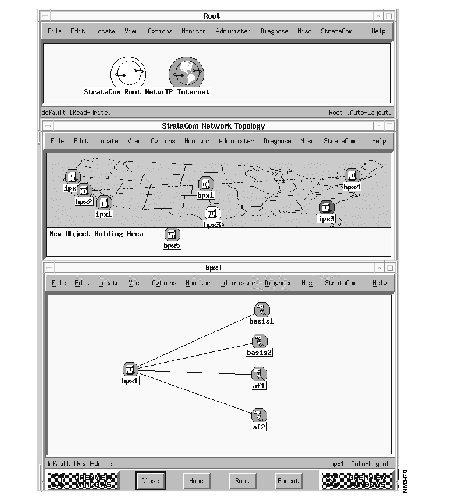
The tiered network design incorporates a BPX shelf submap. The following screens show three submaps, including the root level, the routing backbone level, and the shelf level. Included on the BPX shelf submap are icons for the BPX core shelf, BIS (IPX/AF) and AXIS. By default, a bus layout is incorporated into the display. Both the routing backbone submap and multiple shelf submaps (corresponding to each BPX) are created and maintained by StrataView Plus topology based on data originally from topology
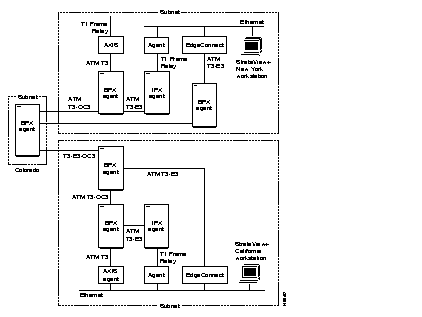
Each StrataView Plus workstation that is resident within a network must be able to communicate with all nodes within the network. Throughout the network(s), StrataView Plus communications are enabled as a result of the following connection methods:
The StrataView Plus workstation can be connected via 19200 serial line. Direct connectivity to a remote node occurs as a result of serial data transmission through modems or serial interfaces on the IPX's Ethernet backbone.
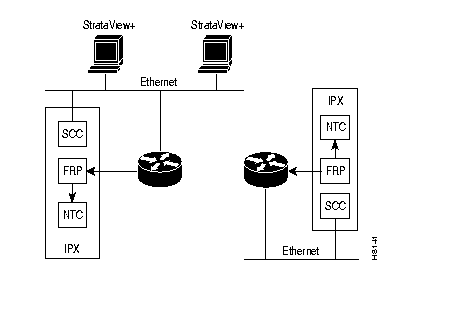
The StrataView Plus workstation can be connected to the LAN via standard 802.3 Ethernet. Ethernet data transmitted through this connection can then traverse routers and frame relay interfaces on an IPX backbone, to form direct connection at the remote node end.
The StrataView Plus workstation can be connected to nodes where direct connections are neither feasible nor required.
Over serial lines, the physically attached node forwards messages to and from the StrataView Plus workstation and the remote nodes.
Over Ethernet, the physically attached node can serve as the relay point (or router) for IP traffic. Ethernet attachments are required to enable SNMP and/or TFTP (Statistics) applications. You can attach either Ethernet or Asynchronous cabling to view StrataView Plus topology or Administrative window displays.
In addition to the large Network Topology map, there is also a small Network Overview map that appears in the lower right corner of the screen. This small map provides an overview of the entire network. This overview of the network can be useful to look at when zooming is used in the Network Topology map resulting in a display of only a portion of the network.
StrataView Plus provides the capability to save and restore the configuration of the nodes in the domain(s) to which it is connected. For structured networks, the node BRAM configuration is saved for the nodes in each domain, on a domain-by-domain basis. All domains must be connected to a StrataView Plus workstation. In a larger network, it may be necessary to use multiple StrataView Plus workstations, with each workstation connected to a portion of the domains. The node configuration includes trunks, active ports, terminated connections, connection parameters, and card slot assignments. Saving and restoring is accomplished by the use of save and restore commands via the Administration Window. A list of the configurations stored on a StrataView Plus workstation can be viewed from the Network Topology window using the Config option from the Images pulldown menu.
System software and card firmware can be downloaded to the BPX/IPX network by entering Super User commands in the Node Administration Window. Refer to the SuperUser Commands Reference Manual for details on these commands.
A listing of the BPX/IPX software releases and card firmware versions stored by StrataView Plus can be viewed by selecting the SW/FW option in the Images pulldown menu in the Network Topology Window.
New updates as well as current BPX/IPX software releases and card firmware versions can be stored in StrataView Plus from tape using the standard file administration commands used to read from tape. These commands are accessed from a standard workstation Motif window.
|
|