


|
|

This chapter describes commands used to configure the switch port on the Cisco 3800 system. The switch port is a new interface type that supports a switch engine device. A switch interface is not associated with any physical port; rather, it represents a whole engine. It is a virtual device created for network management and configuration. It is considered a Layer 3 protocol termination point to Cisco IOS. A switch interface can be assigned a Layer 3 address and runs Layer 3 host protocols. For the physical ports, the only new switch port introduced at the Cisco IOS software interface level is S0.
Commands are listed in Table 7-1, Table 7-2, Table 7-3, and Table 7-4 and are described in detail later in this chapter
| Command | Description |
|---|---|
| connect frame relay | Establish/break a switched Frame Relay connection. |
| connect voice | Establish/break a switched voice connection. |
| Command | Description |
|---|---|
| show connection-table | Show all connections in a given table. |
| show call-controller call | Show all Q2931 connections |
| show call-controller statistics | Show statistics about calls. |
| Command | Description |
|---|---|
| clear controller switch | Clear statistics about calls. |
| Command | Description |
|---|---|
| debug switch connection | Enable debugger output of switch connection establishment and teardown. |
| debug switch setup | Enable debugger output for switch call setup and clear. |
| debug switch signaling | Enable debugger output for switch call signaling messages |
| debug switch timers | Enable debugger output for timer operation in switch call setup. |
| debug switch verbose | Enable detailed debugger messages for switch call setup and signaling. |
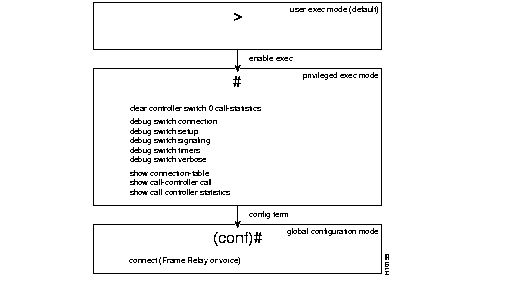
To enter privileged mode, characterized by the # prompt, enter the following command:
>enable exec
Freezer#
To enter global configuration mode, characterized by the (conf)# prompt, enter the following command from privileged exec mode:
Freezer# config term
Freezer(conf)#
Clears statistics about calls, such as the number of calls handled and the number of calls failed.
Freezer# clear controller switch 0 call-statistics
From global configuration mode, enter the connect frame relay command to establish a switched Frame Relay connection. Use the no form of this command to break the connection.
Freezer(conf)#connectsource-address destination-address[class]Freezer(conf)#no connectsource-address destination-address[class]
| source-address, destination-address | Addresses consist of the following:
· Topology address. · Source or destination hostname. · Standard description of interface type--serial or source. · Channel, serial channel (DLCI), or switch channel (connection ID and session number tag, 6-126). Depends on encapsulation of the interface; serial is for encaps frame-relay, switch is for encaps ftc-trunk. |
| class | Name of Frame Relay media class--for example, slow-pvc. |
The following command connects serial Frame Relay to remote serial Frame Relay:
Freezer(conf)# connect serial0/1 dlci 100 hostname Europa serial0/3 dlci 300 class slow-pvc
The connect voice command is used to establish a switched voice connection. Use the no form of this command to break a switched voice connection.
Freezer(conf)# connect source-address destination-address{active|passive}Freezer(conf)# no connect source-address destination-address{active|passive}
| source-address destination-address | Addresses consist of the following:
· Topology address. · Source or destination hostname. · Standard description of source and destination interface type, serial or source. · Channel, serial channel (DLCI), or switch channel (connection ID and session number tag 6-126). Depends on encapsulation of the interface; serial is for encaps frame-relay, switch is for encaps ftc-trunk. |
| active | Set the node to active when you want to initiate the connection. |
| passive | Set the node to passive when you want the node to wait for contact. |
The following command connects voice to remote voice:
Freezer(conf)# connect voice 10 38002 voice51 active
Use the debug switch connection command to enable debugger output for switch information about connection establishment and teardown. Use the no form fo this command tp disable debugger output for switch information about connection estabnlishment and teardown.
Freezer#debug switch connectionFreezer#no debug switch connection
Use the debug switch setup command to enable debugger output for switch call setup and clear. Use the no form of this command to disable debugger output for switch call setup and clear.
Freezer#debug switch setupFreezer#no debug switch setup
Use the debug switch signaling command to turn on debug output for switch call signaling messages. Use the no form of this command to disable the switch timer debugger output.
Freezer#debug switch signalingFreezer#no debug switch signaling
Use the debug switch timers command to turn on debug output for timer operation in switch call setup and signaling. Use the no form of this command to disable the switch timer debugger output.
Freezer#debug switch timersFreezer#no debug switch timers
Use the debug switch verbose command to turn on more detailed debug messages for switch call setup and signaling. Use the no form of this command to disable the debug messages for switch call setup and signaling.
Freezer#debug switch verboseFreezer#no debug switch verbose
Displays all Q2931 connections, or a single connection in detail when youinclude an optional parameter.
Freezer#show call-controller call[connection-number]
| detailed | If specified, a detailed listing displays. |
| connection-number | If specified, a detailed listing of the specific connection displays. This number is assigned by the system and is a current connection ID from 1-252. |
Use the show call-controller statistics command to show statistics about calls, such as the number of calls handled and the number of calls that failed.
Freezer# show call-controller statistics
Displays all connections in a given table, or the single connection specified in detail if optional parameters are provided.
Freezer#show connection-table[detailedconnection-number]
| detailed | If specified, a detailed listing displays. |
| connection-number | If specified, a detailed listing of the specific connection displays. This number is assigned by the system. |
|
|