


|
|

Setting up a frame relay connection is normally performed from StrataView Plus using the Connection Manager graphical user interface. An example of the StrataView Plus screen used for making an AXIS frame relay connection is shown below. For full details of how to set up a connection, refer to the Cisco StrataView Plus Operations Guide.
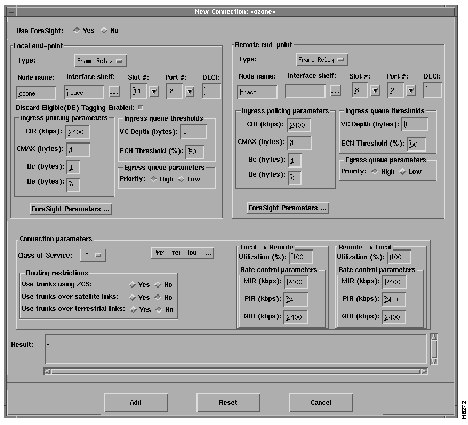
The following paragraphs describe how to establish an end-to-end frame relay connection assuming network interworking and AXIS FRSM end points.
Figure 5-2 shows two BPX nodes in a BPX network in which each of these two nodes is connected to an AXIS shelf via an BNI card. User frame relay equipment, located at "A", is attached to one of the AXIS shelves via a port on the shelf's FRSM card. User frame relay equipment, located at "B", is attached to the other AXIS shelf. This chapter describes how a frame relay connection can be established to permit bidirectional communication between the frame relay equipment at "A" and "B".

To make the connection, the path from "A" to "B" is made up of three segments as shown in Figure 5-2. When using CLI, each segment must be established and configured separately.
Two segments span from the FRSM to the BNM on the AXIS shelves. These segments are part ATM and part frame relay with the conversion being made in the AXIS shelves.
There is also an ATM trunk segment that spans the BPX backbone network from one of the BPX nodes to the other BPX node, this segment terminates on a BNI feeder trunk in each node. This segment may include intermediary BPX nodes (not shown in the diagram).
The links between the segments must be configured properly so that the three segments make up one complete end to end connection from "A" to "B". This process consists primarily of ensuring that the VPI between the AXIS and it collocated BPX must contain the AXIS slot number of the FRSM and the VCI must contain the logical channel number assigned to the virtual circuit.
To establish an end to end frame relay connection, perform the following steps:
Establish the Customer Equipment to BPX Segments
This step must be performed on the AXIS at BOTH ends of the connection ("A" and "B").
On the AXIS:
If not already enabled, enable the port to the frame relay equipment by performing an addport command using the parameters as follows:
For port number, specify an unused port number (1 to 96).
For line number, specify the FRSM line used to connect to the frame relay equipment (1 to 4, with 1 being the top line).
For DS0 speed, specify either "1" for 56K or "2" for 64K bits per second.
For beginning timeslot, specify the beginning timeslot in the T1 or E1 line.
For number of timeslot, specify the number of consecutive T1 or E1 timeslots to be used for the connection.
Select network interworking or service interworking in the chan_type parameter. 1 is for network interworking.
For channel number, enter a value between 16 and 271. THIS WILL BE THE SAME NUMBER SPECIFIED IN THE VCI FIELD TO/FROM THE BPX.
For port number, enter the port number previously enabled.
For DLCI, enter a DLCI number to be used in communicating with the frame relay equipment.
At this point the AXIS segment is up with default parameters.
For slot number and port number, specify slot and port of the BNI port connected to AXIS.
For VPI, specify the slot number in the AXIS shelf that contains the FRSM attached to the BPX.
For VCI, specify the LCN (logical channel number) of the frame relay connection configured on the local AXIS shelf.
For Nodename, specify the nodename of the BPX at the other end of the connection.
For Remote Channel, specify the BNI slot and port number of the BNI port attached to AXIS at the remote end. Specify the VPI as the slot number of the remote AXIS FRSM connected to the BPX and specify VCI as the LCN (logical channel number) of the frame relay connection at the remote AXIS.
Specify the type of connection. ATFR when ForeSight is not being used and ATFST when ForeSight is being used.
| Parameter | Description |
|---|---|
| MCR | Minimum Cell Rate |
| PCR | Peak Cell Rate |
| % Util | Percentage utilization of channel |
Minimum Cell Rate (MCR) is only used with Foresight (ATFST).
MCR and Peak Cell Rated (PCR) should be specified according to the following formulae.
MCR = CIR *3/800 cells per second
PCR = AR * 3/800 cells per second but less than or equal to 6000
AR = Frame relay port speed in bps.
| For example: | AR equals 64K, PCR = 237, or AR speed equals 256K, PCR = 950, or AR speed equals 1536K, PCR = 5703 |
The above MCR and PCR formulae assume a The DC version of the AXIS shelf frame size of 100 octets, however, even smaller frame sizes can result in worse case scenarios. For example:
| For a frame size of 64 octets the PCR formula becomes | PCR = AR * 2/512 cells per sec |
| For a frame size of 43 octets the PCR formula becomes | PCR = AR * 2/344 cells per sec |
% Util should normally be set to the same value as that used for the frame relay segments of the connection.
FRSM service interworking connections are made in the same manner as the network interworking connections except that chan_type in the AXIS addchan command is specified as service interworking (transparent or translation) and the connection end that is remote from the AXIS is an ATM UNI.
These services are setup the same as frame relay except the for port_type in the addchan command which is set as 2 for FUNI or 3 for frame forwarding.
Setting up an AUSM connection is normally performed from StrataView Plus using the Connection Manager graphical user interface. An example of the StrataView Plus screen used for making an AXIS ATM to ATM connection is shown below. For full details of how to set up a connection, refer to the Cisco StrataView Plus Operations Guide.
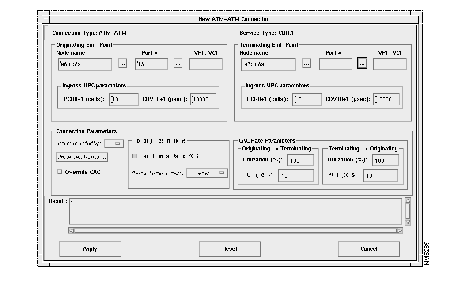
Use the following sequence of commands to establish an ATM UNI/NNI connection using the AUSM card. The connection is between a T1 or E1 ATM UNI on the AUSM card and an ATM service interface elsewhere in the IPX/BPX network.
The AUSM 8T1/E1 has a similar command sequence for adding ATM connections for ATM ports.
For IMA ports:
The AUSM 8Ti/E1 LCN range is 16 -1015.
For the BPX segment, set up the connection in the same manner as that for FRSM. The connection type should be specified as ABR, CBR, or VBR to match the connection type used at the connection endpoint (e.g., AUSM). The parameter values map directly from those specified at the connection endpoint.
Via the Command Line Interface (CLI)
Setting up a CESM connection is performed through the CLI. The procedure is to first add the line using the add line command (addln) and then add and configure a channel using the add channel (addchan) command. In the addchan command the channel number, the cell delay variation, the cell loss integration period, and buffer size are all specified. The command sequence is:
Example :
addln 1
addchan 16 10000 2500 0
|
|