


|
|

This chapter provides the procedures for unpacking, installing, and powering up the Cisco AXIS shelf.
 | Warning Installation should be performed by authorized personnel only. |
AXIS is designed for mounting in a standard 19 inch rack. The AXIS site requires a 19 inch rack with sufficient available mounting units for the modules to be installed (5U for each shelf, 3U for the main cooling assembly, 2U for the booster cooling assembly, 2U for the plenum chamber, or 1U for the spacer unit and 3U for the AC power module). The rack should have a set of mounting rails at the front and a second set at the rear or in a designated intermediate position. There must be sufficient clearance around the rack to allow removal and replacement of front and back cards and for the attachment and routing of cables to the line modules. Ideally there should be at least 3 feet clearance in the front of the rack and 2 feet clearance in the back of the rack.
The AXIS shelf can be configured for either AC or DC power.
An easily accessible AC or DC power source must be available within six feet of the AXIS system. Before powering up the node, verify that the AXIS node is powered from a dedicated branch circuit. An easily accessible disconnect device should be included in the facility wiring.
A 20A DC circuit breaker is recommenced for the 48 VDC power source which supplies DC power to each AXIS shelf. This circuit breaker should protect against excess currents, short circuits, and earth faults in accordance with NEC, CEC, and ANSI/NFPA 70.
For the DC version, a 48 VDC power feed is required. For power supply redundancy, two such power feeds (preferably from independent power sources) are required. Each power feed must be capable of supplying 500 watts. The DC power connectors attach to the power entry modules at the rear of the shelf through EURO Block 3-pin connectors. For power and ground connections to AXIS, a 12 AWG conductors must be used. If the 48 VDC source has wires of a different gauge, a customer supplied terminal block, that accepts the source wires as input and provides, as output, 12 AWG wires to the AXIS DC connector, must be provided. Only power supplies complying with SELV requirements in EN 60950 can be connected to the 48 VDC input of the AXIS system.
Also for the DC version, verify that the node is powered from a dedicated DC branch circuit The circuit should be protected by a dedicated circuit breaker sized such that the rated current and the trip delay is higher and longer than the AXIS circuit breaker. A dedicated 20A, 1-pole DC circuit breaker with a long trip delay is recommended for installation to each of the DC power entry modules to the AXIS shelf.
The DC version of the AXIS shelf uses a 15A, 1-pole DC circuit breaker with medium trip delay on the -48V input.
For the AC version an AC power source is required. For power supply redundancy, two such AC sources, (preferably independent) are required. Each source should be capable of supplying 500 watts per shelf. The AC power cables from the AC source attach to the AC power module which is mounted below the shelf and cooling assembly.
Also for the AC version verify that the node is powered from a dedicated AC branch circuit. The circuit should be protected by a dedicated 2-pole circuit breaker sized such that the rated current and the trip delay is higher and longer than the AXIS circuit breaker. A 20A, 2-pole AC circuit breaker with a long trip delay is recommended for installation.
The AC version of the AXIS shelf uses a 20A, 2-pole AC circuit breaker on each AC input.
The site must be capable of maintaining a maximum ambient temperature of 50× C while the system is operating (recommended range is 20× C to 30× C). A fully loaded AXIS shelf may dissipate up to 2400 BTUs.
The AXIS shelf, the Main Cooling Assembly, the Booster Cooling Assembly, the Plenum and Spacer, and the AC Power Module are shipped in their own separate shipping containers.
To unpack and install the shelf and the cooling assembly, the following tools should be available:
| Warning If any of the shipping containers are damaged, of if any of the various shipping indicators show improper handling of the containers, contact your local shipping representative. |
Step 1 Move the container to the area in which it is to be installed.
Step 2 Use a knife to open the cardboard container.
Step 3 Remove any foam packaging.
Step 4 Lift the module out of the container.
Step 5 Remove any anti-static bag surrounding the module.
Step 6 Remove any manuals and accessory hardware and set aside for future reference.
Step 7 Save the packing materials until the installation is complete.
Before proceeding with the installation, use the parts checklist to verify that all the parts you ordered are present and in good condition.
Plug-in cards may be shipped already installed in the shelf or under separate cover. The exact number of cards will vary from site to site, depending on the selected configuration. The AXIS shelf is shipped with all unused front and back slots covered with inserts which prevent radio frequency emissions and ensure proper air flow through the shelf. The unit must not be operated with any unused slots left uncovered.
| Warning For protection against shock hazard, verify that all power cords are disconnected before servicing the unit. The maximum voltage that may be present in the unit is 240VAC in AC systems and 48VDC in DC systems. |
The two 48VDC power feeds must be properly grounded on the positive 48V and safety ground pins.
Ensure that the AXIS frame and all other frames are attached to an isolated ground connection.
For AC systems, an insulated grounding conductor that is identical in size to the grounded and ungrounded branch circuit supply conductors, but is green with yellow stripes, is installed as part of the branch circuit that supplies the unit. The grounding conductor described is to be a separately derived system, at the supply transformer or motor generator set.
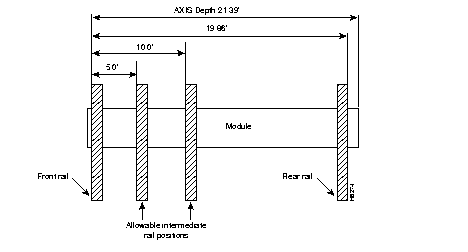
AXIS modules are designed to be mounted to two vertical rack mounting rails. A front mounting rail is used as one mounting point using the flanges provided at the front of each AXIS module. A second rail, either at the rear of the rack or at an intermediate position, is used for the second mounting point (mounting brackets are provided for attaching the module to the second rail). The allowable positions for intermediate rails is shown in Figure 6-1.
The AXIS units are mounted in a specific order from the bottom to the top.
The AC power module (if used) is mounted first, then the fan cooling assembly is mounted, then the first shelf is mounted, and then the second shelf (if installed) is mounted.
If a third and/or fourth shelf is installed, a booster cooling assembly must be mounted immediately above the second shelf and immediately below the third and fourth shelves. The plenum or spacer unit is mounted last above the highest shelf. If a cable management kit is to used in a 2 or 4 shelf rack, the top unit must be a Plenum because cable management hardware is not supported by the Spacer unit.
When each module is installed, there should be approximately 1/32 of an inch vertical space between adjacent modules. This can be achieved by ensuring that each module is installed at the center of each standard rack increment. This space is important because it allows cards, fan and power entry modules to be removed without interference. Hardware is available in the installation kits for this purpose (see Figure 6-5).
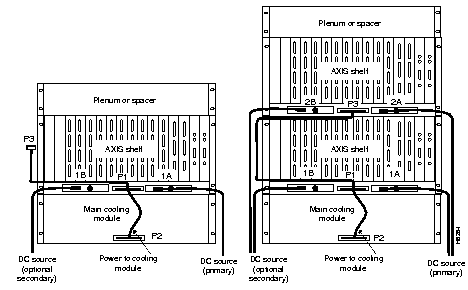
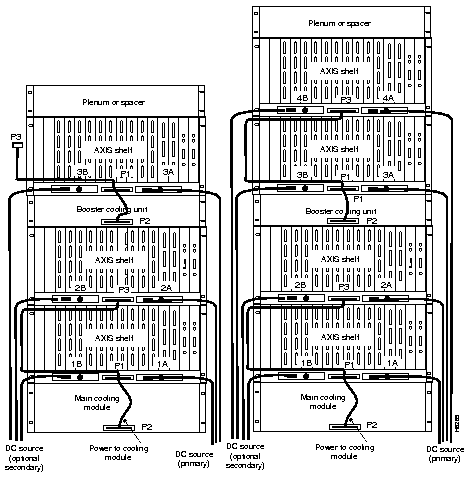
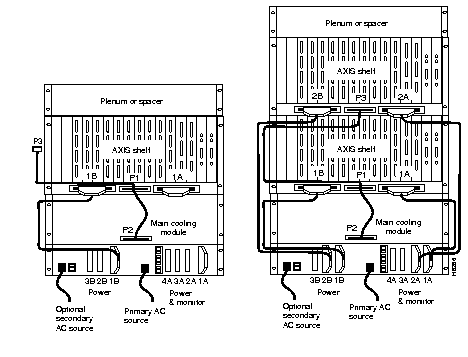
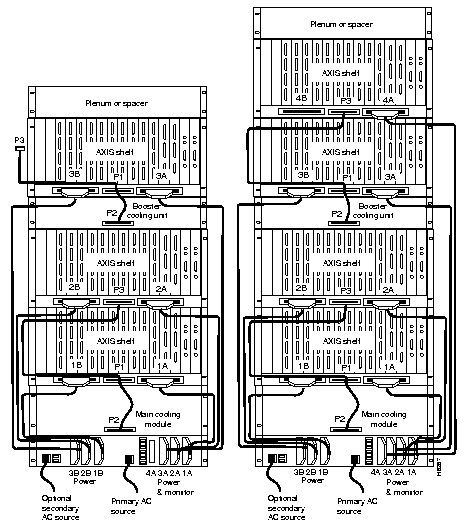
Racks with one and two shelves are shown in Figure 6-2. Racks with three and four shelves are shown in Figure 6-3.
The AXIS shelf and Cooling Assembly rely on their contact with the rack for grounding. Therefore, the rack should be properly connected to earth.
The equipment should be mounted in the rack to prevent any hazardous condition due to uneven mechanical loading.
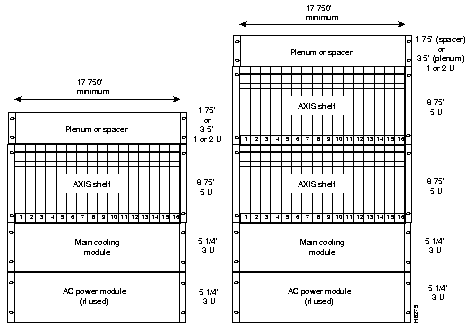
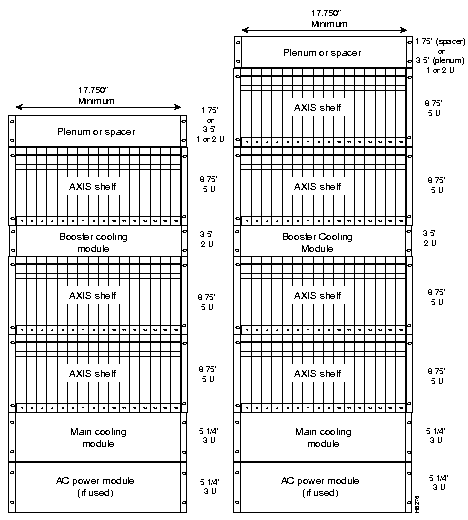
Start by mounting the lowest module first and work upwards. In the AC system, the lowest module is the AC power module, in DC systems it is the main cooling module.
Step 1 Determine the vertical position in the rack where the shelf or shelves are to be installed. Determine the vertical position of the lowest module first, then work your way up.
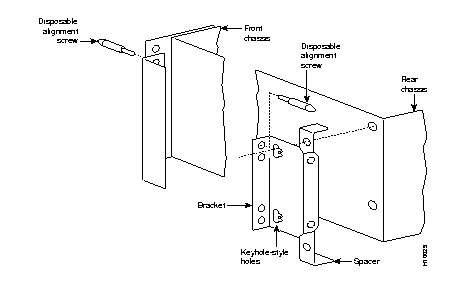
Step 2 Install disposable alignment screws in the upper mounting holes in the rack.
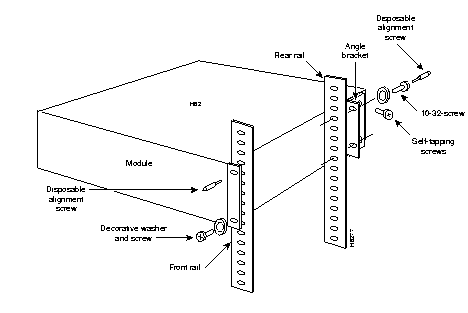
Step 3 Have one person lift the first module into its position and fasten the lower front mounting screws (see Figure 6-4).
Step 4 Attach the angle brackets (supplied with the module), one on each side of the mounted module. Position the brackets so that they can be used to secure the module to the rear rail of the rack. Holes are provided in the side of the module to accommodate various distances of the rear rail from the front rail. The angle bracket is attached to the side of the module using the provided self-tapping screws (see Figure 6-4). Use the disposable alignment screws on the rear positioning as well as the front to assure accurate positioning of the first unit.
Step 5 Attach the angle bracket to the rear rail in the rack using four, number 10-32 machine screws and flat washers (supplied with the module). The AC Power Module uses a special bracket at the rear that provides a small shelf for support (see Figure 6-4). Attach the bracket to the mounting angle rack using number10-32 screws. Screws are not mandatory to hold the bracket to the module.
Step 6 Repeat Step 2 through Step 5 for the remaining modules.
Where there is restricted depth in the rack, the holes in the side of the module can also be used to mount the shelf such that the center of the module is mounted onto the front of the rack. In this arrangement, the shelf will protrude from the front of the rack and partially protrude into the rack space.
There are several aids for mounting modules where side access is limited.
Either the plenum chamber or the spacer unit (not both) should be mounted immediately above the shelf. The decision of which one to use is dependent upon the configuration of equipment in the rack and how the air is to be expelled. The plenum delivers air to the rear of the rack and is used in normal UL compliant installations where the top of the unit must be covered. The spacer may be used for installations that may have equipment mounted above the AXIS assembly that acts as the necessary top cover. The spacer guarantees the minimum necessary air exhaust space of 1.75 inches providing that the sides and rear are open and unobstructed. The AXIS shelf may not be UL compliant when the spacer is used. Further, the plenum supports the attachment of a cable management kit whereas the spacer does not. This is an important factor if cable management is to be used for the upper shelf in two and four shelf configurations.
Insert the selected unit immediately above the shelf and secure to the shelf with four, number 10-32 machine screws and flat washers.
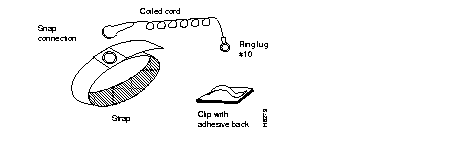
The AXIS shelf is provided with a wrist strap which grounds the user and protects the electronic components from electrostatic shock. The wrist strap kit consists of a strap, a coiled cord, and a clip for holding the strap as shown in Figure 6-6.
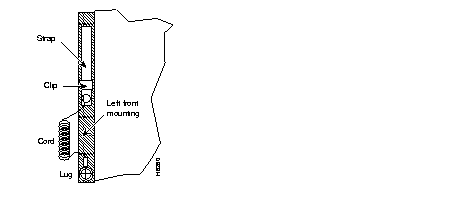
It is recommended that the wrist strap is installed on the left front flange of one of the units at a convenient height. Use the a front mounting screw to secure the ring lug to the flange and front rail. The other end of the cord is attached to the strap with a snap connector. Peel the back off the clip to expose the adhesive surface and attach to the front of the unit above the ring lug, mount the clip sideways to allow the strap to be held in a position that will not interfere with the removal of the Number1 card. Use the clip to store the strap when not in use. (See Figure 6-7.)
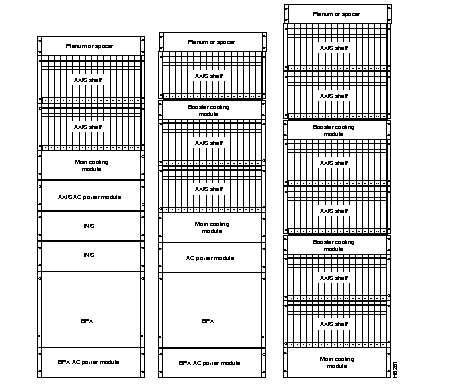
Different Cisco units, for example, AXIS, BPX, and INS, can be collocated in the same rack or cabinet. When this is done, however, the inclusion and positioning of AXIS power, cooling, booster, plenum, and spacer modules relative to the AXIS shelf must be the same as those when AXIS is used in a dedicated rack. Some examples of multi-system configurations are shown in Figure 6-8.
The configuration on the left includes a BPX, redundant INS's and two AXIS shelves. The center includes a BPX and three AXIS shelves. On the right is a six shelf DC arrangement.
In multi-system racks, the BPX, if included, should be mounted at the bottom. The AXIS shelves including the power, cooling, booster, plenum, and spacer should be mounted in the proper order at the top to allow for growth.
| Warning The power to the shelf is OFF at this point. DO NOT apply power by pressing the Black Button until later. |
Step 1 Press the Red button on each power entry module (PEM) so that their Black buttons are in the out position. This opens the circuit breakers in the power entry modules.
Step 2 Each power entry module has a EURO Block 3-pin male power receptacle for connecting the 48VDC power sources. The mating female connector is supplied by Cisco with the power entry module.
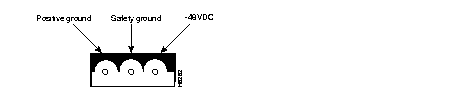
Step 3 Attach the two supplied female EURO connectors to the two cables supplying DC power to the power entry modules. The cables should have three insulated number 12 AWG wires (solid or stranded) with the insulation stripped back 0.25 inch (6mm) on each wire.
Test which way the female connector attaches to the male connector using the pin assignments in Figure 6-9 as a guide. For each cable, insert each of the wires into their correct holes in the connector and secure each wire by tightening the screws in the connector.
Step 4 Connect a cable to each of the power entry module connectors. The connectors are polarized so they cannot be inserted the wrong way.
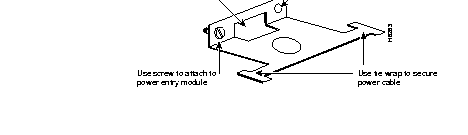
Step 5 Use the PEM cable clamp (see Figure 6-10) to secure the power cable. Place the cable clamp over the connector so that the small hole is positioned over the boss on the PEM and secure by attaching the clamp to the PEM with the captive screw. The cable clamp can be dressed to the left or right and secured to the clamp using a tie wrap.
Step 6 If the redundant PEM module is not used, the Cover Power Entry Module must be installed in the empty position to assure proper cooling of the rear cards.
The DC cabling for single and multi-shelf racks is shown in Figure 6-11 and Figure 6-12.
A cable is provided with the main and booster cooling assemblies for delivering power from the shelf to the fan cooling assembly. The cable provides for redundancy and the cooling unit can be powered from two independent shelves.
The cooling assembly cabling for a single and multi-shelf racks is also shown in Figure 6-11 and Figure 6-12.
AC Input Power
The AC power assembly can be configured with either a single primary input AC source or optional primary and secondary (redundant) input AC sources. AC power is supplied through connectors on the rear panel.
Available Power
The AC power assembly holds up to six independent 875W power supplies each of which supplies power to a common output bus. Power is then available for AXIS shelves through connectors on the rear panel.
The number of power supplies that are configured in the assembly depends upon the number of AXIS shelves that have to be supported. The maximum number of AXIS shelves that can be supported by a single AC power assembly is four.
In a fully loaded configuration each AXIS shelf requires 500 watts. Therefore, a power assembly equipped with three power supplies, totaling 2625W, can supply enough power for a four shelf rack. A power assembly equipped with four power supplies, totaling 3500W, provides enough power for a four shelf rack even in the event of a single power supply failure. More power supplies provide even more protection in the event of multiple power supply failures.
Monitoring Power Supply Status
In addition to supplying power, each power supply provides a signal that indicates the status of the power supply.
Rear Panel Connectors
The rear panel has:
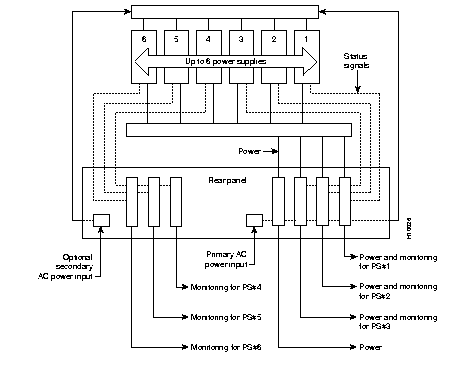
Referring to Figure 6-13, power is available at each of the four connectors on the right of the rear panel. A cable from any of these four connectors can be connected to any shelf in the rack.
Each of the right three connectors of the group of four also provides a power supply status signal for monitoring power supply performance by an AXIS shelf. Each of these connectors provides a status signal for a particular power supply as shown in the diagram.
The group of three connectors on the left of the rear panel supply status signals for any remaining power supplies that may be configured in the assembly.
Refer to Figure 6-14 and Figure 6-15 when performing the following steps.
| Warning The power to the shelf is OFF at this point. DO NOT apply power until later. |
A fully loaded multi-AXIS rack may have between 150 and 200 cables attached to the rack's modules. Cable management kits are available for installation on the rear of rack modules. These kits provide the means to route the power and data cables in a neat and orderly fashion to and from the modules in the rack.Depending upon the number of racks in the shelf and the number of cables connected to the shelves, one or more cable management kits may be required.
The cable management kits are installed to the rear of the Cooling Module, the Booster Cooling Module, and the Plenum as required. Note that a cable management kit cannot be installed on the spacer unit.
There are two basic cable management kits, one for the plenum chamber and another for the cooling and booster cooling modules.
The plenum chamber kit consists of a cable management panel and the necessary brackets, screws and washers for rear mounting on the plenum as shown in Table 6-1.
| Description | Quantity |
|---|---|
| Number 10 flat washer | 8 |
| 10-32, 0.375in. long screws with locking nuts | 8 |
| 10-32, 0.375in. long thread forming screws | 4 |
| Inner bracket | 2 |
| Outer bracket | 2 |
| Cable management panel | 1 |
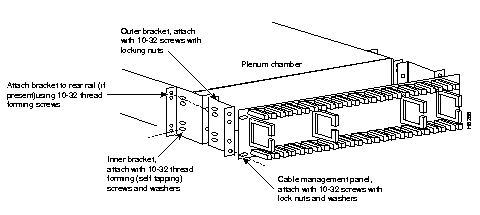
A cable management kit for the plenum is shown in Figure 6-16. Install the kit as follows:
Step 1 Install the two inner brackets onto the sides of the plenum chamber, one each side using two thread forming screws for each bracket. If a rear rail is being used to mount the plenum, use the protruding flange to attach to the rail using two thread forming screws and washers (supplied with the plenum install kit). If there is limited access, use the procedures described in the "Rack Mounting the Modules" section under Limited Access.
Step 2 Install the two outer brackets onto the two inner brackets using two screws with locking nuts for each bracket.
Step 3 Install the cable management panel onto the outer brackets using two screws, locking nuts, and washers for each bracket.
The cable management kit that is installed on the cooling module and booster cooling module, consists of a set of brackets, a power routing assembly, and the cable management panel as shown in Table 6-2.
| Description | Quantity |
|---|---|
| Number 10 flat washer | 12 |
| 10-32, 0.375in. long screws with locking nuts | 8 |
| 10-32, 0.375in. long thread forming screws | 8 |
| Cable support | 2 |
| Power & fan cable management assembly | 2 |
| Short fan panel bracket | 2 |
| Cable management panel | 1 |
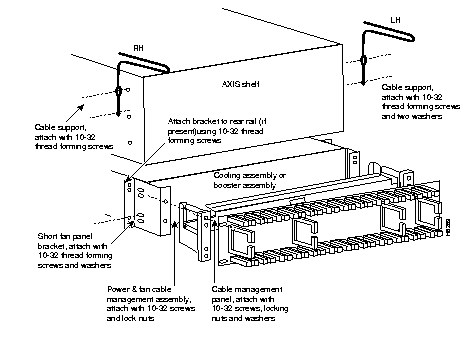
A cable management kit for the cooling and booster units is shown in Figure 6-17. Referring to this figure, install the kit as follows:
Step 1 Install the two short fan panel brackets onto the sides of the cooling unit, one each side using two thread forming screws for each bracket. If a rear rail is being used to mount the plenum, use the protruding flange to attach to the rail using two thread forming screws and washers (supplied with the cooling unit install kit). If there is limited access, use the procedures described under Limited Access. Install the power and fan cable management assembly onto the two short fan panel brackets using two screws with locking nuts for each bracket.
Step 2 Install the cable management panel onto the outer brackets using four screws, locking nuts, and washers for each bracket.
Step 3 Install one or both cable supports onto the AXIS shelf above the cooling module using a number 10-32 thread forming screw for each support. Use two washers between the cable support on the left hand support only.
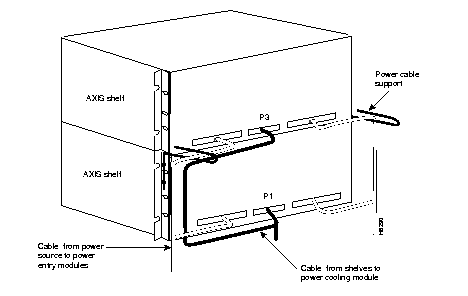
There are two kinds of power cables on an AXIS shelf. The first are the power cables that power the shelf, either directly from a 48 VDC source or from a power supply module. The second are those power cables that power the cooling module and booster module.
At the AXIS shelf end the cables should be routed through the power cable support so that they can be routed down the side of the rack as shown in Figure 6-18.
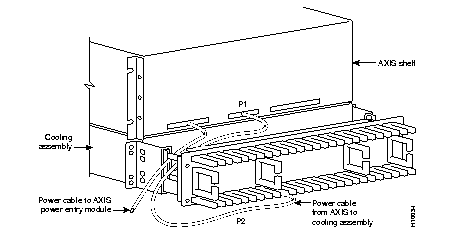
At the cooling assembly, the cable should be routed through the cable management kit as shown in Figure 6-19.
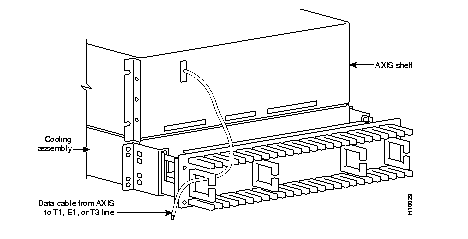
Data Cables connected to the AXIS shelf back cards are routed up or down the cable management panel where they are feed through the fingers and routed to the left or right side of the rack. The cables can then be routed to their appropriate equipment (router, for example). See Figure 6-20.
| Warning Before handling any cards, ground yourself by clipping the wrist strap that is supplied with AXIS to a convenient metallic contact on the shelf and to your wrist. This simple procedure prevents static electrical damage to the cards. |
Systems may be shipped with empty slots with filler cards or with plug-in cards installed. If filler cards are installed in any of the slots, they may need to be replaced with functional cards. Remove, replace, and install front and back cards as necessary to obtain the correct configuration.
When seated, AXIS front cards are retained by a mechanical latch attached to the card. See Figure 6-21.
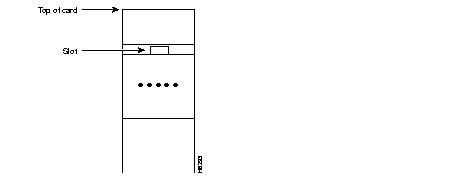
To remove a front card:
Step 1 Insert a small flat head screwdriver into the slot in the insertion/extractor lever and press until the latch springs open, approximately 10°. Continue to lift the insertion/extractor lever to disconnect the connector.
Step 2 Gently pull the card out of the card cage.
To install a front card:
Step 1 Position the rear card guides over the appropriate slot at the top and bottom of the card cage.
Step 2 Gently slide the card all the way into the slot and press the insertion/extractor lever until it snaps into the vertical position.
Back cards are retained through two screws: one at the top of the faceplate and one at the bottom of the faceplate.
To remove a back card:
Step 1 Remove any cables connected to the back card.
Step 2 Use a flat screwdriver to undo the two retaining screws in the back card's faceplate.
Step 3 Pull both of the two extractor levers out to the horizontal position, this will start the removal of the card. Gently pull the card out of the card cage.
To install a back card:
Step 1 Ensure that the two extractor levers are in the "in" position. When the card is being inserted into the slot, the levers should be vertical along the line of the back card.
Step 2 Position the rear card guides over the appropriate slot at the top and bottom of the card cage.
Step 3 Gently slide the card all the way into the slot and tighten the two captive screws on the back card's faceplate. Tighten the upper and lower screws to prevent mis-alignment of the card. Do not overtighten the screws. Tighten to secure the card.
| Warning Cards must be inserted in the correct slot positions. This is particularly true with back cards. If service module back cards are inserted into slots intended only for ASC and/or BNM back cards (slots 1, 2, 3, and 4) damage to the card and backplane can result. If you accidentally attempt to insert a service module back card into slots 1, 2, 3, or 4 and have difficulty in operating the shelf, examine the backplane pins and the backcard connector to see if they have been bent or damaged. |
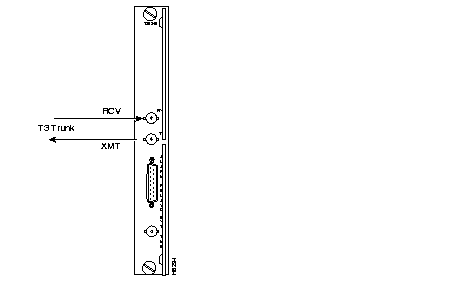
Connect two T3 coaxial cables between the T3 BNC connectors on the AXIS BNM line module card and the T3 BNC connectors on the BPX's BNI Line Module. The Transmit port on the BPX line module must connect to the Receive port on the AXIS BNM line module and vice versa, see Figure 6-22.
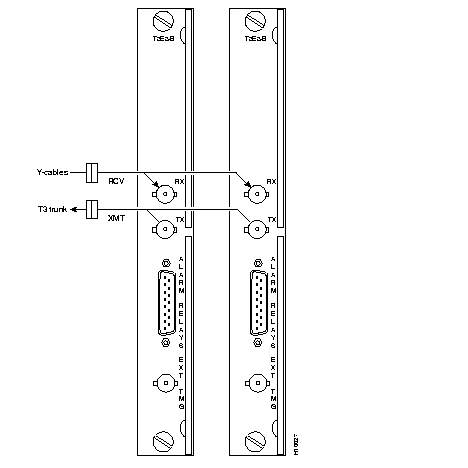
If redundant BNM cards are being used, use Y-cable adapters as shown in Figure 6-23. It is recommended that specially designed short T3 or E3 Y-cables be purchased from Cisco.
The customer's frame relay is connected to the AXIS shelf through T1 or E1 lines. T1 lines use cables terminated with DB15 connectors, E1 lines use cables terminated with either DB15 or BNC connectors (depending upon the line module configuration).
Service lines using DB15 connectors need only one cable per port. Service lines using BNC connectors require two cables (one transmit and one receive) from the E1 port of the customer's equipment to a E1 port on an AXIS line module.
Dry contact relay closures are available for forwarding AXIS alarms to a user office alarm system. Separate visual and audible alarm outputs are available for both major and minor alarm outputs. The AXIS alarm outputs are available from a DB15 connector on the BNM line module faceplate. Refer to Appendix B for the pinouts on this connector. Use switchboard cable for running these connections.
If the AXIS node is to be synchronized to some other external equipment or a local digital central office, a connector on the back card can be used to provide a clock input.
For a T1 clock input, the DB15 connector marked EXT TMG on the T3E3-D line module is used.
For a E1 clock input, the BNC connector marked EXT TMG on the T3E3-B line module is used.
When using an alpha-numeric (dumb) terminal to input Command Line Interface commands, the terminal must be connected directly (no modem) to the Maintenance Port DB25 connector on the ASC line module faceplate. Use a conventional RS-232 cable with a DB25 connector at each end. A so-called "Null Modem" cable is NOT required. This port should never be Y-cabled.
When using a workstation to issue commands or transfer files to and from the shelf, the workstation can be attached through the RS-232 Control Port on the ASC line module faceplate. Using this connection requires the workstation to communicate using TCP/IP and SLIP communication protocols.
The workstation can be attached either directly with no modems or remotely through modems. In either case, a conventional RS-232 modem cable should be used.
If the shelf has dual redundant ASC modules, use a Y-cable to connect the workstation or modem to the Control Port of both the ASC modules. If a modem is used, a null-modem cable is required.
Before applying power to the AXIS shelf, check the following items:
To apply power to a DC system, press the BLACK button on each of the power entry modules until they latch in the IN position.To apply power to an AC system, switch the circuit breakers on the rear of the power module to the ON position.
The LEDs on the front cards may flash for a few moments while the shelf performs a self-test and then settle down to Active or Standby.
When power is applied and the LEDs have stabilized:
Before the AXIS shelf can receive commands, SNMP requests, file downloads, etc. the shelf must be assigned IP addresses for the Control port, the LAN port, and the inband channel. This procedure requires a alpha-numeric terminal to be connected to the Maintenance port of the active ASC card and addresses assigned through the command line interface. See the Cisco StrataCom AXIS Command Reference for details on how to login and use the specific commands.
Carry out the following procedures:
Once the IP addresses have been assigned, the shelf can be managed from StrataView Plus.
|
|