


|
|

This chapter provides safety information and describes the tasks you must perform before you install the Cisco 2518.
This chapter includes the following topics:
Follow these guidelines to ensure general safety:
Maintaining Safety with Electricity
Follow these guidelines when working on equipment powered by electricity.
Warning Do not work on the system or connect or disconnect cables during periods of lightning activity. To see this warning in multiple languages, see the appendix "Translated Safety Warnings."
Warning Do not touch the power supply when the power cord is connected. For systems with a power switch, line voltages are present within the power supply even when the power switch is off and the power cord is connected. For systems without a power switch, line voltages are present within the power supply when the power cord is connected. To see this warning in multiple languages, see the appendix "Translated Safety Warnings."
Preventing Electrostatic Discharge Damage
Electrostatic discharge (ESD) can damage equipment and impair electrical circuitry. It occurs when electronic components are improperly handled and can result in complete or intermittent failures.
Always follow ESD-prevention procedures when removing and replacing components. Ensure that the router/hub is electrically connected to earth ground. Wear an ESD-preventive wrist strap, ensuring that it makes good skin contact. Connect the clip to an unpainted surface of the chassis frame to safely channel unwanted ESD voltages to ground. To properly guard against ESD damage and shocks, the wrist strap and cord must operate effectively. If no wrist strap is available, ground yourself by touching the metal part of the router/hub.
This section describes the requirements your site must meet for safe installation and operation of your system. Ensure that your site is properly prepared before beginning installation.
The Cisco 2518 is designed to be rack-mounted in a wiring closet, or placed on a desktop.
Warning Ultimate disposal of this product should be handled according to all national laws and regulations. To see this warning in multiple languages, see the appendix "Translated Safety Warnings."
The location of the individual router/hub and the layout of your equipment rack or wiring room are extremely important for proper system operation. Equipment placed too close together, inadequate ventilation, and inaccessible panels can cause system malfunctions and shutdowns, and can make system maintenance difficult.
When planning your site layout and equipment locations, use the precautions in the following sections to help avoid equipment failures and reduce the possibility of environmentally caused shutdowns. If you are currently experiencing shutdowns or unusually high errors with your existing equipment, these precautions can help you isolate the cause of failures and prevent future problems.
The following precautions will help you plan an acceptable operating environment for the Cisco 2518 and will help you avoid environmentally caused equipment failures:
The following tips will help you plan an acceptable equipment rack configuration:
Check the power at your site to ensure that you are receiving "clean" power (free of spikes and noise). Install a power conditioner if necessary.
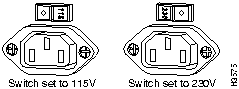
Figure 2-1 : Power Supply Input Voltage Selection Switch The installation checklist lists the procedures for initial hardware installation of a new Cisco 2518. Make a copy of this checklist and mark the entries as you complete each procedure. Include a copy of the checklist for each system in your site log.
Installation checklist for site _______________________________________________
LAN interface name ______________________________
Unit serial number ________________________
The site log provides a historical record of all actions relevant to the Cisco 2518. Keep the site log in an easily accessible place near the router/hub where anyone who performs tasks has access to it. Use the installation checklist to verify steps in the installation and maintenance of your system. Site log entries might include the following:
When setting up your Cisco 2518, consider distance limitations and potential electromagnetic interference (EMI) as defined by the Electronic Industries Association (EIA). Following are the distance limitation specifications for serial interfaces.
The IEEE 802.3 specification for the maximum length of an Ethernet unshielded twisted pair (UTP) segment is 328 feet (100 meters) at a transmission rate of 10 Mbps.
As with all signaling systems, EIA/TIA-232 signals can travel a limited distance at any given bit rate; generally, the slower the data rate, the greater the distance. Table 2-1 shows the standard relationship between baud rate and maximum distance.
Table 2-1 : EIA/TIA-232 Speed and Distance Limitations
The use of balanced drivers allows EIA/TIA-449 signals to travel greater distances than the
Table 2-2 : EIA/TIA-449 Speed and Distance Limitations
When you run cables for any significant distance in an electromagnetic field, interference can occur between the field and the signals on the cables. This fact has two implications for the construction of terminal plant cabling:
If you use twisted-pair cables with a good distribution of grounding conductors in your plant cabling, emitted radio interference is not likely. If you exceed the maximum distances, ground the conductor for each data signal; however, this practice is not recommended.
If you have cables exceeding recommended distances, or if you have cables that pass between buildings, give special consideration to the effect of lightning strikes or ground loops. The electromagnetic pulse caused by lightning or other high-energy phenomena can easily couple enough energy into unshielded conductors to destroy electronic devices. If your site has experienced this type of problem, consult experts in lightning suppression and shielding.
To prevent EMI, consult experts in radio-frequency interference (RFI).
In order to avoid possible EMI interference, follow these recommendations:
Console and Auxiliary Port Considerations
Before connecting the management card console and router card auxiliary ports, read the following sections.
Management Card Console Port Connection
The management card has an RJ-45 console asynchronous serial port. This port connects to a terminal or PC with a special blue colored RJ-45 to DB-25 console cable, which is supplied. The default parameters for the console port are 9600 baud, 8 data bits, no parity generated or checked, and 1 stop bit. The console port does not support hardware flow control.
Router Card Auxiliary Port Connections
The router card has an RJ-45 asynchronous (AUX) serial port that is used as an auxiliary port. This port connects to a terminal using an RJ-45-to-DB-25 adapter. Depending on the adapter used, this port becomes a data communications equipment (DCE) device or a data terminal equipment (DTE) device. To use the terminal as a console, you should use a DCE RJ-45-to-DB-25 adapter. The default parameters for the port are 9600 baud, 8 data bits, no parity generated or checked, and 2 stop bits.
Network Connection Considerations
This section contains information about connecting the Ethernet, serial, and BRI ports to your network.
The Ethernet hub ports are located on the Cisco 2518 router/hub port card, and on the router card. Use a modular, RJ-45, UTP cable to connect the Ethernet ports to workstations, PCs, servers, or a media attachment unit (MAU). To connect to another hub, use a cross-connect UTP cable.
Two serial interface ports are located on the router card. The serial ports use 60-pin, D-type connectors. All serial interfaces except the EIA-530 interface can be configured as DCE using a DCE cable. The DTE serial port needs external clocking, which is provided by a channel service unit/data service unit (CSU/DSU) or modem.
You must use a special serial cable to connect the router card to a modem or CSU/DSU. This cable is available from Cisco Systems and can be ordered with the system. The cable uses a DB-60 connector on the router/hub end. For cable specifications, see the appendix "Cabling Specifications." For ordering information, contact a customer service representative.
The Basic Rate Interface (BRI) port is an RJ-45 8-pin jack located to the right of the serial port on the daughter card. Use an appropriate cable to connect the system directly to the ISDN through the NT1. The common carrier will provide the NT1 connection worldwide, except in North America, where the NT1 is owned by individual customers.
Do not unpack the Cisco 2518 until you are ready to install it; keep the router/hub in its shipping container to prevent accidental damage. When you have determined where you want to install the Cisco 2518, proceed with the unpacking.
The router/hub, cables, UniverCD or printed publications, and any optional equipment you ordered might be shipped in more than one container. When you unpack each shipping container, check the packing list to ensure that you received the following items:
Inspect all items for shipping damage. If anything appears to be damaged, or if you encounter problems when installing or configuring your system, contact a customer service representative.
Preparing Your System for Operation
To prepare your system for operation:
Copyright 1988-1996 © Cisco Systems Inc.


Installation checklist copied
Verified by
Date
Background information placed in the site log
Environmental specifications verified
Site power voltages verified
Installation site prepower check completed
Required tools available
Additional equipment available
Power supply input voltage selection switch set
Unit received
UniverCD or printed documentation received, if ordered
Router/Hub components verified
Software version verified
Initial electrical connections established
Terminal or PC attached to the Cisco router/hub console port
Modem attached to the console port (for remote configuration)
Signal distance limits verified
Startup sequence steps completed
Initial system operation verified
Data Rate (Baud)
Distance (Feet)
Distance (Meters)
2400
200
60
4800
100
30
9600
50
15
19200
25
7.6
38400
12
3.7

EIA/TIA232 standard. Table 2-2 lists the standard relationship between baud rate and maximum distance for EIA/TIA-449 signals. These limits are also valid for V.35 and X.21.
Data Rate (Baud)
Distance (Feet)
Distance (Meters)
2400
4,100
1,250
4800
2,050
625
9600
1,025
312
19200
513
156
38400
256
78
56000
102
31
T1
50
15


