


|
|

Configuring the Cisco 2518 SNMP Agent with SPSET
This chapter describes the System Parameter Setup program (SPSET). SPSET resides in the Cisco router/hub firmware, and is used to configure or modify the Cisco router/hub simple network management protocol (SNMP) agent.
Use SPSET to perform the following modifications:
Connect a terminal or PC to the Cisco router/hub console port as described in the chapter "Installing the Router/Hub." SPSET is designed to use ANSI screen codes, therefore to see a proper screen display, you should use a PC or VT100 terminal running ANSI emulation.
When the Cisco router/hub is powered on, the SNMP agent is configured to the values stored in SPSET. To run the SPSET program, perform the following steps:
               SYSTEM PARAMETERS SETUP - MAIN MENU
--------------------------------------------------------------------
--------------------------------------------------------------------
                         GENERAL SETUP
--------------------------------------------------------------------
                          IP SETUP
                         SNMP SETUP
                        WRITE TO PORT
                      RESET SAVED HUB FUNCTIONS
                LOAD FACTORY-SET CONFIGURATION
                      EXIT WITHOUT SAVE
                       EXIT WITH SAVE
----------------------------HELP------------------------------------
The General Setup screen contains options for the boot device, serial port setup, router agent interface setup, and hub setup.
             SYSTEM PARAMETERS SETUP - GENERAL SETUP
--------------------------------------------------------------------
--------------------------------------------------------------------
                         General Setup
Boot Device:   ROM-disk
                         Serial Setup
Serial Mode:  None                    Port Selection:  COM1
Baud Rate:    9600                    Word Length:     8
Stop Bits:    1                       Parity Check:    None
                  Router-Agent Interface Setup
KeepAlive (sec):  00010                 Memory Base Addr: D
Password: 00000
                         Hub Setup
Hub Functions:  Not Saved
----------------------------HELP------------------------------------
To move the cursor through the options, press the Tab key to move forward or Shift-Tab to move backward. To return to the main menu, press the Esc key.
Table 6-1 describes the general setup options.
Table 6-1 General Setup Options
| Parameter | Meaning | Default |
|---|---|---|
| Boot Device | This option is read-only, and indicates that the Cisco hub management card boots from the ROM disk. | None |
| Serial Mode | Options are SLIP, and None. Use SLIP to communicate with a PC running the Cisco Hub/Ring Manager. | None |
| Port selection (SLIP) | Serial port used for the connection. SLIP options are COM 1 and COM 2. | COM 1 |
| Baud rate (SLIP) | Baud rate for the serial connection. SLIP options are 1200, 2400, 4800, and 9600 bps. | 2400 |
| Word length | Length of each data word. Options are 7 or 8. | 8 |
| Stop bits | Number of stop bits. Options are 1, 1.5, or 2. | 1 |
| Parity check | Parity setting. Options are odd, even, or none. | None |
| Keepalive (sec) | Time interval for "keepalive" signals between the router card and the management card. The keepalive interval set for the router's PCbus must be the same as the keepalive interval configured with SPSET. | 00010 |
| Memory Base Addr | Set the memory base address to the same value as the router, either A (0xA0000) or D (0xD0000). | D |
| Password | Used with ring management. The password is sent to the LAN Reporting Mechanism (LRM) in the router when requesting a reporting link. The password must be identical on both the router and management card. | 0 |
| Hub functions | Determines whether or not hub functions performed by the network management station (for example, port disconnect) are saved in the management card's NVRAM. If the hub functions are saved, you can delete them with the Delete Hub Functions option of the SPSET Main Menu. | Not saved |
The IP setup screen displays the IP address for the default gateway, LAN interface, and serial line interface protocol (SLIP) interface. This screen is read-only with no modifiable parameters.
             SYSTEM PARAMETERS SETUP - IP SETUP
--------------------------------------------------------------------
                      Default Gateway
IP Address:  000.000.000.000
            LAN/PCbus Interface        SLIP Interface
Address:  000.000.000.000              000.000.000.000
Net Mask: 255.255.255.000              255.255.255.000
----------------------------HELP------------------------------------
Table 6-2 describes the IP setup options.
Table 6-2 IP Setup Screen Options
| Parameter | Meaning |
|---|---|
| IP address (default gateway) | Default gateway IP address is the PCbus IP address of the router. This field is filled in automatically. |
| LAN PCbus interface: address | IP address of the SNMP agent. This field is filled in automatically. |
| SLIP interface: address | IP address of the SLIP interface. |
| Net mask | Subnet mask, or address of the network.The first column displays the subnet mask of the PCBus interface, and is read-only. The second column displays the subnet mask of the SLIP interface and can be changed. |
The SNMP Setup screen contains options for setting SNMP community names and SNMP trap addresses.
             SYSTEM PARAMETERS - SNMP SETUP
--------------------------------------------------------------------
                       SNMP COMMUNITIES
Community 1  Community Name:  public               Privilege:   R
Community 2  Community Name:  cisco                Privilege:  R/W
Community 3  Community Name:                       Privilege:   R
Community 4  Community Name:                       Privilege:   R
Community 5  Community Name:                       Privilege:   R
                      SNMP TRAP MANAGER
Community 1  IP Address  :  000.000.000.000
Community 2  IP Address  :  000.000.000.000
Community 3  IP Address  :  000.000.000.000
Community 3  IP Address  :  000.000.000.000
Community 5  IP Address  :  000.000.000.000
----------------------------HELP------------------------------------
Move the cursor through the options by pressing the Tab key to move forward or Shift-Tab to move backward. To return to the main menu, press the Esc key.
Table 6-3 describes the SNMP Setup screen options.
Table 6-3 SNMP Setup Screen Options
| Parameter | Meaning |
|---|---|
| Community n community name | Specifies SNMP community names. Names may be up to 16 characters in length. All characters are translated as lowercase. |
| Privilege | Options are R for read only and R/W for read/write. The network management station can read or write to and from the SNMP agent's management information base (MIB) according to the privilege setting. |
| Community n IP Address | IP address of the SNMP management station that will receive SNMP trap messages from the Cisco 2518. |
The Write to Port screen contains options for writing a specific hexadecimal value to a hardware port. See Table 6-4.
             SYSTEM PARAMETERS -- WRITE TO PORT
--------------------------------------------------------------------
             Enter I/O Port: 0000
             Enter I/O value: 00
----------------------------HELP------------------------------------
Table 6-4 Write-to-Port Screen Options
| Parameter | Meaning | Default |
|---|---|---|
| Enter I/O port | Address of the hardware port, a value from 0000 to FFFF. | 0000 |
| Enter I/O value | Hexadecimal number to write to the port, a value from 00 to FF. | 00 |

This section describes additional options available from the Main Menu. See Table 6-5.
Table 6-5 Additional Main Menu Options
| Menu Option | Meaning |
|---|---|
| Reset Saved Hub Functions | Deletes the functions performed by the hub from NVRAM. The Hub Functions option in the General Setup menu determines whether or not the hub functions are stored in NVRAM. |
| Load Factory Set Configuration | Factory-set configuration will overwrite the current configuration. |
| Exit Without Save | Quits SPSET without saving the current configuration. |
| Exit With Save | Quits SPSET and saves the current configuration to NVRAM. |
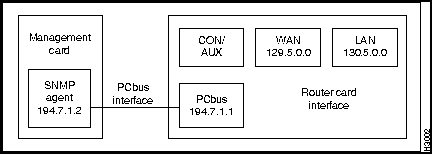
The PCbus ARP automatically assigns IP addressing to the SNMP agent. The three addresses set by ARP are as follows:
These addresses are determined by the IP address you assign for the router PCbus interface.
Figure 6-1 illustrates a sample IP address assignment for the Cisco 2518. Note that the IP address of the SNMP agent is one greater then the IP address of the PCbus interface, and that it is on its own unique network.
Figure 6-1 Sample IP Addressing for the Cisco 2518
To verify the SNMP agent address assigned by the PCbus ARP process, perform the following steps:

|
Copyright 1988-1995 © Cisco Systems Inc.