|
|

Replacing FC-to-SC FDDI Adapters in the Cisco 4000 Series
Part Number: FC-SC-ADAPTER=
This document contains instructions for making Cisco 4000 series single-mode FDDI network processor module network connections using FC-to-SC interface adapters. FC-to-SC FDDI adapters allow newer versions of the Cisco 4000 series FDDI module equipped with SC-connectors to replace older versions of the module equipped with FC-connectors without changing the connectors on the fiber-optic cables.
This document is for the FC-to-SC adapter installer, who should be familiar with electronic circuitry and wiring practices and have experience as an electronic or electromechanical technician.
This document is to be used in conjunction with the Cisco 4000 Series Public Network Certification document. If you have a Cisco 4000-M, Cisco 4500-M, or Cisco 4700-M router, also use this document with the Cisco 4000 Series Installation Guide document that shipped with your router. If you have a Cisco 4000, refer to the Cisco 4000 Hardware Installation and Maintenance publication. If you have a Cisco 4500 or Cisco 4700, refer to the Cisco 4000 Series Hardware Installation and Maintenance publication.
This document contains the following sections, including step-by-step procedures for replacing a FC-to-SC fiber connector adapter:
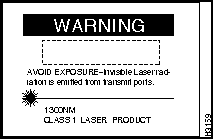
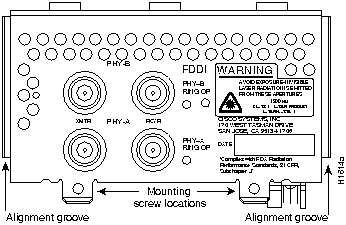
Warning Invisible laser radiation may be emitted from the aperture ports of the single-mode FDDI card when no cable is connected. Avoid exposure and do not stare into open apertures. Following is an example of the warning label that appears on the product:

Follow these guidelines to ensure general safety:
Follow these guidelines when working on equipment powered by electricity:
No additional tools or equipment are required to replace FC-to-SC connector adapters.
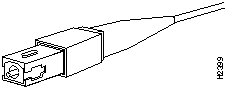
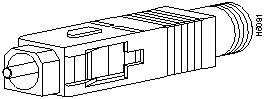
Older versions of the single-mode network processor module use simplex FC-type connectors (see Figure 1) for the transmit and receive ports. Newer versions of the single-mode network processor module use simplex SC-type connectors. (See Figure 2.) The connector accepts standard 8.7 to 10/125-micron single-mode fiber-optic cable. The single-mode interface supports connections at distances up to 6 miles (10 kilometers).
Figure 1 : Older, FC-type Single-Mode FDDI Network Interface Connector
Figure 2 : Newer, SC-type Single-Mode FDDI Network Interface Connector
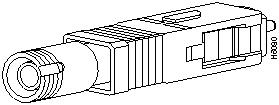
The FC-to-SC adapter allows the newer, SC-type connector single-mode FDDI module to be used with cables installed for the earlier, FC-type connector version of the FDDI module. (See Figure 3 and Figure 4.)
Figure 3 : Single-Mode FDDI Network Interface FC-to-SC Adapter, FC End
Figure 4 : Single-Mode FDDI Network Interface FC-to-SC Adapter, SC End
Making Single-Mode FDDI Network Connections Using the FC-to-SC Adapter
Take the following steps to connect a single-mode FDDI module using the FC-to-SC FDDI adapter:
This completes the FC-to-SC adapter single-mode FDDI network connections procedure. If you assistance, refer to the section "Cisco Connection Online."
Cisco Connection Online (CCO), formerly Cisco Information Online (CIO), is Cisco Systems' primary, real-time support channel. Maintenance customers and partners can self-register on CCO to obtain additional content and services.
Available 24 hours a day, 7 days a week, CCO provides a wealth of standard and value-added services to Cisco's customers and business partners. CCO services include product information, software updates, release notes, technical tips, the Bug Navigator, configuration notes, brochures, descriptions of service offerings, and download access to public and authorized files.
CCO serves a wide variety of users through two interfaces that are updated and enhanced simultaneously---a character-based version and a multimedia version that resides on the World Wide Web (WWW). The character-based CCO supports Zmodem, Kermit, Xmodem, FTP, Internet e-mail, and fax download options, and is excellent for quick access to information over lower bandwidths. The WWW version of CCO provides richly formatted documents with photographs, figures, graphics, and video, as well as hyperlinks to related information.
You can access CCO in the following ways:
For a copy of CCO's Frequently Asked Questions (FAQ), contact
Copyright 1988-1996 © Cisco Systems Inc.





http://www.cisco.com.
cco.cisco.com.
ccohelp@cisco.com.
For additional information, contact
ccoteam@cisco.com.
tac@cisco.com.
To obtain general information about Cisco Systems, Cisco products, or upgrades, contact 800 553-6387, 408 526-7208, or
csrep@cisco.com.