


|
|

Before installing the Catalyst 2600 Token Ring Switch, read this chapter carefully, it contains the information on:
This section will help you understand the physical configuration rules for the Catalyst 2600.
If you have a large network, we recommend that you create a sketch of the network to which you will add one or more Catalyst 2600 switches. Include major network elements such as hubs and concentrators, servers, bridges, and routers.
To plan for the installation of a Catalyst 2600, obtain all connectivity and physical planning information about the network segments to which you will attach. In addition, if you are planning to use permanently installed telecommunications wiring, you should have information about the cabling installation that will allow you to determine the termination points of every cable, the cable type, connector type (if any), and the distance between termination points. Building floorplans and telecommunications closet layouts are also useful.
Cables and Distances Between Devices
Devices attached to the RJ-45 jacks on the front of the Catalyst 2600 should conform to the cabling rules established in the EIA/TIA 568A and ISO/IEC 11801:1995. If you must exceed the distances prescribed in this section, refer to the appendix "Cable and Pin Information" for cable design specifications.
Dedicated-Media LAN Segment Rules
For installations where permanently installed building cable is available, 100-ohm or 120-ohm twisted-pair Category 3, 4, or 5 cabling up to 200 m (660 ft), including patch and equipment cabling, can be used.
IBM Cabling System 150-ohm, shielded twisted-pair (STP) cables (types 1 and 9) can also be used following the same 200m distance restrictions. Because the RJ-45 connectors on the Catalyst 2600 use pins 3, 4, 5, and 6, a cable with an IBM STP data connector on one end and an RJ-45 connector on the other must be constructed. For an illustration, see the appendix "Cable and Pin Information."
The same distance limitations apply to installations in which cabling is done with patch cables. Ensure that patch cables are composed of Category 3 or better components. IBM Cabling System 150-ohm, type 6 patch cables can also be used following the same rules as for permanently installed STP or STP-A cables.
Shared-Media LAN Segment Rules
The types of cables that can be used are the same as those described above for dedicated-media segments. The acceptable distances are defined by the hub or concentrator attached to the Catalyst 2600 port.
Straight-through cables should always be used for the Token Ring ports. For an illustration, see the appendix "Cable and Pin Information."
Interconnecting Catalyst 2600 Switches
The Catalyst 2600 is a switch and not a concentrator, so Catalyst 2600s can be connected together to form large networks. As in other configurations, the effective capacity between the Catalyst 2600 switches is 32 Mbps when the ports on both switches are set up for FDX operation.
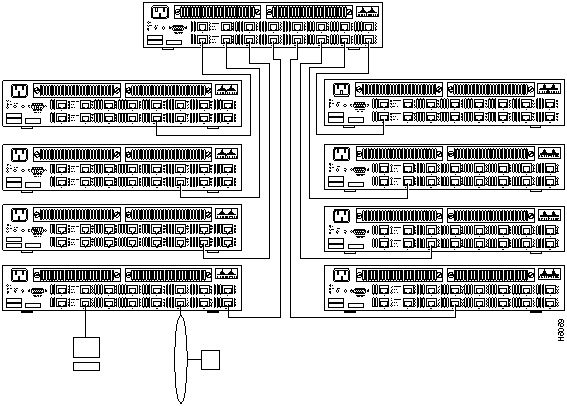
The topology of a cascaded network of Catalyst 2600 switches is important from a performance perspective. A star topology (as in Figure 2-1) offers maximum bandwidth, and is preferred for network problem determination because no single cable carries all of the traffic. A serial topology reduces capacity and could divide the network in the event of failure.
Creating parallel paths directly between two Catalyst 2600 switches results in unsatisfactory network operation unless the spanning tree algorithm or a TokenChannel is configured. Because the spanning tree algorithm was designed especially to prevent loops in networks that use transparent bridging, the algorithm will block a port of one of the Catalyst 2600 switches in the parallel paths. If the port in the primary path fails, the port that has been blocked will change automatically to the forwarding state, keeping the network working.
Figure 2-1 : Interconnected Catalyst 2600 Switches
Recording Your Installation Information
Prepare a set of planning worksheets for each Catalyst 2600 you plan to install.
Filling Out The Rack Inventory Chart
The Rack Inventory Chart helps you track all components installed in each rack in your establishment. This chart is particularly useful for larger installations.
The information on the Cabling Chart is used by the installer to place the Catalyst 2600 in its assigned location and connect the appropriate cables to it.
Filling Out the Locator Charts
The locator charts associate adapter addresses to the physical location and device identification numbers. These charts are useful for problem determination and should be kept current, especially in larger installations.
Copyright 1988-1996 © Cisco Systems Inc.
