|
|

Catalyst 5000 Series ATM LAN Emulation Module Installation and Configuration Note
Product Number: WS-X5153, WS-X5154, WS-X5155 for Single PHY; WS-X5156, WS-X5157, WS-X5158 for Dual PHY
This document contains instructions for installing and configuring the Catalyst 5000 series Asynchronous Transfer Mode (ATM) LAN Emulation module (Single and Dual PHY) for ATM software release 3.1. This document also provides onfiguration examples.
The ATM LAN Emulation module, Dual PHY, compensates for a failure of the primary physical module by providing a mechanism that automatically switches over to a secondary PHY interface.
For a complete description of commands used to configure and maintain the Catalyst 5000 series switch, refer to the Catalyst 5000 series Configuration Guide and Command Reference publication. For complete hardware configuration and maintenance procedures, refer to the Catalyst 5000 series Installation Guide publication. These documents are available on a CD-ROM called Cisco Connection Documentation, Enterprise Series, or in print.
Sections in this document include the following:


Catalyst 5000 Series Switch Overview
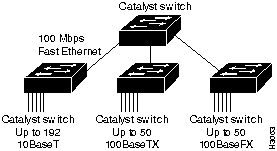
The Catalyst 5000 series switch provides high-density switched Ethernet and Fast Ethernet for both wiring closet and data center applications. The switch includes a single, integrated 1.2-Gbps switching backplane that supports switched 10-Mbps Ethernet with repeater connections, and 100-Mbps Fast Ethernet with backbone connections, Fiber Distributed Data Interface (FDDI), and Asynchronous Transfer Mode (ATM), Copper Distributed Data Interface (CDDI), and Asynchronous Transfer Mode (ATM). The Catalyst 5000 provides switched connections to individual workstations, servers, LAN segments, backbones, or other Catalyst 5000 switches using shielded twisted-pair (STP), unshielded twisted-pair (UTP), and fiber-optic cable. Figure 1 is an example of a configuration using the Catalyst 5000 series switch.
Figure 1 : Cascaded Switches Using Fast Ethernet Interfaces
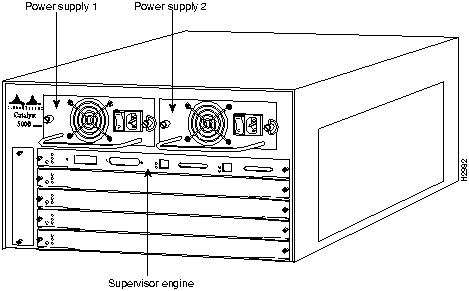
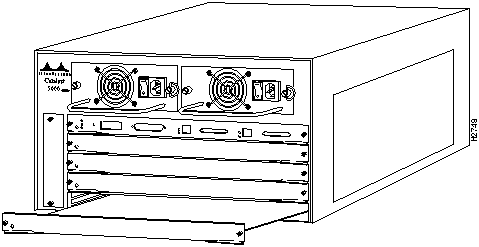
The Catalyst 5000 series switch chassis has five slots. Slot 1 is reserved for the Supervisor engine, which provides Layer 2 switching, local and remote management, and dual Fast Ethernet interfaces. The remaining four slots are used for any combination of modules for additional Ethernet, Fast Ethernet, CDDI/FDDI, and ATM connections. Figure 2 shows the rear view of the Catalyst 5000 series switch, which provides access to the Supervisor engine, all switching modules, power supplies, and fan assembly.
Figure 2 : Catalyst 5000 Series Switch Chassis Rear View
ATM LAN Emulation Module Overview
The following section contains an overview of the Catalyst 5000 series ATM LAN Emulation module for ATM software release 3.1.
ATM LAN Emulation Module Hardware
The ATM LAN Emulation Module offers the following hardware options:
ATM LAN Emulation Software for Release 3.1
Software release 3.1 for the Catalyst 5000 series LAN Emulation module contains the following features:
ATM LAN Emulation module, Dual PHY (Single Mode)
Figure 3 : ATM LAN Emulation Module, Dual PHY (Single Mode Fiber)

The ATM LAN Emulation module, Dual PHY (Single Mode Fiber) provides a direct connection between the ATM network and the switch using a single mode fiber-optic connector. The LEDs provide status information for the module and individual port connections. The physical layer interface module (PLIM) on the ATM LAN Emulation module determines the type of ATM connection. There are no restrictions on slot locations or sequence. An ATM LAN Emulation module can be installed in any available module slot.
ATM LAN Emulation Module, Dual PHY (Multimode)
Figure 4 : ATM LAN Emulation Module, Dual PHY (Multimode Fiber)

The ATM LAN Emulation module, Dual PHY (Multimode Fiber) provides a direct connection between the ATM network and the switch using a multimode fiber-optic connector. The LEDs provide status information for the module and individual port connections. The physical layer interface module (PLIM) on the ATM LAN Emulation module, Dual PHY, determines the type of ATM connection. There are no restrictions on slot locations or sequence. An ATM LAN Emulation module, Dual PHY, can be installed in any available module slot.
ATM LAN Emulation Module, Dual PHY (UTP)
Figure 5 : ATM LAN Emulation Module, Dual PHY (UTP)

The ATM LAN Emulation module, Dual PHY (UTP) provides a direct connection between the ATM network and the switch using one RJ-45 connector. The LEDs provide status information for the module and individual ATM port connection. The PLIM on the ATM LAN Emulation module, Dual PHY determines the type of ATM connection. There are no restrictions on slot locations or sequence. An ATM LAN Emulation module can be installed in any available module slot.
Following are the ATM LAN Emulation Module, Dual PHY specifications:
Table 1 : ATM LAN Emulation Module, Dual PHY Specifications
| Description | Specification |
|---|---|
| Dimensions (H x W x D) | 1.2 x 14.4 x 16 in (3 x 35.6 x 40.6 cm) |
| Weight | Minimum: 3 lb (1.36 kg)
Maximum: 5 lb (2.27 kg) |
| Environmental Conditions:
Operating temperature Nonoperating temperature Humidity |
32 to 104°F (0 to 40°C) -40 to 167°F (-40 to 75°C) 10 to 90%, noncondensing |
| Connectors | Multimode fiber-optic: SC
Single-mode fiber-optic: SC Category 5 UTP1: RJ-45 |
| RAM buffer memory | 1.192 MB per interface |
| Maximum station-to-station cabling distance | Multimode fiber: 1.2 miles (2 km)
Single-mode fiber: 6.25 miles (10 km) Category 5 UTP: 328' (100 m) |
| Frame-to-cell conversion | AAL5, 4096 virtual circuits, 256 concurrent reassembly |
| Network management | SNMP2 agent |
| Agency approvals:
Safety EMI3 |
UL4 1950, CSA5-C22.2 No. 950-93, and EN60950 FCC Part 15 Class A, EN55022 Class B, and VCCI Class 2 with single-mode and multimode fiber, and unshielded twisted pair |
The five available interface slots on the Catalyst 5000 series switch support the Supervisor engine, and any combination of network interface modules (slots 2 through 5), providing a maximum port density of up to three ATM LAN Emulation modules. Slot 1 is reserved for the Supervisor engine.
Each module contains a status LED. When on, this LED indicates that the module is powered up and operational. It does not necessarily mean that the interface ports are functional or enabled.
The LEDs on the faceplate of the ATM LAN Emulation Module, Dual PHY, are described in Table 2.
Table 2 : ATM LAN Emulation Module, Dual PHY LEDs
| LED | Description |
|---|---|
| Status | The switch performs a series of self-tests and diagnostic tests.
If all the tests pass, the status LED is green. If a test other than an individual port test fails, the status LED is red. During system boot or if the module is disabled, the LED is orange. During self-test diagnostics, the LED is orange. If the module is disabled, the LED is orange. |
| TX (Transmit) | Whenever a port is transmitting a packet, the transmit (TX) LED is green for approximately 50 ms otherwise, it is off. |
| RX (Receive) | Whenever a port is receiving a packet, the receive (RX) LED is green for approximately 50 ms1; otherwise, it is off. |
| Link | The link LEDs display the link integrity status of an ATM port. If the integrity is good, the link LED is green. |
| Active | The Active LEDs are present on the ATM LAN Emulation module, Dual PHY. When green, it indicates that the specified port is active. If the LED is off, the specified port is the standby port. |
When preparing your site for network connections to the switch, you need to consider some factors related to each type of interface:
Before installing the switch, have all additional external equipment and cables on hand. If you intend to build your own cables, refer to the cable pinouts in the appendix "Cabling Specifications" in the Catalyst 5000 Series Installation Guide. For ordering information, contact a customer service representative.
Approximating the ATM LAN Emulation Module Power Margin
The LED used for a multimode transmission light source creates multiple propagation paths of light, each with a different path length and time requirement to cross the optical fiber, causing signal dispersion (smear). Higher-order mode loss (HOL) results from light from the LED entering the fiber and being radiated into the fiber cladding. A worst-case estimate of the power margin (PM) for multimode transmissions assumes minimum transmitter power (PT), maximum link loss (LL), and minimum receiver sensitivity (PR). The worst-case analysis provides a margin of error, although not all the parts of an actual system will operate at the worst-case levels.
See Table 3 for maximum cable distances used with the ATM LAN Emulation module.
Table 3 : ATM Maximum Transmission Distances
| Transceiver Type | Maximum Distance between Stations |
|---|---|
| Multimode | 1.2 miles (2 km) |
| Single-mode | 6.25 miles (10 km) |
| Category 5 UTP | 328 feet (100 meters) |
The power budget (PB) is the maximum possible amount of power transmitted. The following equation lists the calculation of the power budget:
The power margin calculation is derived from the power budget and subtracts the link loss, as follows:
If the power margin is positive, as a rule, the link will work.
Table 4 lists the factors that contribute to link loss and the estimate of the link loss value attributable to those factors.
Table 4 : Estimating Link Loss
| Link Loss Factor | Estimate of Link Loss Value |
|---|---|
| Higher-order mode losses | 0.5 dB |
| Clock recovery module | 1 dB |
| Modal and chromatic dispersion | Dependent on fiber and wavelength used |
| Connector | 0.5 dB |
| Splice | 0.5 dB |
| Fiber attenuation | 1 dB/km |
The power budget minus the data link loss should be greater than zero. Results less than zero may have insufficient power to operate the receiver.
Multimode Power Budget Examples
Example 1: Sufficient Power for Transmission
The following example shows the calculation of multimode power budget based on the following variables:
Estimate the power budget as follows:
The value of 2.5 dB indicates that this link would have sufficient power for transmission.
The following example has the same parameters as the previous example but includes a multimode link distance of 4 km:
The value of 1.5 dB indicates that this link would have sufficient power for transmission. However, because of the dispersion limit on the link (4 km x 155.52 MHz > 500 MHz/km), this link would not work with multimode fiber. In this case, single-mode fiber would be the better choice.
Using Statistics to Estimate the Power Budget
Statistical models determine the power budget more accurately than the worst-case method. Determining the link loss with statistical methods requires accurate knowledge of variations in the data link components. Statistical power budget analysis is beyond the scope of this document. For further information, refer to User-Network Interface (UNI) Forum specifications, ITU-T standards, and your equipment specifications.
The following publications contain information on determining attenuation and power budget:
ATM LAN Emulation Module Connection Equipment
All ATM interfaces are full-duplex. You must use the appropriate ATM interface cable to connect the ATM single-mode, multimode, or UTP module with an external ATM network.
The ATM LAN Emulation module, Dual PHY, provides an interface to ATM switching fabrics for transmitting and receiving data at rates of up to 155 Mbps bidirectionally. The ATM LAN Emulation Module- Dual PHY can support PLIMs that connect to the following physical layers:
The ATM LAN Emulation Module- Dual PHY supports RFC 1213 interface MIBs as specified in the ATM MIB V.2 specification.
The ATM interface cable is used to connect the switch to an ATM network. Cables can be obtained from the following cable vendors:
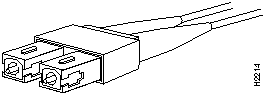
For traffic over single-mode or multimode fiber, use the SC type connector shown in Figure 6 to connect the ATM LAN Emulation Module- Dual PHY with the external switch.
Figure 6 : Fiber-Optic Network Interface Connector (SC Type)
For UTP, use the RJ-45 male connectors shown in Figure 7 to connect to the ATM LAN emulation network.
Figure 7 : ATM Dual-PHY UTP RJ-45 Interface Cable Connectors
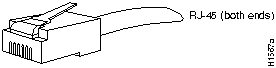
The following table lists the signals for the ATM LAN Emulation Module- Dual PHY RJ-45 UTP connector.
Table 5 : ATM LAN Emulation Module- Dual PHY (UTP) RJ-45 Port Pinouts
| Pin | Signal | Description |
|---|---|---|
| 1 | TxD+ | Transmit data + |
| 2 | TxD-- | Transmit data -- |
| 3 | NC | No connection |
| 4 | NC | No connection |
| 5 | NC | No connection |
| 6 | NC | No connection |
| 7 | RxD+ | Receive data + |
| 8 | RxD-- | Receive data -- |
Following Safety Recommendations
The following guidelines will help to ensure your safety and protect the equipment. This list is not inclusive of all potentially hazardous situations that you may be exposed to as you install the switch, so be alert.

The Supervisor engine, switching modules, and redundant power supplies are designed to be removed and replaced while the system is operating without presenting an electrical hazard or damage to the system. However, removing a supervisor engine module while the system is operating will cause the system to halt. Before removing a redundant power supply, ensure that the primary supply is powered on. However, you must shut down the system before removing or replacing any of the replaceable components inside the front panel; for example, the backplane. Never install equipment that appears damaged.
Follow these basic guidelines when working with any electrical equipment:
In addition, use the following guidelines when working with any equipment that is disconnected from a power source but still connected to telephone wiring or other network cabling
Use caution when installing or modifying telephone lines.
Preventing Electrostatic Discharge Damage
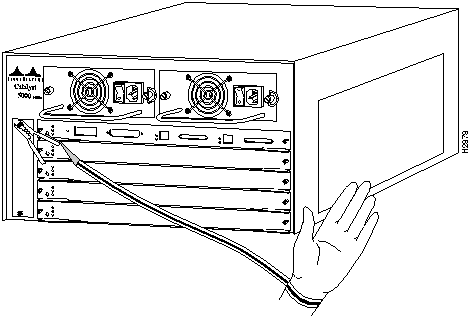
Electrostatic Discharge (ESD) damage occurs when electronic or components are improperly handled, resulting in complete or intermittent failures. The Supervisor engine and switching modules each consist of a printed circuit board (PCB) fixed in a metal carrier. Electromagnetic interference (EMI) shielding, connectors, and a handle are integral components of the carrier. Although the metal carrier helps to protect modules from ESD, use a preventive antistatic strap whenever you handle the Supervisor engine or switching modules. Handle the carriers by the handles and the carrier edges only, never touch the modules or connector pins.
Following are guidelines for preventing ESD damage:
Figure 8 : Placement of ESD Wrist Strap Installing and Configuring Modules
All switching modules support hot swapping, letting you install, remove, replace, and rearrange them without turning off the system power. When the system detects that a switching module has been installed or removed, it automatically runs diagnostic and discovery routines, acknowledges the presence or absence of the module, and resumes system operation without any operator intervention.
The hot-swap feature allows you to remove and replace modules while the system is operating; you do not need to notify the software or shut down the system power.
The hot-swap feature lets you remove and replace switching modules while the system is operating. You do not need to notify the software or shut down the system power. All switching modules support hot swapping.
The switching module contains a bus-type connector that connects to the backplane. Each connector consists of a set of tiered pins in two lengths. The pins send specific signals to the system as they make contact with the backplane. The system assesses the signals it receives and the order in which it receives them to determine what event is occurring and what task it needs to perform, such as reinitializing new interfaces or shutting down removed ones.
For example, when inserting the switching module, the longest pins make contact with the backplane first, and the shortest pins make contact last. The system recognizes the signals and the sequence in which it receives them. The system expects to receive signals from individual pins in this logical sequence.
When you remove or insert a switching module, the backplane pins send signals to notify the system, and performs as follows:
When you insert a new switching module, the system runs a diagnostic test on the new interfaces and compares them to the existing configuration. If this initial diagnostic fails, the system remains off line for another 15 seconds while it performs a second set of diagnostic tests to determine whether or not the switching module is faulty and if normal system operation is possible.
If the second diagnostic test passes, indicating that the system is operating normally and a new switching module is faulty, the system resumes normal operation but leaves the new interfaces disabled.
If the second diagnostic test fails, the system crashes, which usually indicates that the new Supervisor engine or a switching module created a problem in the bus and should be removed.
Avoiding Problems When Inserting and Removing Switching Modules
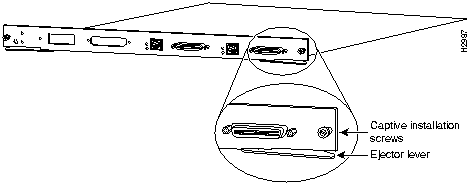
The function of the ejector levers (see Figure 9) on the switching module is to align and seat the board connectors in the backplane. Failure to use the ejector levers and insert the switching module properly can disrupt the order in which the pins make contact with the backplane. Follow the installation and removal instructions carefully, and review the following examples of incorrect insertion practices and results:
It is also important to use the ejector levers when removing a switching module, ensuring that its connector pins disconnect from the backplane in the logical sequence expected by the system. A switching module partially connected to the backplane can hang the bus. Detailed steps for correctly performing a hot swap are included in the following procedures for installing and removing a switching module.
Figure 9 : Ejector Levers and Captive Installation Screws (Supervisor Engine Module Shown) You need a flat-blade screwdriver to remove any filler (blank) switching modules and to tighten the captive installation screws that secure the modules in their slots. Whenever you handle switching modules, use a wrist strap or other grounding device to prevent ESD damage.
Take the following steps to remove a switching module:
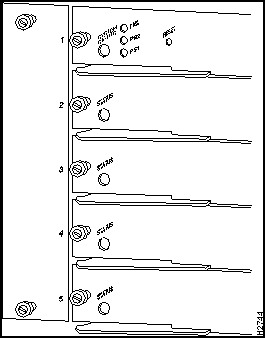
You can install switching modules in any of the four switching module slots, numbered 2 through 5 from top to bottom, when viewing the chassis from the rear. (See Figure 10.) The top slot contains the Supervisor engine---a required system component. Switching module fillers, blank switching module carriers, are installed in slots without switching modules to maintain consistent airflow through the switching module compartment.
Figure 10 : Module Slot Numbers Follow these steps to installing a module.
Figure 11 : Module Installation Accessing the ATM LAN Emulation Module
You can open a session with the ATM module in the Catalyst 5000 series switch by entering the session mod_num command from the Supervisor console> prompt. After opening the session, you see the ATM> prompt. You then have direct access only to the ATM module with which you have established a session.
The ATM module uses a subset of the Cisco Internetwork Operating System (IOS) software. Generally, the IOS software works the same on the ATM module as it does on routers. Refer to the Catalyst 5000 Series Advanced Configuration Guide for information about using the ATM module command line.
Configuring the ATM LAN Emulation Module
To enter configuration mode, enter the EXEC command configure at the privileged-level EXEC prompt. The ATM module responds with the following prompt asking you to specify the terminal, nonvolatile memory (NVRAM), or a file stored on a network server as the source of configuration commands:
Terminal configuration means changing the runtime configuration. You can save the runtime configuration into the NVRAM. When you configure from memory, the runtime configuration is updated from the NVRAM. When you configure from the network, the runtime configuration is updated from a file in a server on the network.
The ATM module accepts one configuration command per line. You can enter as many configuration commands as you want.
You can add comments to a configuration file describing the commands you have entered. Precede a comment with an exclamation point (!). Comments are not stored in NVRAM or in the active copy of the configuration file. In other words, comments do not appear when you list the active configuration with the write terminal EXEC command or list the configuration in NVRAM with the show configuration EXEC command. Comments are stripped out of the configuration file when it is loaded to the ATM module.
To configure the ATM module from the terminal, complete the following steps:
In the following example, the ATM module is configured from the terminal. The interface atm 0 command is issued to designate that atm interface 0 is to be configured. Then, the lane client ethernet vlan# elan-name command is issued to link VLAN 1 to the manufacturing (man) ELAN. By pressing Ctrl-Z, the user quits configuration mode. The write memory command loads the configuration changes into nonvolatile memory (NVRAM) on the ATM module.
Nonvolatile memory stores the current configuration information in text format as configuration commands, recording only nondefault settings. The memory is checksummed to guard against corrupted data.
As part of its startup sequence, the ATM module startup software always checks for configuration information in NVRAM. If NVRAM holds valid configuration commands, the ATM module executes the commands automatically at startup. If the ATM module detects a problem with the nonvolatile memory or the configuration it contains, the card goes into default configuration. Problems can include a bad checksum for the information in NVRAM or the absence of critical configuration information.
Configuring from Nonvolatile Memory
You can configure the ATM module from NVRAM by re-executing the configuration commands stored in NVRAM. To do so, complete the following step in EXEC mode:
The implementation of LAN Emulation (LANE) makes an ATM interface look like one or more Ethernet interfaces.
LANE is an ATM service defined by the ATM Forum specification "LAN Emulation over ATM," ATM_FORUM 94-0035. This service emulates the following LAN-specific characteristics:
LANE service provides connectivity between ATM-attached devices and LAN-attached devices. This includes connectivity between ATM-attached stations and LAN-attached stations, as well as connectivity between LAN-attached stations across an ATM network.
Because LANE connectivity is defined at the MAC layer, upper-protocol layer functions of LAN applications can continue unchanged when the devices join Emulated LANs (ELANs). This feature protects corporate investments in legacy LAN applications.
An ATM network can support multiple independent ELANs. Membership of an end system in any of the ELANs is independent of the physical location of the end system. This characteristic simplifies hardware moves and changes. In addition, the end systems can move easily from one ELAN to another, independent from whether the hardware moves.
In this release, Cisco supports only emulated Ethernet LANs. This release does not support emulation of Token Ring networks.
This release of LANE is supported on Catalyst 5000 series switches containing ATM modules and on Cisco routers with ATM interfaces installed; it requires a switch that supports User-Network Interface (UNI) 3.0 or 3.1 and point-to-multipoint signaling---for example, the Cisco LightStream family of switches.
An unlimited number of ELANs can be set up in an ATM cloud. A Catalyst 5000 ATM module can participate in multiple ELANs.
LANE is defined on a client-server LAN model as follows:
Before You Begin Configuring LANE
Before implementing LANE, be aware that:
LANE Configuration Prerequisites
Before configuring LANE, perform the following tasks:
This section contains the following procedures for configuring LANE:
You can display the ATM addresses that are used by default for the LECS, LES, BUS, and LEC on the card. Use this information to configure LECS addresses in the ATM switch and configure the LECS database.
Procedure for Dual PHYs Connected to the Same Switch
To display default ATM addresses, enter the following command:
You see the following screen:
where ** is the subinterface number byte in hex. Take note of the addresses returned for later use.
Procedure for Dual PHYs Connected to Different Switches
If the two PHYs of the ATM Dual PHY card are connected to different switches, you must determine the addresses that will be used if the first PHY goes down. Take note of the address for later use. Use the following procedure:
Diagnostics
Ensure that the card is connected to the switch, that the interface is up, and that ILMI PVC is enabled.
The following screen indicates that the card could not get the ATM prefix through ILMI from the switch.
Configuring the LECS ATM Address on an LS1010
You must program all LECS addresses into each ATM switch that is connected to a participant in your LANE network. Programming the addresses allows the LESs and LECs to determine the LECs addresses dynamically through ILMI.
To configure a server ATM address on an LS1010, perform the following steps on each LS1010:
To set up the LES/BUS for an ELAN, perform the following steps beginning in interface configuration mode:
If the ELAN in step 2 is intended to have restricted membership, you may not want to specify the name here. You need to specify the name in the LECS database when it is set up. However, if you link the LEC to an ELAN in this step and, through some mistake, it does not match the database entry linking the LEC to an ELAN, this LEC will not be allowed to join this ELAN or any other. You might consider this as either a helpful check that the configuration is correct, or as a problem to overcome.
If you do decide to include the name of the ELAN linked to the LEC and later want to associate that LEC with a different ELAN, make the change in the LECS database before you make the change for the LEC on this subinterface.
Complete the steps in this section to set up the LECS database. If you have more than one LECS, all databases must be identical. If you have more than one server in an ELAN, the servers take precedence in the order they are entered. If a Dual PHY card acts as a server, you need to enter both of the predetermined addresses.
Procedure for Setting Up the Database for the Default ELAN
When you configure a Catalyst 5000 switch as the LECS for one default ELAN, you provide a name for the database, the ATM address of the LES for the ELAN, and a default name for the ELAN. In addition, you indicate that the LECS ATM address is to be computed automatically.
When you set up a database of only a default, unrestricted ELAN, you need not specify where the LANE LECs are located. That is, when you set up the LECS database for a single default ELAN, you need not provide any database entries that link the ATM addresses of any LECs with the ELAN name.
To set up the LECS for the default ELAN, complete the following steps:
In Step 2, enter the ATM address of the LES for the specified ELAN as noted in your worksheet.
If you are setting up only a default ELAN, the elan-name value in Step 2 is the same as the default ELAN name you provide in Step 3.
Procedure for Setting Up the Database for Unrestricted Membership ELANs
When you set up a database for unrestricted ELANs, you create database entries that link the name of each ELAN to the ATM address of its LES.
However, you may choose not to specify where the LECs are located. That is, when you set up the LECS database, you do not have to provide any database entries that link the ATM addresses or MAC addresses of any LECs with the ELAN name.
To configure a router as the LECS for multiple ELANs with unrestricted membership, complete the following steps beginning in global configuration mode:
In Steps 2 and 3, enter the ATM address of the LES for the specified ELAN, as noted in your worksheet.
Procedure for Setting Up the Database for Restricted Membership ELANs
When you set up the database for restricted-membership ELANs, you create database entries that link the name of each ELAN to the ATM address of its LES.
However, you also must specify where the LECs are located. That is, for each restricted-membership ELAN, you provide a database entry that explicitly links the ATM address or MAC address of each LEC of that ELAN with the name of that ELAN.
Those LEC database entries specify the LECs that are allowed to join the ELAN. When an LEC requests that the LECS indicate which ELAN it is to join, the LECS consults its database and then responds as configured.
When LECs for the same restricted-membership ELAN are located in multiple Catalyst 5000 ATM modules, each LEC ATM address or MAC address must be linked explicitly with the name of the ELAN. As a result, you must configure as many LEC entries (Step 5 in the following procedure) as you have LECs for ELANs in all the ATM modules of Catalyst 5000 switches. Of course, each LEC will have a different ATM address in the database entries.
To set up the LECS for ELANs with restricted membership, perform the following steps, beginning in global configuration mode:
To start and bind the LECS, perform the following steps:
On any given Catalyst 5000 series switch, you can set up one LEC for one ELAN or multiple LECs for multiple ELANs. You can set up a client for a given ELAN on any Catalyst 5000 you choose to participate in that ELAN. After you set up the interface for the VLAN, you must link the VLAN number with the ELAN name.
To set up only a client for an ELAN, perform the following steps beginning in interface configuration mode:
Once you have set up the clients as needed on the subinterfaces of an ATM module, you can display their ATM addresses by completing the following step in EXEC mode:
The output of this command shows all subinterfaces configured for LANE. For each subinterface, the command displays and clearly labels the ATM addresses that respectively belong to the server, the broadcast-and-unknown server, and the client.
When you look at each ATM address, you will notice the following:
Repeat this step on each Catalyst 5000 series switch before you proceed to set up the clients on the next Catalyst 5000.
Print the display or make a note on your LANE worksheet of these ATM addresses so you can use it when you set up the configuration server's database.
At this point in the configuration process, the clients are normally not operational.
Configuring Specialized Features
This section describes the configuring of specialized features, such as LES/BUS/LECS redundancy.
Configuring LES/BUS/LECS Redundancy
LES/BUS/LECS redundancy allows you to configure redundant LAN Emulation Servers (LESs) and Broadcast Unknown Servers (BUSs) so that the LAN Emulation Clients (LECs) in an ELAN can automatically switch to a backup LES in case of a failure of the primary LES. The priority of the LES/BUS pairs is established by the order in which they are entered in the LECS database.
The LANE protocol does not specify where any of the ELAN server entities should be located, but for the purpose of reliability and performance, Cisco implements these server components on its routers and LAN switches.
With Phase I LANE, only one LAN Emulation Configuration Server (LECS), capable of serving multiple ELANs, and only one LAN Emulation Server (LES) per ELAN could exist for an ATM cloud. The Phase I LANE protocol did not allow for multiple LAN Emulation Servers within an ELAN. Therefore, these components represented both single points of failure and potential bottlenecks for LANE service.
LANE LES/BUS/LECS redundancy corrects these limitations by allowing backup LECS and LES servers for an ELAN. LANE LES/BUS/LECS redundancy is always enabled. An administrator uses this redundancy feature by configuring multiple servers.
LES/BUS/LECS redundancy works only with Cisco LECS and LES combinations. Third party LANE components continue to interoperate with the LECS and LES function of Cisco routers but cannot take advantage of the redundancy features.
The following three servers are single points of failure in the ATM LAN Emulation System:
LES/BUS/LEC redundancy eliminates these single points of failure.
Procedure
To enable redundant LECSs, enter the multiple LECS addresses to the end ATM switches, which are used as central locations for the list of LECS addresses. After entering the LECS addresses, LANE components connected to the switches can obtain the global list of LECS addresses.
To configure LES/BUS/LECS redundancy, you must enable multiple/redundant/standby LECSs and multiple/redundant/standby LES/BUSs. Cisco LANE operates seamlessly with other vendors' LANE components, although LES/BUS/LECS redundancy is not effective in this situation. To enable LES/BUS/LEC redundancy, complete the following steps.
Enabling ILMI Keepalive Timeout
If enabled, ILMI sends keep-alive messages on an ongoing basis on the active PHY to the switch, and the switch responds. If the response is not obtained for the last four polls, then ILMI times out. The DUALPHY has a feature by which it can switch from active PHY to backup PHY if the ILMI timer times out. This feature is useful only if the two PHY's are connected to two different switches. (Refer to Scenario 3).
By Default this feature is disabled. To enable it, session to the ATM module using the session command, and type the following commands:
The above commands enable the transmission of ILMI keep-alive and set the time between two ILMI keepalive messages to four seconds.
Monitoring and Maintaining LANE Components
After configuring LANE components on an interface or any of its subinterfaces, on a specified subinterface, or on an ELAN, you can display their status. To show LANE information, perform the following steps in EXEC mode:
The examples in this section show the steps in setting up an ATM LANE configuration in a Catalyst 5000 series ATM module.
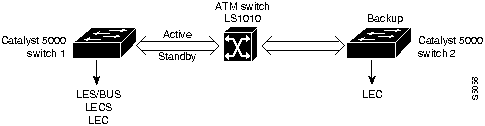
Figure 12 : LES/BUS/LECS Configuration Figure 12 shows a configuration composed of two Catalyst 5000 series Ethernet switches, Catalyst 5000 Ethernet Switch 1 and Catalyst 5000 Ethernet Switch 2, and an ATM switch.
Example Configuration Assumptions
For this example, the following assumptions apply:
Example Configuration Procedure
Suppose you want to set up LANE on the configuration in Figure 12. Perform the following steps:
Set up the prefix of the ATM address.
Configure the LECS ATM address on the LS1010 switch.
Set up the LES/BUS.
The above set of commands starts a LES/BUS pair. The ELAN name is "default," and the interface on which this LES/BUS pair is configured is "atm0"
Set up the LECS database.
Start and bind the LECS.
Start the LEC.
Configure the address of the LES/BUS pair on Switch 1.
Start the LECon Switch 2.
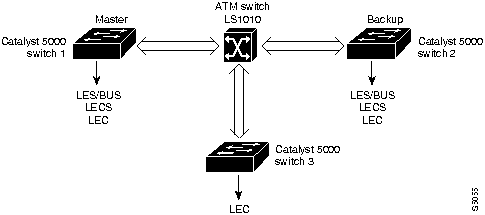
Figure 13 : LES/BUS/LECS Redundancy Figure 13 shows three Catalyst 5000 series switches, Catalyst 5000 Switch 1, Switch 2, and Switch 3, and an ATM switch, which is an LS1010. LES/BUS/LECS redundancy is configured. Switch 1 and Switch 2 both have one LES/BUS/LECS running for every ELAN. Switch 1 is the master server, and Switch 2 is the backup server. If Switch 1 fails, then Switch 2 provides the LES/BUS/LECS components of the ELAN. Once Switch 1 recovers, it becomes the master server again.
Example Configuration Assumptions
For this example, the following assumptions apply:
Example Configuration Procedure
To set up the configuration in Figure 13, perform the following steps:
Set up the prefix of the ATM address.
The subinterface number byte is displayed in hex.
Start and bind the LECS.
Start the LES/BUSs.
Set the address of the LECS in the STM (LS1010) switch.
Start the LECs.
Configure VLAN 2.
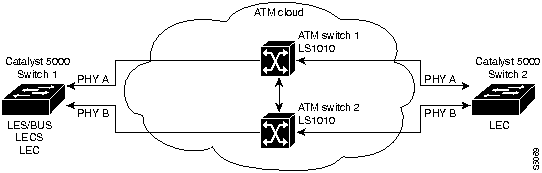
Figure 14 : LES/BUS/LECS Renundancy with Dual PHYs Figure 14 shows two ATM switches in an ATM cloud. ATM Switch 1 is connected to two Catalyst 5000 series switches (Switch 1 and Switch 2), which have ATM Dual-PHY modules. ATM Switch 2 is also connected to Switch 1 and Switch 2. If the PHY A on Switch 1 is lost, data continues to flow to Switch 2 on PHY B, showing Dual-PHY redundancy.
Example Configuration Assumptions
For this example, the following assumptions apply:
Example Configuration Procedure
To set up LANE on the configuration in Figure 14, perform the following steps:
Set up the prefix of the ATM address.
Return to PHY A.
Set the address of default LECS in the ATM switches.
Start up a LES/BUS on Catalyst 5000 series Switch 1.
Configure the LECS database on Catalyst 5000 series Switch 1.
Start and bind the LECS on the Catalyst 5000 series Switch 1.
Start the LEC on the Catalyst 5000 series Switch 1 and Switch 2.
Configure VLAN 2.
The following section includes typical LANE scenarios and conceptual information about how LANE works.
In typical LANE cases, one or more Catalyst 5000 series switches or Cisco routers with ATM interfaces are attached to a Cisco LightStream ATM switch. For distributing multiple ELANs within a network, you can use Catalyst 5000 switches with ATM interfaces to configure the LANE LECS, LES, and LANE BUS.
The physical layout and the physical components of an emulated network might not differ for the single and the multiple ELAN cases. The differences are in the software configuration for the number of ELANs and the assignment of LANE components to the different physical components.
LANE configurations that use routers typically have one or more Catalyst 5000 series switches or Cisco routers with ATM interfaces attached to a Cisco LightStream ATM switch. The Cisco LightStream ATM switch provides connectivity to the broader ATM network switch cloud. The routers are configured to support one or more ELANs. One of the routers is configured to perform the LECS functions. A router is configured to perform the LES function and the BUS function for each ELAN. (One router can perform the LES and the BUS functions for several ELANs.) Routers and Catalyst 5000 series switches can act as an LEC for one or more ELANs.
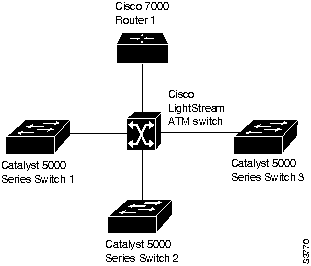
This section presents two scenarios using a router, Catalyst 5000 series switches, and a Cisco LightStream ATM switch. Figure 15 illustrates this typical layout of one Cisco LightStream ATM switch, with a Cisco router and three Catalyst 5000 series switches; it illustrates both the single and the multiple ELAN cases.
Figure 15 : Typical ELAN Layout Single ELAN Scenario with Catalyst 5000 Switches and Routers
In a single ELAN scenario, the LANE components might be assigned as follows:
Multiple ELAN Scenario with Catalyst 5000 Switches and Routers
In a multiple LAN scenario, one ATM switch, one router, and three Catalyst 5000 series switches are used, but multiple ELANs are configured. In the following scenario, three ELANs are configured on a router and three Catalyst 5000 series switches.
The LANE components are assigned as follows:
Defining LANE Operation and Communication
Communication among LANE components is ordinarily handled by several types of switched virtual circuits (SVCs). Some SVCs are unidirectional; others are bidirectional. Some are point-to-point and others are point-to-multipoint. Figure 16 illustrates the various types of SVCs.
The following section describes LANE Operation and Communication processes, starting with an LEC requesting to join an ELAN after the component Catalyst 5000 series switches have been installed.
On the Catalyst 5000 series switch, a VLAN is a logical group of end stations, independent of physical location, with a common set of requirements. Currently, the Catalyst 5000 series switch supports a port-centric VLAN configuration. All end stations connected to ports belong to the same VLAN and are assigned to the same VLAN number. The VLAN number is only significant to the Catalyst 5000 series switch.
On an ATM network, an emulated LAN is called an ELAN and is designated by a name. You can configure some ELANs from a router and some from a Catalyst 5000 switch. You can configure some ELANs with unrestricted membership and some ELANs with restricted membership. You can also configure a default ELAN, which must have unrestricted membership.
To create a VLAN that spans multiple Catalyst 5000 series switches on an ATM network, you must assign the VLAN on each Catalyst 5000 series switch to the same ELAN. Use the lane client ethernet vlan# elan-name command to link the VLAN number with the ELAN name. You must use a router to allow communication between two or more ELANs, whether they are on the same or on different Catalyst 5000 series switches.
The following process (illustrated in Figure 16) normally occurs after an LEC has been enabled on the ATM module in a Catalyst 5000 series switch:
As communication occurs on the ELAN, each LEC dynamically builds a local LANE ARP (LE ARP) table. An LEC LE ARP table can also have static, preconfigured entries. The LE ARP table maps MAC addresses to ATM addresses.
When an LEC first joins an ELAN, its LE ARP table has no dynamic entries, and the LEC has no information about destinations on or behind its ELAN. To learn about a destination when a packet is to be sent, the LEC begins the following process to find the ATM address corresponding to the known MAC address:
For unknown destinations, the LEC sends a packet to the BUS, which forwards the packet to all LECs. The BUS floods the packet because the destination might be behind a bridge that has not yet learned this particular address.
When an LEC sends broadcast, multicast, or unicast traffic with an unknown address, the following process occurs:
On a LAN, packets are addressed by the MAC-layer addresses of the destination and source stations. To provide similar functionality for LANE, MAC-layer addressing must be supported. Every LEC must have a MAC address. In addition, every LANE component (LECS, LES, BUS, and LEC) must have a unique ATM address.
In this release, all LECs on the same interface have the same, automatically assigned MAC address. That MAC address is also used as the end-system identifier (ESI) part of the ATM address, as explained in the following section. Although LEC MAC addresses are not unique, all ATM addresses are unique.
Defining LANE ATM Addressing Structure
A LANE ATM address has the same syntax as an NSAP, but it is not a network-level address. It consists of the following:
Automatically Assigning ATM Addresses
Cisco provides the following standard method of constructing and assigning ATM and MAC addresses for use in an LECS database. A pool of MAC addresses is assigned to each ATM module. The pool contains 16 MAC addresses. For constructing ATM addresses, the following assignments are made to the LANE components:
Because the LANE components are defined on different subinterfaces of an ATM interface, the value of the selector field in an ATM address is different for each component. The result is a unique ATM address for each LANE component, even within the same Catalyst 5000 series switch. For more information about assigning components to subinterfaces, see the "Assigning Components to Interfaces and Subinterfaces" section later in this chapter.
For example, if the MAC addresses assigned to an interface are 0800.200C.1000 through 0800.200C.100F, the ESI part of the ATM addresses are assigned to LANE components as follows:
ATM address templates can be used in many LANE commands that assign ATM addresses to LANE components (thus overriding automatically assigned ATM addresses), or that link LEC ATM addresses to ELANs. The use of templates can greatly simplify the use of these commands. The syntax of address templates, the use of address templates, and the use of wildcard characters within an address template for LANE are very similar to those of address templates for ISO CLNS.
LANE ATM address templates can use two types of wildcards: an asterisk (*) to match any single character, and an ellipsis (...) to match any number of leading or trailing characters.
In LANE, a prefix template explicitly matches the prefix but uses wildcards for the ESI and selector fields. An ESI template explicitly matches the ESI field but uses wildcards for the prefix and selector. Table 6 indicates how the values of unspecified bytes are determined when an ATM address template is used.
Table 6 : ATM Address Template Values
Assigning Components to Interfaces and Subinterfaces
The following rules apply to assigning LANE components on the major ATM interface and its subinterfaces:
The Catalyst 5000 ATM module uses ILMI registration to build its ATM address and to register this address with the ATM switch. To build its ATM address, the Catalyst 5000 obtains its ATM address prefix from the ATM switch. Then it combines the ATM address prefix with its own MAC address and the LEC subinterface number. Once the Catalyst ATM module has determined its ATM address, it uses ILMI registration to register this address with the ATM switch.
Using the atm vc-per-vp command, you can configure the maximum number of VCIs per VPI. If this value is configured, when the Catalyst 5000 ATM module registers with the ATM switch, the maximum number of VCIs per VPI is also passed to the ATM switch. In this way, the ATM switch will not assign a VCI value for an SVC to the Catalyst 5000 that is out of the ATM switch's range. The default is 10 VCI bits, and 2 VPI bits on the Catalyst 5000 ATM module. Any change from the default requires an ATM module reset.
Using UNI 3.1 Signaling Support
The ATM LAN Emulation module, Dual PHY, supports backward compatibility with ATM switches for User- Network Interface version 3.1. The version, 3.0 or 3.1, is negotiated on startup by Interim Local Management Interface (ILMI) upon startup and requires no configuration. When Interim Local Management Interface link auto-determination is enabled on the interface and is successful, the router accepts the UNI-version returned by ILMI. If the ILMI link auto-determination is unsuccessful or ILMI is disabled, UNI-version defaults to 3.0. You can override the version number using the atm uni-version command. When you use the no value of the command and if ILMI is enabled, the UNI-version is set to the version returned by ILMI and the link auto-determination is successful. Otherwise, the version reverts to 3.0. Use the following command to override the UNI-version:
[no] atm uni-version [3.0 | 3.1]
When VLANs are added to a Catalyst 5000 series switch in a management domain, VLAN Trunk Protocol (VTP) automatically distributes information to other trunks of all of the devices in the domain. The VTP is transmitted on all trunk connections, including Interswitch Link (ISL) and 802.10, and LANE. VTP is disabled by default on your Catalyst 5000 series ATM switch and must be explicitly enabled. VTP functionality works only with the Network Management Processor (NMP) software version 2.1 or later and ATM software version 3.1 or later.
VTP running on the Catalyst 5000 series Supervisor module allows you to set up VLAN-to-LEC/ELAN mapping and establish LECs on the ATM module. This section describes the procedure for creating an LEC on each ATM module of a Catalyst 5000 series switch.
Procedure for Setting Up an LEC with VTP
You can create an LEC on each ATM module of every Catalyst 5000 series module in a specificified VTP domain. The following procedure sets up an LEC for VLAN 1:
The value <vlan_num> represents the vlan number to configure, and the elan-name is the name of the ELAN.
You can use VTP to set up an LEC in transparent mode or nontransparent mode. When VTP is enabled and your switch is in transparent mode, entering the set vlan <vlan#> [name <elan name>] command creates LECs on all ATM modules of only the switch on which you enter the command.
In nontransparent mode, the set vlan <vlan#> [name <elan -name>] command entered from the Supervisor module of any Catalyst 5000 series switch automatically creates an LEC for that VLAN/ELAN-name pair on all ATM modules on Catalyst 5000 series switches in that VTP domain.
To find your current mode and domain, use the show vtp domain command.
This section describes the prerequisites and procedures for setting up VTP.
When you set up an LEC using VTP, the following prerequisites apply:
To enable VTP for VLAN 1, enter the following commands:
To disable VTP, enter the following command:
no vtp enable
Configuring PVC-supported VLANs on a Catalyst 5000 Series ATM Module
To use permanent Virtual Circuits (PVCs), you must configure PVCs into both the Catalyst 5000 series ATM module and the ATM switch cloud. PVCs remain active until the circuit is removed from either configuration.
PVC-based ATM link functionality allows Catalyst 5000 series switches connectivity to each other through ATM interfaces over PVCs. One or more PVCs can be configured for each VLAN on every Catalyst 5000 series ATM module. Connectivity can be back-to-back or through an ATM switch cloud. RFC 1483-compliant bridged LLC/SNAP packet encapsulation is used.
When you create a PVC, you create a virtual circuit descriptor (VCD) and attach it to the Virtual Path Identifier (VPI) and Virtual Channel Identifier(VCI). A VCD is a mechanism that identifies which VPI-VCI pair to use for a particular packet. The Catalyst 5000 ATM module requires this feature to manage the packets for transmission. The number chosen for the VCD is independent of the VPI-VCI pair used.
This functionality is compatible with Switched Virtual Connection (SVC)-based LANE with the following restrictions:
Setting Up a PVC within the ATM Cloud
To configure a PVC within the ATM cloud, refer to the appropriate manual from your switch vendor.
The ATM module supports a VLAN using either LANE or Permanent Virtual Circuits (PVCs).This section describes the procedure and gives an example for setting up a VLAN to run over PVCs on the Catalyst 5000 series ATM module.
Procedure for Setting Up VLANs over PVCs
Use the following procedure to set up a VLAN to run over PVCs on the Catalyst 5000 series ATM module.
If you have enabled VTP in the ATM module, the Catalyst 5000 series ATM module creates LECs for each VLAN configured on the Supervisor module. The ATM module software also automatically deletes a previously existing LEC for a particular VLAN when that LEC subsequently is configured to run over a PVC.
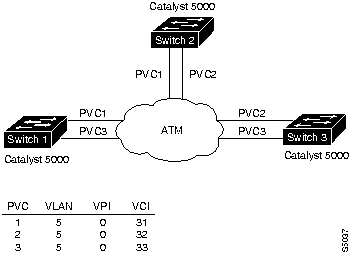
Figure 17 is an example of setting up a VLAN to run over a PVC on the Catalyst 5000 series ATM module.
The following assumptions apply to this example:
Table 7 : PVC Connections in Figure 17
Before configuring the VLAN over PVCs, you must have performed the following tasks:
You must configure one PVC connection between each pair of Catalyst 5000 ATM switches for each VLAN on a particular Catalyst 5000 ATM module. Follow these steps at Switch 1 to configure a VLAN to run over a PVC:
Removing Previously Assigned PVCs from a VLAN
You can remove and unbind a previously assigned PVC from a VLAN. You can also unbind a previously assigned PVC from a VLAN without removing the PVC itself. If you do not remove the PVC itself, you can bind the PVC to a different VLAN.
Procedures for Removing Previously Assigned PVCs
To remove a previously assigned PVC from a VLAN, perform the following tasks:
To unbind a previously assigned PVC from a VLAN without removing the PVC itself, perform the following tasks:
This section contains procedures for configuring output throttling. You can configure output throttling on your Catalyst 5000 series ATM module. Output throttling applies to both LANE and to PVCs. Per-VC pacing is not supported.
Procedures for Output Throttling
To throttle the output of the entire interface, perform the following tasks:
To put the output rate to the default of 155 MBps, perform the following tasks:
Copyright 1988-1996 © Cisco Systems Inc.






Configuring from terminal, memory, or network [terminal]?
Task
Command
configure terminal
Refer to the Catalyst 5000 Series Command Reference for information about specific commands.
Ctrl-Z
write memory
ATM# configure terminal
ATM (config)# interface atm 0
ATM (config)# lane client ethernet 1 man
Ctrl-Z
ATM (config)# write memory
Task
Command
configure memory
--- lane auto-config-atm-address
--- lane fixed-config-atm-address
--- lane config-atm-address ADDRESS
show lane default-atm-addresses
ATM#show lane default-atm-addresses
interface ATM0:
LANE Client:        47.00918100000000613E5D1101.00400BF00440.**
LANE Server:        47.00918100000000613E5D1101.00400BF00441.**
LANE Bus:           47.00918100000000613E5D1101.00400BF00442.**
LANE Config Server: 47.00918100000000613E5D1101.00400BF00443.00
Task
Command
Change the preferred PHY to the one not currently in use.
atm preferred phy <A or B>
Display the default ATM addresses
show lane default-atm-addresses
Determine the active PHY.
show interface
ATM#show lane default-atm-addresses
interface ATM0:
LANE Client:        ...00400BF00440.**
LANE Server:        ...00400BF00441.**
LANE Bus:           ...00400BF00442.**
LANE Config Server: ...00400BF00443.00
Task
Command
configure terminal
atm lecs-address <atm-address>
show atm ilmi-configuration
Task
Command
configure terminal
interface atm 0.<subinterface-number>
lane server-bus ethernet <elan-name>
Task
Commands
lane database database-name
name elan-name server-atm-address atm-address
default-name elan-name
exit
Task
Command
lane database database-name
name elan-name1 server-atm-address atm-address
name elan-name2 server-atm-address atm-address
default name elan-name
exit
Task
Command
lane database database-name
name elan-name1 server-atm-address atm-address restricted
name elan-name2 server-atm-address atm-address [restricted]
default name elan-name
client-atm-address atm-address name elan-name
exit
Task
Command
configure terminal
interface atm0
lane config test
lane config auto-config-atm-address
lane config database <database-name>
end
Task
Command
interface atm 0.subinterface-number
lane client ethernet vlan# elan-name
Task
Command
show lane
Task
Command
set configserver index.address mask (for the Cisco LS100). The <index> determines the priority. 0 is the highest priority.
atm lecs-address address(for the Cisco LS1010).
name <elan-name> server-atm-address <les-address>
ATM>enable
ATM#configure terminal
Enter configuration commands, one per line.  End with CNTL/Z.
ATM(config)#int atm0
ATM(config-if)#atm ilmi-keepalive 4
ATM(config-if)#end
ATM#
Task
Command
show lane [interface atm 0 [.subinterface-number] | name elan-name] [brief]
show lane bus [interface atm 0 [.subinterface-number] | name elan-name] [brief]
show lane client [interface atm 0 [.subinterface-number] | name elan-name] [brief]
show lane config [interface atm 0]
show lane database [database-name]
show lane le-arp [interface atm 0 [.subinterface-number] | name elan-name]
show lane server [interface atm 0 [.subinterface-number] | name elan-name] [brief]
vlan number
ELAN name
1
default
2
VLAN0002
3
VLAN0003
4
VLAN0004
Catalyst> session 4
Trying ATM-4...
Connected to ATM-4.
Escape character is '^]'.
ATM>
ATM>enable
ATM#
ATM#show lane default
interface ATM0:
LANE Client:        47.0091810000000061705b7701.00400BFF0010.**
LANE Server:        47.0091810000000061705b7701.00400BFF0011.**
LANE Bus:           47.0091810000000061705b7701.00400BFF0012.**
LANE Config Server: 47.0091810000000061705b7701.00400BFF0013.00
ATM#
** is the subinterface number byte in hex.
Switch>enable
Switch#configure terminal
Enter configuration commands, one per line.  End with CNTL/Z.
Switch(config)#atm lecs-address 47.0091810000000061705b7701.00400BFF0013.00 1
Switch(config)#end
Switch#
ATM#write memory
ATM#configure terminal
Enter configuration commands, one per line.  End with CNTL/Z.
ATM(config)#interface atm0
ATM(config-subif)#lane server-bus ethernet default
ATM(config-subif)#end
ATM#write mememory
ATM#configure terminal
Enter configuration commands, one per line. End with CNTL/Z.
ATM(config)#lane database test
ATM(lane-config-database)#name default server-atm-address
47.0091810000000061705b7701.00400BFF0011.00
ATM(lane-config-database)#default-name default
ATM(lane-config-database)#end
ATM#write memory
ATM#config terminal
Enter configuration commands, one per line. End with CNTL/Z.
ATM(config)#interface atm0
ATM(config-if)#lane configure test
ATM(config-if)#lane configure auto-config-atm-address
ATM(config-if)#end
ATM#
ATM#write memory
ATM#configure terminal
Enter configuration commands, one per line. End with CNTL/Z.
ATM(config)#interface atm0.1
ATM(config-subif)#lane client ethernet 1 default
ATM(config-subif)end
ATM#write memory
ATM#config terminal
Enter configuration commands, one per line. End with CNTL/Z.
ATM(config-subif)#interface atm0.2
ATM(config-subif)#lane server-bus ethernet VLAN0002
ATM(config-subif)#end
ATM#
ATM#write memory
ATM#configure terminal
ATM(config)#lane database test
ATM(lane-config-database)#name VLAN0002 server-atm-address
47.0091810000000061705b7701.00400BFF0011.02
ATM(lane-config-database)#end
ATM#
ATM#write mememory
ATM#configure terminal
Enter configuration commands, one per line. End with CNTL/Z.
ATM(config)#interface atm0.2
ATM(config-subif)#lane client ethernet 2 VLAN0002
ATM(config-subif)end
ATM#write memory
Catalyst> session 4
Trying ATM-4...
Connected to ATM-4.
Escape character is '^]'.
ATM>
ATM>enable
ATM#
ATM#show lane default
interface ATM0:
LANE Client:        47.0091810000000061705b7701.00400BFF0010.**
LANE Server:        47.0091810000000061705b7701.00400BFF0011.**
LANE Bus:           47.0091810000000061705b7701.00400BFF0012.**
LANE Config Server: 47.0091810000000061705b7701.00400BFF0013.00
ATM#
Catalyst> session 4
Trying ATM-4...
Connected to ATM-4.
Escape character is '^]'.
ATM>
ATM>enable
ATM#
ATM#show lane default
interface ATM0:
LANE Client: 47.0091810000000061705b7701.00400B583040.**
LANE Server: 47.0091810000000061705b7701.00400B583041.**
LANE Bus: 47.0091810000000061705b7701.00400B583042.**
LANE Config Server: 47.0091810000000061705b7701.00400B583043.00
ATM#
ATM#configure terminal
Enter configuration commands, one per line. End with CNTL/Z.
ATM(config)#lane database test
ATM(lane-config-database)#name default server-atm-address
47.0091810000000061705b7701.00400BFF0011.00
ATM(lane-config-database)#name default server-atm-address
47.0091810000000061705b7701.00400B583041.00
ATM(lane-config-database)#default-name default
ATM(lane-config-database)#end
The order of the entries is critical and should be the same on both the primary and secondary Catalyst Series 5000 switch for this configuration to work effectively.
write memory
ATM#configure terminal
Enter configuration commands, one per line. End with CNTL/Z.
ATM(config)#interface atm0
ATM(config-if)#lane config test
ATM(config-if)#lane config auto-config-atm-address
ATM(config-if)#lane config
ATM(config-if)#end
ATM#
write memory
ATM#configure terminal
Enter configuration commands, one per line. End with CNTL/Z.
ATM(config)#interface atm0
ATM(config-subif)#lane server-bus ethernet default
ATM(config-subif)#end
write memory
Switch>enable
Switch#configure terminal
Enter configuration commands, one per line. End with CNTL/Z.
Switch(config)#atm lecs-address 47.0091810000000061705b7701.00400BFF0013.00 1
Switch(config)#atm lecs-address 47.0091810000000061705b7701.00400B583043.00 2
Switch(config)#end
Switch#
write memory
ATM#configure terminal
Enter configuration commands, one per line. End with CNTL/Z.
ATM(config)#interface atm0.1
ATM(config-subif)#lane client ethernet 1 default
ATM(config-subif)end
write memory
To use VTP to create the LEC refer to the section "Using VLAN Trunk Protocol."
ATM#configure terminal
Enter configuration commands, one per line. End with CNTL/Z.
ATM(config-subif)#interface atm0.2
ATM(config-subif)#lane server-bus ethernet VLAN0002
ATM(config-subif)#end
ATM#
write memory
ATM#configure terminal
ATM(config)#lane database test
ATM(lane-config-database)#name VLAN0002 server-atm-address
47.0091810000000061705b7701.00400BFF0011.02
ATM(lane-config-database)#name VLAN0002 server-atm-address
47.0091810000000061705b7701.00400B583041.02
ATM(lane-config-database)#end
ATM#
write memory
ATM#configure terminal
Enter configuration commands, one per line. End with CNTL/Z.
ATM(config)#interface atm0.2
ATM(config-subif)#lane client ethernet 2 VLAN0002
ATM(config-subif)end
write memory
Catalyst> session 4
Trying ATM-4...
Connected to ATM-4.
Escape character is '^]'.
ATM>
ATM>enable
ATM#
ATM#show lane default
interface ATM0:
LANE Client: 47.0091810000000061705b7701.00400BFF0010.**
LANE Server: 47.0091810000000061705b7701.00400BFF0011.**
LANE Bus: 47.0091810000000061705b7701.00400BFF0012.**
LANE Config Server: 47.0091810000000061705b7701.00400BFF0013.00
ATM#
** is the subinterface number byte in hex.
ATM>enable
ATM#
ATM#configure terminal
Enter configuration commands, one per line.  End with CNTL/Z.
ATM(config)#interface atm0
ATM(config-subif)#atm preferred phy B
ATM(config-subif)#end
ATM#
ATM#show lane default
interface ATM0:
LANE Client:        47.0091810000000061705b8301.00400BFF0010.**
LANE Server:        47.0091810000000061705b8301.00400BFF0011.**
LANE Bus:           47.0091810000000061705b8301.00400BFF0012.**
LANE Config Server: 47.0091810000000061705b8301.00400BFF0013.00
ATM#
ATM#configure terminal
Enter configuration commands, one per line.  End with CNTL/Z.
ATM(config)#interface atm0
ATM(config-subif)#atm preferred phy B
ATM(config-subif)#end
ATM#
Switch>enable
Switch#configure terminal
Enter configuration commands, one per line.  End with CNTL/Z.
Switch(config)#atm lecs-address 47.0091810000000061705b7701.00400BFF0013.00 1
Switch(config)#atm lecs-address 47.0091810000000061705b8301.00400BFF0013.00 2
Switch(config)#end
Switch#
Switch#write memory
ATM#configure terminal
Enter configuration commands, one per line.  End with CNTL/Z.
ATM(config)#interface and the atm0
ATM(config-subif)#lane server-bus ethernet default
ATM(config-subif)#end
ATM#write memory
ATM#configure terminal
Enter configuration commands, one per line.  End with CNTL/Z.
ATM(config)#lane database test
ATM(lane-config-database)#name default server-atm-address
                             47.0091810000000061705b7701.00400BFF0011.00
ATM(lane-config-database)#name default server-atm-address
                             47.0091810000000061705b8301.00400BFF0011.00
ATM(lane-config-database)#default-name default
ATM(lane-config-database)#end
ATM#write memory
ATM#configure terminal
Enter configuration commands, one per line.  End with CNTL/Z.
ATM(config)#interface atm0
ATM(config-if)#lane configure test
ATM(config-if)#lane configure auto-config-atm-address
ATM(config-if)#end
ATM#
ATM#write memory
ATM#configure terminal
Enter configuration commands, one per line.  End with CNTL/Z.
ATM(config)#interface atm0.1
ATM(config-subif)#lane client ethernet 1 default
ATM(config-subif)end
ATM#write memory
ATM#configure terminal
Enter configuration commands, one per line.  End with CNTL/Z.
ATM(config-subif)#interface atm0.2
ATM(config-subif)#lane server-bus ethernet VLAN0002
ATM(config-subif)#end
ATM#
ATM#write memory
ATM#configure terminal
ATM(config)#lane database test
ATM(lane-config-database)#name VLAN0002 server-atm-address
                             47.0091810000000061705b7701.00400BFF0011.02
ATM(lane-config-database)#name VLAN0002 server-atm-address
                             47.0091810000000061705b8301.00400BFF0011.02
ATM(lane-config-database)#end
ATM#
ATM#write memory
ATM#configure terminal
Enter configuration commands, one per line.  End with CNTL/Z.
ATM(config)#interface atm0.2
ATM(config-subif)#lane client ethernet 2 VLAN0002
ATM(config-subif)end
ATM#write memory
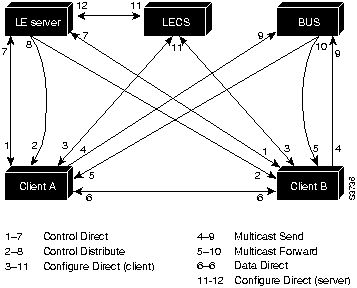
The LEC sets up a connection to the LECS (bidirectional point-to-point Configure Direct VCC, link 1-7 in Figure 16) to find the ATM address of the LES for its ELAN.
The LECs find the LECS by using the following interface and addresses in the listed order:
remains established.
The LES for the ELAN sets up a connection to the LECS to verify that the LEC is allowed to join the ELAN (bidirectional point-to-point Server Configure VCC, link 11-12 in Figure 16). The LES configuration request contains the LEC MAC address, its ATM address, and the name of the ELAN. The LECS checks its database to determine whether the LEC can join that LAN; then it uses the same VCC to inform the LES whether the LEC is allowed to join.
Unspecified Digits
Where to Obtain Value
Prefix (first 13 bytes)
Switch via ILMI, or configured locally if ILMI is not supported on the switch.
ESI (next 6 bytes)
Slot MAC address1 plus
Selector field (last 1 byte)
Subinterface number, in the range 0 through 255.
1 The Catalyst 5000 series switch ATM card has a pool of 16 MAC addresses.
Task
Command
Enter the commands shown in the section "Setting Up VTP."
set vlan <vlan#> default
The name "default" is the ELAN name for VLAN 1.
VLAN #
ELAN Name
1
default
2
VLAN0002
3
VLAN0003
4
VLAN0004
5
VLAN0005
...1005
...VLAN1005
lane database test
name marktng server-atm-address 47.0091810000000061705B8301.00400B020011.01
!
interface ATM0
no ip address
no ip route-cache
atm pvc 1 0 5 qsaal
atm pvc 2 0 16 ilmi
lane config auto-config-atm-address
lane config database test
!
interface ATM0.1 multipoint
no ip route-cache
lane server-bus ethernet marktng
lane client ethernet 1 marktng
lane database test
name default server-atm-address 47.0091810000000061705B8301.00400B020011.01
!
interface ATM0
no ip address
no ip route-cache
atm pvc 1 0 5 qsaal
atm pvc 2 0 16 ilmi
lane config auto-config-atm-address
lane config database test
!
interface ATM0.1 multipoint
no ip route-cache
lane server-bus ethernet default
lane client ethernet 1 default
Task
Command
session mod_num
enable
configure terminal
vtp enable
CNTL/Z
write memory
exit
Task
Commands
enable
password
set vlan vlan_num
session mod_num
enable
configure terminal
interface atm0
atm pvc <vcd> <vpi> <vci> aal5snap
atm bind pvc vlan <vcd> <vlan number>
CNTL/Z
show atm vlan
show atm vc
write memory
PVC
VLAN/Switch Connections
1
Connects VLAN 5 on Switch 1 to VLAN 5 on Switch 2
2
Connects VLAN 5 on Switch 2 to VLAN 5 on Switch 3
3
Connects VLAN 5 on Switch 1 to VLAN 5 on Switch 3
enable
set vlan 5
session 2
enable
Console> enable
Console> (enable) session 2
Trying ATM-2...
Connected to ATM-2.
Escape character is '^]'.
configure terminal
interface atm0
atm pvc 10 0 31 aal5snap
atm pvc 11 0 31 aal5snap
ATM>enable
ATM#configure terminal
ATM(config)#interface atm0
ATM(config-if)#atm pvc 10 0 31 aal5snap
ATM(config-if)#atm pvc 11 0 33 aal5snap
atm bind pvc vlan 10 5
atm bind pvc vlan 11 5
ATM(config-if)#atm bind pvc vlan 10 5
ATM(config-if)#atm bind pvc vlan 11 5
CNTL/Z
show atm vlan
show atm vc
ATM(config-if)#end
ATM#show atm vlan
VCD     VLAN-ID
10     5
11     5
ATM#show atm vc
                                     AAL /         Peak   Avg.  Burst
Interface     VCD   VPI   VCI Type  Encapsulation  Kbps   Kbps  Cells Status
ATM0            1     0     5  PVC  AAL5-SAAL          0      0     0 ACTIVE
ATM0            2     0    16  PVC  AAL5-ILMI          0      0     0 ACTIVE
ATM0           10     0    31  PVC  AAL5-SNAP          0      0     0 ACTIVE
ATM0           11     0    33  PVC  AAL5-SNAP          0      0     0 ACTIVE

ATM#wr mem
Building configuration...
[OK]
ATM#
write memory
Task
Command
enable
configure terminal
interface atm0
no atm pvc <vcd>
CTRL/Z
Task
Command
enable
configure terminal
interface atm0
no atm bind pvc vlan <vcd> <vlan number>
CTRL/Z
Task
Command
enable
interface atm0
atm traffic-shape rate <number between 1-155 indicating Mbps>
CTRL/Z
Task
Command
enable
interface atm0
no atm traffic-shape rate <number between 1-155 indicating Mbps>
CTRL/Z