


|
|

This chapter describes the FDDI and 100BaseT cabling guidelines and several common Catalyst 2820 configurations using the Catalyst 2820 modules. The cabling guidelines and sample networks are divided according to the two groups of modules, FDDI and 100BaseT.
The following cabling guidelines apply to an FDDI network:
The FDDI modules can have one or two ports: an S port in a single-attach configuration or an A port and B port in a dual-attach configuration. Table 3-1 describes the valid port configurations for an FDDI module.
Table 3-1 : Valid FDDI Port Configurations
| Module Connection | Other
Device |
Description |
|---|---|---|
| A | B | Peer connection between FDDI fiber-optic DAS and another DAS device on trunk ring. |
| B | A | Peer connection between FDDI fiber-optic DAS and another DAS device on trunk ring. |
| S | M | Connection between FDDI fiber-optic SAS or UTP SAS and concentrator. |
| A | M | Connection between FDDI fiber-optic DAS and concentrator. Used for dual homing. |
| B | M | Connection between FDDI fiber-optic DAS and concentrator. Used for dual homing. |
| S | S | Connection between FDDI fiber-optic SAS or UTP SAS and another SAS station. |
Common Catalyst 2820 FDDI Configurations
This section describes several common Catalyst 2820 network configurations:
Trunk Ring Connection Using FDDI Fiber DAS
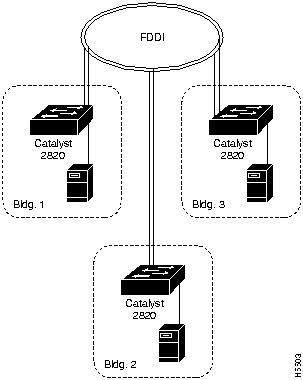
Figure 3-1 shows three Catalyst 2820s connected to a trunk ring. Each Catalyst 2820 is configured with an FDDI Fiber DAS module and a 100BaseTX/1 module for a local server connection.
Figure 3-1 : Trunk Ring Connection Using FDDI Fiber DAS
Concentrator Connection in a Dual-Homing Configuration Using FDDI Fiber DAS
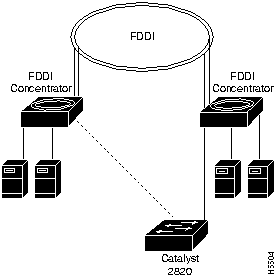
Figure 3-2 shows a Catalyst 2820 connected to a concentrator in a dual-homing configuration using a fiber-optic DAS module.
Figure 3-2 : Concentrator Connection in a Dual-Homing Configuration
Concentrator Connection Using FDDI Fiber SAS
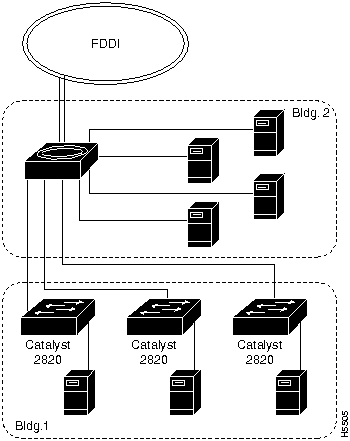
Figure 3-3 shows three Catalyst 2820s connected to a concentrator. Each Catalyst 2820 is configured with an FDDI Fiber SAS module and a 100BaseTX module for a local server connection. This configuration could also apply to a Catalyst 2820 connected to a server or router port.
Figure 3-3 : Concentrator Connection Using FDDI Fiber SAS
Server or Router Connection Using FDDI UTP SAS
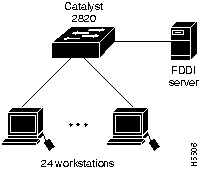
Figure 3-4 shows a server connected to a Catalyst 2820 with an installed FDDI UTP SAS module. This configuration could also apply to a Catalyst 2820 connected to a concentrator or router port.
Figure 3-4 : Server or Router Connection Using FDDI UTP SAS
This section describes 100BaseT cabling guidelines and some common Catalyst 2820 configurations. The following cabling guidelines apply to a 100BaseT network:
The 100BaseT standard specifies that individual cable lengths do not exceed an overall cable budget. To determine your cable budget, use the following formula:
Table 3-2 : Cabling Limits in a 100BaseT Network
| Number of Repeaters | Maximum Cable Length Between Two Nodes |
|---|---|
| 0 | 400 m |
| 1 | 310 m |
| 2 | 220 m |
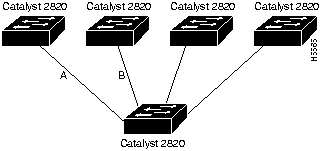
The maximum cable length between any two nodes in a one-repeater 100BaseT network is 310 meters. Figure 3-5 illustrates this guideline. A Catalyst 2820 with a shared 100BaseFX module is connected with fiber-optic cable to four other Catalyst 2820 switches with switched 100BaseFX modules. In this example, the total length of cable A plus cable B must be 310 meters or less.
Figure 3-5 : 100BaseT One-Repeater Network
Common Catalyst 2820 100BaseT Configurations
This section describes several common Catalyst 2820 network configurations:
High-Performance Client/Server Workgroup Connection
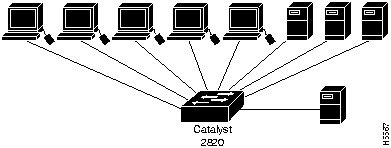
Figure 3-6 shows a high-performance client-server workgroup connected to a Catalyst 2820 with one 8-port shared module and one 100BaseTX switched module.
The servers and workstations are configured with 100BaseT adapters.
Figure 3-6 : High-Performance Client/Server Workgroup Connection
Server Connection Using 100BaseFX Modules
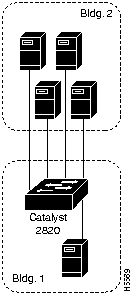
Figure 3-7 shows a Catalyst 2820 connected to several 100BaseT servers. The Catalyst 2820 has a 4-port shared 100BaseFX module and a switched 100BaseFX module. The servers in building 2 are configured with 100BaseFX adapters.
Figure 3-7 : Server Connections Using 100BaseFX
100BaseFX Backbone Connections
Figure 3-8 shows multiple Catalyst 2820s with switched 100BaseFX modules connected by fiber-optic cable in a high-rise network. With full-duplex operation over fiber-optic cabling, the cable length can extend to 2 kilometers.
Figure 3-8 : Catalyst 2800s Connected Using 100BaseFX Modules in a High-Rise Building
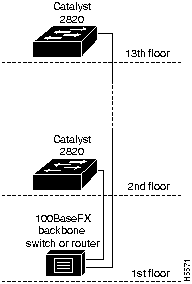
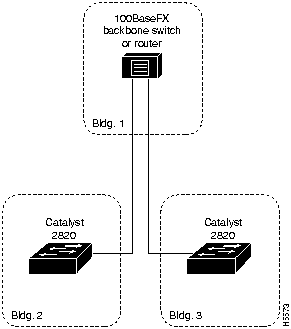
Figure 3-9 shows two Catalyst 2820s with switched 100BaseFX modules connected via fiber-optic cable in a campus network. With full-duplex operation over fiber-optic cabling, the cable length can extend to 2 kilometers.
Figure 3-9 : 100BaseFX Connection in a Campus Environment

|
Copyright 1988-1996 © Cisco Systems Inc.