|
|

This appendix describes the physical characteristics and connector pinouts of the
Catalyst 2100.
Table A-1 Technical Specifications
| Reliability | 50,000 hours MTBF |
| Operating temperature | 0 to 40 degrees Celsius |
| Operating humidity | 10% to 90% |
| Operating altitude | Up to 10,000 feet |
| Power consumption | 100 watts |
| Input voltage | 90 to 250 volts, 50 to 60 Hz |
| Weight | 23 lbs (10.4 Kg) |
| Width | 19 in. (48.26 cm) |
| Depth | 12.28 in. (31.19 cm) |
| Height | 5.25 in. (13.34 cm) |
This section describes the following connectors used by Catalyst 2100:
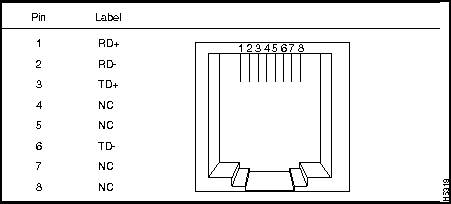
Ports 1 through 25 use standard RJ-45 connectors and 10Base T pin-outs with internal cross-over, as indicated by an X. These 10Base T ports have their transmit (TD) and receive (RD) signals internally crossed, for attachment of an adapter using a straight-through cable.
Table A-2 10Base T Pinout and Connector
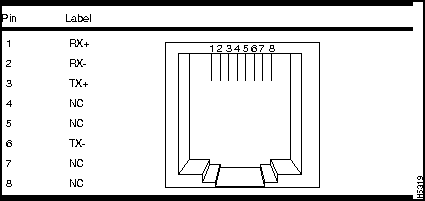
The pinout for the 100Base TX ports is shown in Table A-3.
Table A-3 100Base TX Pinout and Connector
The AUI connector is a 15-pin female receptacle shown in Figure A-1; the pinouts are shown in Table A-4.
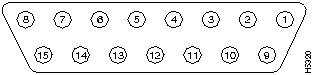
Table A-4 AUI Connector Pinouts
| 1 | GND | Ground |
| 2 | CI+ | Positive AUI differential collision-data input |
| 3 | TX+ | Positive AUI differential transmit-data input |
| 4 | GND | Ground |
| 5 | RX+ | Positive AUI differential receive-data output |
| 6 | GND | Ground |
| 7 | NC | |
| 8 | GND | Ground |
| 9 | CI- | Negative AUI differential collision data |
| 10 | TX- | Negative AUI differential transmit-data input |
| 11 | GND | Ground |
| 12 | RX- | Negative AUI differential receive data output |
| 13 | +12V | 12 Volt supply for external MAU |
| 14 | GND | Ground |
| 15 | NC |
The serial connector is a male 9-pin D subminiature connector as shown in Figure A-2.
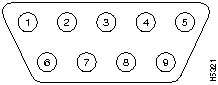
The pinouts are shown in Table A-5.
Table A-5 Serial Connector Pinouts
| 1 | DCD |
| 2 | RD |
| 3 | TD |
| 4 | DTR |
| 5 | GND |
| 6 | DSR |
| 7 | RTS |
| 8 | CTS |
| 9 | RI |
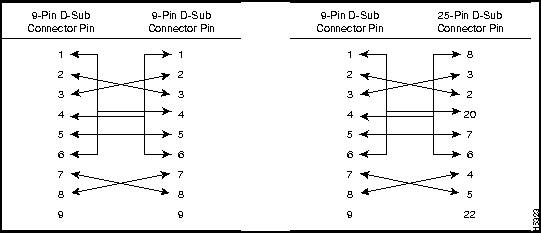
The shell is connected to the chassis ground. Use a standard modem cable to connect to a modem. Use a null-modem cable to connect to a terminal.
Either piece of equipment may come with either 25-pin or 9-pin connectors.
Figure A-3 Standard Modem Cable Schematic with 9- and 25-Pin Devices
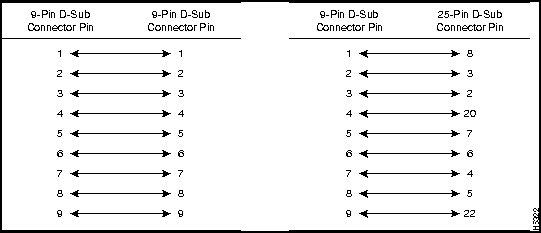
Figure A-4 Null-Modem Cable Schematic with 9- and 25-Pin Devices

|
Copyright 1988-1996 © Cisco Systems Inc.