|
|

Validating CiscoWorks Installation on HP-UX
To validate the CiscoWorks installation and configuration, you must edit the .cshrc file on your system. Follow the procedures in this chapter to complete the validation of your CiscoWorks installation.
This section briefly summarizes the steps you should follow to validate the CiscoWorks installation. In general, you will follow these overall steps:
Verifying Environment Variables and Search Paths
To use HP OpenView, CiscoWorks, and Sybase, you must define the appropriate environment variables and paths in your install.cshrc file.
Environment variables define how your particular system is set up, such as directory paths that specify the location of files. The environment variables and paths are explained in Table 4-1.
Table 4-1 : Environment Variables and Directory Paths
| Environment
Variable or Path |
Explanation |
|---|---|
| NMSROOT | Refers to the directory /usr/nms where CiscoWorks was installed. If the software was installed in a different directory, substitute the appropriate directory path to ensure a correct definition of the NMSROOT environment variable. |
| SYBASE | Refers to the directory path where Sybase is located. The default is $NSMROOT/ sybase. If you selected the default, the Sybase software was installed in the /usr/nms/sybase directory. The SYBASE variable refers to the NMSROOT variable and the sybase directory following it. |
| PATH | Refers to the directory path for /usr/OV/bin, $NMSROOT/bin, $NMSROOT/etc, and $SYBASE/bin. The path should be specified for HP OpenView, CiscoWorks, and Sybase. |
| MANPATH | Refers to the directory path for the CiscoWorks manual pages. |
| DISPLAY | Refers to the environment variable for the monitor on which CiscoWorks displays. The default is :0 or hostname:0 |
Verifying Changes to the .cshrc File
The installation and configuration scripts have made changes to the install.cshrc file. Specifically, the scripts have:
You should now verify that the correct changes have been made to the install.cshrc file. To verify the changes, perform the following steps:
This completes the process of verifying the install.cshrc file.
Displaying CiscoWorks Applications
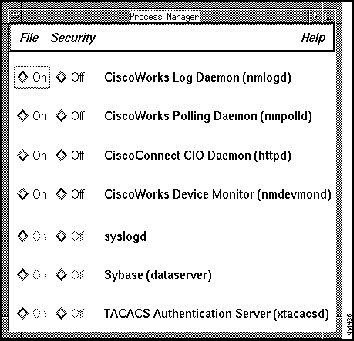
Once you have installed and configured CiscoWorks and verified the install.cshrc file, you can access HP OpenView and display the CiscoWorks applications. After you start CiscoWorks, you can verify that the appropriate CiscoWorks processes are running by accessing the Process Manager window.
The Process Manager window maps several different types of CiscoWorks processes or daemons. A daemon is a process that performs a specific function for the system.
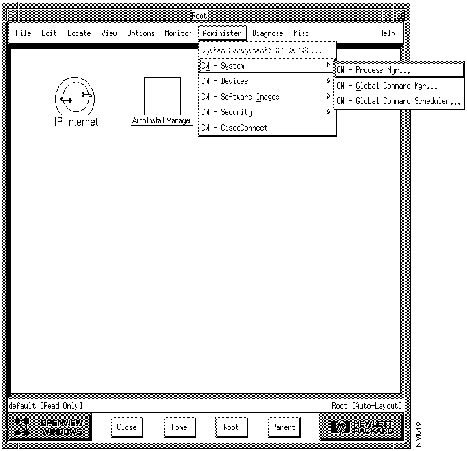
To access HP OpenView and CiscoWorks, perform the following steps:
Figure 4-1 : CiscoWorks Menu Options Within HP OpenView
Figure 4-2 : Process Manager Window This completes the process of starting HP OpenView and CiscoWorks and accessing the Process Manager window.
Copyright 1988-1996 © Cisco Systems Inc.
hostname%
source
/usr/nms/
etc/install.cshrc
hostname%
printenv | more
NMSROOT  /usr/nms

SYBASE  /usr/nms/sybase

MANPATH  /usr/man
hostname%
ovw