


|
|

This chapter provides an introduction to virtual LANs (VLANs) and switched internetworking, compares traditional shared LAN configurations with switched LAN configurations, and discusses the benefits of using a switched VLAN architecture. It also explains how VlanDirector simplifies the management and configuration of the virtual LAN.
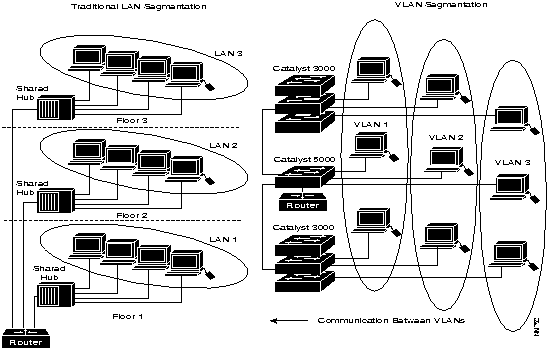
A LAN is configured according to the physical infrastructure it is connecting. Users are grouped based on their location in relation to the hub they are plugged into and how the cable is run to the wiring closet. Segmentation is typically provided by the router interconnecting each shared hub.
Engineering users can be connected to the same hub as accounting and administration users because of their respective physical locations. They share the same segment and contend for the same bandwidth, although the bandwidth requirements can vary greatly according to workgroup or department.
A VLAN is a switched network that is logically segmented by functions, project teams, or applications without regard to the physical location of users. Each switch port can be assigned to a VLAN. Ports in a VLAN share broadcasts. Ports that do not belong to that VLAN do not share these broadcasts.
Switches remove the physical constraints imposed by a shared-hub architecture because they logically group users and ports across the enterprise. As a replacement for shared hubs, switches remove the physical barriers imposed in each wiring closet.
Figure 1-1 shows the difference between LAN and VLAN segmentation.
Figure 1-1 : LAN Segmentation and VLAN Segmentation
VLANs provide the following features:
Handling Adds, Moves, and Changes
Moves, adds, and changes are one of the greatest expenses in managing a network. Many moves require recabling. Almost all moves require new station addressing and hub and router reconfiguration. Invariably, as soon as managers stabilize their networks, more changes are requested.
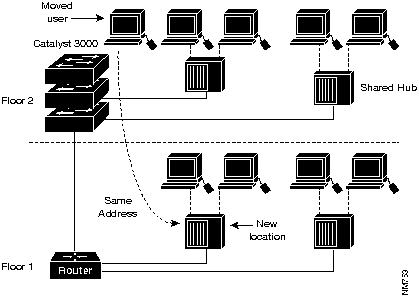
VLANs simplify adds, moves, and changes. VLAN users can share the same network address space regardless of location. If a group of VLAN users move but remain in the same VLAN connected to a switch port, their network address does not change.
Router configuration is left intact; a simple move for a user from one location to another does not create any configuration modifications in the router if the user stays in the same VLAN.
Figure 1-2 : Simplification of Moves with VLANs
Controlling Broadcast Activity
Broadcast traffic occurs in every network. If incorrectly managed, broadcasts can seriously degrade network performance or even bring down an entire network.
Broadcast traffic in one VLAN is not transmitted outside that VLAN. This type of configuration substantially reduces overall broadcast traffic, frees bandwidth for real user traffic, and lowers the overall vulnerability of the network to broadcast storms.
You can control the size of the broadcast domains by regulating the overall size of their associated VLANs and by restricting both the number of switch ports in a VLAN and the number of people using these ports.
You can also assign VLANs based on the application type and the amount of application broadcasts. You can place users sharing a broadcast-intensive application in the same VLAN group and distribute the application across the campus.
VLANs can be used to provide security firewalls, restrict individual user access, flag any unwanted intrusion to the network, and control the size and composition of the broadcast domain.
You can increase security by segmenting the network into distinct broadcast groups. This enables you to
Managing VLANs with VlanDirector
You can create VLANs using the command line interface (CLI) on your switches, or using VlanDirector.
VlanDirector simplifies the creation and management of VLANs, enabling you to easily perform configuration operations with simple "drag-and-drop" mouse clicks. You can create, modify, and delete VLANs and VLAN ports. This enables you to centrally plan and manage moves and changes.
VlanDirector also allows you to view the network topology and the VLAN topology for selected VLANs. Multiple windows enable you to switch between high-level and detailed network views. Figure 1-3 shows an example of the views provided by VlanDirector.
Figure 1-3 : Sample VlanDirector Views
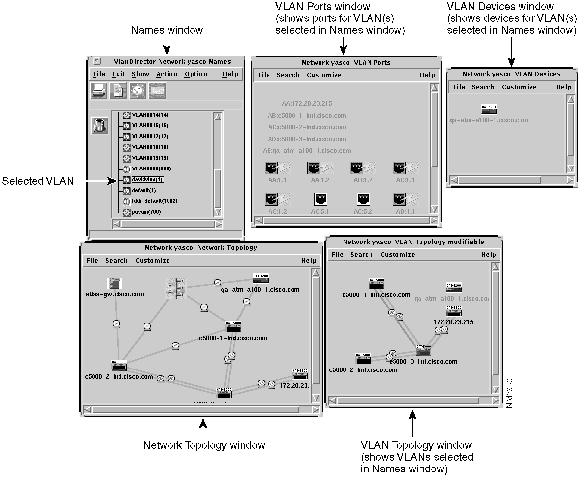
When you first launch VlanDirector, it performs a discovery of your network. You can view existing VLANs and determine any changes you want to make or new VLANs you want to assign. VlanDirector also includes the CiscoView application, allowing you to drag and drop ports into a new or existing VLAN.
VlanDirector provides the following features:

|
Copyright 1988-1996 © Cisco Systems Inc.