|
|

VlanDirector provides a number of troubleshooting and information gathering features, such as system and error messages, discrepancy information, and log files. In addition, CiscoView provides port status information. This chapter describes these features and provides guidance on how to use them to solve operational or network problems.
Responding to System and Error Messages
Whenever an error message is displayed, click the Help button in the message window to display information to help you resolve the problem. The online help for error messages suggests a possible cause for the message and recommends a solution. You can also click the Help button when you receive a system message for information about the message.
System messages usually prompt you to confirm an action. You can also search in the main Help contents for error or system messages. Search under Error followed by the message for an error message, and search under System Message followed by the message for a system message.
Discrepancies are unusual network connections or configurations, usually between two devices. A discrepancy is not an error that stops normal VlanDirector operations.
If a discrepancy exists, the VlanDirector Names window displays a checkmark directly below the trash can icon after the initial discovery process has been completed. To display information about discrepancies, click the Discrepancies icon or, in the Names window select Action>Show Discrepancies. The Show Discrepancies window is displayed as shown in Figure 8-1. For each item listed, the window identifies the VLANs, devices, links, and ports.
Figure 8-1 : VlanDirector Show Discrepancies Window
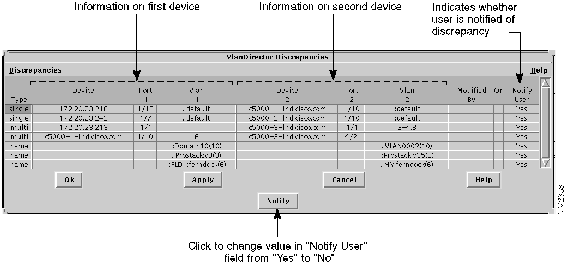
Table 8-1 shows the meaning for each discrepancy type.
| Value | Meaning |
|---|---|
| Multi | Different ends of a trunk specify different VLANs. For example, vlan1, vlan2, and vlan3 are enabled on one end but not at the other end. |
| Protocol | Different ends of a link specify different protocols. For example, this could occur on a Fast Ethernet link with Inter Switch Link (ISL) enabled on one end but not on the other end. |
| Single | Different ends of a single VLAN link specify different VLANs. For example, a link between two Catalyst 5000 switches that is not multi-VLAN capable (such as a 10-MB ethernet link or a 100-MB Fast Ethernet link that is not running ISL) does not have the same VLAN at both ends. |
| Name Conflict | VlanDirector has discovered two disconnected sets of switches that have VLANs of the same name.
Implications: The VLANs are broken into two or more disjoint parts. Packets from one part are not travelling to the other part. Possible Resolution Rename one of the VLANs. |
| VLAN Index Conflict | Same VLAN name on different switches with different VLAN indexes or domains.
VlanDirector has discovered a single VLAN name with different domain numbers on two or more Catalyst 3000 switches or different VLAN indices on Catalyst 5000 switches. Traffic from switches with one number for this VLAN will not go to ports on switches with a different number for this VLAN. Possible Resolutions Rename one of the VLANs Delete both VLANs. Recreate a new single VLAN with the name. |
| SAID Conflict | Indicates different SAID numbers on the same VLAN. |
You can respond to discrepancies in the following ways:
The Names window no longer alerts you when the selected discrepancy occurs.
If you made configuration changes that caused problems, it can be useful to compare the changed configuration to an earlier one that did not have the same problems. To do this, refer to Comparing Configurations in Chapter 5.
VlanDirector records information about network changes in a file. The location of the log file is $VLVROOT/etc/vview/logs, which by default is /user/vlan/etc/vview/logs.
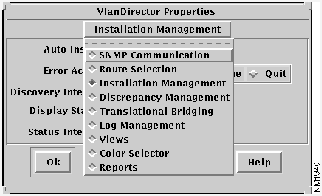
By default, logging is performed and VlanDirector restarts the logging process every seven days. To customize logging properties, follow these steps:
Figure 8-2 : VlanDirector Properties Window
Copyright 1988-1996 © Cisco Systems Inc.