


|
|

Using News Reader with CiscoRemote Plus
You can use the News Reader application to access articles and information posted on the Internet as part of USENET. You'll find articles organized under specific topics called newsgroups.
Most newsgroups are forums for the exchange of information and discussion for Internet users around the world. Newsgroups focus on many topics, such as sports, science, recreation, hobbies, technology, and literature.
Each newsgroup has many articles that you can read with News Reader. You can also reply to articles or create your own and post them for participants in the newsgroup to read.
Before connecting to a news server, you need to know its name or IP address. You can obtain this information from your network administrator or Internet service provider.
Take the following steps to connect to a news server:
News Reader establishes a connection with the news server.
To read articles on USENET, you must first subscribe to one or more newsgroups. Subscribing merely creates a list of newsgroups that you intend to review frequently. You can subscribe to as many newsgroups as you want.
Take the following steps to subscribe to a newsgroup:
When you have subscribed to a newsgroup, you can read the articles posted in it. Many newsgroups contain hundreds or thousands of articles.
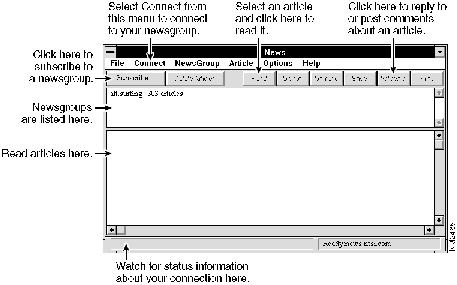
You select a newsgroup in the News window and open it to see a list of articles. You can then select from that list the article(s) you want to read.
Take the following steps to open a newsgroup:
If the article is too long to fit in the News window, you can save the article as a file, which you can later open with another application, such as a text editor or word processor.
You can post comments or a reply to an article by clicking on Followup in the toolbar or by selecting Followup from the Article menu; composing your message, and clicking on Send.
You can post your own information in a newsgroup for others to read.
Take the following steps to post an article:
Disconnecting from the News Server
To disconnect from the news server, select Disconnect from the Connect menu. You can also exit News Reader to disconnect and close the application.
For more information about the other features of News Reader, refer to the document CiscoRemote Plus Administrator Guide, which is available on the CiscoRemote Plus CD. News Reader's additional features allow you to do the following:
Copyright 1988-1996 © Cisco Systems Inc.
alt.kids-talk.penpals

fidonet.penpal

relcom.penpals

soc.penpals
