


|
|

Cisco 700 series routers connect Ethernet LANs to other networks over Integrated Services Digital Network (ISDN) Basic Rate Interface (BRI) lines. Cisco 700 series routers offer multiprotocol routing capability between WAN and LAN ports and can function as transparent bridges.
This chapter contains the following sections:
For more information on the commands described in this chapter, refer to the Cisco 700 Series Command Reference.
This section describes the major features of Cisco 700 series routers.
Cisco 700 series routers include dial-on-demand routing (DDR). This allows the router to dynamically initiate calls to remote devices across ISDN BRI lines as traffic demands. The router also terminates ISDN connections based on the level of the traffic demanded on the ISDN line and the dynamic routing parameters.
The automatic service profile identifier (SPID) and switch detection feature simplifies the use of ISDN terminal equipment and makes the equipment easier to use with fewer parameters to enter. With this feature, the user only has to enter the local directory numbers with area code. No SPID number or switch type is required from the user. The command used is the set autodetection command.
The automatic detection feature only applies to ISDN switches for the USA and Canada, usually an AT&T 5ESS Custom, DMS-100, NI-1, or NI-2 switch. The automatic detection mechanism might not work with any other switch, such as a Siemens switch. The automatic detection feature is only implemented in the U. S. image.
Cisco 700 series routers support the use of a Trivial File Transfer Protocol (TFTP) client. This feature increases TFTP file transfer efficiency and reliability. The swl tftp command loads the TFTP client software from the console port.
Remote users often have multiple service providers. Connecting to different service providers might require different user names and passwords. Previous releases of Cisco 700 software used the same user name and password for all profiles when making outgoing Point-to-Point Protocol (PPP) connections. Cisco 700 series router software Release 4.1(1) allows different profiles to have different user names and passwords.
In previous releases, the set systemname command set the system prompt and the PPP user name when making outgoing PPP connections. Different profiles can now use different user names when dialing out. A new profile level command, the set ppp clientname command, has been created for this purpose.
The Bandwidth Allocation Control Protocol (BACP) and the Bandwidth Allocation Protocol (BAP) define a set of rules to control dynamic bandwidth allocation gracefully by managing the number of links in a PPP multilink bundle. BACP consists of a network control protocol that negotiates once per PPP multilink bundle while BAP defines a set of request and response messages to manage the links.
Cisco 700 series router software Release 4.0(2) already supports dynamic management of both B channels with the demand feature. The implementation of BACP and BAP allows Cisco 700 series routers to coordinate and negotiate the actual allocation and deallocation of the second channel. The parameters are set using the demand command and the timeout command.
BACP is only implemented on a BRI interface. A Multilink PPP has to be negotiated for BACP to be functional.
If a data call is bumped to accommodate a voice call and if BAP negotiation is enforced, the user might experience a short audio idle period before a B channel becomes available. The user might not be able to connect the voice call if the peer declines to give up the link. This happens when the set ppp bacp linkdrop negotiation command is set to ON.
A generic filter capability on the Transaction Control Protocol/User Datagram Protocol (TCP/UDP) packets allows users to filter NetBIOS packets generated by application programs. Use the set ip filter command to control this feature.
When a WINS client sends out a NetBIOS Name query, the router can answer a NetBIOS name query in place of the WINS server. If the router cannot answer, the router forwards the query packets to the server, which forwards the response to the client. If spoofing is set, the router keeps a local database of up to 100 Domain Name System (DNS) name entries and has an aging scheme to age out the unused name entries.
The automatic configuration feature allows the Cisco 700 series router to obtain a configuration file from a remote server using BOOTP protocol. Upon power-up, the router examines the Auto_Config flag stored in NVRAM. If the Auto_Config flag is FALSE, the router initiates a BOOTP request for an IP address from the BOOTP server. If the BOOTP server finds a matching MAC address, the server returns an IP address and a configuration file name. The router initiates TFTP to download a configuration file.
After successfully loading the configuration file, the router sets the Auto_Config flag to TRUE in NVRAM. In subsequence power-up operations, if the Auto_Config is TRUE, the router does not initiate BOOTP. The set default command resets the Auto_Config flag to FALSE.
The automatic configuration feature only works on the Ethernet interface. If the router does not receive a BOOTP response from the server within 5 seconds of the first BOOTP request, the router gives up and the Internet Protocol (IP) information must be configured manually.
DHCP automates IP addressing and reduces the number of IP addresses a site might require. Cisco 700 series routers can function as a dynamic host configuration protocol (DHCP) server. (The router can also act as a DHCP relay, but not both at the same time.)
When a DHCP server is enabled and configured, it assigns and manages IP addresses from a specified address pool to DHCP clients. The options supported by this server are sufficient for Windows 95 clients. If more IP addresses or options are required, a commercial DHCP server (for example, Windows NT) should be used.
Cisco 700 series routers can function as a DHCP relay agent. (The router can also act as a DHCP server, but not both at the same time.) When configured, Cisco 700 series routers relay DHCP requests and responses between DHCP clients and a specified DHCP server. Use the set dhcp relay command, where the IP address is the address of the server to which DHCP requests will be forwarded.
Cisco 700 series routers support port address translation (PAT) allowing a designated private IP network to communicate with the outside world. When configured, Cisco 700 series routers translate source addresses from an IP private network to a single, global, unique IP address before forwarding the packets to the outside world.
The router can be assigned an IP address from the remote device using Internet Protocol Control Protocol (IPCP) address negotiation. The implementation is based on RFC1332. It supports IPCP options 1 and 3. (It does not support option 2, TCP/IP Header Compression.) IP unnumbered is also supported. IPCP address negotiation is on by default in any profile configured for IP routing. This feature does not support assigning addresses to remote devices.
The IP Routing Information Protocol (RIP) Update Linkup option for IP RIP enables better interoperability between the router and Cisco IOS software. If the IP RIP update is set to link up for a WAN profile, the IP RIP data is sent as soon as a connection is established and again every 30 seconds for as long as the connection exists. If the connection does not exist, no RIP data is sent. This prevents the line from being brought up by RIP packets where the update is periodic.
When this feature is on, the negotiated IP address is assigned to the Standard or the user-defined profile (whichever profile is used to place the call). It also tells the software to try any IP address configured for this profile in the IP address negotiation.
When this feature is off and the internal profile does not contain an address, the negotiated IP address is automatically assigned to the Internal profile by the system. If the Internal profile contains an address, it will be assigned to the user-defined profile from which the call was initiated. The parameters are set using the set ppp address negotiation command.
Fee Pulse Mode manages the ISDN connection based on the paid periods of time. If other thresholds indicate a call should be dropped due to low traffic, Fee Pulse Mode maintains the connection until the current paid period has expired. Therefore, you are not paying full price for part of a connection period. This feature is available only for NET3 (same as ETSI) switch types, and you must subscribe to Advice of Charge-During Active Call (AOC-D) supplementary service.
If the feature is enabled and idle time expires, the router checks the remaining time in the current paid period. The router maintains the connection until the end of the paid period, minus the disconnect time required to terminate the PPP and ISDN links.
If the idle time expires too close to the end of the paid period to close the connections before the end of the paid period, the router extends the connection to the end of the next paid period, minus disconnect time.
Cisco 700 series routers can transfer an active voice call to another telephone number. For more information on configuring call transfer, refer to the chapter "ISDN and Analog Telephone Devices."
Call forwarding supplementary service has been added for Sweden and Finland (NET3). Call forwarding is implemented differently in the European countries. The version implemented here uses keypad procedures and is only partly ETSI-compliant.
Cisco 700 series routers can add another party to an active voice call. You can connect three people using this feature. For more information on configuring three-way call conferencing, refer to the chapter "ISDN and Analog Telephone Devices."
The data call button, located on the front panel of Cisco 770 series routers, provides an alternative to establishing or disconnecting data calls through the command interface. The data call button performs in Make or Break mode. If no B channels are connected for data, and at least one B channel is available, the button works in Make mode and attempts to establish a call. When at least one B channel is connected for data, the button works in Break mode, disconnecting the call. Table 1-1 summarizes the operation of the Cisco 770 series data call button.
| Current Status | No call up | 1 data call only | 2 data calls | 1 voice call only | 2 voice calls | 1 data and 1 voice call |
|---|---|---|---|---|---|---|
| Switch Operation | Make a data call | Disconnect the data call | Disconnect both data calls | Make a data call | No action | Disconnect the data call |
Cisco 700 series routers can place a call to a backup telephone number when an outgoing call is not successful because the receiving side is busy or does not answer. Cisco 700 series routers support second number fail-over for manual and auto-data calls. The parameters are set using the set backupnumber command.
To improve performance, only the services defined in Novell IPX Router Specification 107-000029-001 are supported, and a maximum of 400 IPX route entries and 200 IPX SAPs are allowed. If you need more route and SAPs entries, software Release 4.0(1) and higher supports set ipx sap helper and set ipx gateway commands.
The IPX ping feature allows you to determine if the specified IPX node is alive and reachable. Cisco 700 series routers only generate Novell IPX format ping packets when IPX ping is sourced from the router. The response by the Cisco 700 series router to a Novell IPX ping packet is in Novell IPX format. The response by the Cisco 700 series router to Cisco IPX ping packets is in Cisco IPX format. (If a Novell NetWare server is pinged, the specified server must be running the IPXPING.NLM to respond to the ping. This NLM [NetWare Loadable Module] is part of an IPX Upgrade [IPXRTR.EXE] to NetWare servers.) The parameters are set using the ipxping address command.
Cisco 700 series routers can route IPX packets to an established default gateway if no learned or static route can be found for the destination in the routing table. The parameters are set using the set ipx gateway command.
IPX SAP filtering controls which services are added to the Cisco 700 series router Service Advertisement Protocol (SAP) table. You can specify filters per type range or socket range. Before a service is added to the SAP table, the service type and socket number for the service is checked against the existing filters. If the type and socket ranges match any of the existing filters, service is permitted or denied based on the action specified in the action field of the filter. Otherwise (no filter matches the incoming service), the service is blocked. If no filter is configured, all SAPs are permitted. The parameters are set using the set ipx filter sap command. The maximum number of SAP filters is 20.
Cisco 700 series routers can forward to a specified router or server (instead of responding to them) all SAP get-nearest-service request broadcast packets and get general service request broadcast packets to an IPX router or IPX server as unicast packets. Cisco 700 series routers forward these request packets without looking in the local SAP table. The parameters are set using the set ipx sap helper command.
Route summarization is provided on IP RIP Version 2 (only Version 2 provides the required subnet mask information). When route summarization is set to auto, the router summarizes routes that cross the classful boundary to a single route based on the classful boundary. When route summarization is set to off, the router uses the normal RIP Version 2 routes with variable-length subnet masks (VLSMs). The default setting for RIP summarization is OFF. Use the set ip rip summarization command to control this feature.
Cisco 700 series routers support data compression using the compression algorithm QIC-122 standard, Stacker LZS. Data compression is a software configuration option that optimizes the ISDN line bandwidth. Packets are compressed before being sent onto the ISDN line. After they arrive at their destination, the packets are decompressed and sent on to the remote LAN.
Cisco 700 series routers provide the following security features:
For 64-kbps or 128-kbps leased line connections, previous versions of the software required PAP/CHAP authentication to identify the corresponding profile. In software Release 4.0(1) and higher, the authentication sequence is no longer required for leased line connections.
To eliminate the need for authentication, a user-defined profile named leasedline must be present and defined. If this profile is not present upon call connect, the router requires authentication to select the correct profile. If the call cannot be authenticated, the router defaults to the Standard profile.
Within the user-defined profile called leasedline, verify that PPP authentication is set to none. The switch types that support this feature are PERM64 and PERM128.
Cisco 700 series routers support Simple Network Management Protocol (SNMP).
Cisco 700 series routers support the following SNMP community names:
These community names are read-only and cannot be changed. Cisco 700 series routers do not support SNMP set commands.
Cisco 700 series routers support the following SNMP Management Information Bases (MIBs):
Cisco 700 series routers support MIB II standards as follows:
Cisco 700 series routers support IEEE 802.1d MIB standards as follows:
Cisco 700 series routers support the following Request For Comments (RFC) documents:
Figure 1-1 and Figure 1-2 show the front panels of Cisco 760 series and Cisco 770 series routers. Instructions for connecting the routers are provided in the Cisco 700 Quick Reference Guide.
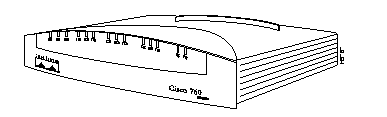
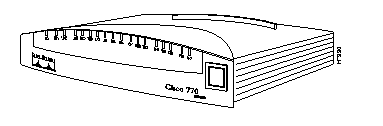
The ports for the Ethernet, ISDN S/T, ISDN U, and basic telephone service connections are located on the rear panel of the Cisco 760 series router, as shown in Figure 1-3 through Figure 1-6 and on the rear panel of the Cisco 770 series routers, as shown in Figure 1-7 through Figure 1-10.


The specifications for Cisco 700 series routers are listed in Table 1-2.
Table 1-3 lists the interfaces available on each Cisco 700 series router by model number.
| Model | Interfaces |
|---|---|
| Cisco 761 | 1 Ethernet and 1 ISDN BRI S/T |
| Cisco 762 | 1 Ethernet, 1 ISDN BRI S/T, and 1 ISDN BRI U |
| Cisco 765 | 1 Ethernet, 1 ISDN BRI S/T, and 2 analog telephone |
| Cisco 766 | 1 Ethernet, 1 ISDN BRI S/T, 1 ISDN BRI U, and 2 analog telephone |
| Cisco 771 | 4 port unmanaged Ethernet hub and 1 ISDN BRI S/T |
| Cisco 772 | 4 port unmanaged Ethernet hub, 1 ISDN BRI S/T, and 1 ISDN BRI U |
| Cisco 775 | 4 port unmanaged Ethernet hub, 1 ISDN BRI S/T, and 2 analog telephone |
| Cisco 776 | 4 port unmanaged Ethernet hub, 1 ISDN BRI S/T, 1 ISDN BRI U, and 2 analog telephone |
|
|