Before installing Cisco 700 series routers, read this chapter carefully for the information that will make your installation of the Cisco 700 series router quicker and easier.
The procedures for installing Cisco 700 series routers are described in the Cisco 700 Quick Reference Guide. This chapter provides supplementary information and contains the following sections:
This section defines terms you will encounter when gathering the information required to configure the router.
- Integrated Services Digital Network (ISDN) Basic Rate Interface (BRI)--A digital communication medium that operates over existing analog telephone lines. The BRI provides two 64-kbps B channels (for voice and data) and one 16-kbps D channel (for customer and call information). This channel combination is sometimes denoted as 2B+D.
- Service Profile Identifiers (SPIDs)--Numbers assigned by the ISDN service provider that identify the ISDN B channels. They are assigned only in North America. The SPID format is generally the ISDN telephone number with several numbers added to it. Depending on the switch type supporting your ISDN BRI line, your ISDN line might be assigned none, one, or two SPIDs.
- Directory numbers--The equivalent of telephone numbers. This is the number the router dials to connect to a remote router. ISDN BRI lines are generally assigned two local directory numbers, one for each B channel.
- Access code--A number that must be dialed preceding the telephone number to dial outside of a specific telephone system, such as a Centrex system.
- Internet Protocol (IP) address--A network address that uniquely identifies a device on an IP network. This type of address consists of 4 bytes, represented as decimal values, separated by periods, as in 123.45.67.89.
- Media Access Control (MAC) address--Also known as a hardware address. This address is assigned by the device manufacturer, for example 1234.5678.9000.
- Point-to-Point Protocol (PPP)--A direct connection between two nodes; a connection without any intervening nodes or switches. In an internetwork, the term refers to a direct connection between two networks.
- Password Authentication Protocol (PAP)--A form of PPP authentication that requires an exchange of user names and clear-text passwords between two devices. PAP passwords are sent unencrypted. Both devices must support PPP.
- Challenge Handshake Authentication Protocol (CHAP)--A form of PPP authentication that requires an exchange of user names and secrets (encrypted passwords) between two devices. This security feature is supported on lines using PPP encapsulation. CHAP passwords are called secrets because they are sent encrypted. Both devices must support PPP.
If you have never configured a router, this section points out some of the helpful information located in this guide and the Cisco 700 Series Command Reference.
If you have not yet ordered an ISDN BRI line to support your Cisco 700 series router, refer to the Cisco 700 Series Command Reference publication. In addtion, there is a worksheet in the Cisco 700 Quick Reference Guide.
This guide contains step-by-step configuration examples for basic configurations. The Cisco 700 Series Command Reference publication contains advanced examples.
The operation of a Cisco 700 series router is based on user profiles. If you are unfamiliar with user profiles, refer to the Cisco 700 Series Command Reference publication.
The the Cisco 700 Series Command Reference publication describes interoperability issues when connecting Cisco 700 series routers to a router running Cisco IOS router software.
Safety Recommendations
Follow these guidelines to ensure general safety:
- Keep the chassis area clear and dust-free during and after installation.
- If you remove the chassis cover, store it in a safe place.
- Keep tools away from walk areas where you and others could trip over them.
- Do not wear loose clothing that could get caught in the chassis. Fasten your tie or scarf and roll up your sleeves.
- Wear safety glasses when working under any conditions that might be hazardous to your eyes.
- Do not perform any action that creates a potential hazard to people or makes the equipment unsafe.
 | Warning The device is designed to work with TN power systems. (To see translated versions of this warning, refer to the section "Translated Safety Warnings" in the document Regulatory Compliance and Safety Information included in your router package.) |
| Warning This product relies on the building's installation for short-circuit (overcurrent) protection. Ensure that a fuse or circuit breaker no larger than 120 VAC, 15A U.S. (240 VAC, 10A international) is used on the phase conductors (all current-carrying conductors). (To see translated versions of this warning, refer to the section "Translated Safety Warnings" in the document Regulatory Compliance and Safety Information included in your router package.) |
| Warning This equipment is intended to be grounded. Ensure that the host is connected to earth ground during normal use. (To see translated versions of this warning, refer to the section "Translated Safety Warnings" in the document Regulatory Compliance and Safety Information included in your router package.) |
| Warning Read the installation instructions before you connect the system to its power source. (To see translated versions of this warning, refer to the section "Translated Safety Warnings" in the document Regulatory Compliance and Safety Information included in your router package.) |
| Warning Before working on a system that has an on/off switch, turn OFF the power and unplug the power cord. (To see translated versions of this warning, refer to the section "Translated Safety Warnings" in the document Regulatory Compliance and Safety Information included in your router package.) |
| Warning Before working on equipment that is connected to power lines, remove jewelry (including rings, necklaces, and watches). Metal objects will heat up when connected to power and ground and can cause serious burns or weld the metal object to the terminals. (To see translated versions of this warning, refer to the section "Translated Safety Warnings" in the document Regulatory Compliance and Safety Information included in your router package.) |
- Locate the emergency power-off switch for the room in which you are working; if an electrical accident occurs, you can act quickly to shut off power.
- Disconnect all power before working near power supplies.
- Never assume power is disconnected from a circuit; always check.
- Do not work alone when potentially hazardous conditions exist.
- Look carefully for possible hazards in your work area, such as moist floors, ungrounded power extension cables, and missing safety grounds.
- If an electrical accident occurs, proceed as follows:
- Use caution; do not become a victim yourself.
- Turn off power to the system.
- If possible, send another person to get medical aid. Otherwise, assess the condition of the victim and then call for help.
- Determine whether the person needs rescue breathing or external cardiac compressions; then take appropriate action.
| Warning Ultimate disposal of this product should be handled according to all national laws and regulations. (To see translated versions of this warning, refer to the section "Translated Safety Warnings" in the document Regulatory Compliance and Safety Information included in your router package.) |
| Warning Network hazardous voltages are present in the BRI cable. If you detach the BRI cable, detach the end away from the router first to avoid possible electric shock. Network hazardous voltages also are present on the system card in the area of the BRI port (RJ-45 connector), regardless of when power is turned OFF. (To see translated versions of this warning, refer to the section "Translated Safety Warnings" in the document Regulatory Compliance and Safety Information, which was included in your router package.) |
| Warning The ISDN connection is regarded as a source of voltage that should be inaccessible to user contact. Users should not attempt to tamper with or open any public telephone operator (PTO)-provided equipment or connection hardware. Any hard-wired connection (other than by a nonremovable, connect-one-time-only plug) must be made only by PTO staff or suitably trained engineers. (To see translated versions of this warning, refer to the section "Translated Safety Warnings" in the document Regulatory Compliance and Safety Information included in your router package.) |
| Warning The ports labeled "10BaseT," "CONFIG," and "10Base2" are safety extra-low voltage (SELV) circuits. SELV circuits should only be connected to other SELV circuits. Because the BRI circuits are treated like telephone-network voltage, avoid connecting the SELV circuit to the telephone network voltage (TNV) circuits. (To see translated versions of this warning, refer to the section "Translated Safety Warnings" in the document Regulatory Compliance and Safety Information included in your router package.) |
Preventing Electrostatic Discharge Damage
Always follow electrostatic discharge (ESD)-prevention procedures when removing and replacing components. Ensure that the chassis is electrically connected to earth ground. Wear an ESD-preventive wrist strap, ensuring that it makes good skin contact. Connect the clip to an unpainted surface of the chassis frame to safely channel unwanted ESD voltages to ground. To properly guard against ESD damage and shocks, the wrist strap and cord must operate effectively. If no wrist strap is available, ground yourself by touching the metal part of the chassis. Always follow the guidelines in the preceding section, "Safety Recommendations."
Do not touch any exposed contact pins or connector shells of interface ports that do not have a cable attached. If cables are connected at one end only, do not touch the exposed pins at the unconnected end of the cable.
Note This device is intended for use in residential and commercial environments only.
 | Caution Periodically check the resistance value of the antistatic strap, which should be between 1 and 10 megohms (Mohms). |
Electromagnetic Interference Prevention
When you run cables for any significant distance in an electromagnetic field, interference can occur between the field and the signals on the cables. The construction of terminal plant cabling has two implications:
- Plant cabling can emit radio interference if it is unshielded for too long a distance.
- Strong EMI, especially when caused by lightning or radio transmitters, can destroy the drivers and receivers in the unit.
If you use twisted-pair cables with a good distribution of grounding conductors in your plant cabling, emitted radio interference is unlikely. If you exceed the maximum distances--although we do not recommend doing this--you should ground the conductor for each data signal for the best results.
If you have cables that exceed the recommended distances, or if you have cables that pass between buildings, consider the effect of lightning strikes or ground loops. The electromagnetic pulse caused by lightning or other high-energy phenomena can easily generate enough energy in unshielded conductors to destroy electronic devices. If your site has experienced this problem, consult experts in lightning suppression and shielding.
| Warning Do not work on the system or connect or disconnect cables during periods of lightning activity. (To see translated versions of this warning, refer to the section "Translated Safety Warnings" in the document Regulatory Compliance and Safety Information included in your router package.) |
Most data centers cannot resolve the infrequent but potentially catastrophic problems just described without pulse meters and other special equipment. Take precautions to avoid these problems by creating a properly grounded and shielded environment, and especially consider issues involving electrical surge suppression.
Keep Cisco 700 series routers in their shipping containers to prevent accidental damage until you determine where you want to install them; then proceed with unpacking. Check the packing list for the items in the Cisco 700 Quick Reference Guide.
Inspect all items for shipping damage. If anything appears to be damaged, or if you encounter problems when installing or configuring your system, contact your customer service representative.
A DB-9 configuration port labeled CONFIG is located on the rear panel of Cisco 700 series routers. This port connects to a terminal using a DB-9-to-DB-9 console cable, shown in the Cisco 700 Quick Reference Guide. If your terminal or PC console has a DB-25 connector, use the included DB-25-to-DB-9 adapter.
If you are connecting the router to a Macintosh computer, you need an RS-422-to-DB-9 cable or an RS-422-to-DB-25 cable. If you are using an RS-422-to-DB-25 cable, use the included DB-25-to-DB-9 adapter to attach the cable to the router.
The configuration port is configured as a data communications equipment (DCE) device. The parameters for the console port are 9600 baud, 8 data bits, no parity, and 1 stop bit. The configuration port does not support hardware flow control. Your terminal or PC terminal emulation program should be set to match the parameters of the console port.
For information on the console port pinouts, refer to the appendix "Cabling Specifications and Common Port Assignments."
Take the following steps to connect the Cisco 700 series router to a console through the configuration port:
Step 1 Connect the console cable to the router console port, labeled CONFIG. (See Figure 2-1.)
Figure 2-1: Console Cable to Router Connection (Cisco 766 Shown)
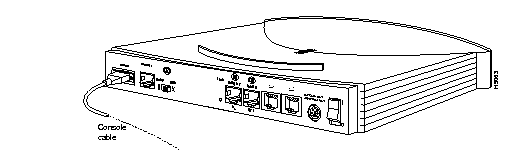
Step 2 Connect the other end of the console cable to a console terminal (an ASCII terminal or PC). You may need to use the DB-9-to-DB-25 adapter, included with your router.
Before configuring a Cisco 700 series router, you should gather the information listed in Cisco 700 Quick Reference Guide. This information is commonly available from the ISDN BRI service provider (telephone company) and the network administrator of the central site network or internet service provider.
In North America, Cisco 700 series routers access ISDN lines through a network termination (NT-1) device. Cisco 762, Cisco 766, Cisco 772, and Cisco 776 routers have a built-in NT-1 capability, so you can connect these routers directly to the line. If you are using a Cisco 700 series router without built-in NT-1 capability, obtain an NT-1 device, connect the NT-1 device to the line, and connect the Cisco 700 series router to the NT-1 device. The procedure is illustrated in the Cisco 700 Quick Reference Guide.
Table 2-1 lists the ISDN port label for each Cisco 700 series router.
Table 2-1: ISDN BRI Port Labels
| Label
| Router
|
|---|
| ISDN U
| Cisco 762, Cisco 766, Cisco 772, and Cisco 776
|
| ISDN S/T
| Cisco 761, Cisco 765, Cisco 771, and Cisco 775
|
Table 2-2 indicates which type of ISDN BRI cable you should use.
Table 2-2: ISDN BRI Cables
| Interface Type
| Cable
|
|---|
| ISDN U
| RJ-45-to-RJ-45 or RJ-11-to-RJ-45
|
| ISDN S/T
| From the ISDN wall jack to the NT-1, use either RJ-11-to-RJ-11 or RJ-45-to-RJ-45
From the NT-1 to the router ISDN interface, use RJ-45-to-RJ-45
|
The distance limitations for the ISDN BRI cable are listed in Table 2-3.
Table 2-3: ISDN BRI Cable Specifications
| Specification
| High-Capacitance Cable
| Low-Capacitance Cable
|
|---|
| Resistance (@ 96 kHz1)
| 160 ohms/km
| 160 ohms/km
|
| Capacitance (@ 1 kHz)
| 120 nF2/km
| 30 nF/km
|
| Impedance (@ 96 kHz)
| 75 ohms
| 150 ohms
|
| Wire diameter
| 0.024 inches (0.6 mm)
| 0.024 inches (0.6 mm)
|
| Distance limitation
| 32.8 feet (10 m)
| 32.8 feet (10 m)
|
1
kHz = kilohertz.
2
nF = nanoFarad.



