


|
|

This appendix describes how to troubleshoot the access server by referring to the LEDs on the chassis, feature cards, and modules.
Refer to the appropriate illustration for the location of the LEDs:
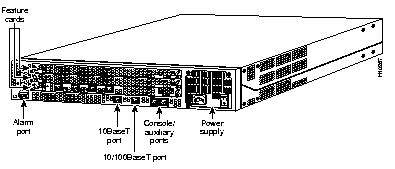



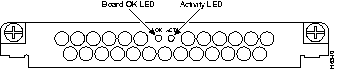

The LEDs indicate the current operating condition of the access server. You can observe the LEDs, note any fault condition that the product is encountering, and then contact your system administrator or a customer service representative, if necessary. Refer to Table B-1 for a description of the LEDs.
| Chassis/Card | LED | State | Description |
|---|---|---|---|
| Access server chassis | Alarm | On | An alarm error has been detected. |
| Ethernet | Flickering Off | The Ethernet LAN connection is transmitting and receiving data normally.
The Ethernet LAN connection is not transmitting or receiving data. Check the Ethernet cable connections. | |
| System Status (Located to right of Console/Auxiliary ports) | Off
On Blinking | Power is off or system has not booted.
System is operating normally. A memory failure has occurred. | |
| Quad T1/PRI card | Activity (ACT) | Flickering | The CSU/DSU in the card is communicating with a remote CSU/DSU. |
| Board OK (OK) | On | The T1/PRI card has passed initial power up diagnostics tests and is operating normally. | |
| Loopback (LB) | On | A local or remote loopback diagnostic test is running on the associated T1 port. | |
| Monitor (MON) | On | Using the MON SEL switch, the signals to/from the associated T1 port have been switched to the bantam jacks for test purposes. Only one port can be selected for monitoring.
Normally, none of the MON LEDs should be on. | |
| Remote Alarm (RA) | On | An alarm has been received on the associated T1 port, indicating loss of signal (LOS) or loss of multi-frame alignment (OOF) at the remote node. | |
| Local Alarm (LA) | On | The associated T1 port has detected loss of signal (LOS) or loss of multi-frame alignment (OOF) errors on the local node. | |
| Quad E1/PRI card | Activity (ACT) | Flickering | The CSU/DSU in the card is communicating with a remote CSU/DSU. |
| Board OK (OK) | On | The E1/PRI card has passed initial power up diagnostics tests and is operating normally. | |
| Loopback (LB) | On | A local or remote loopback diagnostic test is running on the associated E1 port. | |
| Impedance (120) | On | Port is configured for 120-ohm line termination. If Off, port is configured for 75-ohm line termination. | |
| Remote Alarm (RA) | On | An alarm has been received on the associated E1 port, indicating loss of signal (LOS) or loss of multi-frame alignment (OOF) at the remote node. | |
| Local Alarm (LA) | On | The associated E1 port has detected loss of signal (LOS) or loss of multi-frame alignment (OOF) errors on the local node. | |
| MICA carrier card | Activity (ACT)
| Flickering | There is modem call activity on the MICA modem module cards. |
| Off | There is no modem call activity on the MICA modem module cards. | ||
| Board OK (OK) | One flash | The card is powering up. | |
| On | The card has passed initial power up diagnostics tests and is operating normally. | ||
| Off | A fault condition has occurred. | ||
| 12-port modules1 | Activity (ACT) | Flickering | There is transmit activity on one (or more) modems on this module. |
| Board OK (OK) | On | The card has passed the initial power ON diagnostic tests and is operating normally. | |
| Off | A fault condition is present on the card. |
If a T1 controller does not come up, or there is a large number of errors associated with a particular controller, you might be able to determine whether the problem is in the quad T1/PRI card or in an external T1 line by using the bantam jacks. A rotary switch at the front of the T1/PRI card selects which of the four T1 lines are to be monitored/inspected. The LED labeled MON indicates which T1 line is connected to the bantam jacks.
External test equipment, such as a bit error rate tester, can be used to inject data into the TX IN jack and receive data from the RX OUT jack with the remote location in loop back. This would be an invasive test that would disrupt connections on that T1 port. Another example is to use passive monitoring equipment that can listen on the TX MON and RX MON jacks during regular operation to detect T1 errors.
Connecting test equipment to the following Bantam jacks provides various functions:
For information about isolating problems with the network connections to your access server, refer to the publication Troubleshooting Internetworking Systems available on the Cisco Documentation CD-ROM that shipped with the Cisco AS5300. For more information, see the section "Additional Documentation" in "About This Guide."
For information about technical support, onsite service, and exchange and repair services, refer to the Cisco Information Packet that shipped with the Cisco AS5300 universal access server.
|
|