The installation process in this section is for experienced installers only. For additional quick installation information, see the instructions in the "Quick Hardware Installation" section of this guide. For detailed installation instructions, refer to the Catalyst 5000 Series Installation Guide and the Catalyst 5000 Series Module Installation Guide.
| Caution Electrostatic discharge (ESD) can damage equipment and impair electrical circuitry. Always ensure that the chassis is electrically connected to earth ground. Wear an ESD-preventive wrist or ankle strap connected to the chassis when handling modules or coming into contact with internal components.
|

Catalyst 5002:
- Attach the L brackets to the chassis.
- If the chassis is too heavy to lift into position, remove the modules from the chassis.
- Position the chassis in the rack and align the mounting holes.
- Secure the chassis in the rack.
- If removed during rack-mounting, reinstall the modules in the chassis.

Catalyst 5000/5505:
- Attach the L brackets to the chassis.
- Attach the cable guide to the chassis, if desired.
- If the chassis is too heavy to lift into position, remove the modules and power supplies from the chassis.
- Position the chassis in the rack and align the mounting holes.
- Secure the chassis in the rack.
- If removed during rack-mounting, reinstall the modules and power supplies in the chassis.

Catalyst 5500:
- Attach the shelf brackets and crossbar bracket to the rack.
- Attach the L brackets to the chassis.
- Attach the cable guide to the chassis, if desired.
- If the chassis is too heavy to lift into position, remove the modules and power supplies from the chassis.
- Position the chassis on the shelf brackets and align the mounting holes.
- Secure the chassis in the rack.
- If removed during rack-mounting, reinstall the modules and power supplies in the chassis.
This procedure applies to all Catalyst 5000 series switch models.
- Connect the supervisor engine to the network:
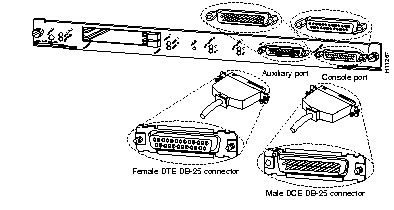
- Connect a terminal or other device to the supervisor console port.
- Connect the supervisor uplink ports to the network.
- Connect the modules to the network:
- Ethernet and Fast Ethernet
- FDDI/CDDI
- ATM LANE and ATM DS3
- Route Switch Module (RSM)
- (Catalyst 5500 only) LightStream 1010 ATM Switch Processor (ASP)
|
| Warning Before you work on any equipment, be aware of the hazards involved with electrical circuitry and be familiar with standard practices for preventing accidents.
|
Catalyst 5002:
- Ensure that all modules and network cables are securely installed.
- Attach each power cable to a separate grounded outlet.
- Do not connect the power cables to the power supplies until you are ready to boot the system.
Catalyst 5000/5505:
AC Power Supply (Catalyst 5000 and 5505):
- Ensure that all power supplies, modules, and network cables are securely installed.
- Connect an AC power cable to each power supply.
- Attach each power cable to a separate grounded outlet.
DC Power Supply (Catalyst 5000 only):
- Ensure that all power supplies, modules, and network cables are securely installed.
- Ensure that power is OFF to the DC circuit.
- For each power supply, remove the terminal block cover and attach the proper DC-input wires. Make sure each power supply is attached to a separate grounded circuit.
- Replace the terminal block cover.
- Connect the switch to the central office (CO) ground through the CO ground connector.
- Restore power to the DC circuit.

Catalyst 5500:
AC Power Supply:
- Ensure that all power supplies, modules, and network cables are securely installed.
- Connect an AC power cable to each power supply.
- Attach each power cable to a separate grounded outlet.
DC Power Supply:
- Ensure that all power supplies, modules, and network cables are securely installed.
- Ensure that power is OFF to the DC circuit.
- For each power supply, remove the terminal block cover and attach the proper DC-input wires. Make sure each power supply is attached to a separate grounded circuit.
- Replace the terminal block cover.
- Connect the switch to the central office (CO) ground through the CO ground connector.
- Restore power to the DC circuit.
This procedure applies to all Catalyst 5000 series switch models.
- Before you start the system, verify the following:
- All modules and network cable connections are securely installed.
- Each power supply is properly installed and is connected to a separate grounded circuit.
- Turn the power supplies ON (|). (For the Catalyst 5002, attach the power cables to the power supplies to provide power to the switch.) The switch begins the boot process.
- During the boot process:
- The Power supply, PS1, PS2, and Fan LEDs should be green.
- The System Status LED on the supervisor should be green after the boot is complete.
- The supervisor interface LEDs and module LEDs might blink or stay lit continuously during the boot process. Many module LEDs do not come on until you configure the interfaces.
- The console screen displays a script and system banner.
- Press Return at the Enter Password prompt to access the console command line.
- Proceed to the "Quick Software Configuration" section to configure your Catalyst 5000 series switch.



