


|
|

This chapter describes the tasks you must perform before you begin to install the Cisco 3800 Expansion Router Module (ERM), and includes the following sections:
In addition, follow these guidelines to ensure general safety:
 | Warning Ultimate disposal of this product should be handled according to all national laws and regulations. |
Follow these guidelines when working on equipment powered by electricity.
| Warning Before working on equipment that is connected to power lines, remove jewelry (including rings, necklaces, and watches). Metal objects will heat up when connected to power and ground and can cause serious burns or weld the metal object to the terminals. |
| Warning Before working on a chassis or working near power supplies, unplug the power cord on AC units; disconnect the power at the circuit breaker on DC units. |
| Warning Do not touch the power supply when the power cord is connected. For systems with a power switch, line voltages are present within the power supply even when the power switch is OFF and the power cord is connected. For systems without a power switch, line voltages are present within the power supply when the power cord is connected. |
| Warning Read the installation instructions before you connect the system to its power source. |
Electrostatic discharge (ESD) can damage equipment and impair electrical circuitry. It occurs when electronic components are improperly handled and can result in complete or intermittent failures.
Always follow ESD-prevention procedures when removing and replacing components. Ensure that the chassis is electrically connected to earth ground. Wear an ESD-preventive wrist strap, ensuring that it makes good skin contact. Connect the clip to an unpainted surface of the chassis frame to safely channel unwanted ESD voltages to ground. To properly guard against ESD damage and shocks, the wrist strap and cord must operate effectively. If no wrist strap is available, ground yourself by touching the metal part of the chassis.
 | Caution For safety, periodically check the resistance value of the antistatic strap, which should be between 1 to 10 megohms (Mohms). |
This section describes the requirements your site must meet for safe installation and operation of your system. Ensure that your site is properly prepared before beginning installation.
The Cisco 3800 ERM is installed in the Cisco 3800 chassis. Refer to the publication Cisco 3800 Series Hardware Installation Guide for installation considerations. The location of the Cisco 3800 and the layout of your equipment rack or wiring room are extremely important for proper system operation. Equipment placed too close together, inadequate ventilation, and inaccessible panels can cause system malfunctions and shutdowns, and can make Cisco 3800 ERM maintenance difficult.
Check the power at your site to ensure that you are receiving "clean" power (free of spikes and noise). Install a power conditioner if necessary.
| Warning The device is designed to work with TN power systems. |
The AC power supply of the Cisco 3800 ERM is part of the Cisco 3800 chassis. The Cisco 3800 ERM, when installed in the 3800 chassis, receives -48 volts DC power from the backplane.
This product relies on the building's installation for short-circuit (overcurrent) protection. Ensure that a fuse or circuit breaker no larger than 120 VAC, 15A U.S. (240 VAC, 10A international) is used on the phase conductors (all current-carrying conductors).
An insulated grounding conductor identical in size to the grounded and ungrounded branch circuit supply conductors must be installed as part of the branch circuit that supplies the device.
| Warning Never defeat the ground conductor or operate the equipment in the absence of a suitably installed ground conductor. Contact the appropriate electrical inspection authority or an electrician if you are uncertain that suitable grounding is available. |
In addition to the safety ground, the Cisco 3800 chassis must be grounded to the local ground using the rack-mounting bracket or its frame bonding connections.
The Installation Checklist lists the procedures for initial hardware installation of a new Cisco 3800 ERM. Make a copy of this checklist and mark the entries as you complete each procedure. Include a copy of the checklist for each system in your Site Log. (See the next section, "Creating a Site Log.")
Cisco 3800 ERM installation checklist for site _________________________________________
| Task | Verified by | Date |
| Installation checklist copied | ||
| Background information placed in the Site Log | ||
| Site power voltages verified | ||
| Required tools available | ||
| Additional equipment available | ||
| Cisco 3800 ERM received | ||
| Cisco Documentation CD received | ||
| Cisco Information Packet received | ||
| Cisco 3800 Expansion Router Module Installation and Configuration Guide (this publication) received | ||
| Optional printed documentation received | ||
| Chassis components verified | ||
| Initial electrical connections established | ||
| ASCII terminal or PC attached to console port | ||
| Signal distance limits verified | ||
| Startup sequence steps completed | ||
| Initial system operation verified | ||
| Software image verified |
The Site Log provides a record of all actions relevant to the Cisco 3800 ERM. Keep it near the chassis where anyone who installs or maintains the Cisco 3800 ERM has access to it. Use the Installation Checklist (see the previous section, "Installation Checklist") to verify steps in the installation and maintenance of your Cisco 3800 ERM. Site Log entries might include the following:
When setting up your Cisco 3800 ERM in the Cisco 3800, consider distance limitations and potential electromagnetic interference (EMI) as defined by the EIA.
| Warning The Ethernet, Token Ring, serial, console, and auxiliary ports contain safety extra-low voltage (SELV) circuits. |
Before you connect the Cisco 3800 Combo card serial port to the synchronous serial port on the Cisco 3800 ERM, keep in mind the following:
The Cisco 3800 ERM synchronous serial port supports the EIA-530 signaling standard. The EIA-530 standard, which supports balanced transmission, provides the increased functionality, speed, and distance of EIA/TIA-449 on the smaller, DB-25 connector used for EIA/TIA-232, instead of the 37-pin connector used for EIA/TIA-449. Like EIA/TIA-449, EIA-530 refers to the electrical specifications of EIA/TIA-422 and EIA/TIA-423. Although the specification recommends a maximum speed of 2 Mbps, EIA-530 is used successfully at 4 Mbps or faster speeds over short distances.
Figure 2-1 shows the serial transition cable you use to connect the serial port on the ERM with a serial port on the Combo card.
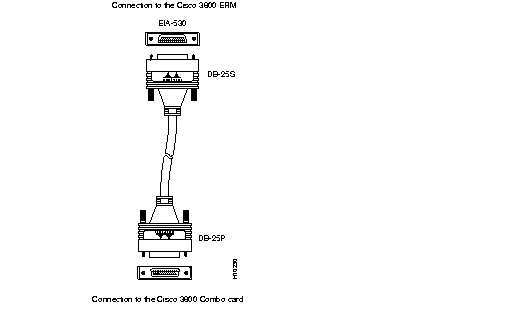
The EIA-530 DCE serial transition cable which comes with the Cisco 3800 ERM is straight-through with all pins connected. The network end (Combo card end) of the EIA-530 transition cable is a standard DB-25P (male) plug commonly used for EIA/TIA-232 connections. The end that connects to the serial port on the ERM has a DB-25S (female) connector, as shown in Figure 2-2.

The IEEE has established Ethernet as standard 802.3. The Cisco 3800 ERM Ethernet implementation is as follows:
The cables required to connect the Cisco 3800 ERM to an Ethernet network are not included. For cable ordering information, contact customer service. Refer to the section "Ethernet Cable Assembly and Pinouts" in the appendix "Cable Specifications."
The IEEE has established Token Ring as standard 802.5. The distance limitations for the IEEE 802.5 specification indicate a maximum segment distance of 328 feet (100 meters) for UTP cabling. The distance limitation is 1,640 feet (500 meters) for shielded twisted-pair (STP) cabling.
Token Ring can operate at two different ring speeds: 4 and 16 Mbps. All devices on the ring must agree on the operating speed.
Use a Token Ring lobe cable to connect the Cisco 3800 ERM to a media attachment unit (MAU). The lobe cable and MAU are not included with the Cisco 3800 ERM. Refer to the section "Token Ring Port Pinouts" in the appendix "Cable Specifications" for the Token Ring port pinouts.
The Cisco 3800 ERM includes asynchronous serial console and auxiliary ports. The console and auxiliary ports provide access to the Cisco 3800 ERM either locally (with a console terminal) or remotely (with a modem). This section discusses important cabling information to consider before connecting a console terminal (an ASCII terminal or PC running terminal emulation software) to the console port or a modem to the auxiliary port.
The main difference between the console and auxiliary ports is that the auxiliary port supports hardware flow control and the console port does not. Flow control paces the transmission of data between a sending device and a receiving device and ensures that the receiving device can absorb the data sent to it before the sending device sends more. When the buffers on the receiving device are full, a message is sent to the sending device to suspend transmission until the data in the buffers has been processed. Because the auxiliary port supports flow control, it is ideal for use with the high-speed transmissions of a modem. Console terminals transmit at slower speeds than modems, so the console port is ideal for use with console terminals.
The Cisco 3800 ERM includes an EIA/TIA-232 asynchronous serial console port (RJ-45). Depending on the cable and the adapter used, this port will appear as either a DTE or DCE device at the end of the cable. Cables and adapters are included with the Cisco 3800 ERM to connect a console terminal (an ASCII terminal or PC running terminal emulation software) to the console port. To connect an ASCII terminal to the console port, use the RJ-45 rollover cable with the female RJ-45-to-DB-25 adapter (labeled Terminal). To connect a PC running terminal emulation software to the console port, use the RJ-45 rollover cable with the female RJ-45-to-DB-9 adapter (labeled Terminal). The default parameters for the console port are 9600 baud, 8 data bits, no parity, and 2 stop bits.
The console port does not support hardware flow control. For detailed information about installing a console terminal and modem, see the sections "Connecting a Terminal or PC to the ERM Console Port" and "Connecting a Modem to the Auxiliary Port" in the chapter "Installing the Cisco 3800 ERM." See the appendix "Cable Specifications" for cable and port pinouts.
The Cisco 3800 ERM includes an EIA/TIA-232 asynchronous serial auxiliary port (RJ-45) that supports flow control. Depending on the cable and the adapter used, this port will appear as either a DTE or DCE device at the end of the cable. A cable and an adapter are included with the Cisco 3800 ERM to connect a modem to the auxiliary port. To connect a modem to the auxiliary port, use the RJ-45 rollover cable with the male RJ-45-to-DB-25 adapter (labeled Modem). For detailed information about connecting devices to the auxiliary port, see the section "Connecting a Modem to the Auxiliary Port" in the chapter "Installing the Cisco 3800 ERM." See the appendix "Cable Specifications" for cable and port pinouts.
|
|