


|
|

This chapter describes the NPC processor, associated back cards, and related functions.
The chapter contains the following:
The processor group consists of the Nodal Processor Card (NPC), the System Clock Card (SCC), the Lower Expansion Card (LEC), and the System Bus. This card group controls overall IPX communication via the System bus between the central processor and other cards and communication between all the nodes in the network. System timing, network control, and status reporting functions are also performed by the processor group.
The NPC is a microprocessor-based system controller. This front card contains the software for controlling, configuring, diagnosing, and monitoring the IPX. It also maintains the alarm and event logs. The NPC controls statistics gathering and communicates with the other plug-in system cards over the control bus.
In addition to communicating with cards on the node in which it resides, the NPC communicates with other IPX, IGX, and BPX nodes. For this, the NCC uses a reserved, low-speed data link on a trunk. The NPC's communication link with other IPX nodes is used for rerouting, sending signalling information, information on new connections, and topology changes when new nodes are added or removed.
In general, the NPC:
The NPC can serve in redundant or non-redundant node configurations and is installed in the shelf slots reserved for the active and standby NPC cards. The back card used with the NPC can be either an SCC or an SCC-B. If an Ethernet connection is required (e.g., connection to StrataView Plus) The SCC-B is required.
NPC memory can expand up to the following limits. This is a factory upgrade:
The RS-232 ports support connections to network management terminals and modems. The modems are for remote access to the node.
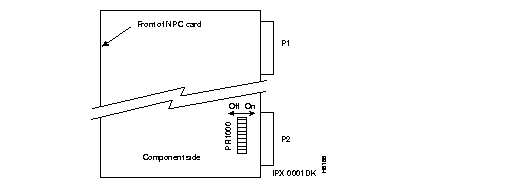
When an NPC card is used with the SCC-B card to utilize the Ethernet port, the implementation switches on the NPC card must be set to ON. When the NPC is not used with the SCC-B card, the switch must be Off. The switch (in an 8-switch DIP) is located next to the lower connector (P2) on the NPC card. The DIP is identified by the silkscreened "RP1000." See Figure 2-1 for switch location.
The front panel of the NPC has a green ACTIVE LED and a red FAIL LED. The NPC monitors its own activity and, if it detects a failure, lights the FAIL LED. If the NPC is configured for redundancy, the on-line NPC is indicated by the lit ACTIVE LED. The standby NPC has no lit indicators. The state of any NPC can also be determined with the dspcd command.
The SCC-B is installed with the NPC in nodes and provides a centralized clock generation function for the IPX. It also provides modem and printer interfaces and an Ethernet interface. The SCC-B can be used prior to Release 8.2 with the PCC, but this combination does not provide the Ethernet LAN port.
The software and hardware requirements for the SCC-B are:
The SCC-B uses an Attachment Unit Interface (AUI) connector in place of the RMU connector on the SCC faceplate. The AUI is a 15-pin sub miniature connector (DB-15).
The Ethernet port circuitry is on the NPC. Therefore, the SCC-B is required for the NPC to use Ethernet. When an SCC-B card is used with an NPC, the utility bus for the IPX 8 and IPX 16 must be the dual-slot version. This two-slot wide bus adds several traces for routing the Ethernet connection between the NPC and SCC-B. For redundant NPC applications, the traces carrying the Ethernet signal from the two NPC cards are bridged on the SCC-B card to provide port redundancy for the circuitry. See Figure 2-2.
Two configurations of the SCC-B with the NPC are possible. One is for either an IPX 8 or IPX 16. These single-shelf nodes have an SCC-B and a dual-slot utility bus. The dual utility bus supports single or redundant NPCs. The other configuration is an IPX 32 node with an upper and a lower shelf. It comes with an SCC-B for the upper shelf, an LEC for the lower shelf, and two single-width utility buses--one for each shelf. An existing IPX 32 does not require a change in NPC utility buses. Table 2-1 shows model numbers, and Table 2-2 shows AUI pin assignments.
| Utility Bus | Model No. | Used With | Qty. | Comments |
|---|---|---|---|---|
| Dual | 550058 | IPX 8 /16, single shelf | 1 | Used with NPC and SCC-B |
| Single | 550059 | IPX 32, dual shelf | 2 | Used with NPC, SCC-B, LEC |
| Pin | Name | Pin # | Name |
|---|---|---|---|
| 1 | Shield | - | - |
| 2 | Collision Presence + | 9 | Collision Presence-- |
| 3 | XMT + | 10 | XMT-- |
| 4 | Reserved | 11 | Reserved |
| 5 | RCV + | 12 | RCV-- |
| 6 | Power return | 13 | Power (+12V) |
| 7 | Reserved | 14 | Reserved |
| 8 | Reserved | 15 | Reserved |
The SCC-B connectors and indicators are shown in Figure 2-2 and described in Table 2-3.
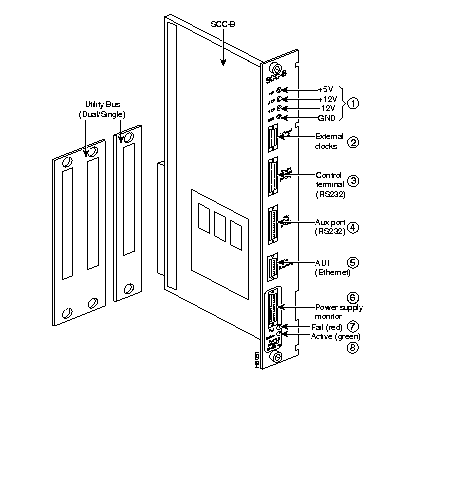
| No. | Connector/Indicator | Function |
|---|---|---|
| 1. | +5, -12, +12, GND | Test points to measure power supply voltages. |
| 2. | EXTERNAL CLOCKS | DB15 connector for connecting a primary and optional redundant external source of system clock. |
| 3. | CONTROL TERMINAL (RS-232) | A DB25 connector for connecting a VT100 or equivalent terminal for an operator control terminal. Can also be used for dial-in modem. This is a bi-directional port. |
| 4. | AUX. PORT (RS-232) | A DB25 connector for connecting a system printer. Can also be used for out-dial modem. This is a one-way, outgoing port. |
| 5. | AUI | DB15 Attachment Unit Interface (AUI) for Ethernet LAN connection. |
| 6. | POWER SUPPLY MONITOR | A system connection to the power supplies so that they can be monitored by circuits inside the SCC. |
| 7. | FAIL light (red) | Indicates that the card has failed. |
| 8. | ACTIVE light (green) | Indicates an active and normally functioning card. |
The System Clock Card (SCC) card provides a centralized clock generation function for the IPX. It generates the system clock and trunk synchronizing clocks. The SCC phase-locks the internal IPX timing to the selected clock source for network synchronization. Each IPX node must have an SCC.
The SCC is a back card that plugs directly into the NPC card in slot 1. The NPC and SCC card set are the backbone of the IPX system. The NPC controls and monitors the SCC control buses. A single SCC can support redundant NPCs.
The SCC circuits include of the following:
The SCC has duplicates of the internal clock circuitry and its associated phase lock loops and NPC-related control circuitry. One operates off the System A Bus, and the other operates off the System B Bus. Both circuits are independent and are monitored separately to provide complete backup if a circuit fails (FAIL lamp comes on). However, since both the System A bus and System B bus clock circuits exist on a single card, removing the SCC disrupts system operation. The lower priority SCC circuits are not duplicated. The lower priority circuits are the external clock inputs, control and auxiliary ports, and monitoring circuits for power supplies, cabinet temperature, fan detection, and fan speed. A failure in a lower priority circuit does not cause a system failure, but the SCC reports the problem.
The DB-15 connector labeled Ext Clocks on the faceplate of the SCC connects two external sources for a high-stability clock (primary and redundant). These inputs are 1.544 MHz for T1 systems and 2.048 MHz for CEPT systems. In addition, one of the trunk or circuit line inputs may also serve as a source of timing for the node. If no clock source is selected, the clock source is the internal IPX clock.
Refer to Figure 2-3 and Table 2-4 for details on the SCC faceplate. When correlating the descriptions in the table with the callouts in the figure, read from the top down.
In addition to the clock functions, the SCC provides a pair of low-speed, serial communications ports. The first port (CONTROL TERMINAL) is a bi-directional port used for connecting the IPX to a local network control terminal or to a modem for remote terminal connection. The second port connects to a maintenance log printer or to an auto-dial modem for automatic reporting of local IPX alarm conditions. This modem can be programmed to dial Customer Service for assistance when a network alarm occurs
 | Caution Switching NPCs results in a temporary malfunction of the clock signals for the node and, if the node is distributing the primary clock, the network. |
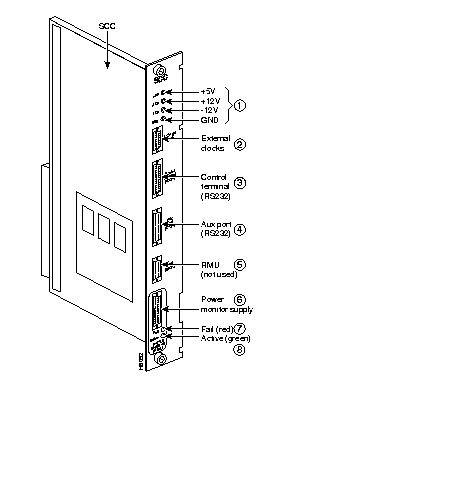
| No. | Connector/Indicator | Function |
|---|---|---|
| 1. | +5, -12, +12, GND | Test points to measure power supply voltages. |
| 2. | EXTERNAL CLOCKS | DB15 connector for connecting a primary and optional redundant external source of system clock. |
| 3. | CONTROL TERMINAL
(RS-232) | A DB25 connector for connecting a VT100 or equivalent terminal for an operator control terminal. Can also be used for dial-in modem. This is a bi-directional port. |
| 4. | AUX. PORT
(RS-232) | A DB25 connector for connecting a system printer. Can also be used for out-dial modem. This is a one-way, outgoing port. |
| 5. | RMU | Not used. |
| 6. | POWER SUPPLY MONITOR | A system connection to the power supplies so the supplies can be monitored by circuits on the SCC. |
| 7. | FAIL light (red) | Indicates that the card has failed. |
| 8. | ACTIVE light (green) | Indicates that the card is active and functioning normally. |
|
|