


|
|

After installing the Cisco 2518 and connecting a terminal or PC to the EIA/TIA-232 port on the management card, configure the Cisco IOS software.
The following procedures are required to configure the Cisco 2518 router card, and are explained in more detail later in this chapter:
Table 4-1 lists console commands used by the router/hub.
Table 4-1 Console Commands Used by the Router/Hub
| Key Sequence or Command | Action |
|---|---|
| Ctrl-E | Stops the SNMP agent and displays the <<C>> prompt. |
| Ctrl-Q | Exits the router program |
| hellottt | Wakes up the SNMP agent |
| agent | Restarts the SNMP agent |
| reset | Resets the network management card |
| router | Connects to the router card |
Connect a terminal or PC to the EIA/TIA-232 console port of the management card as described in the chapter "Installing the Router/Hub."
This section describes the following procedures:
You should follow the procedure that best fits the needs of your network configuration.
If you do not plan to use AutoInstall, do not connect the router card's serial (WAN) cable to the CSU/DSU or the router card itself. This will prevent the router card from attempting to run the AutoInstall process. The router card will attempt to run AutoInstall whenever you start it if the serial (WAN) connection is connected on both ends and the router card does not have a configuration stored in NVRAM.
It can take several minutes for your router card to determine that AutoInstall is not set up on a remote TCP/IP host. After the router card determines that AutoInstall is not configured, it will default to the setup routine. If the serial (WAN) cable is not connected, the router card will boot from Flash memory and go into the setup routine.
When you have booted from Flash memory, the following information appears after about 30 seconds.
<<C>>router
<<C>>ttt -c4 -i -r -q17
Terminal Emulation Facility. v.1.9.
Loading 103-2.0.2 at 0x3000040, size = 5407432 bytes [OK]
F3: 5280172+127228+269448 at 0x3000060
        Restricted Rights Legend
Use, duplication, or disclosure by the Government is
subject to restrictions as set forth in subparagraph
(c) of the Commercial Computer Software - Restricted
Rights clause at FAR sec. 52.227-19 and subparagraph
(c) (1) (ii) of the Rights in Technical Data and Computer
Software clause at DFARS sec. 252.227-7013.

     cisco Systems, Inc.
     170 West Tasman Drive
     San Jose, California 95134-1706
Cisco Internetwork Operating System Software
IOS (tm) 3000 Software (IGS-J-L), Version 10.3(2.0.2)
Copyright (c) 1986-1995 by cisco Systems, Inc.
Compiled Tue 21-Mar-95 12:57 by deannaw
Image text-base: 0x0302CACC, data-base: 0x00001000
cisco AP-EBC (68030) processor (revision A) with 4092K/2048K bytes
of memory.
Processor board serial number 01708657
SuperLAT software copyright 1990 by Meridian Technology Corp).
TN3270 Emulation software (copyright 1994 by TGV Inc).
X.25 software, Version 2.0, NET2, BFE and GOSIP compliant.
Bridging software.
Basic Rate ISDN software, Version 1.0.
Authorized for Enterprise software set.  (0x0)
1 Ethernet/IEEE 802.3 interface.
2 Serial network interfaces.
1 ISDN Basic Rate interface.32K bytes of non-volatile configuration
memory.
1 PCbus interface.
8192K bytes of processor board System flash (Read ONLY)
Notice: NVRAM invalid, possibly due to write erase.
   --- System Configuration Dialog ---
At any point you may enter a question mark '?' for help.
Refer to the 'Getting Started' Guide for additional help.
Use ctrl-c to abort configuration dialog at any prompt.
Would you like to enter the initial configuration dialog? [yes]: yes
First, would you like to see the current interface summary? [yes]: yes
Any interface listed with OK? value "NO" does not have a valid
configuration

Interface    IP-Address     OK?   Method    Status         Protocol
BRI0         unassigned    NO    not set   up                 up
PCbus0       unassigned    NO    not set   down             down
Serial0      unassigned    NO    not set   down             down
Serial1      unassigned    NO    not set   down             down
Ethernet0    unassigned    NO    not set   reset            down
Configuring global parameters:

  Enter host name [Router]: c2518
The enable secret is a one-way cryptographic secret used
instead of the enable password when it exists.
  Enter enable secret: 1111
The enable password is used when there is no enable secret
and when using older software and some boot images.
  Enter enable password: 2222
  Enter virtual terminal password: 3333
  Configure SNMP Network Management? [yes]: yes
    Community string [public]: public
  Configure IP? [yes]: yes
    Configure IGRP routing? [yes]: no
    Configure RIP routing? [no]: no
  Configure Vines? [no]: no
  Configure IPX? [no]: yes
  Configure AppleTalk? [no]: no
  Configure Apollo? [no]: no
  Configure DECnet? [no]: no
  Configure XNS? [no]: no
  Configure CLNS? [no]: no
  Configure bridging? [no]: yes
  Configure LAT? [no]: no
  Enter ISDN BRI Switch Type [none]: basic-NTI1
Configuring interface parameters:
Configuring interface BRI0:

Is this interface in use? [yes]: yes
  Configure IP on this interface? [yes]: yes
    IP address for this interface: x.x.x.x
    Number of bits in subnet field [0]: 0
    Class A network is x.x.x.x, 0 subnet bits; mask is 255.0.0.0
  Configure IPX on this interface? [no]: no
  Configure bridging on this interface? [no]: no
Configuring interface PCbus0:
  Is this interface in use? [yes]: yes
  Configure IP on this interface? [yes]: yes
  Configure IP unnumbered on this interface? [no]: no
    IP address for this interface: x.x.x.x
    Number of bits in subnet field [0]: 0
    Class A network is x.x.x.x, 0 subnet bits; mask is 255.0.0.0
  Configure IPX on this interface? [no]: no
  Configure bridging on this interface? [no]: no

Configuring interface Serial0:
  Is this interface in use? [yes]: yes
  Configure IP on this interface? [yes]: yes
  Configure IP unnumbered on this interface? [no]: no
    IP address for this interface: x.x.x.x
    Number of bits in subnet field [0]: 0
    Class A network is 123.0.0.0, 0 subnet bits; mask is 255.0.0.0
  Configure IPX on this interface? [no]: no
  Configure bridging on this interface? [no]: no

Configuring interface Serial1:
  Is this interface in use? [yes]: yes
  Configure IP on this interface? [yes]: yes
  Configure IP unnumbered on this interface? [no]: no
    IP address for this interface: x.x.x.x
    Number of bits in subnet field [0]: 0
    Class A network is x.x.x.x, 0 subnet bits; mask is x.x.x.x
  Configure IPX on this interface? [no]: no
  Configure bridging on this interface? [no]: no
Configuring interface Ethernet0:
  Is this interface in use? [yes]: yes
  Configure IP on this interface? [yes]: yes
    IP address for this interface: x.x.x.x
    Number of bits in subnet field [0]: 0
    Class A network is x.x.x.x, 0 subnet bits; mask is 255.0.0.0
  Configure IPX on this interface? [no]: yes
    IPX network number [5]: 5
  Configure bridging on this interface? [no]: yes
The following configuration command script was created:
hostname c2518
enable secret 1111
enable password 2222
line vty 0 4
password 3333
snmp-server community cisco
!
ip routing
no vines routing
ipx routing
no appletalk routing
no apollo routing
no decnet routing
no xns routing
no clns routing
bridge 1 protocol dec
!
interface BRI0
no ipx network

interface PCbus0
no ipx network
interface Serial0
no ipx network
interface Serial1
no ipx network
interface Ethernet0
no ipx network
isdn switch-type nti
!
interface BRI0
ip address x.x.x.x 255.0.0.0
ipx network 1
bridge-group 1
!
interface PCbus0
ip address x.x.x.x 255.0.0.0
!
interface Serial0
ip address x.x.x.x 255.0.0.0
!
interface Serial1
ip address x.x.x.x 255.0.0.0
!
interface Ethernet0
ip address x.x.x.x 255.0.0.0
ipx network 5
bridge-group 1
!
end
Use this configuration? [yes/no]: yes
Password: ****
c2518# config t
c2518(config)# int pcbus 0
c2518(config)# no shut
c2518(config-if)Ctrl-Z
c2518(boot)# copy running-config startup-config
#######
The router is now configured.
The AutoInstall process is designed to configure the router card automatically after connecting to your wide-area network (WAN). For AutoInstall to work properly, a Transmission Control Protocol/Internet Protocol (TCP/IP) host on your network must be preconfigured to provide the required configuration files. The TCP/IP host may exist anywhere on the network if the following two conditions are maintained:
This functionality is coordinated by your system administrator at the site where the TCP/IP host is located. Do not attempt to use AutoInstall unless the required files have been provided on the TCP/IP host.
To prepare your router card for the AutoInstall process:
Figure 4-1 BRI Port---RJ-45 Female Connector


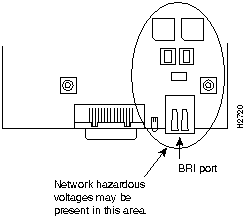
Figure 4-2 Network Hazardous Voltage Area Near the BRI Port
The router card will send a Serial Line Reverse Address Resolution Protocol (SLARP) packet over the serial line. When the packet reaches the opposite end of the WAN connection, the remote router will reply with the IP address of its serial interface. The router card will increment the serial interface address by one and assign this address to its own serial interface. This process will take approximately one minute.
After the serial interface on the router card has been assigned a valid serial interface IP address, it will resolve its host name. It will send a Trivial File Transfer Protocol (TFTP) request on the serial line for the configuration file called network-confg. If the TCP/IP host responds with this file, AutoInstall will search the file's contents for the host name associated with its IP address.
If the TCP/IP host does not respond with the network-confg file, AutoInstall will broadcast a reverse domain name server (DNS) request containing the IP address for the router card's serial port that it was assigned over the network. If the DNS services have been set up, AutoInstall will resolve the router card's name from this file. After the IP address and host name have been found, AutoInstall will broadcast a TFTP request to the TCP/IP host for the file called hostname-confg. If this file has been set up by the system administrator, it will be downloaded automatically to the router card's memory, completing the configuration.
If the AutoInstall completed successfully, you still need to write the configuration data to the router card's nonvolatile random-access memory (NVRAM) and reset the configuration registers. Perform the following steps to complete these tasks:
Hostname> enable
Password:*******
c2518(boot)# copy running-config startup-config
You can check the value of these settings by entering the show version command at the Hostname# prompt:
Hostname# show version
.
.
.
configuration register is 0x0 (will be 0x2102 at next reload)
If the AutoInstall feature is not set up, or if your router card is unable to locate the appropriate files, you should use the manual configuration with or without the setup utility.
For more information on router software configuration, refer to the following Cisco publications:
Configuration Builder Getting Started Guide
Router Products Getting Started Guide
Router Products Configuration Guide
Router Products Command Reference
Troubleshooting Internetworking Systems (as needed)
To order Cisco Connection Documentation CD-ROM, Cisco's online library of product information, or printed documentation, refer to the section "Ordering Cisco Documentation," which is in the warranty booklet that accompanied your Cisco 2518.

|
Copyright 1988-1995 © Cisco Systems Inc.