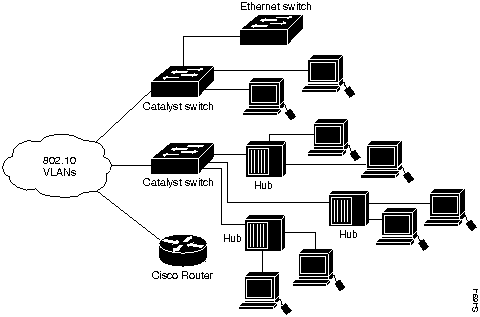
|
|

The Catalyst 5000 series switch provides high-density switched Ethernet and Fast Ethernet for both wiring closet and data-center applications. The switch includes a single, integrated 1.2 gigabit-
per-second (Gbps) switching backplane that supports switched 10-megabit-per-second (Mbps) Ethernet, Ethernet repeater connections, and Switched 100 Mbps Fast Ethernet with backbone connections to Fast Ethernet, Asynchronous Transfer Mode (ATM), Fiber Distributed Data Interface (FDDI), and Copper Distributed Data Interface (CDDI). The Catalyst 5000 series switch provides switched connections to individual workstations, servers, LAN segments, backbones, or other Catalyst 5000 switches using shielded twisted-pair (STP), unshielded twisted-pair (UTP), and fiber-optic cable.
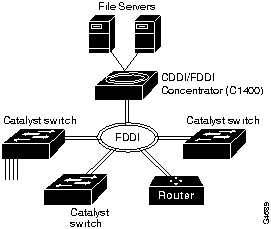
The Catalyst 5000 accommodates up to 96 switched Ethernet interfaces or 192 shared Ethernet interfaces in a standard 19-inch rack. The switch chassis has five slots. The first slot is for the supervisor engine module, which provides Layer 2 switching, local and remote management, and dual Fast Ethernet interfaces. The remaining four slots are for any combination of Ethernet, Fast Ethernet, CDDI/FDDI, and ATM modules. Figure 1-1, Figure 1-2, and Figure 1-3 show examples of configurations that use the Catalyst 5000 series switch.
The use of Layer 2 switching on the Catalyst 5000 prevents unicast packets that are sent between two switched ports from going to all of the other switched ports. Preventing extraneous traffic across switched interfaces increases the bandwidth of all networks.
Typically, the Catalyst 5000 Ethernet interfaces connect workstations and repeaters while the Fast Ethernet interfaces connect to workstations, servers, switches, and routers. The 10/100 BaseTX Fast Ethernet Switching Module supports autosensing and autonegotiation, a process that allows the Catalyst 5000 to negotiate the correct port connection speed (10 or 100 Mbps) and duplex mode (half or full duplex) with an attached device. Fast Ethernet connections can interconnect multiple Catalyst 5000 switches on multiple floors in different buildings of a campus. Fast Ethernet connections can also act as redundant backup links between switches or expand existing Ethernet networks that need additional capacity.
Figure 1-1 : Cascaded Switches Using Fast Ethernet Interfaces
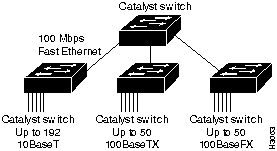
Figure 1-2 : Fast Ethernet As a Backup for ATM Links
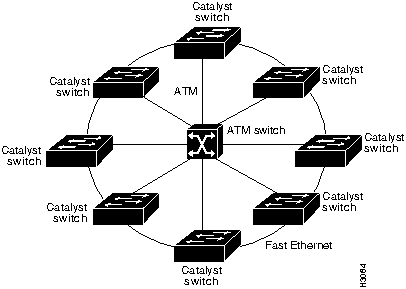
Figure 1-3 : Switches Using an FDDI Backbone
Summarizing Catalyst 5000 Features
The Catalyst 5000 series switch provides the following features:
The Catalyst 5000 architecture is based on high-speed switching network principles, using a queuing model for input and output. Each Catalyst 5000 port maintains its own frame buffer memory. Each frame is stored in a frame buffer before it is forwarded to the next port.
The switch uses central bus arbitration and address recognition logic for all modules. Frame copies are not required for high-speed broadcast and multicast frame forwarding. The switching bus resides on the backplane, operating at 1.2 Gbps, using a 48-bit-wide bus with a 25-MHz clock. Each module port has direct access to the bus through the 192-pin Future Bus connector of each backplane slot. The bus supports a three-level priority request scheme through the bus arbiter. It allows each port to perform a local flush and maintains a packet retry mechanism for outbound port congestion. Refer to the sections "System Architecture" and "Packet Data Flow" in the Catalyst 5000 Series Installation Guide for additional information.
The Catalyst 5000 1.2 Gbps media independent backplane provides wire-speed connections for all ports. It can support the following interface and network types:
Encoded Address Recognition Logic (EARL)
Encoded address recognition logic (EARL) is a custom Catalyst 5000 component similar to the learning bridge or content-addressable memory (CAM) of other types of network switches and routers. The Catalyst 5000 EARL automatically learns up to 16,000 source MAC addresses and saves them in a RAM address table with virtual LAN (VLAN) and port information. The EARL uses learned entries as destination addresses (DAs) and directs packets using port information contained in the DAs.
Bus arbitration and EARL are shared among all ports. Together they control the destination of packet transfers and access to the data switching bus.
The Catalyst 5000 supports wire-speed, single-stream 10 Mbps Ethernet and 100Mbps Fast Ethernet packet transmission for packet sizes from 64 bytes to 1500 bytes. The switch supports wire-speed, multiple-stream 10 Mbps Ethernet traffic throughput with no packet loss when 50 pairs of interfaces are configured.
The Catalyst 5000 supports three levels of priority on the data switching bus to handle an oversubscribed interface. Two of these priority levels are user defined; each interface can be set as either High priority or Normal priority (the default is Normal). To serve time-sensitive traffic such as voice or video, bus arbitration logic is maintained in separate logical queues for each priority class; this guarantees that high-priority queues are served first.
The Catalyst 5000 series switch is designed with the following features for maximum network uptime:
When creating fault-tolerant internetworks, a loop-free path must exist between all nodes in a network. A spanning tree algorithm is used to calculate the best loop-free path throughout a Catalyst 5000 series switched network. Spanning tree packets are sent and received by switches in the network at regular intervals. The packets are not forwarded by the switches participating in the spanning tree, but are instead processed to determine the spanning tree itself. The IEEE 802.1D bridge protocol, called Spanning-Tree Protocol (STP), performs this function for Catalyst 5000 switches.
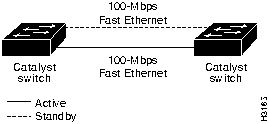
The Catalyst 5000 series switch uses STP on all Ethernet and Fast Ethernet-based virtual local area networks (VLANs). The STP detects and breaks loops by placing some connections in a standby mode, which are activated in the event of a failure. A separate STP runs within each configured VLAN, ensuring legal Ethernet topologies throughout the network.
The supported STP states are as follows:
The state for each VLAN is initially set by the configuration and later modified by the STP process. After the port-to-VLAN state is set, the 802.1D bridge specification determines whether the port forwards or blocks packets. Ports can be configured immediately to enter STP forwarding mode when a connection is made, instead of the usual sequence of blocking, learning, and then forwarding. This is usual in situations where immediate access to a server is required.
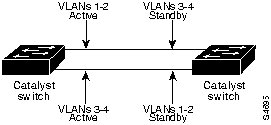
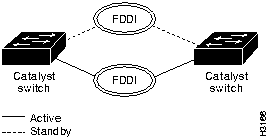
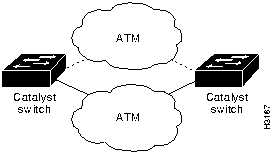
You can design fault-tolerant connections using Ethernet only or Ethernet combined with other topologies. Refer to Figure 1-4, Figure 1-6, and Figure 1-7 for STP examples.
Figure 1-4 : Fault-Tolerant Fast Ethernet Topology Example Figure 1-5 : Fault-Tolerant Fast Ethernet Topology with Increased Capacity Example Figure 1-6 : Fault-Tolerant FDDI Topology Example Figure 1-7 : Fault-Tolerant ATM Topology Example Virtual Local Area Network (VLAN)
A VLAN on a Catalyst 5000 is essentially a broadcast domain. Only end stations within the VLAN receive packets that are unicast, broadcast, and multicast (flooded) from within the VLAN. A VLAN enhances performance by limiting traffic; it allows the transmission of traffic among stations that belong to it, and blocks traffic from other stations in other VLANs. VLANs can provide security barriers (firewalls) between end stations that are connected through the same switch.
A VLAN can also be described as a group of end stations, independent of physical location, with a common set of requirements. For example, several end stations may be grouped as a department, such as engineering or accounting. If the end stations are located in close proximity to one another, they can be grouped into a LAN segment. If any of the end stations are on a different LAN segment, typically located in different buildings or locations, they can be grouped together into a VLAN that has all the same attributes as a LAN even though the end stations are not all on the same LAN segment. The information identifying a packet as part of a specific VLAN is preserved across a Catalyst 5000 connection to a router or other switch.
The VLANs on a Catalyst 5000 simplify adding and moving end stations on a network. For example, when an end station is physically moved to a new location, its attributes can be reassigned from a network management station via SNMP or the command line interface. When an end station is moved within the same VLAN, it retains its previously assigned attributes in its new location. When an end station is moved to a different VLAN, the attributes of the new VLAN are applied to the end station, depending upon the security levels in place.
The IP address of a Catalyst 5000 series switch Network Management Processor (NMP) can be assigned to any VLAN. This mobility of the IP address allows a network management station and workstations on any VLAN on a Catalyst 5000 series switch to access directly another Catalyst 5000 series switch on the same VLAN without the use of a router. Only one IP address can be assigned to a Catalyst 5000 series switch; if the IP address is reassigned to a different VLAN, the previous IP address assignment to a VLAN is no longer valid.
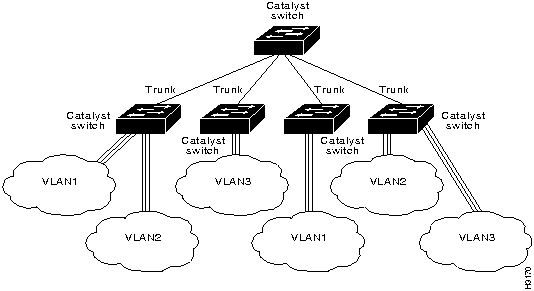
A trunk is a physical link between two Catalyst 5000 series switches or between Catalyst 5000 series switches and routers that carries the traffic of multiple VLANs. Trunks allow you to extend VLANs from one Catalyst 5000 switch to another. Users usually connect switches to each other and to routers using high-speed interfaces, such as Fast Ethernet, FDDI, and ATM.
The Catalyst 5000 series switch provides a means of multiplexing up to 1000 VLANs between switches and routers by using the following methods or protocols:
You can use any combination of these trunk technologies to form enterprise-wide VLANs. You can choose between low-cost copper and long-distance fiber connections for your trunks.
Inter-switch Links (ISLs) on Fast Ethernet Ports
Any Fast Ethernet port can be configured as a trunk. Trunks use the Inter-switch link (ISL) protocol to support multiple VLANs. An ISL trunk is like a continuation of the switching backplane. It provides a means for the Catalyst 5000 to multiplex up to 1000 VLANs between switches and routers.
The Dynamic ISL (DISL) Protocol dynamically configures trunk ports between Catalyst 5000 series switches; it synchronizes the configuration of two interconnected Fast Ethernet interfaces into becoming ISL trunks.The DISL Protocol minimizes VLAN trunk configuration procedures because only one end of a link must be configured as a trunk or nontrunk.
Figure 1-8 shows an example of a Fast Ethernet ISL configuration.
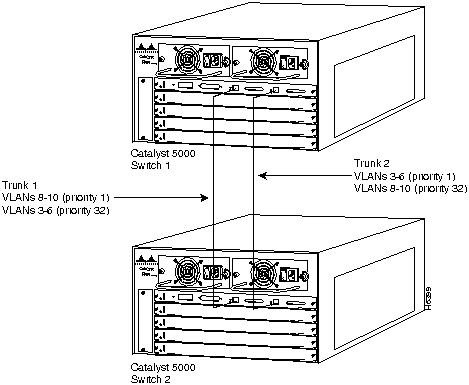
Figure 1-8 : Fast Ethernet ISL Configuration Example Load Sharing on Trunks Load sharing allows VLAN traffic on parallel Fast Ethernet ISL trunks to be split between multiple trunks. By setting STP parameters on a VLAN basis, you can define which VLANs have priority access to a trunk and which used the trunk as a backup when another trunk fails.
In STP, low integer values have the highest priority. Therefore, when you assign spanning tree port priorities that are lower than the default value of 32 to VLANs, the traffic of those VLANs travels on the trunk with the lowest integer value. The spanning tree port priority must be set to the same value at both ends of each trunk on each Catalyst 5000 series switch.
For example, Figure 1-9 illustrates two trunks that are connected to the ports of supervisor engine modules on two Catalyst 5000 series switches. The port cost of carrying VLAN traffic across these trunks is equal.
This splits VLAN traffic between the two trunks and increases the throughput capacity and fault tolerance between Catalyst 5000 switches; trunk 1 carries traffic for VLANs 8 through 10, and trunk 2 carries traffic for VLANs 3 through 6. If either trunk fails, the remaining trunk carries the traffic for all of the VLANs. For detailed commands and examples of load sharing, refer to the "Command Reference" chapter of this manual.
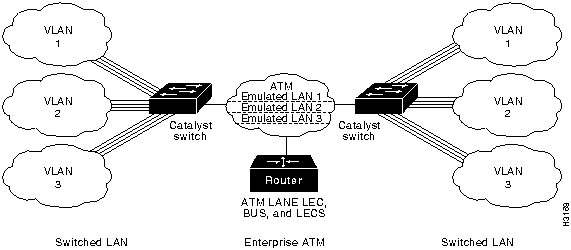
Figure 1-9 : Spanning Tree Load Sharing Using VLAN Priority The Catalyst 5000 ATM module provides an interface to switch LANs across an ATM network, supplying LAN users with access to ATM-based services. LAN emulation (LANE) extends virtual LAN (VLANs) throughout the network by establishing point-to-point ATM virtual-circuit connections between switches on the same VLAN.
Using a Catalyst 5000 ATM module, you can set up the following client and servers for LAN emulation:
Figure 1-10 shows an example of an ATM LAN emulation configuration.
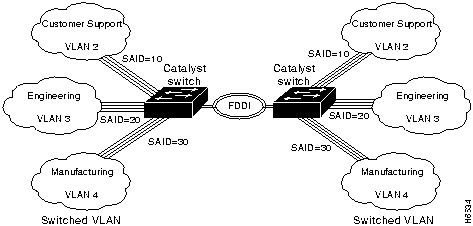
Figure 1-10 : ATM LAN Emulation to Extend VLANs Example VLANs can be extended across an FDDI network by multiplexing switched packets over a CDDI/FDDI interface using the 802.10 protocol. Using 802.10, Catalyst 5000 CDDI/FDDI interface links can operate as inter-switch trunks that provide broadcast control between configured VLANs. The 802.10 protocol encapsulates a VLAN identifier and packet data according to the IEEE 802.10 specification. CDDI/FDDI interfaces that support 802.10 make selective forwarding decisions within a network domain based upon the VLAN identifier.
The VLAN identifier is a user-configurable 4-byte Security Association ID (SAID). The SAID identifies traffic as belonging to a particular VLAN and determines which VLAN each packet is switched to on the bus.
Refer to Figure 1-11 for an example of configuring FDDI trunks. In this example, the SAID ensures that packets destined for VLAN 1 only reach VLAN 1 after they are transmitted across the FDDI trunks. Refer to Figure 1-12 for an example of an FDDI 802.10 VLAN network configuration.
Figure 1-11 : FDDI Trunks Configuration Example Figure 1-12 : FDDI 802.10 VLAN Network Configuration Example VTP provides CDDI/FDDI module configuration for 802.10-based VLANs. VTP requires a protocol type (Ethernet, FDDI, or Token Ring) to be configured for each VLAN. A VLAN can only have one type associated with it. Each VLAN type must have its own unique identifier and translations between different identifiers must be mapped. VTP advertises VLAN translation mappings to all Catalyst 5000s in a management domain.
Catalyst 5000 FDDI/CDDI modules can integrate switched Ethernet and Fast Ethernet LANs into the FDDI network. To map an 802.10 FDDI VLAN to an Ethernet VLAN, you must map the 802.10 VLAN SAID to an Ethernet VLAN.
If a CDDI/FDDI module receives a a packet containing a VLAN SAID that matches a Catalyst 5000 locally supported Ethernet VLAN, the CDDI/FDDI module translates the packet into Ethernet format and forwards it across the switch backplane to the Ethernet module. CDDI/FDDI modules filter the packets they receive from reaching the backplane if the VLAN SAIDs in the packets do not match a locally supported VLAN.
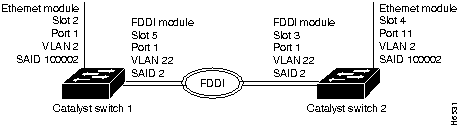
For example, Figure 1-13 illustrates the configuration for forwarding a packet from the Ethernet module port 1 in slot 2 to the FDDI module port 1 in slot 5. For this example, you would specify the translation of Ethernet VLAN 2 to FDDI VLAN 22. FDDI VLAN 22 is then automatically translated to Ethernet VLAN 2. The VLAN SAID must be identical on both FDDI modules. Since 802.10 CDDI/FDDI interface links can operate as inter-switch trunks, you can configure multiple VLAN translations over a link.
Figure 1-13 : VLAN Identifiers for an FDDI 802.10 Configuration CDDI/FDDI modules also support one native (nontrunk) VLAN, which handles all non-802.10 encapsulated FDDI traffic. A translation number need not be configured for the native VLAN since packets that are forwarded to the native VLAN do not contain VLAN identifiers. To map an Ethernet VLAN to an FDDI native VLAN, you must configure the Ethernet VLAN with the VLAN identifier, module number, and port number of the FDDI-native VLAN.
Rejecting MAC Address Learning (fddicheck)
An FDDI interface can reject the learning of MAC addresses that it previously learned from an Ethernet interface using the fddicheck user-configurable option. This feature resolves the problem that occurs when VOID frames occur on the FDDI ring and translated Ethernet frames sent by the FDDI interface are received and learned on the same FDDI interface instead of stripped by the MAC hardware.
Disabling Automatic Packet Recognition and Translation (APART)
To increase throughput performance, you can disable the software content-addressable memory (CAM) of the FDDI module. The CAM stores Internet packet exchange (IPX) translation information to support automatic packet recognition and translation (APART). Disabling the FDDI module CAM disables APART. However, the Catalyst 5000 EARL CAM continues to provide packet forwarding functionality.
There are some serious drawbacks to disabling the FDDI software CAM. Disabling APART means that only default IPX translations are used. FDDI module hardware filtering is disabled, and all traffic from the FDDI ring is translated and forwarded to the Catalyst backplane before the EARL CAM can filter it. This could greatly impact system performance. Additionally, the fddicheck user-configurable option is disabled when APART is disabled.
When new VLANs are added to a Catalyst 5000 Series switch in a management domain, VLAN Trunk Protocol (VTP) automatically distributes the information to other trunks of all of the devices in the management domain. This allows VLAN naming consistency, and connectivity between all devices in the domain. The VTP is transmitted on all trunk connections, including Interswitch Link (ISL) and 802.10, and ATM LAN emulation (LANE).
The Catalyst 5000 series switch transmits VTP frames on its trunk ports, advertising its management domain name, configuration revision number, and VLAN information that it has learned. Other Catalyst 5000 series switches in the domain use these advertisements to learn about any new VLANs that are configured in the transmitting switch. This process of advertising and learning allows a new VLAN to be created and configured on only one switch in the management domain and be automatically learned about by all other devices in the domain.
You can have redundancy in a network domain by using multiple VTP servers. Only a few VTP servers are required in a large network. All devices are normally VTP servers in a small network. You can enable VTP transparent mode for devices that are not designed to support VTP or are not configured to participate in VTP.
You can manage your Catalyst 5000 series switch through a console port using either the command line interface (CLI) or other methods for performing network management functions, such as Cisco Discovery Protocol (CDP), Embedded Remote Monitoring (RMON), or Switched Port Analyzer (SPAN). The console port is an EIA/TIA-232 interface to which you can connect a console terminal or modem. Through the console port, you can directly access the command line interface or configure a Serial Line Internet Protocol (SLIP) interface to access network management functions, such as Telnet, ping, Simple Network Protocol (SNMP), and so on.
You can assign the IP address for the Catalyst 5000 to any VLAN. You can direct telnet to access the IP address of the Catalyst 5000 to reach the CLI. You can also use the IP address of the switch to access an SNMP agent.
CiscoWorks for Switched Ethernets
CiscoWorks for Switched Internetworks (CWSI) is an integrated set of switched-management applications which provides tools for configuring Catalyst switches. The CWSI tools allow you to detect, analyze, and manage traffic activity, and to segment and build broadcast firewalls between logically dispersed users throughout the campus. These management functions improve network performance, provide a method to monitor and detect problems, and offer campus views in which to configure and maintain workgroup communication across the network. The management application tools are:
Simple Network Management Protocol (SNMP)
Simple Network Management Protocol (SNMP) is an application-layer protocol designed to facilitate the exchange of management information between network devices. The SNMP system consists of three parts: SNMP manager, SNMP agent, and Management Information Base (MIB).
Instead of defining a large set of commands, SNMP places all operations in a get-request, get-next-request, and set-request format. For example, an SNMP manager can get a value from an SNMP agent or store a value into that SNMP agent. The SNMP manager can be part of a network management system (NMS), and the SNMP agent can reside on a networking device such as a switch. The SNMP agent can respond to MIB-related queries being sent by the NMS.
Following are basic functions supported by SNMP agents:
The Catalyst 5000 series switch provides outgoing Telnet functionality from the command line interface; this feature allows a network manager to use the Telnet feature to transition from the command line interface of the switch to other devices on the network. Moreover, using Telnet, a network manager can maintain a connection to a Catalyst 5000 series switch while also connecting to another switch or router.
Cisco Discovery Protocol (CDP)
Cisco Discovery Protocol (CDP) is media- and protocol-independent and runs on all Cisco-manufactured equipment including routers, bridges, access and communication servers, and switches. With CDP, network management applications can retrieve the device type and SNMP-agent address of neighboring devices. This enables applications to send SNMP queries to neighboring devices.
CDP meets a need created by the existence of lower-level, virtually transparent protocols. CDP allows network management applications to discover Cisco devices that are neighbors of already known devices, in particular neighbors running lower-layer, transparent protocols. CDP runs on all media that support Subnetwork Access Protocol (SNAP), including LAN and Frame Relay. CDP runs over the data link layer only, not the network layer. Two systems that support different network layer protocols can learn about each other.
Cached CDP information is available to network management applications. Cisco devices never forward a CDP packet. When new information is received, old information is discarded.
Embedded Remote Monitoring (RMON)
The Catalyst 5000 series switch provides support for the embedded remote monitoring (RMON) of Ethernet and Fast Ethernet ports. Embedded RMON provides you with visibility into network activity. It enables you to access and remotely monitor the RMON specification RFC 1757 groupings of statistics, historical information, alarms, and events for any port, through SNMP or the TrafficDirector Management application.
The RMON feature monitors network traffic at the link layer of the OSI model without requiring a dedicated monitoring probe or network analyzer. It allows a network manager to analyze network traffic patterns, set up proactive alarms to detect problems before they affect users, identify heavy network users as candidates to move to dedicated or higher speed ports, and perform trend analysis for long-term planning.
The statistics group of the RMON specification maintains utilization and error statistics for the switch that is monitored. Statistics include information about: collisions, cyclic redundancy checks (CRC) and alignment: undersized or oversized packets, "jabber," "fragments," "broadcast," "multicast," and "unicast" messages: and bandwidth utilization.
The history group takes periodic samples from the statistics section and stores them for later retrieval. This includes information such as utilization, error counts, and packet counts.
A system network administrator uses the alarm group to set a sampling interval and threshold for any RMON recorded item. Examples of alarm settings include absolute or relative values, rising or falling thresholds of utilization, packet counts, and CRC errors.
The event group allows events (generated traps) to be logged, printed, and provided to a network manager. The time and date is recorded with each logged event. Network managers use the event group to create customized reports that are based on alarm types.
Extended RMON capabilities are provided through the use of a Cisco SwitchProbe connected to the switch's SPAN port. Refer to the following section, "Switched Port Analyzer (SPAN)," for additional information.
The Catalyst 5000 series switch switched port analyzer (SPAN) enables you to monitor traffic on any port for analysis by a sniffer or RMON probe. Enhanced SPAN (E-SPAN) enables you to monitor traffic from a VLAN (multiple ports) to a port for analysis. The SPAN redirects traffic from an Ethernet, Fast Ethernet, or FDDI port or VLAN to an Ethernet or Fast Ethernet monitor port for detailed analysis and troubleshooting. You can monitor a single port or VLAN using a dedicated analyzer, such as a Network General Sniffer, or remote monitoring (RMON) probe, such as a Cisco SwitchProbe.
Serial Line Internet Protocol (SLIP)
You can access the Catalyst 5000 series switch administrative interface using Serial Line Internet Protocol (SLIP). This protocol is a version of Internet Protocol (IP) that runs over serial links, allowing IP communications over the administrative interface.
The Catalyst 5000 series switch uses the following standard internet protocols:
The Catalyst 5000 series switch supports standard and enterprise-specific MIBs. The following MIBs are supported:
For more information about Cisco proprietary MIBs, Refer to "Appendix C, Workgroup MIB Reference" of the this publication.
Copyright 1988-1996 © Cisco Systems Inc.