
Table of Contents
LightStream 1010 ATM Switch Hardware
LightStream 1010 ATM Switch Hardware
This chapter lists the hardware components, describes the physical properties of the LightStream 1010, and provides a functional overview of the LightStream 1010 in the following sections:
The switch consists of the following hardware components:
- Five-slot rack-mounted chassis with one slot dedicated to the ATM switch processor (ASP) and any combination of the following modules:
- Redundant hot-swappable power supplies
- Fan assembly
With hot swapping, you can add, replace, or remove modules without interrupting the system power or entering any console commands. The redundant power supply option provides dual load-sharing power supplies that maintain input power without interruption if one supply fails. Environmental monitoring and reporting functions enable you to maintain normal system operation by resolving adverse environmental conditions prior to loss of operation. If conditions reach critical thresholds, the system may shut down to avoid damage to equipment from excessive heat or electrical current. Downloadable software and Flashcode allow you to load new images into Flash memory remotely---without having to physically access the switch---for fast, reliable system upgrades.
All carrier modules (CAMs), port adapter modules (PAMs), and dual, fault-tolerant power supplies support hot swapping. Only the functions performed by the removed component are affected. The ASP module enables switching and controls data across the switch backplane, so it must be present for the system to operate.
 Caution Redundant power supplies are required to allow removal of one power supply without interruption of system operation. The power supply to be removed must have the power turned OFF before it is removed.
 Caution All port adapter modules support hot-swapping. The ASP module is a required system component. Removing an ASP module while the system is operating will cause the system to halt.
 Caution Remove all interface cables before hot swappinga port adapter module. Removing a PAM with interface cables connected may cause the system to halt.
You can mount the LightStream 1010 in any of the following:
- Standard 19-inch (76-centimeter) 2- or 4-post equipment rack
- Enclosed cabinet
- Two- or four-post Telco rack, with either the front panel or back panel facing out
Mounting the LightStream 1010 ATM switch with the front facing out provides easy access to all system components, cables, network connections, diagnostic LEDs, and power supply(ies).
A rack-mount kit is included for mounting the chassis in an EIA-310-C standard 19-inch (48-centimeter) equipment rack. For rack-mounting installation instructions, refer to the section "Rack-Mounting the Switch" in the chapter "Installing the LightStream 1010 ATM Switch."
 Warning Do not stack the chassis on any other equipment. If the chassis falls, it can cause severe bodily injury and equipment damage. To see translated versions of this warning, refer to the appendix "Translated Safety Warnings."
The front of the switch (see Figure 2-1) provides access to the ASP and PAMs, power supply(ies), and fan assembly. The LEDs on the ASP indicate normal system operation and the currently active power supplies. The status LED indicates that the system is in normal operating state. The fan LED indicates fan operating status. The power (PS0 and PS1) LEDs indicate that a power supply is installed in the indicated power supply bay and is providing power to the system. (For descriptions of thresholds and status levels, refer to the section "Environmental Monitoring and Reporting Functions" later in this chapter.) A detailed description of each LED is provided in the chapter "Confirming the Installation."
The "Physical Description" section includes detailed information about the following LightStream 1010 components and features:
Figure 2-1 : Front View of the LightStream 1010 ATM Switch
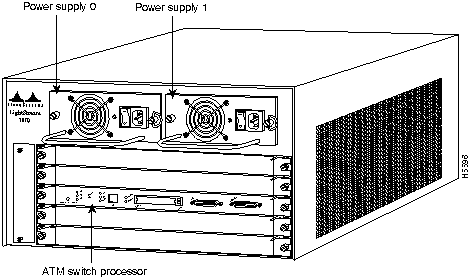
One 350-watt power supply is standard equipment in the switch. A second, identical power supply provides a fault-tolerant power option. Load sharing and redundancy are automatically enabled when a second power supply is installed and powered on; no configuration is required. Each supply has an individual power switch, power cord, and status LEDs on the ASP. When only one power supply is used, it can be installed in either power supply bay.
Figure 2-2 shows the LightStream 1010 rear view.
Figure 2-2 : Rear View of the LightStream 1010 ATM Switch
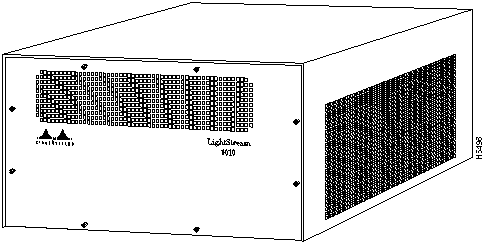
Each interface (or port) in the switch is designated by several different types of addresses. The physical interface address is the actual physical location (card/sub_card/port) of the interface connector within the chassis. The system software uses the physical addresses to control activity within the switch and to display status information. These physical card/sub_card/port addresses are not used by other devices in the network; they are specific to the individual switch and its internal components and software.
The following sections describe how the LightStream 1010 switch assigns and controls both the physical (card/sub_card/port) and Media Access Control (MAC)-layer addresses for interfaces within the chassis.
In the LightStream 1010 switch, port IDs specify the actual physical location of each PAM port on the front of the switch. (See Figure 2-3.) The address is composed of a three-part number in the format card/subcard_number/port number. The first number identifies the slot in which the module is installed. Module slots are numbered 0 to 4 from top to bottom. The second number identifies the subcard or PAM number. The PAMs are numbered 0 and 1 with 0 being the left PAM facing the front of the switch. The third number identifies the physical port number on the module. The port numbers always begin at 0 and are numbered from the left port to the right port, facing the front of the switch. The number of additional ports (/1, /2, and so on) depends on the number of ports available on the module.
Interface ports maintain the same port ID regardless of whether other modules are installed or removed. However, when you move a module to a different slot, the first number in the address changes to reflect the new slot number. For example, on a 4-port 155 UTP PAM in chassis slot 1 in PAM slot 0, the address of the left port is 1/0/0 and the address of the right port is 1/0/3. If you remove the 4-port 155 UTP PAM from slot 1 and install it in slot 4, the addresses of those same ports become 4/0/0 and 4/0/3.
Figure 2-3 : ATM Interface Port ID Address Examples
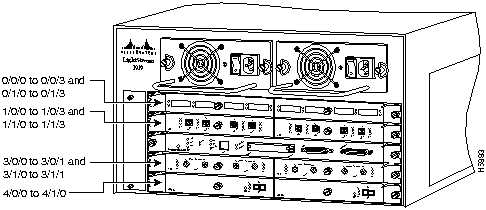
You can identify module ports by physically checking the card/sub_card/port location on the front of the switch. You can also use software commands to display information about a specific interface, or all interfaces, in the switch. To display information about every interface, use the show interface command without parameters. To display information about a specific interface, use the show interface command with the interface type and port address in the format show interface atm card/sub_card_num/port_num. This command is described in the LightStream 1010 ATM Switch Command Reference publication.
The ASP (see Figure 2-4) is the main system processor in the switch. The ASP contains the ATM switching engine and network management processor for the system software, and most of the system memory components. It maintains and executes the management functions that control the system.
Note The ASP must be installed in the middle slot, slot number 2.
Figure 2-4 : ATM Switch Processor

The ASP has the following features:
- 5-gigabits per second (Gbps) switching fabric
- MIPS architecture R4600 microprocessor at 100 MHz internally, 50 MHz system interface
- Memory components include:
- Main memory is used by the system software---one dynamic random access memory (DRAM) bank of two single in-line memory modules (SIMMs), with
16 MB of DRAM as the default (upgradeabe to 32 or 64 MB)
- 8 MB of Flash memory for downloading the system software
- Dual PCMCIA card slot that can be used for additional Flash memory
- Air-temperature sensor for environmental monitoring
- Console serial port that can be configured for a terminal or a modem
- Auxiliary serial port for modem connection
- Ethernet port to allow Simple Network Management System (SNMP) management to use an Ethernet attached management station
In addition to these features, the ASP performs the following management functions:
- Monitors interface and environmental status
- Provides SNMP management and the console/Telnet interface
The ASP must be installed in slot 2, the middle slot when facing the front panel. (See Figure 2-1.)
The embedded Flash memory allows you to remotely load and store system software images. You can download a new software image over the network or from a local server, and add the new image to Flash memory or replace an existing file.
The LEDs on the ASP indicate the status of the system, which includes the fan assembly and power supply(ies) and the ASP. The ASP LEDs are shown in Figure 2-5 and described in Table 2-1.
Figure 2-5 : ATM Switch Processor LEDs
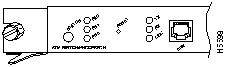
Table 2-1 : ATM Switch Processor LEDs
| Status |
The switch performs a series of self-tests and diagnostic tests. If all the tests pass, the status LED is green. If any test fails, the status LED is red. During system boot or if the module is disabled, the LED is orange. |
| Fan |
Indicates whether or not the fan is operational. If the fan is operational, the fan LED is green. If the fan is not operational, the fan LED is red. |
| PS 0, left bay |
If the power supply is operational, the PS0 LED is green.If the power supply is installed but not operational, the PS0 LED is red.If the power supply is off or not installed, the PS0LED is off. |
| PS 1, right bay |
If the power supply is operational, the PS1 LED is green.If the power supply is installed but not operational, the PS1 LED is red.If the power supply is not installed, the PS1 LED is off. |
| Link |
Green---The Ethernet port is operational.Off---No signal is detected. |
| RX (Receive) |
Off---No signal received.Flashing green---Ethernet packets being received: pulse rate increases with data rate. |
| TX (Transmit) |
Off---Not transmitting.Flashing green---Ethernet packets being transmitted: pulse rate increases with data rate. |
Access to the reset switch, located behind the faceplate of the ASP, is through a small hole approximately 1.5 inches to the right of the ASP status LED. (See Figure 2-5.)
The Ethernet RJ-45 port (labeled Enet) may be used to connect a management workstation and enables SNMP management of the LightStream 1010 switch. (See Figure 2-5.)
Table 2-2 lists the signals for the ASP RJ-45 Ethernet connector.
Table 2-2 : 155 UTP RJ-45 Port Pinouts
| 1 |
RxD+ |
<--- |
Receive data + |
| 2 |
RxD-- |
<--- |
Receive data -- |
| 3 |
NC |
|
No connection |
| 4 |
NC |
|
No connection |
| 5 |
NC |
|
No connection |
| 6 |
NC |
|
No connection |
| 7 |
TxD+ |
---> |
Transmit data + |
| 8 |
TxD-- |
---> |
Transmit data -- |
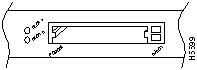
The dual-height Personal Computer Memory Card International Association (PCMCIA), Type II, card slot shown in Figure 2-6, can be used to store Cisco Internetwork Operating System (IOS) software or system configuration information on a Flash card. The switch may also boot from the software stored on the Flash card.
Figure 2-6 : ATM Switch Processor PCMCIA Slot
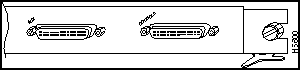
The console port on the ASP is a female, EIA/TIA-232, data communications equipment (DCE), DB-25 receptacle. Both data set ready (DSR) and data carrier detect (DCD) are active when the system is running. (See Figure 2-7.) The ready to send (RTS) signal tracks the state of the clear to send (CTS) input. The console port does not support modem control or hardware flow control. The console port requires a straight-through EIA/TIA-232 cable. Table 2-3 lists the signals used on this port.
Table 2-3 : Console Port Signals
| 1 |
GND |
-- |
Ground |
| 2 |
TxD |
<--- |
Transmit data |
| 3 |
RxD |
---> |
Receive data |
| 6 |
DSR |
---> |
Data set ready (always on) |
| 7 |
GND |
-- |
Ground |
| 8 |
DCD |
---> |
Data carrier detect (always on) |
| 20 |
DTR |
---> |
Data terminal ready |
Note EIA/TIA-232 was known as recommended standard RS-232 before its acceptance as a standard by the Electronic Industries Association (EIA) and Telecommunications Industry Association (TIA).
The auxiliary port on the ASP is a male, EIA/TIA-232 DTE, DB-25 plug to which you can attach a channel service unit/data service unit (CSU/DSU) or other equipment in order to access the switch from the network. (See Figure 2-7.) Table 2-4 lists the EIA/TIA-232 signals used on this port.
The asynchronous auxiliary port supports hardware flow control and modem control.
Table 2-4 : Auxiliary Port Signals
| Pin |
Signal |
Direction |
Description |
| 2 |
TxD |
---> |
Transmit data |
| 3 |
RxD |
<--- |
Receive data |
| 4 |
RTS |
---> |
Request to send (used for hardware flow control) |
| 5 |
CTS |
<--- |
Clear to send (used for hardware flow control) |
| 6 |
DSR |
<--- |
Data set ready |
| 7 |
Signal ground |
-- |
Signal ground |
| 8 |
CD |
<--- |
Carrier detect (used for modem control) |
| 20 |
DTR |
---> |
Data terminal ready (used for modem control only) |
Figure 2-7 : AUX and Console Connectors
The feature card is a daughter card of the ASP module, and implements a number of value-added capabilities over and above the base switch mechanisms. These include:
- Per-virtual channel (VC) statistics collection
- Multicast cell replication
- Congestion control for the available bit rate (ABR) service
- Policing
- Threshold based Selective Discard
- Intelligent Early Packet Discard
Supporting such capabilities on the field-replaceable feature card allows you to upgrade the LightStream 1010 in the field as and when such standards evolve and more advanced mechanisms are required.
Note When you upgrade the feature card you must power down the switch and remove the ASP module.
The port adapter carrier module (CAM), shown in Figure 2-8, may be installed in any slot except slot 2 in the LightStream 1010 and allows any combination of PAMs to be installed with a maximum of two PAMs per CAM. Port adapters are numbered zero and one, with zero on the left, facing the front of the switch.
Figure 2-8 : Port Adapter Module Carrier
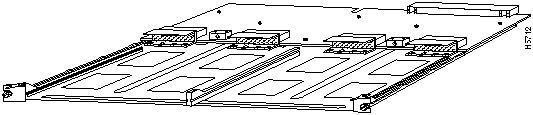
The 155 MM (multimode) PAM, shown in Figure 2-9, provides connection to four multimode fiber-optic interfaces using four duplex SC connectors.
Figure 2-9 : 155 MM Port Adapter Module
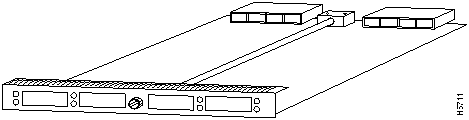
The LEDs, on the 155 MM PAM provide status information for individual SC fiber-optic interface connections. The LEDs are shown in Figure 2-10 and described in Table 2-5.
Figure 2-10 : 155 MM Port Adapter Module LEDs

Table 2-5 : 155 SM Port Adapter Module LED Descriptions
| RX (Receive) |
Off---No signal receivedFlashing green---Cells being received: blinks every five seconds and pulse rate increases with data rateFlashing yellow---LoopbackRed---Alarm (LOF1, LCD2, AIS3) |
| TX (Transmit) |
Off---Not transmittingFlashing green---Cells being transmitted: pulse rate increases with data rateFlashing yellow---LoopbackSteady yellow---Alarm FERF4 |
1 LOF = loss of frame
2 LCD = loss of cell delineation
3 AIS = alarm indication signal
4 FERF = far-end receive failure
 Warning Class 1 laser product. To see translated versions of this warning, refer to the appendix "Translated Safety Warnings."

 Warning Do not stare into the laser beam. To see translated versions of this warning, refer to the appendix "Translated Safety Warnings."
The 155 SM (single-mode) PAM, shown in Figure 2-11, provides connection to four single-mode fiber-optic interfaces using four duplex SC connectors.
Figure 2-11 : 155 SM Port Adapter Module
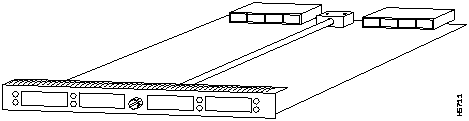
The LEDs, on the 155 SM PAM, provide status information for individual SC fiber-optic interface connections. The LEDs are shown in Figure 2-12 and described in Table 2-6.
Figure 2-12 : 155 SM Port Adapter Module LEDs

Table 2-6 : 155 SM Port Adapter Module LED Descriptions
| RX (Receive) |
Off---No signal receivedFlashing green---Cells being received: blinks every five seconds and pulse rate increases with data rateFlashing yellow---LoopbackRed---Alarm (LOF1, LCD2, AIS3) |
| TX (Transmit) |
Off---Not transmittingFlashing green---Cells being transmitted: pulse rate increases with data rateFlashing yellow---LoopbackSteady yellow---Alarm FERF4 |
1 LOF = loss of frame
2 LCD = loss of cell delineation
3 AIS = alarm indication signal
4 FERF = far-end receive failure
 Warning Class 1 laser product. To see translated versions of this warning, refer to the appendix "Translated Safety Warnings."

 Warning Do not stare into the laser beam. To see translated versions of this warning, refer to the appendix "Translated Safety Warnings."
The UTP (unshielded twisted-pair) PAM, shown in Figure 2-13, provides connection to four UTP interfaces using four RJ-45 connectors.
Figure 2-13 : 155 UTP Port Adapter Module
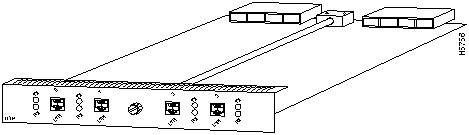
The LEDs on the 155 UTP PAM provide status information for the module and individual RJ-45 UTP interface connections. The LEDs are shown in Figure 2-14 and described in Table 2-7.
Figure 2-14 : 155 UTP Port Adapter Module LEDs

Table 2-7 : 155 UTP Port Adapter Module LED Descriptions
| RX (Receive) |
Off---No signal receivedFlashing green---Cells being received: pulse rate increases with data rateFlashing yellow---LoopbackRed---Alarm (LOF1, LCD2, AIS3) |
| TX (Transmit) |
Off---Not transmittingFlashing green---Cells being transmitted: blinks every five seconds and pulse rate increases with data rateFlashing yellow---LoopbackSteady yellow---Alarm FERF4 |
1 LOF = loss of frame
2 LCD = loss of cell delineation
3 AIS = alarm indication signal
4 FERF = far-end receive failure
Table 2-8 lists the signals for the ATM 1555 UTP RJ-45 connectors.
Table 2-8 : 155 UTP RJ-45 Port Pinouts
| 1 |
RxD+ |
<--- |
Receive data + |
| 2 |
RxD-- |
<--- |
Receive data -- |
| 3 |
NC |
|
No connection |
| 4 |
NC |
|
No connection |
| 5 |
NC |
|
No connection |
| 6 |
NC |
|
No connection |
| 7 |
TxD+ |
---> |
Transmit data + |
| 8 |
TxD-- |
---> |
Transmit data -- |
The DS3 PAM, shown in Figure 2-15, provides connection to two DS-3 interfaces using four BNC coaxial connectors.
Figure 2-15 : DS-3 Port Adapter Module
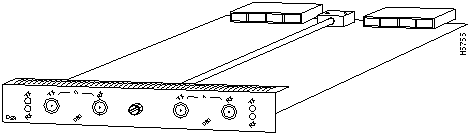
The LEDs on the DS-3 PAM provide status information for the module and individual BNC coaxial interface connections. The LEDs are shown in Figure 2-16 and described in Table 2-9.
Figure 2-16 : DS-3 Port Adapter Module LEDs

Table 2-9 : DS3 Port Adapter Module LED Descriptions
| RX (Receive) |
Off---No signal receivedFlashing green---Cells being received: blinks every five seconds and pulse rate increases with data rateFlashing yellow---LoopbackRed---Alarm (LOF1, LCD2, AIS3) |
| TX (Transmit) |
Off---Not transmittingFlashing green---Cells being transmitted: pulse rate increases with data rateFlashing yellow---LoopbackSteady yellow---Alarm FERF4 |
1 LOF = loss of frame
2 LCD = loss of cell delineation
3 AIS = alarm indication signal
4 FERF = far-end receive failure
 Warning Class 1 laser product. To see translated versions of this warning, refer to the appendix, "Translated Safety Warnings."
 Warning Do not stare into the laser beam. To see translated versions of this warning, refer to the appendix, "Translated Safety Warnings."
The E3 PAM, shown in Figure 2-17, provides connection to two E3 interfaces using four BNC coaxial connectors.
Figure 2-17 : E3 Port Adapter Module
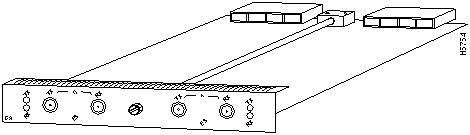
The LEDs on the E3 PAM provide status information for the module and individual E3 coaxial interface connections. The LEDs are shown in Figure 2-18 and described in Table 2-10.
Figure 2-18 : E3 Port Adapter Module LEDs

Table 2-10 : E3 Port Adapter Module LED Descriptions
| RX (Receive) |
Off---No signal receivedFlashing green---Cells being received: blinks every five seconds and pulse rate increases with data rateFlashing yellow---LoopbackRed---Alarm (LOF1, LCD2, AIS3) |
| TX (Transmit) |
Off---Not transmittingFlashing green---Cells being transmitted: pulse rate increases with data rateFlashing yellow---LoopbackSteady yellow---Alarm FERF4 |
1 LOF = loss of frame
2 LCD = loss of cell delineation
3 AIS = alarm indication signal
4 FERF = far-end receive failure
 Warning Class 1 laser product. To see translated versions of this warning, refer to the appendix, "Translated Safety Warnings."
 Warning Do not stare into the laser beam. To see translated versions of this warning, refer to the appendix, "Translated Safety Warnings."
The 622 SM (single-mode) PAM, shown in Figure 2-19, provides connection to one OC12 interface using a duplex SC single-mode fiber-optic connector.
Figure 2-19 : 622 SM Port Adapter Module
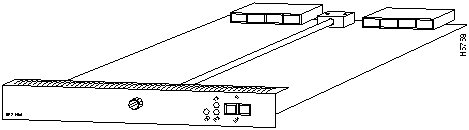
The LEDs on the 622 SM PAM provide status information for the SC fiber-optic interface connection. The LEDs are shown in Figure 2-20 and described in Table 2-11.
Figure 2-20 : 622 SM Port Adapter Module LEDs

Table 2-11 : OC12 Port Adapter Module LED Descriptions
| CD (Carrier Detect) |
Off---Carrier detect signal not receivedGreen---Carrier detect signal received |
| RX (Receive) |
Off---No signal receivedFlashing green---Cells being received: pulse rate increases with data rateFlashing yellow---LoopbackRed---Alarm (LOF1, LCD2, AIS3) |
| TX (Transmit) |
Off---Not transmittingFlashing green---Cells being transmitted: pulse rate increases with data rateFlashing yellow---LoopbackSteady yellow---Alarm FERF4 |
1 LOF = loss of frame
2 LCD = loss of cell delineation
3 AIS = alarm indication signal
4 FERF = far-end receive failure
 Warning Class 1 laser product. To see translated versions of this warning, refer to the appendix "Translated Safety Warnings."

 Warning Do not stare into the laser beam. To see translated versions of this warning, refer to the appendix "Translated Safety Warnings."
The LightStream 1010 ATM switch comes equipped with one 350W, AC-input power supply. An optional second identical power supply is also available for fault-tolerant power. Dual power supplies are automatically load sharing and redundant, which means that a second power supply can be installed or replaced without interrupting system operation.
When two power supplies are installed and both are turned on, each concurrently provides about half of the required power to the system. If one of the power supplies fails, the second power supply immediately ramps up to full power to maintain uninterrupted system operation. Load sharing and fault tolerance are automatically enabled when the second power supply is installed; no software configuration is required.
Each power supply can be connected to a separate AC source so that, in case of an input power line or power supply failure, the second power supply maintains uninterrupted system power.
Each power supply has one LED. The LED is green when the power supply is powered on and operating within tolerances. The LED is off when the power supply is powered off, the power cord is disconnected, or if the power supply has malfunctioned.
See the section "ASP LEDs" for a description of the PS0 and PS1 LEDs on the ASP.
The power supplies are self-monitoring. Each power supply monitors its own temperature and internal voltages. For a description of power-supply shutdown conditions and thresholds, refer to the section "Environmental Monitoring and Reporting Functions" later in this chapter.
The field replaceable system fan assembly provides cooling air for the ASP, interface modules, and backplane. The fan assembly is located inside the chassis compartment. (See Figure 2-21.)
An internal fan in each power supply draws cooling air from the front of the chassis through the power supply and out the rear of the chassis. (See Figure 2-21.) An air dam keeps the power-supply airflow separate from that of the rest of the chassis, which is cooled by the fan assembly.
Figure 2-21 : Internal Airflow
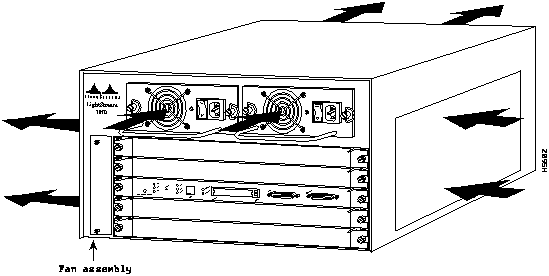
When you are facing the front of the chassis, the fan assembly draws cool air from the right side of the chassis to cool the modules. The exhaust air is forced out the left side of the chassis. Figure 2-21 shows the airflow path.
Sensors on the ASP monitor the internal chassis air temperatures. If the air temperature at the sensor exceeds a desired threshold, the environmental monitor displays warning messages. For specific threshold and status level descriptions, refer to the section "Environmental Monitoring and Reporting Functions" later in this chapter. The fan status LED is shown and described in the section "ATM Switch Processor" in the chapter "Confirming the Installation."
This section describes functions that support and maintain the LightStream 1010 ATM switch. The hot-swapping feature for modules and the redundant hot swapping for power supplies enable you to quickly install new equipment without interrupting system power or shutting down interfaces. The environmental monitoring and reporting functions continuously monitor temperature and voltage points in the system, and provide reports and warning messages that enable you to quickly locate and resolve problems and maintain uninterrupted operation. The redundant power option provides dual load-sharing power supplies. In the event of a power-supply failure, or a failure of one of two separate AC power sources, the redundant power option assures uninterrupted operation.
The eight available PAMs support any combination of network interfaces to provide the following maximum port densities:
- Up to 32 155 multimode fiber-optic ports
- Up to 32 155 single-mode fiber-optic ports
- Up to 32 155 UTP ports
- Up to 16 DS-3 coaxial ports
- Up to 16 E3 coaxial ports
- Up to 8 622-Mbps OC-12 single-mode ports
You can install any combination of PAMs in any of the eight available PAM slots. There are no restrictions on either the number of modules that can be installed or their proximity to the ASP.
The hot-swapping feature allows you to install and replace PAMs while the system is operating; you do not need to disable the software or shut down the system power. All PAMs support hot-swapping.
 Caution The ASP is a required system component. Removing an ASP while the system is operating will cause the system to shut down and may damage the processor.
The environmental monitoring and reporting functions enable you to maintain normal system operation by identifying and resolving adverse conditions before the system fails. Environmental monitoring functions constantly monitor the internal chassis air temperature. Each power supply monitors its own voltage and shuts itself down if it detects a critical condition within the power supply. The reporting functions enable you to retrieve and display the present values of measured parameters, and the reporting functions display alarms on the console if any of the monitored parameters exceed defined thresholds.
The environmental monitoring functions use three levels of status conditions to monitor the system. These levels are normal, alarm, and critical. The processor monitors the temperature inside the module compartment, and the power supplies use the normal and critical levels to monitor DC voltages. Table 2-12 lists temperature thresholds for the processor-monitored levels. Table 2-13 lists the DC power thresholds for the normal and critical power-supply-monitored levels.
Table 2-12 : Processor-Monitored Temperature Thresholds
Table 2-13 : Power-Supply-Monitored Voltage Thresholds
| +5V |
< 4.74V |
4.74--5.26V |
> 5.26V |
The three levels of status condition are as follows:
- Normal---all monitored parameters are within normal tolerances.
- Alarm---an out-of-tolerance temperature or voltage condition exists. The system may not continue operation. If a voltage measurement reaches this level, the power supply can shut down the system. Immediate action is required. The +12 VDC line remains enabled to allow the fan assembly to continue operation.
The power supply monitors its own internal temperature and voltages. The power supply is either within tolerance (normal) or out of tolerance (alarm level), as shown in Table 2-13. If an internal power supply temperature or voltage reaches a critical level, the power supply shuts down without any interaction with the processor.
Copyright 1988-1996 © Cisco Systems Inc.



