|
|
This chapter describes the equipment and site requirements for installing the LightStream 1010 Asynchronous Transfer Mode (ATM) switch, ATM switch processor (ASP), carrier modules (CAMs), and port adapter modules (PAMs). It includes the power and cabling requirements that must be in place at the installation site and describes additional equipment you will need to complete the installation and the environmental conditions your site must meet to maintain normal operation. Instructions for unpacking the system and additional equipment are provided in the document Unpacking Instructions, which is attached to the outside of the shipping container.
This chapter includes information about the following preinstallation requirements:
The following guidelines will help to ensure your safety and protect the equipment. This list is not inclusive of all potentially hazardous situations that you may be exposed to as you install the switch, so be alert.
The switch chassis weighs 32 pounds (13.6 kilograms) when empty (no PAMs or power supplies installed) and 67 pounds (30 kilograms) with two power supplies and PAM carriers installed. The chassis is not intended to be moved frequently. Before you install the switch, ensure that your site is properly prepared so you can avoid having to move the chassis later to accommodate power sources and network connections.
Two people are required to lift the chassis. Whenever you lift the chassis or any heavy object, follow these guidelines:
Figure 3-1 : Unsafe Lifting Practice
The CAMs, PAMs, and redundant (second) power supplies are designed to be removed and replaced while the system is operating without presenting an electrical hazard or damage to the system. Before removing a redundant power supply, ensure that the first supply is powered on and the powered supply being removed is power off. However, you must shut down the system before removing or replacing the ASP. Never install equipment that appears to be damaged.
Follow these basic guidelines when working with any electrical equipment:
In addition, use the guidelines that follow when working with any equipment that is disconnected from a power source but still connected to telephone wiring or other network cabling.
Preventing Electrostatic Discharge Damage
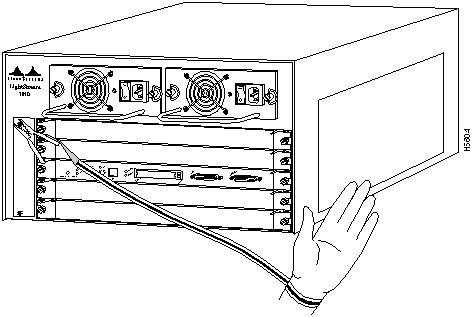
Electrostatic discharge (ESD) damage, which occurs when electronic cards or components are improperly handled, can result in complete or intermittent failures. The ASP and PAMs each consist of a printed circuit card that is fixed in a metal carrier. Electromagnetic interference (EMI) shielding, connectors, and a handle are integral components of the carrier. Although the metal carrier helps to protect the cards from ESD, use a preventive antistatic strap whenever you handle the ASP or PAMs. Handle the carriers by the handles and the carrier edges only; never touch the cards or connector pins.
Following are guidelines for preventing ESD damage:
Figure 3-2 : Placement of Electrostatic Discharge Wrist Strap
This section discusses the site environment requirements for the switch chassis.
The 350W, AC-input power supply uses a power factor corrector (PFC) that allows it to operate on input voltage and current within the ranges of 100 to 240 VAC and 47 to 63 Hz.
A second, identical power supply is also present in chassis configured with the redundant power option. Redundant power ensures that power to the chassis continues uninterrupted in the event that one power supply fails. It also provides uninterrupted power in the event that one power line fails; the redundant power supply operates only if the power supplies are connected to separate input lines. Table A-1 in the appendix "System Specifications" lists system power specifications, including input voltage and operating-frequency ranges.
Note the power consumption rating in Table A-1 in the appendix "System Specifications" for each unit before it is connected.
Following are guidelines for setting up the plant wiring and cabling at your site. When planning the location of the new system, consider the distance limitations for signaling, EMI, and connector compatibility.
When wires are run for any significant distance in an electromagnetic field, interference can occur between the field and the signals on the wires. This fact has two implications for the construction of plant wiring:
If wires exceed recommended distances, or if wires pass between buildings, give special consideration to the effect of a lightning strike in your vicinity. The electromagnetic pulse (EMP) caused by lightning or other high-energy phenomena can easily couple enough energy into unshielded conductors to destroy electronic devices. If you have had problems of this sort in the past, you may want to consult experts in electrical surge suppression and shielding.
Most data centers cannot resolve the infrequent but potentially catastrophic problems just described without pulse meters and other special equipment. These problems can cost a great deal of time to identify and resolve, so take precautions by providing a properly grounded and shielded environment, paying special attention to issues of electrical surge suppression.
The following distance limits are provided as guidelines for planning your network connections before installation.
ATM Connections The maximum distances for ATM network segments and connections depend on the type of transmission cable used, for example, unshielded twisted-pair (UTP), single-mode (SM), or multimode (MM) fiber-optic cable.
Networking standards set recommended maximum distances between stations using fiber-optic and UTP cable. The recommended maximum cable lengths are listed in Table 3-1.
Table 3-1 : ATM Maximum Transmission Distances
Table 3-1 provides guidelines for planning maximum cable spans. For detailed calculations of dispersion and power budget limits, refer to the, Technician's Guide to Fiber Optics, written by D. Sterling, published by Delmar Publishers, 1993.
For Further Reference
The following publications contain information on determining attenuation and power budget:
Serial Connections Serial signals can travel a limited distance at any given bit rate; generally, the slower the baud rate, the greater the distance. Table 3-2 shows the standard relationship between baud rate and distance for EIA/TIA-232 signals.
Table 3-2 : IEEE Standard EIA/TIA-232 Transmission Speed Versus Distance
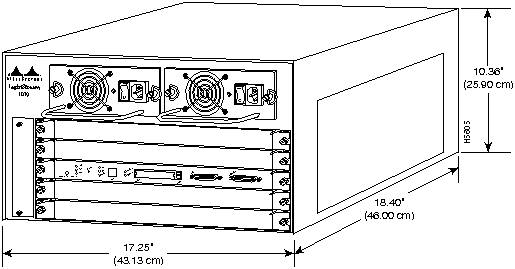
A standard rack-mount kit is provided for mounting the switch in a standard 19-inch equipment rack. The rack-mount kit is not suitable for use with telco-type equipment racks, or those with obstructions (such as a power strip) that could impair access to the PAMs and power supplies. Figure 3-3 show the chassis footprint and outer dimensions.
Figure 3-3 : Chassis Footprint and Outer Dimensions
To use the standard rack-mount kit, your equipment rack must meet the following requirements:
When planning your rack installation, consider the following guidelines:
The following guidelines are provided to ensure your safety:
In addition to the preceding guidelines, review the precautions for avoiding overtemperature conditions in the section "Equipment-Rack Ventilation" later in this chapter.
The switch operates as a standalone system mounted in a rack in a secure wiring closet. It requires a dry, clean, well-ventilated, and air-conditioned environment. An internal fan assembly pulls cooling air through the chassis from the front and right side (intake) to the rear and left side (exhaust) when facing the front of the system. (See Figure 2-23.) The flow of ambient air must be maintained to ensure normal operation. If the airflow is blocked or restricted, or if the intake air is too warm, an overtemperature condition can occur. Under extreme conditions, the environmental monitor will shut down the system to protect the system components.
To ensure normal operation and avoid unnecessary maintenance, plan your site configuration and prepare your site before installation. After installation, make sure the site maintains an ambient temperature of 0 to 40°C (32 to 104°F), and keep the area around the chassis as free from dust as is practical. For a description of the environmental monitor and status levels, refer to the section "Environmental Monitoring and Reporting Functions" in the chapter "LightStream 1010 ATM Switch Hardware."
Table 3-3 lists the operating and nonoperating environmental site requirements. To maintain normal operation and ensure high system availability, maintain an ambient temperature and clean power at your site. The following ranges are those within which the switch will continue to operate; however, a measurement that is approaching the minimum or maximum of a range indicates a potential problem. You can maintain normal operation by anticipating and correcting environmental anomalies before they exceed the maximum operating range.
Table 3-3 : Specifications for Operating and Nonoperating Environments
Planning a proper location for the switch and the layout of your equipment rack or wiring closet is essential for successful system operation. Equipment placed too close together or inadequately ventilated can cause system overtemperature conditions. In addition, chassis panels made inaccessible by poor equipment placement can make system maintenance difficult. Following are precautions that can help avoid problems during installation and ongoing operation.
Follow these general precautions when planning your equipment locations and connections:
If you plan to install the switch in an equipment rack, follow these precautions to avoid overtemperature conditions in addition to the guidelines that are provided in the section "Equipment Racks" earlier in this chapter:
For a functional description of the environmental monitor and the status levels, refer to the section "Environmental Monitoring and Reporting Functions" in the chapter "LightStream 1010 ATM Switch Hardware."
Take the following precautions when planning power connections to the switch:
When preparing your site for network connections to the switch, you need to consider numerous factors related to each type of interface:
Additional and Optional Connection Equipment
To install and configure the switch, you need a terminal with an EIA/TIA-232 data terminal equipment (DTE) port and an EIA/TIA-232 data communications equipment (DCE) console cable with DB-25 plugs at one end. You can detach the terminal (and cable) after the installation and configuration procedures are complete.
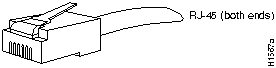
You will need an Ethernet cable with RJ-45 male connectors (Figure 3-4) between the Ethernet port and the Ethernet network. See the ASP Ethernet RJ-45 connector information in the section "Enet Port" in the chapter "LightStream 1010 ATM Switch Hardware."
Figure 3-4 : Ethernet RJ-45 Interface Cable Connectors
All ATM interfaces are full duplex. You must use the appropriate ATM interface cable to connect the ATM MM, SM, or UTP PAM with an external ATM network.
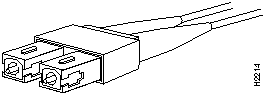
For fiber-optic traffic over SM or MM, use the SC-type connector (Figure 3-5) to connect the 155 MM PAM, 155 SM PAM, 622 SM PAM, and 622 MM PAM with the external ATM switch.
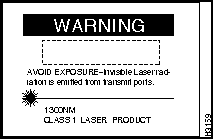
To see translated versions of this warning, refer to the appendix "Translated Safety Warnings."
Figure 3-5 : Fiber-Optic Network Interface Connector (SC Type)
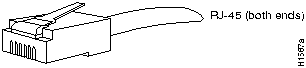
For UTP traffic, use the RJ-45 connector (Figure 3-6) to connect the 155 UTP PAM with the external ATM switch.
Figure 3-6 : UTP RJ-45 Interface Cable Connectors
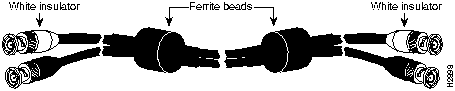
For DS-3 and E3 connections, use the 75-ohm, RG-59, coaxial cable (Figure 3-7), which has bayonet-style, twist-lock (BNC) connectors to connect the DS-3 PAM and E3 PAM with the external ATM switch.
Figure 3-7 : Coaxial Interface Cable and BNC Connectors
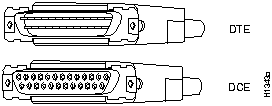
EIA/TIA-232 supports unbalanced circuits at signal speeds up to 64 kbps. The ASP console connection is a standard 25-pin D-shell connector (known as a DB-25) that is commonly used for EIA/TIA-232 connections. Figure 3-8 shows the connectors at the local end of the adapter cable. The system console port on the ASP EIA/TIA-232 connection supports only asynchronous connection.
Figure 3-8 : EIA/TIA-232 Adapter Cable Connectors, Network End
Console Port Connection Equipment
The ASP contains an EIA/TIA-232 asynchronous console port (DB-25 receptacle).
When connecting a serial device, consider the cable as an extension of the switch for an external connection; therefore, use null-modem cable to connect the switch to a remote DCE device such as a modem or DSU, and use a straight-through cable to connect the switch to a DTE device such as a terminal or PC.
Before you connect a terminal to the console port, configure the terminal to match the switch console port, as follows:
Refer to the section "Switch Installation Checklist" (Figure B-1) in the appendix "Configuration Worksheets" to assist you with your installation and to provide a historical record of what was done, by whom, and when. Make a copy of this checklist and indicate when each procedure or verification is completed. When the checklist is completed, place it in your Site Log (Figure B-14) along with the other records for your new switch.
Unpacking and Repacking the System
Unpacking instructions are provided in the document Unpacking Instructions, which is attached to the outside of the shipping container. If you have already read the unpacking instructions and followed the procedures to unpack your LightStream 1010 ATM switch, proceed to the next section "Checking the Contents" to verify that you have received all the required components.
Refer to the section "Switch Installation Checklist" in the appendix "Configuration Worksheets," to check the contents of the shipping container. Use the Switch Installation Checklist to create a record of your order and to ensure that you received all the components you ordered.
Take the following steps to check the contents of your LightStream 1010 ATM switch package:
In the appendix "Configuration Worksheets," refer to the sections "Switch Installation Checklist" and "Switch Component Checklist" for lists of all standard components that are included with the switch, along with optional equipment available. Check each item on the component list. As you unpack, verify and check each item on the component list. Insert the completed checklist into the Site Log (described in the section "Switch Installation Checklist" in the appendix "Configuration Worksheets").
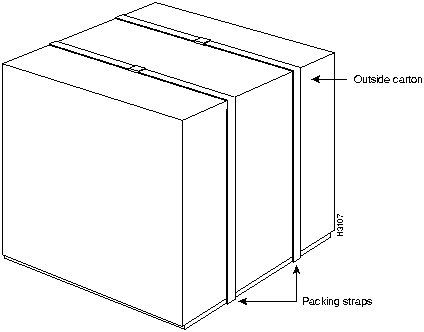
In the event that you need to return or move the LightStream 1010 ATM switch, the following instructions describe repacking the switch using the original packaging material:
Figure 3-9 : LightStream 1010 ATM Switch Packing Material
Figure 3-10 : LightStream 1010 ATM Switch Final Package
Copyright 1988-1996 © Cisco Systems Inc.







Transceiver Speed
Cable Type
Maximum Distance between Stations
155 Mbps
Category 5 UTP
328 feet (100 meters)
155 Mbps
Single-mode fiber
9 miles (15 km)
155 Mbps
Multimode fiber
1.2 miles (2 km)
622 Mbps
Single-mode fiber
9 miles (15 km)
622 Mbps
Multimode fiber
1,640 feet (500 meters)
45 Mbps
Coaxial cable
450 feet (137 meters)
34 Mbps
Coaxial cable
450 feet (137 meters)
Rate (bps)
Distance (feet)
Distance (meters)
2400
200
60
4800
100
30
9600
50
15
19200
25
7.6
38400
12
3.7
56000
8.6
2.6


Minimum
Maximum
Temperature, ambient operating
32°F (0°C)
104°F (40°C)
Temperature, ambient nonoperating and storage
--4°F (--20°C)
149°F (65°C)
Humidity (RH), ambient (noncondensing) operating
10%
90%
Humidity (RH), ambient (noncondensing) nonoperating and storage
5%
95%
Altitude, operating and nonoperating
Sea level
10,000' (3050 m)
Vibration, operating
5--200 Hz, 0.5 g (1 oct./min.)
Vibration, nonoperating
5--200 Hz, 1 g (1 oct./min.)
200--500 Hz, 2 g (1 oct./min.)