|
|

To install and configure PIX Firewall you need an ASCII terminal or a computer with serial communications software installed and running. The computer can be a Windows workstation, Macintosh system, or UNIX system. (However, using a Macintosh requires a special cable that you must obtain from an Apple computer vendor.)
Install PIX Firewall as follows:
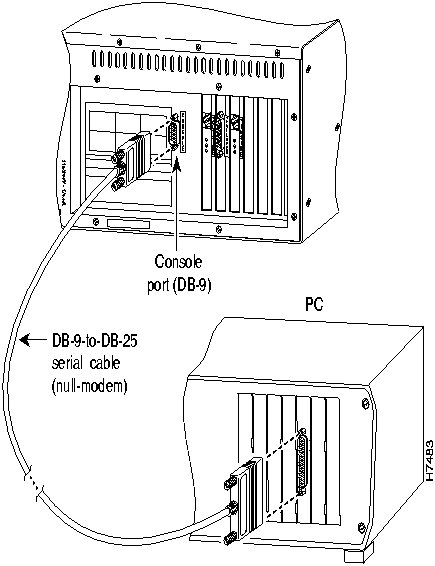
Figure 2-1 : Connecting a Serial Cable to the Console Port and to a PC
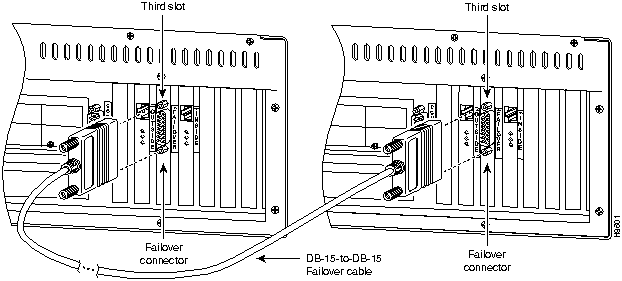
Figure 2-2 : Connecting a Failover Cable Between Two PIX Firewall Units
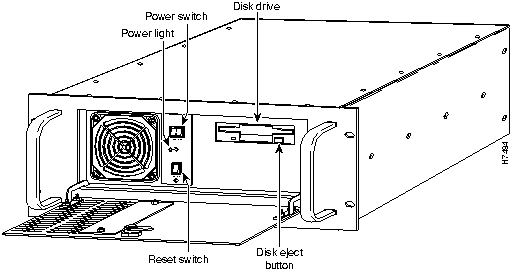
Figure 2-3 : Open Front Access Panel to Power On Unit
Figure 2-4 : Connect Network Interface Cables to Rear of Unit
The installation is now complete. You can now test the connectivity of your PIX Firewall on your network.
You are now ready to configure PIX Firewall as described in the chapter.
Upgrading from a Previous Version
To upgrade from a previous version of PIX Firewall, follow these steps:
Installing PIX Firewall Upgrade Kits
If you purchased one or more optional PIX Firewall upgrade kits or spares, install each with the instructions provided before continuing.
Copyright 1988-1996 © Cisco Systems Inc.
If you are upgrading from a previous PIX Firewall version, refer now to the next section, "Upgrading from a Previous Version."
PIX Bios V2.7
Booting Floppy
...................................Execing flop
Floppy loader version 1.04
Flash=i28F020
.Floppy -> Flash
Reading floppy image........................
Using flash config
Erasing flash...
Burning image into flash...
Saving config...
8MB RAM
Flash=i28F020
Ethernet=3c595 MAC=00a0.2435.ef7d ports=rj,fe
Ethernet=3c595 MAC=00a0.2451.80c8 ports=rj,fe
CA9568 Encryption @ 0x3a0
P r i v a t e I n t e r n e t e X c h a n g e
-----------------------------------------------------------------------
ppppppp iiiii xxx xxx
p p i x x
p p i x x
p p i x x
p p i xx
p p i xx
ppppppp i x x
p i x x
p i x x
p iiiii xxx xxx
-----------------------------------------------------------------------
(c) Cisco Systems, Inc.
PIX Version 3.n
Maximum Connections: 16384
Copyright (c) 1996 by Cisco Systems, Inc.
Restricted Rights Legend
Use, duplication, or disclosure by the Government is
subject to restrictions as set forth in subparagraph
(c) of the Commercial Computer Software - Restricted
Rights clause at FAR sec. 52.227-19 and subparagraph
(c) (1) (ii) of the Rights in Technical Data and Computer
Software clause at DFARS sec. 252.227-7013.
Cisco Systems, Inc.
170 West Tasman Drive
San Jose, California 95134-1706
pixfirewall>