


|
|
CiscoWorks network management software enables you to monitor complex internetworks containing Cisco devices and aids in in-depth network planning, troubleshooting, and analysis. CiscoWorks uses the Simple Network Management Protocol (SNMP), to monitor and control any SNMP device on the network. CiscoWorks consists of five functional areas of operation: fault management, performance management, configuration management (which includes device management tasks), accounting management, and security management.
CiscoWorks works directly with your SNMP network management platform, allowing CiscoWorks applications to be integrated with the features and applications of your platform.
CiscoWorks provides a fully integrated relational database that is based on the Sybase relational database.
This chapter contains the following sections:
Figure 1-1 illustrates the general relationship of CiscoWorks functions.
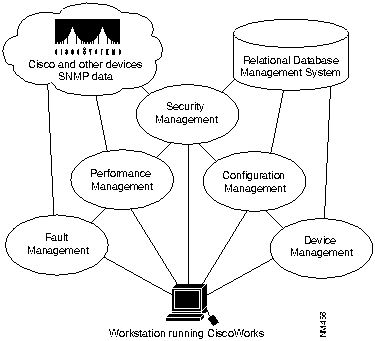
Figure 1-1 CiscoWorks Functional Diagram
CiscoWorks applications target five network management functional areas: fault management, performance management, configuration management (which includes device management), accounting management (which is included in performance management applications), and security management.
The following sections describe the tasks you can perform in each functional area.
You can use CiscoWorks fault management functions to do the following:
With CiscoWorks, you can retrieve status and administrative information about the network devices and display the information for multiple devices concurrently so that you can act on the changing needs of your internetwork environment.
You can use CiscoWorks performance management functions to do the following:
You can use CiscoWorks configuration management functions to do the following:
Device management is a subset of the configuration management function. Following are the major operational areas in device management:
Accounting management is a subset of the performance management functional area: the applications used to generate accounting management information are located in those areas. The following list describes the functions you can perform for accounting management:
You can use CiscoWorks security management functions to do the following:
On the SunNet Manager platform (SNM), you access CiscoWorks applications either from the Tools menu or the Glyphs menu. Figure 1-2 shows the CiscoWorks applications available on the Tools menu.
.
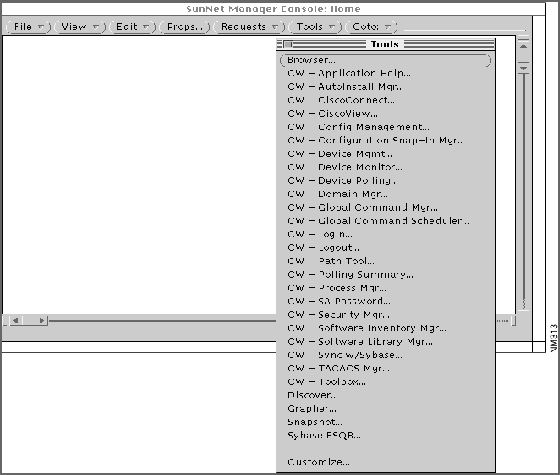
Figure 1-2 CiscoWorks Applications on the SunNet Manager Tools Menu
SNM also has a menu that appears when you click on an icon. On SNM, icons are called glyphs, and the menu that appears is called the Glyph menu (Figure 1-3).
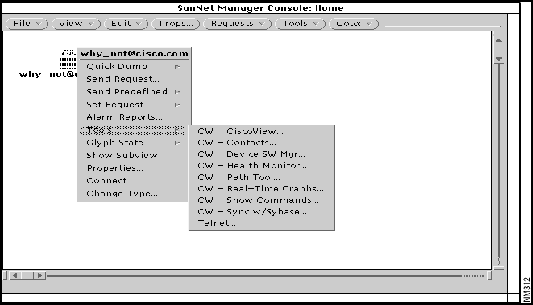
Figure 1-3 CiscoWorks Applications on the Glyph Menu
Table 1-1 and Table 1-2 describe each of the CiscoWorks applications in the Tools and Glyph menus.
Table 1-1 CiscoWorks Tools Menu Applications
| Application | Overview of Tasks |
|---|---|
| AutoInstall Mgr | Remotely deploys a new router using a neighbor router. Perform AutoInstall tasks remotely via the workstation running CiscoWorks instead of running a Telnet session. |
| Config Management | Analyze or edit configuration files of local and remote Cisco Systems devices in your network. Compare the contents of two configuration files in the database or compare the configuration currently running on the device and the configuration that represents the last time you performed a Database to Device command. |
| Configuration Snap-In Mgr | Create and execute system commands on a device or group of devices at any time via the Global Command Scheduler application. |
| Device Mgmt | Create and maintain a database that holds a complete inventory of your network---hardware, software, release levels of operation components, individuals responsible for maintaining the devices, and associated locations. Enter or change data in the database tables for network devices, networks, interfaces, contacts, vendors, and so on. |
| Device Monitor | Monitor your network devices for information about environmental and interface statistics.Specify how often CiscoWorks should check this information and whether or not to log it into the Log Manager application. |
| Device Polling | Probe and extract information about the condition of your networks using a polling feature. Information acquired from polling is stored in the database for further evaluation and analysis. Compare the relative performance and status of devices and interfaces on the network. |
| Domain Mgr | Set up groups of devices, called domains, so CiscoWorks applications can access these device groups to accomplish network management tasks such as security, configuration, and device polling. |
| Global Command Mgr | Create and execute system commands on a device or group of devices at any time via the Global Command Scheduler application. |
| Global Command Scheduler | Schedules commands or other jobs at regularly scheduled times using the crontab utility. Invoked from the Global Command Manager application or the command line. |
| Log Mgr | Store, query, and delete messages gathered from network devices and CiscoWorks applications. |
| Login | Perform a generic login for all CiscoWorks applications that require user authentication so that you do not have to log in to each separate application. |
| Logout | Log out of secured CiscoWorks applications to ensure security for those applications with authority checking turned on. |
| Path Tool | View and analyze the path between two devices. Perform analysis on the path to collect utilization and error data. The display shows the devices encountered between the source and the destination device, the link speeds connecting these SNMP devices, and the interface names. |
| Polling Summary | Summarize the polling setup completed by the Device Polling application. Browse data, and stop and start polling. |
| Process Mgr | Start or stop CiscoWorks-related processes including the following daemons: Log (nmlogd), Polling (nmpolld), Event Logger (nmeventd), and Device Monitor (nmdevmond). View status for the following daemons: System Log (syslogd), the Sybase Server (dataserver), and the TACACS (xtacacsd). |
| SA Password | Log in to the default Sybase database account to perform system administrator tasks. |
| Security Mgr | Set up authority checking procedures to protect selected CiscoWorks applications and your network devices from unauthorized individuals by setting up your CiscoWorks environment to require a login to access applications. This protection ensures that only users with a valid account and password can perform tasks such as configuring a router, deleting database device information, or defining polling procedures. |
| Software Inventory Mgr | Update the Sybase database to include current device software and hardware status. Sorts device information according to platform and software image and allows you to invoke Device Software Manager to update specific devices. |
| Software Library Mgr | Maintain the master storage (a list of available Cisco system software and microcode). |
| Sync w/Sybase | Synchronize both the SNM database and the Sybase database. CiscoWorks maintains data in the Sybase database, whereas SNM maintains its own database. Sync w/Sybase ensures that device data from SNM database is in the Sybase database and vice versa. Generally, synchronize the databases whenever new devices are added to your network. This application includes Sync w/SNM. |
| TACACS Mgr | Maintain the TACACS password file on UNIX hosts that act as TACACS security servers. Create and update TACACS accounts and computer-generated passwords. |
| Sybase DWB | Access Sybase Data Workbench utilities to run and print reports on any table created with the Device Polling application. |
Table 1-2 CiscoWorks Glyph Menu Applications
| Application | Overview of Tasks |
|---|---|
| Contacts | Obtain information about the contact person for a specific device including the complete name, telephone number, e-mail address, title, location, and address of the person responsible for the operation of the device. |
| Device SW Mgr | Automate the upgrade of a system software or microcode image on a Cisco device. |
| Env. Monitor | View the environmental status of a Cisco AGS+ including temperature and voltage statistics. This function can be performed only on AGS+ routers running System Software Release 9.0 or later with an environmental monitor card running ENVM Microcode Version 2.0 or later software. |
| Health Monitor | View information about the status of a device, including buffers, CPU load, memory available, and protocols and interfaces being used. Quickly accesses the Show Commands and Real-Time Graphs windows through the Health Monitor window. |
| Path Tool | View and analyze the path between two devices. Perform analysis on the path to collect utilization and error data. The display shows the devices encountered between the source and the destination device, the link speeds connecting these SNMP devices, and the interface names. |
| Real-Time Graphs | View device information such as the router health (buffer space, CPU load, environment, free memory, and security), interface health (bits per second, bytes, errors, packets per second, packets, and queues), and protocol traffic (IP, ICMP, SNMP, TCP, UDP, AppleTalk, DECnet IV, Novell, VINES, and XNS) using the SNM Grapher utility. |
| Show Commands | View device data about any SNMP device, including Cisco routers and communication servers. This device data includes the software version, buffers, selected device interfaces, traffic mix, IP accounting checkpoint, ARP, and IP route. This application emulates the EXEC show commands for Cisco routers. |
| Sync w/Sybase | Synchronize a single device in both the SNM database and the Sybase database. Synchronize a device to ensure that both databases share the same device data. Generally, synchronize the databases whenever new devices are added to your network. |
CiscoWorks is fully integrated with HP OpenView and NetView for AIX, so you can access CiscoWorks applications directly from the main window of each platform. (See Figure 1-4 and
Figure 1-5.)
Figure 1-4 shows the NetView for AIX main window.
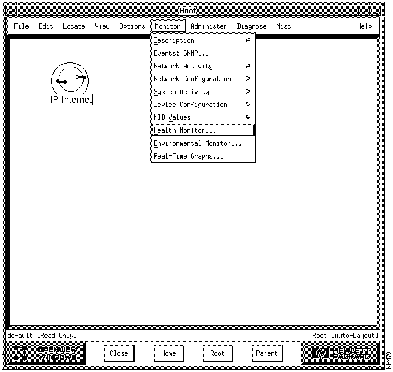
Figure 1-4 HP OpenView Main Window
Figure 1-5 shows the NetView for AIX main window.
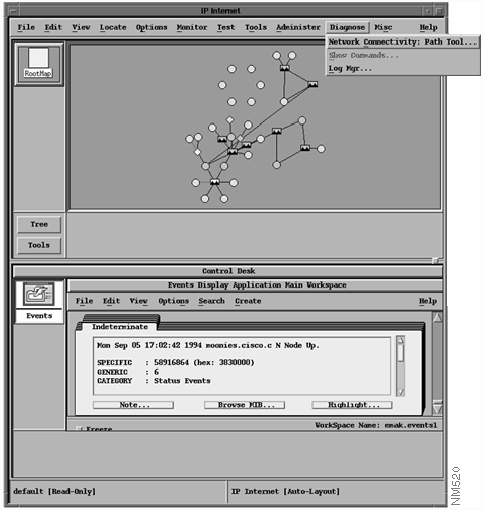
Figure 1-5 NetView for AIX Main Window
The CiscoWorks applications are available from the HP OpenView and NetView for AIX main menus. For example, to open the Device Management application, you would choose Administer, then Cisco Devices, then Device Mgmt (which would be represented as Administer>Cisco Devices>Device Mgmt).
HP OpenView does not use glyphs or a Glyph menu, as SunNet Manager does. In HP OpenView, instead of using the Glyph menu to access device-dependent applications, you would perform the following steps:
Table 1-3 briefly describes each of the CiscoWorks applications, and shows how to choose them from the HP OpenView menus. When the submenu column is blank, you can access the application directly from the menu name listed.
Table 1-3 Accessing CiscoWorks Applications from HP OpenView
| Application | Menu Location | Overview of Tasks |
|---|---|---|
| AutoInstall Manager | Administer>Cisco Devices>AutoInstall Manager |
Remotely deploy a new router using a neighbor router. Perform AutoInstall tasks remotely via the workstation running CiscoWorks instead of running a Telnet session. |
| Configuration Management | Administer>Cisco Devices>Configuration Management |
Access configuration files of local and remote Cisco Systems devices in your network to analyze or edit them as necessary. Compare the contents of two configuration files in the database or compare the configuration currently running on the device and the configuration that represents the last time you performed a Database to Device command. |
| Configuration Snap-In Manager | Administer>Cisco Devices>Configuration Snap-In Manager |
Create and execute system commands on a device or group of devices at any time via the Global Command Scheduler application. |
| Contacts | Monitor>Description>Contacts |
Obtain information about the contact person for a specific device including the complete name, telephone number, e-mail address, title, location, and address of the person responsible for the operation of the device. |
| Device Management | Administer>Cisco Devices>Device Management |
Create and maintain a database that holds a complete inventory of your network---hardware, software, release levels of operation components, individuals responsible for maintaining the devices, and associated locations. Enter or change data in the database tables for network devices, networks, interfaces, contacts, vendors, and so on. |
| Device Polling |
Monitor>Device Polling |
Probe and extract information about the condition of your networks using a polling feature. Information acquired from polling is stored in the database for further evaluation and analysis. Compare the relative performance and status of devices and interfaces on the network. |
| Device Software Manager | Administer>CiscoWorks Software Images>Device Software Manager |
Automate the upgrade of a system software or microcode image on a Cisco device. |
| Domain Manager | Administer> Security>Domain Manager |
Set up groups of devices called domains so that CiscoWorks applications can access these device groups to accomplish network management tasks such as security, configuration, and device polling. |
| Environmental Monitor | Monitor>Environmental Monitor |
View the environmental status of a Cisco AGS+ including temperature and voltage statistics. This function can be performed only on AGS+ routers running System Software Release 9.0 or later with an environmental monitor card running ENVM Microcode Version 2.0 or later software. |
| Global Command Manager |
Administer>CiscoWorks System>Global Command Manager |
Create and execute system commands on a device or group of devices at any time via the Global Command Scheduler application. |
| Global Command Scheduler |
Administer>CiscoWorks System>Global Command Scheduler |
Schedule commands or other jobs at regularly scheduled times using the crontab utility. |
| Health Monitor | Monitor>Health Monitor | View information about the status of a device, including buffers, CPU load, memory available, and protocols and interfaces being used. Enables you to access the Show Commands and Real-Time Graphs windows through the Health Monitor window. |
| Login | Misc>Login |
Perform a generic login for all CiscoWorks applications that require user authentication so that you do not have to log into each separate application. |
| Logout | Misc>Logout |
Log out of secured CiscoWorks applications to ensure security for those applications with authority checking turned on. |
| Log Manager | Diagnose>Log Manager |
Store, query, and delete messages gathered from network devices and CiscoWorks applications. |
| Path Tool | Diagnose>NetworkConnectivity>Path Tool |
View and analyze the path between two devices. Perform analysis on the path to collect utilization and error data. The display shows the devices encountered between the source and the destination device the link speeds connecting these SNMP devices, and the interface names. |
| Polling Summary |
Monitor>Polling Summary |
Summarize the polling setup completed by the Device Polling application. Browse data, and stop and start polling. |
| Process Manager | Administer>CiscoWorks System>Process Manager |
Start or stop CiscoWorks-related processes including the following daemons: Log (nmlogd), Polling (nmpolld), and Event Logger (nmeventd). View status for the following daemons: System Log (syslogd), the Sybase Server (dataserver), and the TACACS (xtacacsd). |
| Real-Time Graphs |
Monitor>Real-Time Graphs |
View device information such as the router health (buffer space, CPU load, environment, free memory, and security), interface health (bits per second, bytes, errors, packets per second, packets, and queues), and protocol traffic (IP, ICMP, SNMP, TCP, UDP, AppleTalk, DECnet IV, Novell, VINES, and XNS) using the xnmgraph utility. |
| SA Password | Administer>Security>SA Password |
Log in to the default Sybase database account to perform system administrator tasks. |
| Security Manager | Administer>Security>Security Manager |
Set up authority checking procedures to protect selected CiscoWorks applications and your network devices from unauthorized individuals by setting up your CiscoWorks environment to require a login to access applications. This protection ensures that only users with a valid account and password can perform tasks such as configuring a router, deleting database device information, or defining polling procedures. |
| Show Commands | Diagnose>Show Commands |
View device data about any SNMP device, including Cisco routers and communication servers. This device data includes the software version, buffers, selected device interfaces, traffic mix, IP accounting checkpoint, ARP, and IP route. This application emulates the EXEC show commands for Cisco routers. |
| Software Inventory Manager | Administer>CiscoWorks Software Images>Software Inventory Manager |
Update the Sybase database to include current device software and hardware status. Sort device information according to platform and software image and invoke Device Software Manager to update specific devices. |
| Software Library Manager | Administer>CiscoWorks Software Images>Software Library Manager |
Maintain the master storage (a list of all available Cisco system software and microcode). |
| Sync w/Sybase | Misc>Sync w/Sybase |
Synchronize both the NMS database and the Sybase database. CiscoWorks maintains data in the Sybase database, whereas HP OpenView maintains its own database. Sync w/Sybase ensures that device data from HP OpenView database is in the Sybase database (Sync w/Platform) and vice versa. Generally, synchronize the databases whenever new devices are added to your network. Use Sync Selected to add individual devices. |
| Sybase DWB | Misc>Sybase DWB |
Access Sybase Data Workbench utilities to run and print reports on any table created with the Device Polling application. |
| TACACS Manager | Administer>Security>TACACS Manager |
Maintain the TACACS password file on UNIX hosts that act as TACACS security servers. Create and update TACACS accounts and computer-generated passwords. |

|
Copyright 1988-1995 © Cisco Systems Inc.