
Table of Contents
Adapter Window
Adapter Window
This appendix explains the use of the Adapter selection in the Workgroup Director window. This selection activates a window that contains basic information about the adapter, such as model and serial numbers, driver and management versions, and diagnostic errors.
Figure A-1 shows the Adapter window, which displays basic information about the adapter.
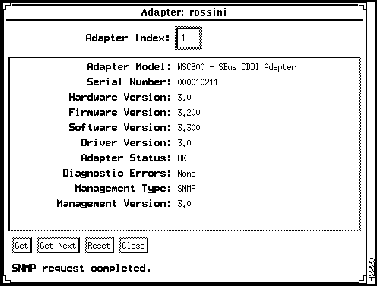
Figure A-1 Adapter Window
The Adapter window parameters are described following:
- Adapter Index---Shows the index number for the adapter, assigned by the workstation (that is, a slot number on HP workstations and an device number on Suns).
- Adapter Model---Displays the model of the adapter installed in your workstation.
- Serial Number---Displays the adapter serial number.
- Hardware Version---Displays the hardware version of the adapter.
- Firmware Version---Displays the firmware version currently installed on the adapter.
- Software Version---Displays the software version that is currently installed on the adapter.
- Driver Version---Displays the version of the driver installed in your workstation.
- Adapter Status---Indicates whether the adapter has successfully completed its self-diagnostics. It reflects the current alarm status of the adapter, as follows:
- OK---The adapter has detected no faults or other problems.
- Major Fault---A major fault occurs if any of the following components fail:
- ram
rom
flash
mac
rcv_ctr
serial eeprom
phy
bm
mac_lb
phy_lb
phy2_lb
itf_lb
itf2_lb
dual_lb
sbug
- Diagnostic Errors---Displays a list of diagnostic errors found while the adapter was completing its self-diagnostics. When the adapter successfully completes its diagnostics, this parameter displays "None."
- Following are descriptions of diagnostic errors that may appear:
- ram---Adapter random-access memory
- rom---Adapter read-only memory
- flash---Adapter Flash memory
- mac---Media Access Control chip
- rev_ctr---Receive counter
- ser_eeprom---Serial EEPROM
- phy---Physical Layer Protocol chip
- bm---Buffer memory
- mac_lb---Failure of the loopback test at the MAC chip
- phy_lb---Failure of the loopback test at the PHY chip
- phy2_lb---Failure of the loopback test at the second PHY chip
- itf_lb---Failure of the loopback test at the external interface
- itf2_lb---Failure of the loopback test at the second external interface
- dual_lb---Failure of the loopback test at the dual interface
- sbug---SBUG chip
- 68302---68302 chip
- ring---Hub internal ring
- Management Type---Displays the type of management agent running on your workstation.
- Management Version---Displays the version of the management agent running on your workstation.
Copyright 1988-1995
©
Cisco Systems Inc.



