
Table of Contents
Hub and Module Windows
Hub and Module Windows
This chapter explains the Hub and Module windows, which contain basic information about the concentrator or switch, such as addressing information, revision numbers, serial numbers, and SMT configuration data.
The Hub window is shown in Figure B-1.
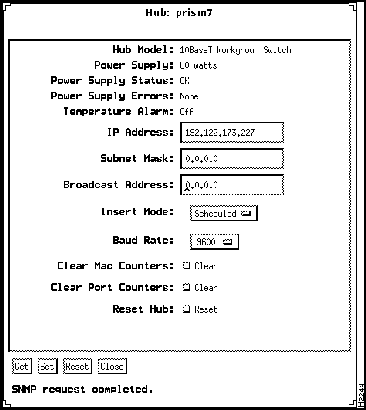
Figure B-1 Hub Window (Catalyst Workgroup Switch example)
Following are descriptions of the Hub window fields:
- Hub Model---Displays the model number of the hub.
- Power Supply---Displays the rating of the hub power supply.
- Power Supply Status---Displays the status of the hub power supply.
- Power Supply Errors---Displays the number of errors of the hub power supply.
- Temperature Alarm---Indicates whether the temperature alarm is on or off. The temperature alarm is on when the ambient air temperature of the hub exceeds 110oF (35oC).
- IP Address (read/write)---Displays the IP address of the hub SNMP agent.
- Subnet Mask (read/write)---Displays the subnet mask of the hub SNMP agent.
- Broadcast Address (read/write)---Displays the broadcast address of the hub SNMP agent.
- Attach Type (concentrators only) (read/write)---Defines the attachment type of the hub: dual attachment, single attachment, or null attachment. The default is dual attachment. You must have an A/B module for a dual attachment or single attachment configuration. Select null attach if you do not have an A/B module.
- In a dual attachment hub, port 1 is configured as A, and port 2 is configured as B.
- In a single attachment hub, port 2 is configured as S (slave), and port 1 is configured as M (master).
- In a null attachment hub, ports 1 and 2 are configured as M.
- Insert Mode (concentrators only) (read/write)---Sets the hub insert mode for M ports. To set the hub in standard insertion mode, select Standard. To set the hub in graceful insertion mode for data preservation, select Scheduled.
- Baud Rate (read/write)---Configures the RS-232 admin port baud rate. The default line speed is 9600 baud.
- Clear MAC Counters (read/write)---Resets the MAC counters to zero.
- Clear Port Counters (read/write)---Resets the Port counters to zero.
- Reset Hub (read/write)---Executes a hardware reset of the hub, causing the hub to leave the FDDI ring and then reconnect. It also resets counters and sends an SNMP trap message to an SNMP trap receiver.
The Module window contains information specific to a module. See Figure B-2.
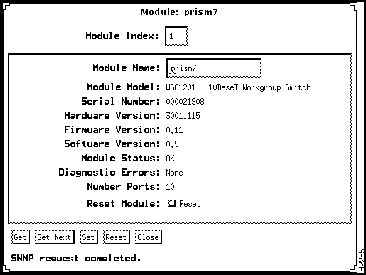
Figure B-2 Module Window
Following are descriptions of the Module window fields:
- Module Index---A unique value for each module within a hub.
- Module Name---The name of the module.
- Module Model---The model number of the module.
- Serial Number---Displays the serial number of the module.
- Hardware Version---Displays the hardware version of the module.
- Firmware Version---Displays the version of firmware in the module.
- Software Version---Displays the version of software in use.
- Module Status---Indicates whether the module has successfully completed its self-diagnostics. It reflects the current alarm status of the module as follows:
- Ok---The module has detected no faults or other problems.
- Minor Fault---A minor fault occurs if any of the following components fail:
- nvram
serial eeprom
phy
- Major Fault---Occurs if any of the following components fail:
- ram
rom
flash
mac
cce
power
- Diagnostic Errors---Displays a list of diagnostic errors found while the module was completing its self-diagnostics. When the module successfully completes its diagnostics, this parameter displays "None." Following are definitions of diagnostic errors that may appear:
- ram---Module random-access memory
- rom---Module read-only memory
- flash---Module flash memory
- nvram---Module nonvolatile memory
- cce---Configuration control element
- phy---Physical layer protocol chip
- mac---Media Access Control chip
- power---Module power supply
- ser_eeprom---Serial EEPROM
- 68302---68302 chip
- ring---Module internal ring
- Number Ports---Displays the number of ports in the module.
- Reset Module---Executes a hardware reset of the module, causing it to leave the FDDI ring and reconnect once it is up. It also resets counters and sends an SNMP trap message to an SNMP trap receiver.
Copyright 1988-1995
©
Cisco Systems Inc.



