
Table of Contents
SNMP Windows
SNMP Windows
This chapter contains descriptions of the following groups of SNMP windows:
- MIB-II
- SNMP V1
- FDDI
- Bridge
- IF Extensions
Workgroup Director contains the following MIB-II windows:
- System Group
- IF Table
- IP Group
- IP Address Table
- IP Route Table
- IP Net to Media Table
- ICMP Group
- TCP Table
- UDP Table
- SNMP Group
The System Group menu item is available on both the Workgroup Director Hub and Adapter windows. Selecting System Group displays identification information.
Figure C-1 shows the System Group window.
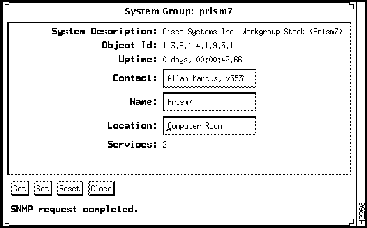
Figure C-1 System Group Window
Descriptions of System Group window parameters follow:
- System Description---Displays a description of the system.
- Object Id---Displays a value that the network management system uses to identify the type of concentrator or adapter.
- Uptime---Displays the amount of time that has elapsed since the concentrator or adapter was reset or powered up.
- Contact (read/write)---Displays the name of the network administration manager and information on how to contact this person.
- Name (read/write)---Displays the concentrator or adapter domain name.
- Location (read/write)---Displays the physical location of this concentrator or adapter, such as "telephone closet, 3rd floor."
- Services---Displays the services that this concentrator, switch, or adapter offers.
The IF (Interface) Table window (see Figure C-2) displays information about the concentrator or adapter. Each interface is attached to a subnetwork.
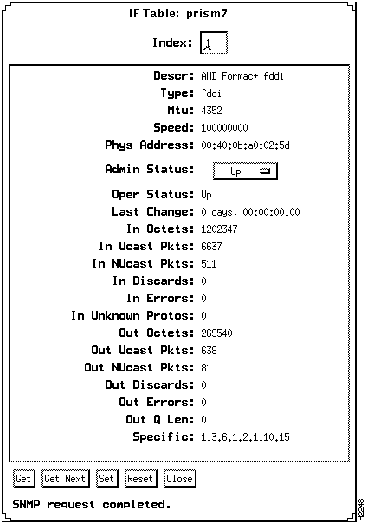
Figure C-2 IF Table Window
Descriptions of IF Table window parameters follow:
- Index---Displays a unique value. The value for each interface must remain constant from one initialization of the network management system to the next.
- Descr---Displays the name of the interface.
- Type---Displays the type of interface.
- Mtu---Displays the size of the largest datagram in bytes that this interface can send or receive.
- Speed---Displays an estimate of the interface current bandwidth in bits per second.
- Phys Address---Displays the MAC address for this interface.
- Admin Status (read/write)---Indicates the desired status of this interface. If this value is Up, the interface is ready to pass packets. If this value is Testing, no packets can be passed.
- Oper Status---Indicates the current status of this interface. If this value is Up, the interface is ready to pass packets. If this value is Testing, no packets can be passed.
- Last Change---Displays the value sysUpTime when the interface powers up. If the current state was entered prior to the last initialization, the value is 0.
- In Octets---Displays the total number of octets received on this interface, including framing characters.
- In Ucast Pkts---Displays the number of subnetwork-unicast packets delivered to a higher-layer protocol from this interface.
- In NUcast Pkts---Displays the total number of subnetworking broadcast or subnetwork-multicast packets delivered to a higher-layer protocol from this interface.
- In Discards---Displays the number of inbound packets that this interface discarded, even though no errors were detected. The interface may discard packets to free up buffer space.
- In Errors---Displays the number of inbound packets that contained errors and therefore could not be delivered by this interface to a higher-level protocol.
- In Unknown Protos---Displays the number of packets received through this interface that it discarded because of an unknown or unsupported protocol.
- Out Octets---Displays the number of octets sent from this interface, including framing characters.
- Out Ucast Pkts---Displays the number of packets that higher-level protocols requested to be transmitted to a subnetwork-unicast address. This value includes packets that were discarded and not sent.
- Out NUcast Pkts---Displays the number of packets that higher level protocols requested for transmittal to a subnetwork-broadcast or subnetwork-multicast address. This value includes discarded and unsent packets.
- Out Discards---Displays the number of outbound packets that were discarded by this interface, even though no errors were detected. The interface sometimes discards packets to free up buffer space.
- Out Errors---Displays the number of outbound packets that this interface could transmit because of errors.
- Out Q Len---Displays the length of the output packet queue (in packets).
- Specific---Refers to the interface media type. For example, if the interface media is FDDI, this value displays a document defining FDDI objects.
The IP (Internet Protocol) Group window, shown in Figure C-3, displays traffic and error information for IP messages.
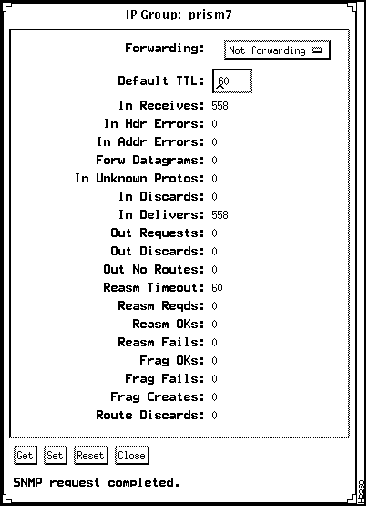
Figure C-3 IP Group Window
Following are descriptions of IP Group window parameters:
- Forwarding (read/write)---Displays the value Forwarding when this concentrator or workstation is acting as a gateway.
- Default TTL (read/write)---Displays a default value that is inserted into the Time-To-Live (TTL) field of this station's datagram IP header, if this value is not supplied by the transport layer protocol.
- In Receives---Displays the number of input datagrams received, including errors.
- In Hdr Errors---Displays the number of input datagrams discarded because of IP header errors, such as bad checksums, version number mismatches, TTL exceeded, or errors discovered during the processing of IP options.
- In Addr Errors---Displays the number of input datagrams discarded because of invalid IP addresses. This count also includes invalid addresses and addresses of unsupported classes.
- IP hosts use this counter to monitor datagrams that did not have a local destination address and were consequently discarded.
- Forw Datagrams---Displays the number of input datagrams that this IP gateway received, but were destined for a different address.
- IP hosts use this parameter to count packets that they successfully source-routed.
- In Unknown Protos---Displays the number of locally addressed datagrams with unknown or unsupported protocols, which were received and discarded.
- In Discards---Displays the number of input IP datagrams that had no problems, but were discarded. IP datagrams are sometimes discarded to free up buffer space.
- In Delivers---Displays the number of input datagrams that were successfully delivered to IP user-protocols.
- Out Requests---Displays the number of IP datagrams that local IP user-protocols supplied to IP in transmission requests. This counter does not include datagrams counted in the Forw Datagrams field.
- Out Discards---Displays the number of discarded output IP datagrams that had no problems.
- Out No Routes---Displays the number of IP datagrams discarded because no route could be found to transmit them to their destination. This counter includes packets counted in the Forw Datagrams field which meet this "no-route" criterion. This also includes any datagrams that a host cannot route because all of its default gateways are down.
- Reasm Timeout---Displays the maximum number of seconds for which this gateway holds received fragments as they await reassembly.
- Reasm Reqds---Displays the number of IP fragments received that need reassembling at this gateway.
- Reasm OKs---Displays the number of IP datagrams successfully reassembled at this gateway.
- Reasm Fails---Displays the number of failures detected by the IP reassembly algorithm.
- Frag OKs---Displays the number of successfully fragmented IP datagrams for this gateway.
- Frag Fails---Displays the number of discarded IP datagrams that need to be fragmented but could not be fragmented.
- Frag Creates---Displays the number of IP datagram fragments that were fragmented at this gateway.
- Route Discards---Displays the number of routing entries discarded though valid. One reason for discarding such an entry could be to free buffer space for other routing entries.
The IP Address Table window, shown in Figure C-4, displays the concentrator or workstation IP addressing information.
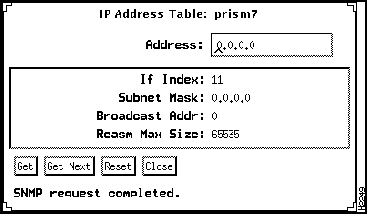
Figure C-4 IP Address Table Window
Following are descriptions of IP Address Table window parameters:
- Address---Displays this concentrator IP address.
- If Index---Displays the index value of the interface from the IF table for this entry.
- Subnet Mask---Displays the subnet mask associated with this IP address.
- Broadcast Addr---Displays the least significant bit in the IP broadcast address used for sending datagrams on the logical interface associated with this address. For example, when the Internet standard all-ones broadcast address is used, the value is 1.
- Reasm Max Size---Displays the size of the largest datagram that this station can reassemble from incoming IP fragmented datagrams.
The IP Route Table window, shown in Figure C-5, displays all the routing information used by this IP address.
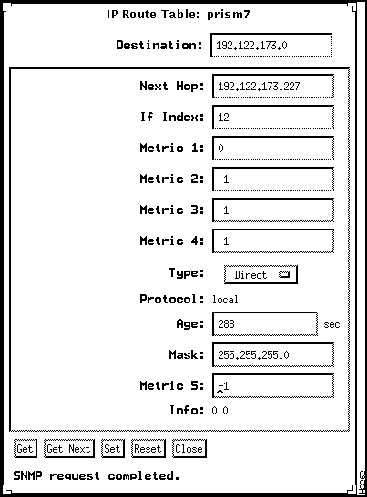
Figure C-5 IP Route Table Window
Following are descriptions of IP Route Table window parameters:
- Destination (read/write)---Displays the destination IP address for this route.
- Next Hop (read/write)---Displays the IP address of the next hop of this route.
- If Index (read/write)---Displays the index value of the interface from the IF table for this entry.
- Metric 1 (read/write)---Displays the primary routing metric for this route. If unused, this value is --1.
- Metric 2 (read/write)---Displays an alternate routing metric for this route. If unused, this value is --1.
- Metric 3 (read/write)---Displays an alternate routing metric for this route. If unused, this value is --1.
- Metric 4 (read/write)---Displays an alternate routing metric for this route. If unused, this value is --1.
- Type (read/write)---Displays the route type. Each type is defined as follows:
- Invalid---Set a route to invalid to remove it from the routing table.
- Direct---A direct route is connected to a sub-network.
- Indirect--- An indirect route is connected to a nonlocal host, network, or sub-network.
- Other---None of these.
- Protocol---Displays the type of routing protocol implemented on this route.
- Age (read/write)---Displays the number of seconds since this route was last updated.
- Mask (read/write)---Displays the mask that will be combined with the destination address before it is compared to the value in the Destination field.
- Metric 5 (read/write)---Displays an alternate routing metric for this route. If unused, its value is --1.
- Info---References the MIB definition for a particular routing protocol responsible for this route. If this information is not available, the value is set to 0.0.
The IP Net to Media Table window, shown in Figure C-6, is a translation table that maps IP addresses to physical addresses.
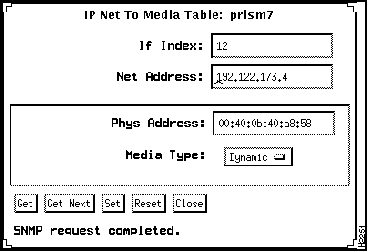
Figure C-6 IP Net To Media Table Window
Following are descriptions of IP Net to Media Table window parameters:
- IF Index (read/write)---Displays the index value of the interface from the IF Table for this entry.
- Net Address (read/write)---Displays the IP address.
- Physical Address (read/write)---Displays the media-dependent physical address.
- Media Type (read/write)---Displays the type of media mapping: invalid, dynamic, or static. To delete an entry from the table set the type to Invalid.
The ICMP (Internet Control Message Protocol) Group window provides traffic statistics for the ICMP. The ICMP Group window is shown in Figure C-7.
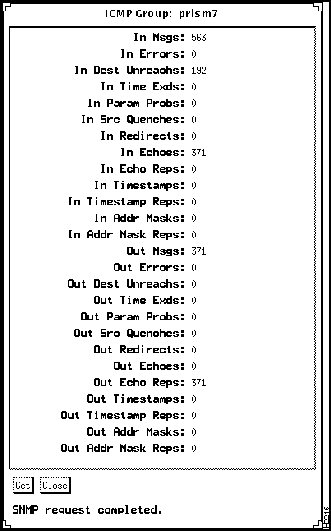
Figure C-7 ICMP Group Window
Note All counters reflect messages that were sent since power up or the last reset of the concentrator or workstation.
Following are descriptions of ICMP Group window parameters:
- In Msgs---Displays the total number of ICMP messages received, including messages counted by the In Errors parameter.
- In Errors---Displays the total number of ICMP messages received that had ICMP-specific errors, such as bad length, bad checksums, and so forth.
- In Dest Unreachs---Displays the number of ICMP messages received that were unable to reach their ultimate destination.
- In Time Exds---Displays the number of ICMP time-exceeded messages received.
- In Param Probs---Displays the number of ICMP parameter problem messages received.
- In Src Quenches---Displays the number of ICMP source quench messages received since power-up or the last reset of the concentrator or workstation.
- In Redirects---Displays the number of ICMP redirect messages received.
- In Echoes---Displays the number of ICMP echo request messages received.
- In Echo Reps---Displays the number of ICMP echo reply messages received.
- In Timestamps---Displays the number of ICMP timestamp request messages received.
- In Timestamp Reps---Displays the number of ICMP timestamp reply messages received.
- In Addr Masks---Displays the number of ICMP address mask request messages received.
- In Addr Mask Reps---Displays the number of ICMP address mask reply messages received.
- Out Msgs---Displays the total number of ICMP messages that were sent. This counter includes all messages counted in the ICMP Out Errors counter.
- Out Errors---Displays the number of ICMP messages not sent because of problems discovered within the ICMP, such as lack of buffers.
- Out Dest Unreachs---Displays the number of ICMP messages that were sent, but were unable to reach a destination.
- Out Time Exds---Displays the number of ICMP time-exceeded messages sent.
- Out Param Probs---Displays the number of ICMP parameter problem messages sent.
- Out Src Quenches---Displays the number of ICMP source quench messages sent.
- Out Redirects---Displays the number ICMP redirect messages sent.
- Out Echoes---Displays the number of ICMP echo request messages sent.
- Out Echo Reps---Displays the number of ICMP echo reply messages sent.
- Out Timestamps---Displays the number of ICMP timestamp request messages sent.
- Out Timestamp Reps---Displays the number of ICMP timestamp reply messages sent.
- Out Addr Masks---Displays the number of ICMP address mask request messages sent.
- Out Addr Mask Reps---Displays the number of ICMP address mask reply messages sent.
The TCP table window is shown in Figure C-8.
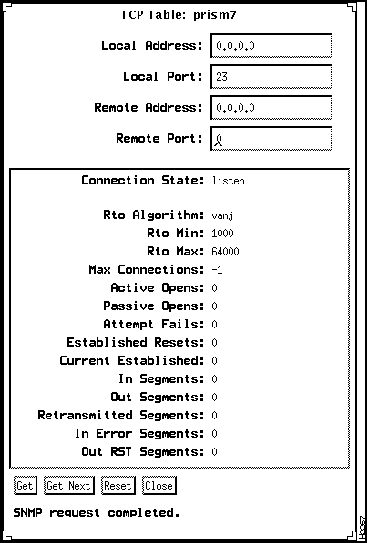
Figure C-8 TCP Table Window
Following are descriptions of TCP Table window parameters:
- Local Address---Displays the local IP address for this TCP connection. Use a local address of 0.0.0.0 if a listen state connection is willing to accept connections for any IP interface associated with the node.
- Local Port---Displays the local port number for this TCP connection.
- Remote Address---Displays the remote IP address for this TCP connection.
- Remote Port---Displays the remote port number for this TCP connection.
- Connection State---Displays the state of this TCP connection. States defined in TCP finite state machine follow:
- closed
- listen
- synSent
- synReceived
- established
- finWait1
- finWait2
- closeWait
- lastAck
- closing
- timeWait
- delete TCB (transmission control block)
- Rto Algorithm---Displays the algorithm used to determine the timeout value used for retransmitting unacknowledged octets.
- Rto Min---Displays the minimum value permitted by a TCP implementation for the retransmission timeout, measured in milliseconds.
- Rto Max---Displays the maximum value permitted by a TCP implementation for the retransmission timeout, measured in milliseconds.
- Max Connections---Displays the limit on the total number of TCP connections the entity can support. In entities where the maximum number of connections is dynamic, this object contains value --1.
- Active Opens---Displays the number of times TCP connections have made a direct transition to the SYN-SENT state from the CLOSED state.
- Passive Opens---Displays the number of times TCP connections have made a direct transition to the SYN-RCVD state from the LISTEN state.
- Attempt Fails---Displays the number of times TCP connections have made a direct transition to the CLOSED state from either the SYN-SENT state or the SYN-RCVD state, plus the number of times TCP connections have made a direct transition to the LISTEN state from the SYN-RCVD state.
- Established Resets---Displays the number of times TCP connections have made a direct transition to the CLOSED state from either the ESTABLISHED state or the CLOSE-WAIT state.
- Current Established---Displays the number of TCP connections for which the current state is either ESTABLISHED or CLOSE-WAIT.
- In Segments---Displays the total number of segments received, including those received in error. This count includes segments received on currently established connections.
- Out Segments---Displays the total number of segments sent, including those on current connections but excluding those containing only retransmitted octets.
- Retransmitted Segments---Displays the total number of segments retransmitted---that is, the number of TCP segments transmitted containing one or more previously transmitted octets.
- In Error Segments---Displays the total number of segments received in error (for example, bad TCP checksums).
- Out RST Segments---Displays the number of TCP segments sent containing the RST flag.
The User Datagram Protocol (UDP) is the connectionless-mode transport protocol in the Internet suite. The UDP Table window is shown in Figure C-9.
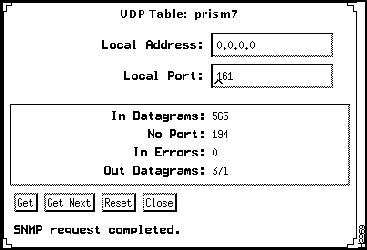
Figure C-9 UDP Table WIndow
Note All counters reflect messages that were sent since power up or the last reset of the concentrator or workstation.
Following are descriptions of UDP Table window parameters:
- Local Address---Displays the local address for this UDP listener. The default value is 0.0.0.0, which means that the listener will accept datagrams for any IP interface associated with this node.
- Local Port---Displays the local port number of this UDP listener.
- In Datagrams---Displays the number of UDP datagrams delivered to UDP users.
- No Ports---Displays the total number of received UDP datagrams that were met with no application at the destination port.
- In Errors---Displays the number of UDP datagrams that could not be delivered for any reason, excluding the lack of an application at the destination port.
- Out Datagrams---Displays the total number of UDP datagrams sent.
The SNMP Group displays traffic statistics of Simple Network Management Protocol packets. The SNMP Group window is shown in Figure C-10.
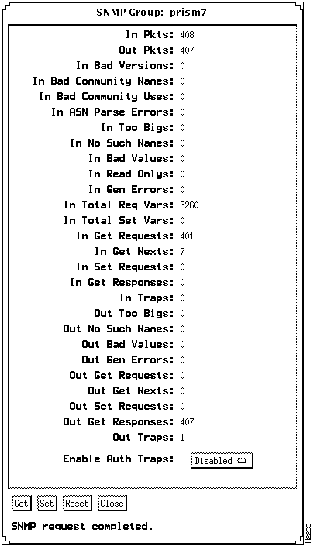
Figure C-10 SNMP Group Window
Note All counters reflect messages that were sent since power up or the last reset of the concentrator or workstation.
Following are descriptions of SNMP Group window parameters:
- In Pkts---Displays the total number of SNMP packets received.
- Out Pkts---Displays the total number of SNMP packets sent.
- In Bad Versions---Displays the total number of SNMP packets received that had a bad version number.
- In Bad Community Names---Displays the total number of SNMP messages received that used an unknown SNMP community name.
- In Bad Community Uses---Displays the total number of SNMP messages received that contained an SNMP operation not allowed by the SNMP community named in the message.
- In ASN Parse Errors---Displays the total number of ASN errors found in SNMP messages received.
- In Too Bigs---Displays the total number of SNMP PDUs received that contained an error-status field value of tooBig.
- In No Such Names---Displays the total number of SNMP PDUs received that contained an error-status field value of nosuchName.
- In Bad Values---Displays the total number of SNMP PDUs received that contained an error-status field value of badValue.
- In Read Onlys---Displays the total number of SNMP PDUs received that contained an error-status field value of ReadOnly. This value is used to detect incorrect SNMP implementations.
- In Gen Errors---Displays the total number of SNMP PDUs received that contained an error-status field value of genErr.
- In Total Req Vars---Displays the total number of MIB objects successfully retrieved because of valid SNMP Get-Request and Get-Next PDUs.
- In Total Set Vars---Displays the total number of MIB objects successfully altered because of valid SNMP Set-Request PDUs.
- In Get Requests---Displays the total number of SNMP Get-Request PDUs received and processed.
- In Get Nexts---Displays the total number of SNMP Get-Next PDUs received and processed.
- In Set Requests---Displays the total number of SNMP Set-Request PDUs received and processed.
- In Get Responses---Displays the total number of SNMP Get-Response PDUs received and processed.
- In Traps---Displays the total number of SNMP Trap PDUs received and processed.
- Out Too Bigs---Displays the total number of SNMP PDUs sent that received an error-status field value of tooBig.
- Out No Such Names---Displays the total number of SNMP PDUs sent that received an error-status field value of noSuchName.
- Out Bad Values---Displays the total number of SNMP PDUs sent that received an error-status field value of badValue.
- Out Gen Errors---Displays the total number of SNMP PDUs sent that received an error-status field value of genErr.
- Out Get Requests---Displays the total number of SNMP Get-Request PDUs sent.
- Out Get Nexts---Displays the total number of SNMP Get-Next PDUs sent.
- Out Set Requests---Displays the total number of SNMP Set-Request PDUs sent.
- Out Get Responses---Displays the total number of SNMP Get-Response PDUs sent.
- Out Traps---Displays the total number of SNMP Trap PDUs sent.
- Enable Auth Traps (read/write)---Indicates whether the SNMP agent process will generate authentication traps. This parameter can disable authentication failure-traps. This value overrides any other configuration information.
Workgroup Director includes the following SNMP V1 windows:
- Community Strings
- Trap Receiver Table
The Community Strings menu item defines the community strings allowed by the SNMP agent in the concentrator or workstation. Any SNMP message that the agent receives must include one of these community strings in order to be processed. Each of the four community strings allows a different level of access, as defined in this section.
Note You must specify the read/write all community string when starting up Workgroup Director. If this parameter is not specified, you will get a noSuchName error when trying to access Community Strings.
Figure C-11 shows the Community Strings window.
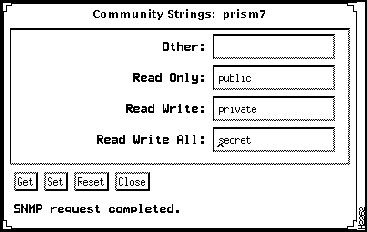
Figure C-11 Community Strings Window
Following are descriptions of Community Strings window parameters:
- Other (read/write)---Does not allow read or write access to MIB objects.
- Read Only (read/write)---Allows read-only access to all MIB objects except community strings.
- Read Write (read/write)---Allows read/write access to all MIB objects except community strings. The default read-write string is public.
- Read Write All (read/write)---Allows read/write access to all MIB objects including community strings. The default read/write-all string is public.
The SNMP agent in the concentrator or workstation uses a trap-directed method to warn the network management station(s) that a problem has occurred. The Trap Receiver Table displays up to ten entries and lists the Internet addresses of the management stations that should be notified if a problem occurs.
When a trap condition occurs, the SNMP agent sends an SNMP trap message to each of the stations in the trap receiver table. Currently, coldStart and authenticationFailure traps are implemented.
Figure C-12 shows the Trap Receiver Table window.
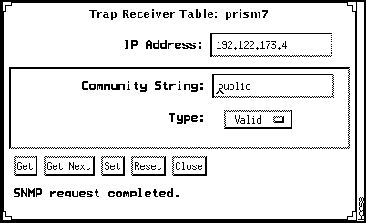
Figure C-12 Trap Receiver Table Window
Following are descriptions of Trap Receiver Table window parameters:
- IP Address (read/write)---Displays the IP address of the trap receiver.
- Community String (read/write)---Displays the community string to be included in the trap message to this trap receiver.
- Type (read/write)---Allows you to declare this table entry valid or invalid.
The FDDI SMT window displaying information from a station running SMT 7.x is shown in Figure C-13 and Figure C-14.
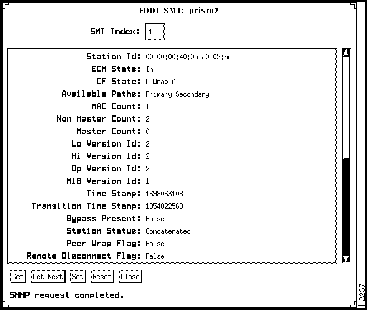
Figure C-13 FDDI SMT Window
Following are descriptions of FDDI SMT window parameters:
- SMT Index---Displays the value of the SMT index associated with this port.
- Station Id---Displays a unique identifier for an FDDI station, represented in a 64-bit field. The last 6 octets (pairs of hexadecimal numbers) derive from the primary MAC address.
- ECM State---Displays the Entity Coordination Management (ECM) function state. ECM controls the bypass switch of the Physical Media Dependent (PMD) layer and signals the physical connection management (PCM) when the media is available. It also coordinates the trace function and initiates a path test after a trace to localize the suspected fault. The ECM State parameter displays one of the following values:
- Out---Waiting for a connect request.
- In---The normal state for a completed connection.
- Trace---Determines the location of a stuck beacon condition.
- Leave---Allows sufficient time to break existing connections.
- Path-test---Indicates the state reached after leaving the trace state.
- Insert state---Allows for the switching time of the bypass.
- Check---Confirms that both the primary and secondary bypass switches have switched.
- Deinsert state---Allows enough time for the bypass switch to deinsert.
- Other---Shows the concentrator has an unknown ECM state.
- CF State---Contains the state established by the A and B port configuration management elements (CEM).
- A separate CEM instance is specified for each type of port. Following are CF State values:
- Isolated---Both 1/A and 2/B ports are isolated from the paths.
- Wrap-S---S port is connected to the primary path.
- Wrap-A---Port 2/B is isolated, and port 1/A is connected to the primary and secondary paths.
- Wrap-B---Port 1/A is isolated, and port 2/B is connected to the primary and secondary paths.
- Thru---Ports 1/A and 2/B are connected to the primary and secondary paths.
- Hold State (SMT 6.x only)---Displays the current state of the hold function as follows:
- Not Holding---There is no holding on either the primary or secondary ring.
- Holding on Primary---The primary ring is operational, and the secondary ring has no fault.
- Holding on Secondary---The secondary ring is operational, and the primary ring has a fault.
- Holding Not Implemented---Holding is not implemented on this concentrator.
- Available Paths---Displays the concentrator internal path types: primary, secondary, and local.
- MAC Count---Displays the number of MACs in the concentrator.
- Non Master Count---Displays the number of non-master ports in the concentrator. These are the A, B, and S (slave) ports.
- Master Count---Displays the number of master ports in the concentrator.
- Lo Version Id---Displays the lowest SMT version that this concentrator supports. The concentrator will not accept SMT messages from another node with a lower SMT version.
- Hi Version Id---Displays the highest SMT version that the concentrator supports.
- Op Version Id---Displays the SMT version currently installed in the concentrator. You can modify this value as long as it falls between the contiguous range of version IDs supported by the station.
- MIB Version Id (SMT 7.x only)---Displays the version of FDDI MIB in this station.
- Time Stamp (SMT 7.x only)---Displays the value of the time stamp.
- Transition Time Stamp (SMT 7.x only)---Reflects the time of the most recent event occurrence, condition assertion, or condition deassertion in the station.
- Bypass Present (SMT 7.x only)---Indicates the presence of an optical bypass on the A/B ports.
- Station Status (SMT 7.x only)---Is the current status of the primary and secondary paths within this station.
- Peer Wrap Flag (SMT 7.x only)---Indicates that a peer wrap condition exists.
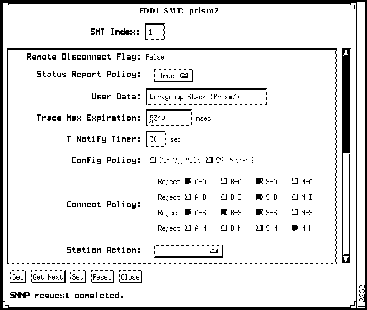
Figure C-14 FDDI SMT Window
- Remote Disconnect Flag---Indicates that the station was remotely disconnected from the network. The value is true for a disconnected station. A disconnected station requires a connect action to rejoin the network. See the Station Action parameter later in this section.
- Status Reporting Policy---Indicates the optional implementation of station reporting frames (SRFs).
- User Data (read/write) (SMT 7.x only)---Displays user-defined information.
- Trace Max Expiration (read/write) (SMT 7.x only)---Displays the propagation time for a trace on an FDDI topology. The default is 7 seconds.
- T Notify Timer (read/write)---Specifies in seconds how often SMT initiates neighbor notification broadcasts. The value is an integer from
2 to 30.
- Config Policy (read/write)---Indicates the configuration policies currently enforced in the node. If no configuration policies are supported, this parameter is shaded.
- Connect Policy (read/write)---Specifies illegal FDDI connections that will be rejected by the concentrator. You can change this parameter to reject specific types of connections by clicking on the boxes. See Table C-1 for connection policies.
Table C-1 Connection Policies (Continued)
| reject A-A |
An undesirable peer connection that creates twisted primary and secondary rings. |
| reject A-B |
Normal trunk ring-peer connection. |
| reject A-S |
Undesirable peer connection that creates a wrapped ring. |
| reject A-M |
A tree connection with possible redundancy. |
| reject B-A |
Normal trunk ring peer connection. |
| reject B-B |
Undesirable peer connection that creates twisted primary and secondary rings. |
| reject B-S |
Undesirable peer connection that creates a wrapped ring. |
| reject B-M |
Tree connection with possible redundancy. |
| reject S-A |
Undesirable peer connection that creates a wrapped ring. |
| reject S-B |
Undesirable peer connection that creates a wrapped ring. |
| reject S-S |
Connection that creates a single ring of two slave stations. |
| reject S-M |
Normal tree connection. |
| reject M-A |
Tree connection that provides possible redundancy. |
| reject M-B |
Tree connection that provides possible redundancy. |
| reject M-S |
Normal tree connection. |
| reject M-M |
An illegal connection that creates a tree of rings topology. |
- Station Action (read/write)---Specifies one of the following actions generated by the SMT and sent to the CMT:
- Clear Field---Clears this field of all actions.
- Connect---Causes the CMT to issue a connect signal to ECM.
- Disconnect---Causes the CMT to issue a disconnect signal to the ECM.
- Path Test---Initiates a station path test.
- Self Test---Initiates a system self-test.
- Disable A---Disables port A.
- Disable B---Disables port B.
- Disable M---Disables all master ports.
This section contains instructions for configuring and interpreting Media Access Control (MAC) parameters. If you require more information about a particular field or subject, refer to the appropriate section of the SMT specification.
The MAC protocol is responsible for constructing frames and tokens and for sending and receiving SMT and User Data frames on the FDDI/CDDI ring.
The MAC menu activates a window containing information about each MAC in the concentrator. This menu is available from both the concentrator and adapter display windows.
Most MAC parameters are read-only and cannot be changed. The words read/write appear after the parameters that you can modify. Remember to click on the Set button to save any changes you make to the read/write parameters.
The FDDI MAC window is shown in two sections: Figure C-15 and Figure C-16.
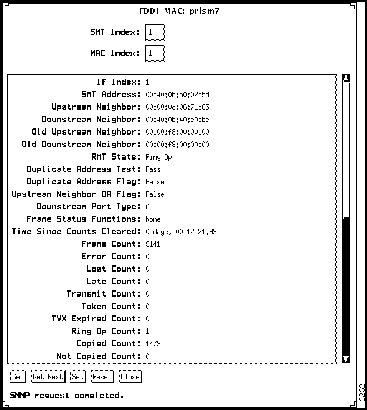
Figure C-15 FDDI MAC Window (SMT 7.x example)
Following are descriptions of FDDI MAC parameters:
- SMT Index---Displays the value of the SMT index associated with this MAC.
- MAC Index---Uniquely identifies the MAC object instances, which is the same as the corresponding resource index in SMT.
- If Index (SMT 7.x only)---Displays the value of the MIB-II ifIndex corresponding to this MAC. It has a range of 0 to 65535, where 0 means none.
- SMT Address---Displays the 48-bit individual address of the MAC that SMT frames use.
- Upstream Neighbor---Displays the current upstream neighbor address.
- Downstream Neighbor (SMT 7.x only)---Displays the long individual MAC address of the downstream neighbor.
- Old Upstream Neighbor---Displays the address of the previous upstream neighbor.
- Old Downstream Neighbor (SMT 7.x only)---Displays the previous value of the downstream neighbor long individual MAC address.
- RMT State---Displays the ring management state. Ring management identifies stuck beaconing, initiates traces, provides notification of MAC availability, and detects duplicate addresses that prevent ring operation. This field displays one of the following values:
- Isolated---Initial state of the RMT.
- Non_Op---Ring is not operational.
- Ring_Op---Ring is operational.
- Detect:---A duplicate address was detected and rendered the ring non operational.
- Non_Op_Dup---Ring is not operational because this MAC has a duplicate address.
- Ring_Op_Dup---This MAC has a duplicate address.
- Directed---This MAC sends beacon frames to notify ring of a stuck condition.
- Trace---The MAC initiates a trace function. Trace provides a mechanism for recovery from a stuck beacon.
- Duplicate Address Test---Indicates whether or not the MAC has passed the duplicate address test. The SMT specification does not allow duplicate MAC addresses.
- Duplicate Address Flag---Indicates the existence of a duplicate address. The SMT specification does not permit duplicate addresses to co-exist. If the value is False, no duplicate addresses exist. If the value is True, a duplicate address exists.
- Upstream Neighbor DA Flag---Indicates that a flag was set in response to a report by an upstream neighbor that a duplicate address condition exists. This flag resets when the condition clears.
- Downstream Port Type---Indicates the type of the first port that is downstream of this MAC. The port types are M (master), S (slave), A, and B.
- Chip Set (SMT 6.x only)---Identifies the object ID of the hardware chips in the concentrator that are responsible for the implementation of the MAC function.
- Frame Status Functions (SMT 7.x only)---Indicates the optional Frame Status processing functions of the MAC.
- Time Since Counts Cleared---Displays the time (in hundredths of a second) since MAC counters were last cleared.
- Frame Count---Displays all frames that the MAC has forwarded on the ring.
- Error Count---Displays a count of all error frames detected by this MAC. Frames that were detected as bad by a previous station are not included in this count.
- Lost Count---Displays a count of all frames and tokens received by this MAC that have an error.
- Late Count (SMT 7.x only)---Displays the number of token-rotation timer (TRT) expirations since this MAC was reset or a token (restricted or nonrestricted) was received.
- Transmit Count (7.x only)---Displays the number of frames transmitted by this MAC. Note that this count does not include MAC frames.
- Token Count (7.x only)---Displays the number of times the station has received a token (total of nonrestricted and restricted) on this MAC. The value of this counter is useful for determination of network load.
- TVX Expired Count (7.x only)---Displays the number of times that TVX has expired.
- Ring Op Count (SMT 7.x only)---Displays the number of transitions of the ring from "ring not operational" to "ring operational."
- Copied Count (SMT 7.x only)---Displays the number of frames addressed to and successfully copied into the receive buffers by this MAC. This count does not include MAC frames.
- Not Copied Count (SMT 7.x only)---Displays the number of frames that were addressed to this MAC but were not copied into its receive buffers (see ANSI MAC 7.5). For example, this might occur due to local buffer congestion. This count does not include MAC frames.
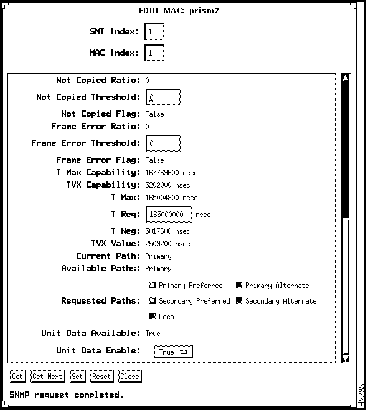
Figure C-16 FDDI MAC Window (SMT 7.x example)
- Not Copied Ratio (SMT 7.x only)---Displays the value of the ratio:
- (delta fddiMACNotCopiedCts ) * 216
-----------------------------------------------------------------------
(delta fddiMACCopiedCts + delta fddiMACNotCopiedCts)
- Not Copied Threshold (read/write) (SMT 7.x only)---Displays the threshold for determining when a MAC condition report is generated.
- Not Copied Flag (SMT 7.x only)---Indicates that the Not Copied condition is present when the flag is True. When the condition clears and on station initialization, the flag is set to False.
- Frame Error Ratio contains the following ratio:
- (MACLost_Ct + MACError_Ct / MACFrame_Ct + MACLost_Ct) x 216
- Frame Error Threshold---Displays the value that determines when a MAC should generate a condition report.
- Frame Error Flag---Indicates the MAC Frame Error Condition is present when the flag is set to False. When the condition clears and on station initialization, the flag is set to True.
- T Max Capability---Indicates the maximum time value of MAC T Max that this MAC supports.
- TVX Capability---Indicates the maximum time value of MAC TVX that this MAC supports. Note that the operational value of MAC TVX is managed by the variable, TVX Lower Bound, in the corresponding FDDI PATH window.
- T Min (SMT 6.x only),T Max,T Req,T Neg,TVX Value---Each MAC continuously monitors the ring in search of conditions that require a ring reinitialization. The expiration of a MAC valid transmission timer (TVX) detects ring activity. The claim token process is a series of negotiations between MACs for right to reinitialize the ring. The winning MAC performs the ring reinitialization.
- These parameters are defined as follows:
- T Min (SMT 6.x only)---Displays the minimum time (in microseconds) that you can set for a T Req value.
- T Max---Displays the maximum time (in microseconds) that you can set for a T Req value.
- T Req (read/write)---Displays the average token rotation time that the MAC element requests during the Claim Token process. Any change to this parameter causes the ring to go down and up (read-only parameter in SMT 7.x).
- T Neg---Displays the T Req value agreed upon by all MACs in the ring.
- TVX Value---Displays the expected time between valid transmissions. The TVX typically expires because of a problem on the ring and will initiate ring recovery.
- Current Path---Indicates the current path handled by the MAC. The values follow:
- Primary---The MAC is connected to the primary path.
- Secondary---The MAC is connected to the secondary path.
- Local---The MAC is connected to the local path.
- Isolated---The MAC is not connected to a path.
- Unknown---The current path cannot be determined.
- Concatenated---The port is inserted in both the primary and secondary paths in a concatenated wrap configuration.
- Thru---The port is inserted in both the primary and secondary paths in a thru configuration.
- Available Paths---Indicates the paths available for this MAC. The possible paths are primary, secondary, and local.
- Requested Paths (read/write)---Displays the paths requested by the MAC. The values are primary, secondary, local, and isolated.
- Unit Data Available (SMT 7.x only)---Displays the value of the MAC_Avail flag defined in RMT.
- Unit Data Enable (SMT 7.x only)---Determines the value of the MA_UNITDATA_Enable flag in RMT(Ring Management). The default and initial value of this flag is True.
- Current Frame Status (read/write) (SMT 6.x only)---Indicates the operational frame status settings of the MAC. The status settings follow:
- FSC-Type 0---The MAC repeats A/C indicators as received.
- FSC-Type 1---The MAC sets C but not A on copying for forwarding.
- FSC-Type 2---The MAC resets C, and sets A on C.
- Action (SMT 6.x only)---Displays values for the following actions:
- Clear Field---Clears all actions set since the last set.
- Enable LLC Service---Enables the MAC services to higher layers.
- Disable LLC Service---Disables the MAC services to higher layers.
- Connect MAC---Connects this MAC to the ring.
- Disconnect MAC---Disconnects this MAC from the ring.
The FDDI Path window is shown in Figure C-17.
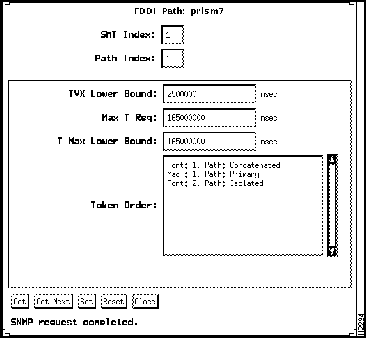
Figure C-17 FDDI Path Window
Following are descriptions of FDDI Path window parameters:
- SMT Index---Displays the value of the SMT index associated with this path.
- Path Index---Displays the value of the path index, identifies the primary, secondary, and local path object instances. Local path object instances are represented with values from 3 to 255.
- TVX Lower Bound---Specifies the minimum time value of MAC TVX Value that shall be used by any MAC that is configured in this path. The operational value of MAC TVX Value is managed by setting this variable. This variable has the following time value range:
- 0 < TVX Lower Bound < Max T Req
- Changes to this variable shall either satisfy the time value relationship:
- PATH TVX Lower Bound <= MAC TVX Capability
- of each of the MACs currently on the path, or be considered out of range. The initial value of PATH TVX Lower Bound is 2.5 milliseconds (msec).
- Max T Req---Specifies the maximum time value of MAC T-Req to be used by any MAC that is configured in this path. The operational value of MAC T- Req is managed by setting this variable. This variable has the following time value range:
- TVX Lower Bound < Max T Req <= T Max Lower Bound.
- The default value of Max T Req is 165 msec.
- T MAX Lower Bound---Specifies the minimum time value of MAC T Max that shall be used by any MAC that is configured in this path. The operational value of MAC T Max is managed by setting this variable.
- This variable has the time value range of
- Max T Req <= T Max Lower Bound
- and an absolute time value range of
- 10 msec <= T Max Lower Bound
- Changes to this variable must either satisfy the following time value relationship or be considered out of range:
- T Max Lower Bound < MAC T Max Capability of each MAC currently on the path.
- The initial value of T Max Lower Bound is 165 msec.
- Token Order---Displays a table which specifies the type of resource the token passes through. The type of resource can be either MAC or port, which is shown in the first column of the table. The order in which the resources are displayed in this table is the order in which the token flows.
- The second column is the index of the resource, for example, the first MAC (1) or second port (2).
- The third column and the fourth column indicate the current insertion status for this resource on this path. The status can be Isolated, Local, Secondary, Primary, Concatenated, and Thru.
The FDDI Port window is used to configure and display statistics for FDDI ports in a concentrator or adapter. (See Figure C-18 and Figure C-19.)
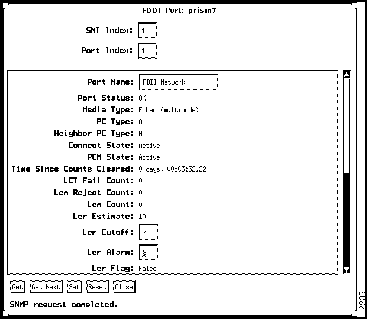
Figure C-18 FDDI Port Window (SMT 7.x example)
Following are descriptions of the parameters in the FDDI Port window:
- SMT Index (read/write)---Displays a unique value for this port.
- Port Index---Displays an index value associated with the port number.
- Port Name (read/write)---Displays the name of the designated port. This parameter is specific to the concentrator.
- Port Status---Indicates the port status.
- The values follow:
- OK---The port is connected. The Link Status LED displays green.
- Minor Fault---A signal is detected, but the port is not connected. The Link Status LED displays orange.
- Not Connected---The port is not connected.
- Media Type---Indicates whether the port is CDDI, CDDI/MLT-3, singlemode fiber, or fiber.
- Class (SMT 6.x only)---Indicates a functional unit, which consists of a port or a pair of ports, plus the associated bypass. The port associations include the following:
- Single attachment---S port.
- Dual attachment---A/B port.
- Concentrator---M port.
- PC Type---Specifies the type of port: M (master), S (slave), A, or B.
- Neighbor PC Type---Specifies the port type of the other end of the connection.
- CE State (SMT 6.x only)---Shows the state of the concentrator configuration control element. The states follow:
- Isolated CE Stated---The PHY is isolated from the paths.
- Insert_P---The port has been inserted into the primary path.
- Insert_X---The port has been inserted; the primary path connects to transmit, and receive connects to the secondary path.
- Other---The CE State field displays this value if the concentrator is unable to determine the CE State.
- Connect State---Indicates the connect state of this port. It groups PCM (physical connection management) states and PC withhold flag states. The connect state values follow:
- Disabled---Port has no line module or was disabled by the user.
- Connecting---Port is attempting to connect, or is disconnected.
- Standby---Connection is withheld or is the inactive port of a dual-homing concentrator.
- Active---The port is active.
- PCM State---Indicates the physical connection management state. The values follow:
- Off---Initial state of the PCM state machine.
- Break---Entry point of a PCM connection.
- Trace---Localizes a stuck beacon condition.
- Connect---Synchronizes the ends of a signaling sequence connection.
- Next---Separates the signaling performed in the signal state and transmits PDUs during the MAC local loop.
- Signal---Enables the PCM to transmit and receive bits of information simultaneously.
- Join---Transmits symbol states received as line states, which result in an active connection.
- Verify---Provides a path to the active state.
- Active---Incorporates the port into the Token Ring path.
- Maint---Allows the CMT to force the PCM of a neighboring port into a known state.
- Time Since Counts Cleared---Shows the elapsed time since the port counters were last cleared. This parameter is specific to the concentrator.
- LCT Fail Count---Shows the number of times the link confidence test (LCT) has failed.
- Lem Reject Count---Displays the link error monitor rejected count, which is the number of times a link was disabled because the link error rate reached the cutoff threshold.
- Lem Count---Displays the link error monitor count, which is the number of recorded link errors received. This value is used to estimate the link error rate. The link error monitor helps measure link performance and isolate faulty links that pass initial tests.
- Ler Estimate---Defines the long-term estimated error rate for the link. The value is the exponent of 10--x. For example, if the indicated value is 11, the estimated error rate is 10--11. The higher the value of Ler Estimate, the better the link error rate. Values range from 10--4 to 10--15.
- Ler Cutoff (read/write)---Displays the error rate for the link that will disable the port. The default is 10--7. The value displayed in this field is the exponent of 10--x.
- Ler Alarm (read/write)---Displays the error rate for the link that will generate an alarm. The default is 10--8. The value displayed in this field is the exponent of 10--x.
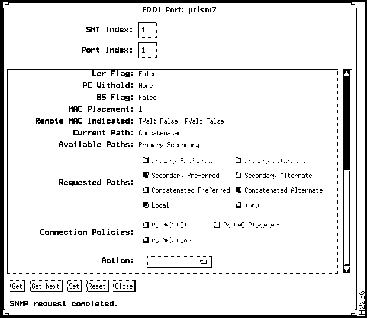
Figure C-19 FDDI Port Window (SMT 7.x example)
- Ler Flag---Displays True when the Ler Estimate value is less than or equal to the Ler Alarm value; that is, the link errors are higher than the alarm levels.
- PC Withhold---Displays a variable from the PCM to other management entries and indicates why the PCM is withholding a connection. The values follow:
- None---The PCM is not withholding a connection.
- M-M---The PCM is withholding a connection because of a port M-to-port-M connection.
- Other---The PCM is withholding a connection because of incompatible port types.
- BS Flag---Indicates that the PCM is not leaving the break state in an expected time interval, and a problem is suspected. If the value is False, the interval is within acceptable limits.
- MAC Placement---Indicates that an upstream MAC is associated with this port. If the value in this field is 0, then no upstream MACs exist. Any other value in this field equals the MAC SNMP FDDI MAC Index.
- Remote MAC Indicated---Indicates that a remote station intends to place a MAC in the Output Token Path of this port. When this value is True, the remote station is actively placing a MAC in the Output Token Path of this port.
- Current Path (SMT 7.x only)---Indicates the path(s) into which this port is currently inserted. The paths are Isolated, Local, Secondary, Primary, Concatenated, and Thru.
- Optical Bypass Present (SMT 6.x only)---Displays True when a bypass switch is installed, and False when there is no bypass switch.
- I Max Expiration (SMT 6.x only)---Indicates the maximum bypass insertion and de-insertion time for this station. The default value is 25,000 microseconds.
- Chip Set (SMT 6.x only)---Identifies the hardware chips that implement the port function.
- Inserted Status (SMT 6.x only)---Indicates whether the attachment is currently inserted in the node. This value is False if the attachment is not inserted in the node, and True if it is inserted in the node.
- Insert Policy (read/write) (SMT 6.x only)---Indicates the insert policy for this attachment. This value is True if the attachment should be inserted, False if it should not be inserted, and Unimplemented if this feature is not implemented.
- Available Paths---Indicates the paths available to this port. Under normal conditions, A and B ports always have both primary and secondary paths available.
- Requested Paths (read/write)---Indicates the requested path connection for this port: Primary Preferred, Primary Alternate, Secondary Preferred, or secondary alternate.
- MAC Loop Time (read/write) (SMT 6.x only)---Displays the time allowed for the MAC to travel around the local loop. This time value prevents deadlock by allowing sufficient time for the MAC recovery process to complete and to exchange Neighbor Information Frames.
- TB Max (read/write) (SMT 6.x only)---Displays the physical connection management (PCM) expiration value. The PCM initializes connections between neighboring ports and manages the signaling between ports. The value for this parameter must be large enough so that it will not trigger an expiration from noise generated by a bypass switch. The TB Max value must be equal to or greater than 30,000 microseconds. The default is 50,000 microseconds.
- Connection Policies (read/write)---Indicates the port connection policies for this node. The policies follow:
- PC-MAC-LCT---This flag indicates that a Link Confidence Test is using a MAC.
- PC-MAC-Loop---This flag indicates that a dedicated MAC is needed on this port to exchange PDUs with a dedicated MAC on a neighboring port.
- PC-MAC- Placement---This flag indicates a MAC that has a transmit path through this port.
- Action (read/write)---Displays requests for the following port actions: maint port, enable port, disable port, start port, and stop port.
The Ethernet Port window shown in Figure C-20 is used to display Workgroup Stack Catalyst Ethernet port statistics and define an optional port name.
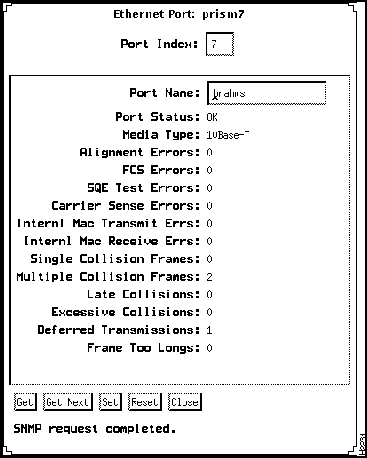
Figure C-20 Ethernet Port Window
Following are descriptions of parameters in the Ethernet Port window:
- Port Index---Displays a unique numer associated with this port.
- Port Name (read/write)---Displays the name of the designated port.
- Port Status---Indicates the port status. This parameter is specific to concentrator. The values follow:
- OK---The port is connected. The Link Status LED displays green.
- Minor Fault---Signal is detected, but the port is not connected. The Link Status LED displays yellow/orange.
- Other---None of these. The Link Status LED is off.
- Media Type---Always 10BaseT.
- Time Since Counts Cleared---Displays the time (in hundredths of a second) since MAC counters were last cleared.
- Alignment Errors---Displays a count of frames received on a particular interface that are not an integral number of octets in length and do not pass the FCS check. The count represented by an instance of this object is incremented when the alignmentError status is returned by the MAC service to the LLC (or other MAC user). Received frames for which multiple error conditions obtain are, according to the conventions of IEEE 802.3 Layer Management, counted exclusively according to the error status presented to the LLC.
- FCS Errors---Displays a count of frames received on a particular interface that are an integral number of octets in length but do not pass the FCS check. The count represented by an instance of this object is incremented when the frameCheckError status is returned by the MAC service to the LLC (or other MAC user). Received frames for which multiple error conditions obtain are, according to the conventions of IEEE 802.3 Layer Management, counted exclusively according to the error status presented to the LLC
- SQE Test Errors---Displays a count of times that the SQE TEST ERROR message is generated by the PLS sublayer for a particular interface.
- Carrier Sense Errors---Displays the number of times that the carrier sense condition was lost or never asserted when attempting to transmit a frame on a particular interface. The count represented by an instance of this object is incremented at most once per transmission attempt, even if the carrier sense condition fluctuates during a transmission attempt.
- Internl Mac Transmit Errs---Displays a count of frames for which transmission on a particular interface fails due to an internal MAC sublayer transmit error. A frame is only counted by an instance of this object if it is not counted by the corresponding instance of either the Late Collisions object, the Excessive Collisions object, or the Carrier Sense Errors object.
- Internl Mac Receive Errs---Displays a count of frames for which reception on a particular interface fails due to an internal MAC sublayer receive error. A frame is only counted by an instance of this object if it is not counted by the corresponding instance of either the Frame Too Longs object, the Alignment Errors object, or the FCS Errors object.
- Single Collision Frames---Displays a count of successfully transmitted frames on a particular interface for which transmission is inhibited by exactly one collision. A frame that is counted by an instance of this object is also counted by the corresponding instance of either the ifOutUcastPkts or ifOutNUcastPkts object and is not counted by the corresponding instance of the Multiple Collision Frames object.
- Multiple Collision Frames---Displays a count of successfully transmitted frames on a particular interface for which transmission is inhibited by more than one collision. A frame that is counted by an instance of this is also counted by the corresponding instance of either the ifOutUcastPkts or ifOutNUcastPkts object and is not counted by the corresponding instance of the Single Collision Frames object.
- Late Collisions---Displays the number of times that a collision is detected on a particular interface later than 512 bit-times into the transmission of a packet. Five hundred and twelve bit-times corresponds to 51.2 microseconds on a 10-megabit-per-second system. A (late) collision included in a count represented by an instance of this object is also considered as a (generic) collision for purposes of other collision-related statistics.
- Excessive Collisions---Displays a count of frames for which transmission on a particular inter face fails due to excessive collisions.
- Deferred Transmissions---Displays a count of frames for which the first transmission attempt on a particular interface is delayed because the medium is busy. The count represented by an instance of this object does not include frames involved in collisions.
- Frame Too Longs---Displays a count of frames received on a particular interface that exceed the maximum permitted frame size.
Workgroup Director contains the following Bridge windows:
- Bridge Base Group
- Bridge Base Table
- Bridge Transparent Group
- Bridge Spanning Tree Group
- Bridge Spanning Tree Table
- Bridge Transparent Table
- Bridge Static Table
The Bridge Base Group window is shown in Figure C-21.
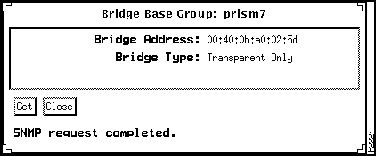
Figure C-21 Bridge Base Group Window
Following are descriptions of the parameters in the Bridge Base Group window:
- Bridge Address---Displays the MAC address used by this bridge when it must be referred to in a unique fashion. It is the numerically smallest MAC address of all ports that belong to this bridge. When concatenated with Stp Priority, a unique bridge identifier is formed, which is used in the Spanning Tree Protocol.
- Bridge Type---Indicates what type of bridging this bridge can perform. The types are transparent-only, source route-only, and srt.
The Bridge Base Table window is shown in Figure C-22.
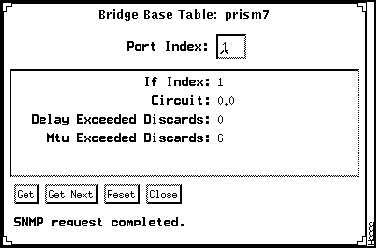
Figure C-22 Bridge Base Table Window
Following are descriptions of the parameters in the Bridge Base Table window:
- Port Index---Displays the port number of the port for which this entry contains bridge management information.
- If Index---Displays the value of the instance of the ifIndex object, defined in MIB-II, for the interface corresponding to this port.
- Circuit---Contains the name of an object instance unique to this port. For example, in the case where multiple ports correspond one-to-one with multiple X.25 virtual circuits, this value might identify an object instance associated with the X.25 virtual circuit corresponding to this port. For a port that has a unique value of Base Port If Index, this object can have the value 0.0.
- Delay Exceeded Discards---Displays the number of frames discarded by this port due to excessive transit delay through the bridge. It is incremented by both transparent and source route bridges.
- Mtu Exceeded Discards---Displays the number of frames discarded by this port due to an excessive size. It is incremented by both transparent and source-route bridges.
The Bridge Transparent Group window is shown in Figure C-23.
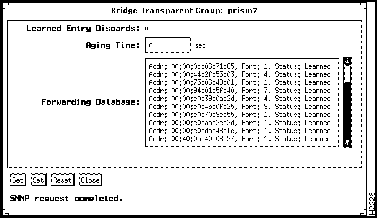
Figure C-23 Bridge Transparent Group Window
Following are descriptions of the parameters in the Bridge Transparent Group window:
- Learned Entry Discards---Displays the total number of Forwarding Database entries that have been or would have been learned, but have been discarded due to a lack of space to store them in the Forwarding Database. If this counter is increasing, it indicates that the Forwarding Database is regularly becoming full (a condition which has unpleasant performance effects on the subnetwork). If this counter has a significant value but is not presently increasing, it indicates that the problem has been occurring but is not persistent.
- Aging Time---Displays the timeout period in seconds for aging out dynamically learned forwarding information. The default value is 300 seconds.
- Forwarding Database---Displays a table that contains information about unicast entries for which the bridge has forwarding and filtering information. This information is used by the transparent bridging function in determining how to propagate a received frame.
- The first column in the table is the unicast MAC address for which the bridge has forwarding and/or filtering information.
- The second column consists of either the value 0 or the port number of the port on which a frame having a source address as shown in the first column. A value of 0 indicates that the port number has not been learned, but that the bridge does have some forwarding/filtering information about this address (for example, in the Bridge Static table).
- The third column specifies the status. The status can be invalid, learned, self, mgmt, or other.
- Possible status values follow:
- invalid---This entry is no longer valid (for example, it was learned but has since aged-out), but has not yet been flushed from the table.
- learned---The value of the corresponding port was learned and is being used.
- self---The value of the corresponding address represents one of the bridge addresses. The corresponding port indicates which of the bridge ports has this address
- mgmt---The value of the corresponding address is also the value of an existing instance of static address, which is shown in Bridge Static Table as Destination Address.
- other---None of these. This would include the case where some other MIB object (not the corresponding instance of port, nor an entry in the Bridge Static table) is being used to determine if and how frames addressed to the value of the corresponding instance of Forwarding Database Address are being forwarded.
The Bridge Spanning Tree Group window is shown in Figure C-24.
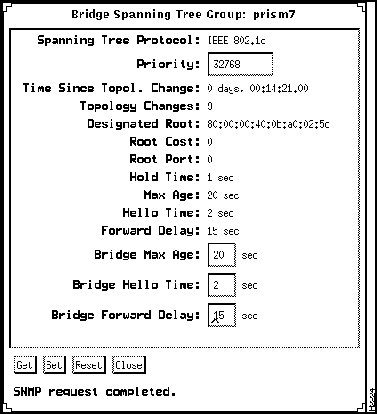
Figure C-24 Bridge Spanning Tree Group Window
Following are descriptions of the parameters in the Bridge Spanning Tree Group window:
- Spanning Tree Protocol---Indicates which version of the Spanning Tree Protocol is being run. Three possible versions follow:
- IEEE 802.1d
- DEC LANbridge 100
- Unknown
- Priority---Displays the value of the writeable portion of the bridge ID, that is, the first two octets of the (8 octet long) bridge ID. The other (last) 6 octets of the bridge ID are given by the value of bridge address shown in the Bridge Base Group window.
- Time Since Topol. Change---Displays the time (in hundredths of a second) since the last time a topology change was detected by the bridge entity.
- Topology Changes---Displays the total number of topology changes detected by this bridge since the management entity was last reset or initialized.
- Designated Root---Displays the bridge identifier of the root of the spanning tree determined by the Spanning Tree Protocol in this node. This value is used as the root identifier parameter in all configuration bridge PDUs originated by this node.
- Root Cost---Displays the cost of the path to the root as seen from this bridge.
- Root Port---Displays the port number of the port offering the lowest cost path from this bridge to the root bridge.
- Hold Time---Determines the interval length during which no more than two configuration bridge PDUs will be transmitted by this node, in units of hundredths of a second.
- Max Age---Displays the maximum age of Spanning Tree Protocol information learned from the network on any port before it is discarded, in units of hundredths of a second. This is the actual value that this bridge is currently using.
- Hello Time---Displays the amount of time (in units of hundredths of a second) between the transmission of configuration bridge PDUs by this node on any port when it is the root of the spanning tree or trying to become the root. This is the actual value that this bridge is currently using.
- Forward Delay---Displays the time, measured in seconds, that controls how fast a port changes its spanning state when moving toward the forwarding state. The value determines how long the port stays in each of the listening and learning states, which precede the forwarding state.
- This value is also used, when a topology change has been detected and is underway, to age all dynamic entries in the forwarding database. This value is the one that this bridge is currently using, in contrast to bridge forward delay, which is the value that this bridge and all others would start using if this bridge were to become the root.
- Bridge Max Age---Displays the value that all bridges use for MaxAge when this bridge is acting as the root, in the range of 6 to 40 seconds.
- Bridge Hello Time---Displays the value that all bridges use for hello time when this bridge is acting as the root, in the range of 1 to 10 seconds.
- Bridge Forward Delay---Displays the value that all bridges use for forward delay when this bridge is acting as the root, in the range of 4 to 30 seconds.
The Bridge Spanning Tree Table window, shown in Figure C-25, contains port-specific information for the Spanning Tree Protocol.
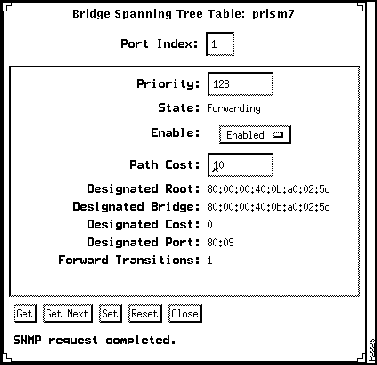
Figure C-25 Bridge Spanning Tree Table Window
Following are descriptions of the parameters in the Bridge Spanning Tree Table window:
- Port Index---Displays the port number of the port for which this entry contains Spanning Tree Protocol management information.
- Priority---Displays the value of the priority field, which is contained in the first (in network byte order) octet of the (2 octet long) Port ID. The other octet of the Port ID is given by the value of Port Index.
- State---Displays the current state of the port as defined by application of the Spanning Tree Protocol. This state controls what action a port takes on reception of a frame. If the bridge has detected a port that is malfunctioning, it will place that port into the broken state. For ports that are disabled as indicated by the Enable field following, this object will have a value of disabled.
- States follow:
- Disabled
- Blocking
- Listening
- Learning
- Forwarding
- Broken
- Enable---Displays the enabled/disabled status of the port.
- Path Cost---Displays the contribution of this port to the path cost of paths toward the spanning tree root that includes this port.
- Designated Root---Displays the unique bridge identifier of the bridge recorded as the root in the configuration BPDUs transmitted by the designated bridge for the segment to which the port is attached.
- Designated Bridge---Displays the bridge identifier of the bridge that this port considers to be the designated bridge for this port's segment.
- Designated Cost---Displays the path cost of the designated port of the segment connected to this port.
- Designated Port---Displays the port identifier of the port on the designated bridge for this port segment.
- Forward Transitions---Displays the number of times this port has transitioned from the learning state to the forwarding state.
The Bridge Transparent Table window is shown in Figure C-26.
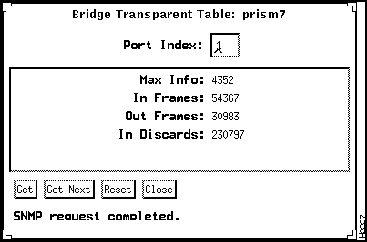
Figure C-26 Bridge Transparent Table Window
Following are descriptions of the parameters in the Bridge Transparent Table window:
- Port Index---Displays the port number of the port for which this entry contains transparent bridging management information.
- Max Info---Displays the maximum size of the INFO (non-MAC) field that this port will receive or transmit.
- In Frames---Displays the number of frames that have been received by this port from its segment. Note that a frame received on the interface corresponding to this port is counted by this object only if it is for a protocol being processed by the local bridging function, including bridge-management frames.
- Out Frames---Displays the number of frames that have been transmitted by this port to its segment. Note that a frame transmitted on the interface corresponding to this port is counted by this object if it is for a protocol being processed by the local bridging function, including bridge management frames.
- In Discards---Displays a count of valid frames received that were discarded (that is, filtered) by the forwarding process.
The Bridge Static Table window, shown in Figure C-27, contains filtering information configured into the bridge. Local or network management specifies the set of ports to which frames received from specific ports and containing specific destination addresses are allowed to be forwarded.
The value of zero in this table, as the port number from which frames with a specific destination address are received, is used to specify all ports for which there is no specific entry in this table for that particular destination address. Entries are valid for unicast and for group/broadcast addresses.
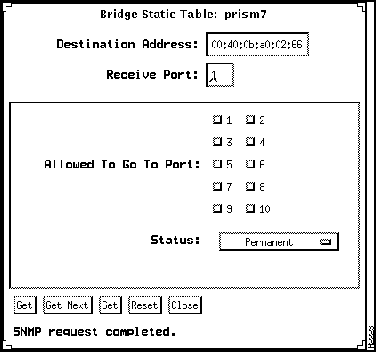
Figure C-27 Bridge Static Table Window
Following are descriptions of the parameters in the Bridge Static Table window:
- Destination Address---Displays the destination MAC address in a frame to which this filtering information applies. This object can take the value of a unicast address, a group address, or the broadcast address.
- Receive Port---Displays either the value 0 or the port number of the port from which a frame must be received in order for filtering information for this entry to apply. A value of zero indicates that this entry applies to all ports of the bridge for which there is no other applicable entry.
- Allowed To Go To Port---Displays the set of ports to which frames received from a specific port and destined for a specific MAC address are allowed to be forwarded.
- Status---Can be Other, Invalid, Permanent, Delete On Reset, or Delete On Timeout. The default value is Permanent.
- Invalid---Writing this value to the object removes the corresponding entry.
- Permanent---This entry is currently in use and will remain so after the next reset of the bridge.
- Delete On Reset---This entry is currently in use and will remain so until the next reset of the bridge.
- Delete On Timeout---This entry is currently in use and will remain so until it expires.
- Other---The entry is currently in use but the conditions under which it will remain so are different from each of the previous values.
Workgroup Director contains the following IF Extensions windows:
- IF Extensions Table
- IF Receive Address Table
The If Extensions Table window is shown in Figure C-28.
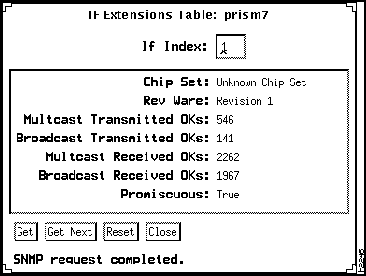
Figure C-28 If Extensions Table Window
Following are descriptions of the parameters in the IF Extensions Table window:
- If Index---Displays a unique value for each IF.
- Chip Set---Identifies the hardware chip set used in the interface.
- Rev Ware---Describes the fireware version of this interface.
- Multicast Transmitted OKs---Displays the count of frames successfully transmitted to a subnetwork or link-layer multicast destination address other than a broadcast address.
- Broadcast Transmitted OKs---Displays the count of frames successfully transmitted to a subnetwork or link-layer broadcast addresses. It does not include frames sent to a multicast address.
- Multicast Received OKs---Displays the count of frames successfully received that are directed to an active subnetwork or link-layer multicast address. This does not include frames directed to a broadcast address, nor frames received with errors.
- Broadcast Received OKs---Displays the count of frames successfully received that are directed to a subnetwork or link-layer broadcast address. This does not include frames received with errors.
- Promiscuous---Displays False if this interface only accepts packets/frames that are addressed to this station, and displays True when the station accepts all packets/frames transmitted on the media.
The IF Receive Address Table window, shown in Figure C-29, contains an entry for each address (broadcast, multicast, or unicast) for which the system will receive packets/frames on a particular interface. When an interface is operating in promiscuous mode, entries are required only for those addresses for which the system would receive frames if it were it not operating in promiscuous mode.
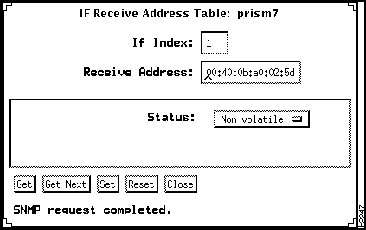
Figure C-29 If Receive Address Table Window
Following are descriptions of the parameters in the IF Receive Address Table window:
- If Index---Displays a unique value for each IF.
- Receive Address---Displays an address for which the system will accept packets/frames on the interface for this entry.
- Status---Is Invalid, Volatile, Nonvolatile or Other (clear field).
- Status is nonvolatile for entries in the table which are valid and will not be deleted by the next restart of the system. Entries having the value Volatile are valid and exist, but have not been saved, so they will not exist after the next restart of the system. Entries having the value Other are valid and exist, but are not classified as to whether they will continue to exist after the next restart.
- Entries having the value Invalid are invalid and do not represent an address for which an interface accepts frames. Setting the status to one of the values---Volatile, Nonvolatile, or Other---causes the corresponding entry to exist or continue to exist and to take on the respective status as regards the next restart of the managed system. Setting an object instance to Invalid causes the corresponding entry to become invalid or cease to exist.
Copyright 1988-1995
©
Cisco Systems Inc.



