
Table of Contents
Properties Window
Properties Window
The Properties window lets you set values, such as naming the host, and specifying a community string, a timeout value for SNMP requests, and the number of times to retry a request that has timed out. This menu is available on both the Hub and Adapter windows.
Click on the Set button to save the information you enter in the Properties window.
Figure D-1 shows the Properties window.
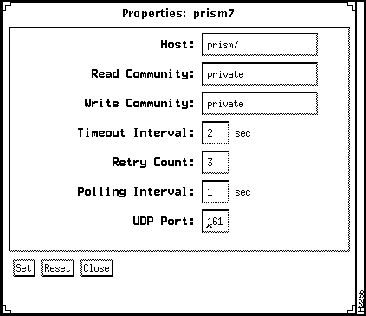
Figure D-1 Properties Window
Following are descriptions of the parameters in the Properties window.
- Host---Names the hub or workstation you want to monitor.
- Read Community---Identifies the string used for reading SNMP requests.
- Write Community---Identifies the string used for writing SNMP requests.
- Timeout Interval---Displays the number of seconds allowed for an SNMP request to respond.
- Retry Count---Displays the number of times to retry a request that has timed out.
- Polling Interval---Indicates how often the target is polled.
- UDP Port---Specifies the user datagram port number dedicated for communication between the host and the target.
Copyright 1988-1995
©
Cisco Systems Inc.



