


|
|

Overview of Cisco Internet Junction
NetWare, Novell's network operating system, provides shared file servers, printers, and other resources to personal computers in the workplace, using applications that run over Novell's Internetwork Packet Exchange (IPX) protocol. Popular Internet applications, such as FTP, Gopher, Mosaic, and Netscape, however, run over the Transmission Control Protocol/Internet Protocol (TCP/IP) network protocol, not IPX.
Cisco Internet Junction software brings TCP/IP-based Internet applications to NetWare clients using Microsoft Windows, without the overhead of running TCP/IP on every desktop computer or workstation. A Novell network is not even a prerequisite, provided you can load IPX at the desktop.
To enable users to access the Internet, you can either run a TCP/IP stack on every desktop computer, or you can implement a TCP/IP gateway at a central location.
Running TCP/IP at every desktop provides access to Internet applications, but has several disadvantages. These disadvantages include the cost of configuring and administering dual protocol stacks, the dwindling supply of IP addresses, and lack of security.
In contrast, Cisco Internet Junction software provides a TCP/IP gateway with a single IP address.
Cisco Internet Junction is a client/server product. The client consists of Cisco Internet Junction client software (IJ client) running on a Windows-based personal computer over IPX. The server consists of Cisco Internet Junction gateway software (IJ gateway) running over both IPX and TCP/IP.
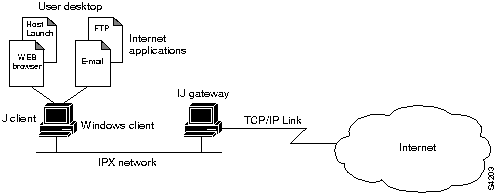
The IJ client interacts with the Internet through the IJ gateway, as shown in Figure 1-1.
Figure 1-1 Connecting to the Internet
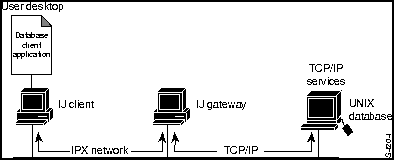
If your site has TCP/IP-based resources, such as UNIX databases, the IJ gateway acts as a protocol bridge that enables you to run client-side applications (such as Oracle's SQL*Net or the SAP R3 client). Figure 1-2 shows the IJ gateway used as an internal protocol bridge.
Figure 1-2 Connecting to Internal TCP/IP Resources
Use of the Internet may involve transferring text, sound, graphical images, and animation. Cisco Internet Junction uses a streaming protocol to take advantage of all the available bandwidth to perform these tasks. Packet size is negotiated between client and gateway and can range from 512 to 1,500 bytes. This variable packet length provides for better throughput and higher performance than a fixed- packet-length protocol such as Novell's Sequenced Packet Exchange (SPX), which is used by most other IPX-to-IP gateways.
The IJ client component consists of two files, WINSOCK.DLL and IJCLIENT.EXE
(see Figure 1-3).
Figure 1-3 Components of IJ Client Desktop
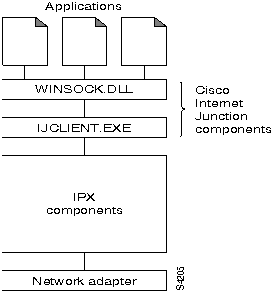
Windows Sockets (Winsock) is the application programming interface (API) generally used for writing Microsoft Windows applications over TCP/IP. Winsock is implemented as a dynamic link library (DLL), which is a set of executable functions that links with an application at runtime. Cisco Internet Junction's WINSOCK.DLL is an implementation of the Winsock 1.1 specifications that has been customized to run over IPX.
The IJCLIENT executable file encapsulates Winsock application requests into outgoing IPX packets and decapsulates incoming IPX packets to pass Winsock responses to applications. The client is resource-efficient; when Internet applications are not in use, the client releases memory by disconnecting from the gateway.
IJCLIENT.EXE uses approximately 180 KB and WINSOCK.DLL approximately 90 KB of high memory only.
IJ client software supports the following Windows versions:
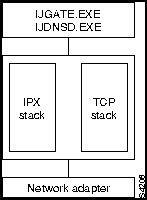
The IJ gateway consists of two executable files, IJGATE.EXE and IJDNSD.EXE. IJGATE.EXE handles IPX-to-TCP/IP bridging. IJDNSD.EXE handles Domain Name Server (DNS) name resolution at the gateway. IJGATE.EXE uses approximately 180 KB and IJDNSD.EXE approximately 45 KB of memory.
Figure 1-4 shows the network components of the IJ gateway.
Figure 1-4 Network Components of IJ Gateway
For best performance and security, we recommend that the IJ gateway be a dedicated computer. If you cannot set aside a computer for this purpose, you can run the gateway software concurrently on any Windows NT computer. You should make certain that the computer is always available.
Internet access provides valuable information and opportunities, but it also involves some risks. To eliminate the risk of intrusion on the Internet, every Internet site should exercise care in running Internet services and should have a security firewall.
Internet services, or daemons, are designed to permit users on the Internet specific types of access to the computers on which the daemons run. These services include file transfer daemon (ftpd), remote login daemon (telnetd), and World Wide Web publishing daemon (httpd).
We strongly suggest that you run all Internet services at the gateway. Because only one instance of each service can be run for the single IP address, running the services at the gateway prevents IJ clients from running them at their computers, intentionally or unintentionally.
Services running on the gateway are available to IJ clients and to legitimate external users. The services do not threaten network security, because external users cannot penetrate beyond the gateway to the NetWare network.
In a homogeneous IPX/SPX network, IJ gateway software acts as a firewall, preventing Internet intruders from accessing the NetWare network.
In a heterogeneous network, the IJ gateway protects only IPX-based computers. Consult with your Internet service provider about setting up an external firewall to protect other computers running TCP/IP services.
To protect a NetWare file server, you should never run TCP/IP services at the server. If you follow this precaution, IJ gateway software also protects the server.
In summary, we recommend the following policies to secure your network:
Although only one IJ gateway is required, some sites may benefit from additional gateways. Multiple gateways provide load balancing, better performance, and fault tolerance. Figure 1-5 shows a network containing multiple IJ gateways.
Figure 1-5 Multiple Gateways on an IPX Network
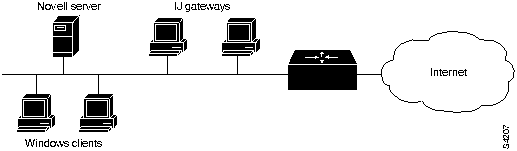
A bottleneck at the gateway's connection to the Internet, or excessive load on the gateway computer, can affect performance at the desktop. To determine whether the gateway is overloaded, monitor its CPU with a tool such as the Windows NT Performance Monitor. Heavy CPU usage may indicate a need for additional IJ gateways.
Multiple IJ gateways perform automatic load balancing. Each IJ gateway broadcasts Service Advertisement Protocol (SAP) messages to advertise itself to clients. As the IJ gateway's load increases, it sends SAP messages less often, thus attracting fewer connection requests than a lightly loaded gateway.
If you want to divide your user community among gateways manually, you can specify each client's preferred gateway, as described in the chapter "Advanced Configuration of Cisco Internet Junction."
Service can be interrupted by failure at the IJ gateway computer or at the Internet connection. To provide uninterrupted service, consider adding redundancy. A fault-tolerant environment includes multiple IJ gateways or multiple Internet connections, or both.
If an IJ gateway computer fails, applications at IJ clients connected to that gateway also fail. If you have additional gateways, IJ client software automatically connects to the gateways that are running when desktop users restart their applications.
To ensure against failure of the network link to the service provider, consider adding a backup link.

|
Copyright 1988-1996 © Cisco Systems Inc.