


|
|

BPX Configuration (Preliminary)
This chapter contains preliminary procedures. Refer to the Command Reference, the AXIS Reference Manual, and StrataCom ISC for more detailed information.
The BPX node can be accessed through a local control port (over an RS-232 or Ethernet TCP/IP link. An administration screen from a control terminal or from the StrataView Plus Network Management Station (NMS) can issue BPX commands. Remote control terminal access is possible using a Virtual Terminal (vt) command if the node has been configured with a name and at least one trunk to the network has been established.
For frame relay connections in both tiered and non-tiered networks StrataView Plus provides end-to-end configuration management using the Connection Manager. When the IPX is configured as an Interface Shelf, it can not be reached by the vt command, and frame relay end-to-end connections are configured from StrataView Plus via the Connection Manager over an in-band LAN connection. (Note: Telnet can be used to access an interface shelf (e.g., IPX shelf or AXIS shelf) if a SV+ workstation is not available to provide in-band management.)
The only type of IPX shelf connections supported for Rel. 8.2 are frame relay to frame relay connections and frame relay interworking connections. However, on the IPX, all types of DAXCONS (connections in and out the same IPX shelf) are supported, voice, data, etc. For Release 8.2, the AXIS shelf includes frame relay interworking connections, ATM connections, and FUNI connections.
The basic tasks to configure an BPX are as follows:
Figure 3-1 and Figure 3-2 are examples of the screens displayed when "dspnode" is entered at a BPX and at one of its IPX shelves, respectively. The "dspnode" screen displayed at the "hubone' bpx node shows that it is connected to the "shlf3ipx" node via BNI trunk 3.3. The "dspnode" screen displayed at the "shlf3ipx" node show that it is connected to the bpx via AIT trunk 8.
Figure 3-1 : The dspnode command from BPX "hubone"

Figure 3-2 : Telnet at IPX shelf "Shlf3IPX" , AIT trunk 8 to BPX "hubone"

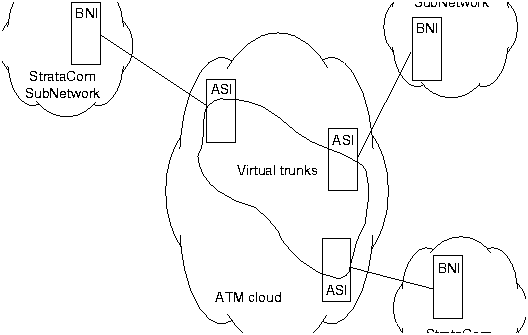
This section details the steps for setting up a virtual trunk. Virtual trunking is an optional feature that must be enabled by StrataCom prior to adding virtual trunks. Also, revision levels of ASI and BNI firmware must be current. The following procedure assumes that StrataCom equipment is used in the ATM Cloud as well as in the StrataCom subnetworks. In this case, a BNI output from the subnetwork is connected to an ASI UNI input at the ATM Cloud (Figure 3-3). Proceed as follows:
Figure 3-3 : Virtual Trunks across a StrataCom ATM Cloud
You can monitor, manage and troubleshoot the BPX using the StrataView Plus Network Management Station. Commands are issued to a BPX node through the Node Administration window. Frame Relay connections are added via the StrataView Plus Connection Manager. You can display and monitor the network's topology, monitor alarms, events, and statistics. Refer to the StrataView Plus Operations Guide for more information.
For detailed configuration information, refer to the Command Reference Manual.
IP, IP Relay Configuration (Preliminary)
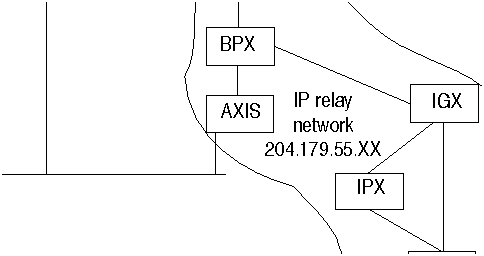
In setting up network management for a network, both the SV+ workstation and network nodes need to be configured. SV+ communicates over a standard physical LAN network to a gateway node or nodes, but a separate in-band IP relay network is setup for all nodes via a gateway node for SNMP and TFTP in-band communication over the node trunks (Figure 3-4).
Figure 3-4 : SV+ Physical LAN and IP Relay Network
Installing SV+ and Associated Applications
Refer to the StrataView Plus Installation manual, the Command Reference, and the AXIS Reference Manual for additional information.
Configure SV+ Workstation (example)
beacon% more /etc/hosts
#
# Sun Host Database
#
# If the NIS is running, this file is only consulted when booting
#
127.0.0.1       localhost
#
204.179.61.121  beacon loghost


# node physical ethernet LAN addresses

204.179.61.104 nw1bpx1p
204.179.61.71 nw1axi1p

# node ip relay addresses

204.179.55.101 nw1ipx1
204.179.55.102 nw1ipx2
204.179.55.103 nw1ipx3
204.179.55.xxx nw1igx1
204.179.55.111 nw1bpx1
204.179.55.105 nw1axi1
If the workstation is connected to the corporate network, add any IP addresses and associated names of hosts that you may want to connect to your workstation, as the NIS is disabled.
Network Node Configuration (Preliminary)
Adding nodes, adding trunks, shelves, etc.
Refer to the applicable Reference manuals, IPX, BPX, IGX, AXIS, etc., for node installation and operation.
As a minimum, the nodes need to be configured with name (cnfname), date (cnfdate), time (cnftime), timezone (cnftmzn), and trunks upped (uptrk) and added (uptrk or addshelf, as applicable. Connections can also be added now, or added later, after configuring the nodes for operation with the SV+ NMS manager.
For information on upgrading the nodes to a later version of switch software or card firmware refer to Appendix A. For information on upgrading system and card firmware on the AXIS, refer to Appendix B.
Configuring the IPX, IGX, and BPX for SV+ NMS Operation
On IPX, BPX, IGX nodes the following commands are used to configure the nodes for operation with SV+: cnflan, cnfnwip, cnfstatmast, cnfsnmp. The AXIS is configured with cnfifip and cnfstatsmgr. The cnflan command is only necessary for nodes or shelves in which the LAN port is actually connected to a physical Ethernet LAN,
Configuring the AXIS for SV+ NMS Operation (example)
At installation, initial access to the AXIS is provided by the control port.
login: "LoginID"

password:
card number: 3

xxxxAXIS.1.3.ASC.a >
xxxxAXIS.1.3.ASC.a > cnfname nw1axi1
nw1nw1axi1.1.3.ASC.a > cnfdate 05/02/96
nw1saxi1.1.3.ASC.a > cnftime 15:31:00
nw1saxi1.1.3.ASC.a > Help
nw1axi1.1.3.ASC.a > version
***** Stratacom Inc. AXIS ASC Card *****2
    Firmware Version    = 2.1.12b_______
    Backup Boot version = model-B BT_2.0.0_______
    ASCFRSM Xilinx file = asc025.h
    ASCBNM Xilinx file  = bnmt3andsrefix
VxWorks (for STRATACOM) version 5.1.1-R3000.
Kernel: WIND version 2.4.
Made on Thu May 2 16:42:36 PDT 1996.
Boot line:
sl(0,0)

cc
nw1axi1.1.3.ASC.a > cnfifip
cnfifip "-ip <ip addr> -if <Interface> -msk <NetMask> -bc <Brocast addr>
"
  -ip <IP addr> where IP addr = nnn.nnn.nnn.nnn
  -if <Interface> where Interface = 26,28,37, 26: Ethernet, 28: Slip 37: ATM
  -msk <NetMask> where NetMask = nnn.nnn.nnn.nnn
  -bc <BrocastAddr> where BrocastAddr = nnnnnnnn,  n is hexdecimal, ethernet only


nw1axi1.1.3.ASC.a > cnfifip -ip 204.179.61.71 -if 26
You are configuring ethernet port are you sure? enter yes/no: yes
nw1axi1.1.3.ASC.a > cnfifip -ip 204.179.55.105 -if 37You are configuring atm port are you sure? enter yes/no: yes
cnfstatsmgr "<ip address>"

nw1axi1.1.3.ASC.a > cnfstatsmgr 204.179.61.121      {this is IP address of SV+ workstn}

|
Copyright 1988-1996 © Cisco Systems Inc.