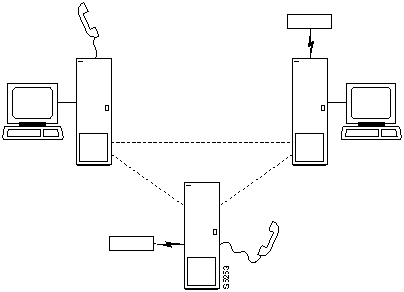
Step 2 Add the connection with the addcon command. The above configuration must have been completed at each end before the connection can be added.
Configuring Data Channel Redundancy
Data channels can be configured for redundancy by installing two identical sets of data front and back card pairs in adjacent slots and connecting to the customer's line through a Y-cable.
- Use the addyred command to establish the redundant connection between the two card sets.
- Use the delyred command to remove redundancy from a redundant pair.
Using an Interface Control Template
Data channels have an associated default interface control template for each of the active (normal), conditioned, looped, near and far states. The templates define how the control leads at the data interface are to be configured (asserted, inhibited, follow a local source or follow a remote source). The interface control template can be changed by using the cnfict command. Each template and each control lead must be configured individually. The cpyict (copy interface control panel) can be used to apply (copy) the settings of a template for one data channel to those of a template for another data channel.
Enabling DFM and Data Channel Utilization
DFM (Data Frame Multiplexing) is a feature on the IPX and IGX in which repetitive data patterns (such as IDLE codes) are suppressed at the source and regenerated at the remote node. This feature is transparent to the user and has the effect of approximately doubling the bandwidth of the data channel.
To enable DFM at one or more nodes of the network, ensure that the DFM feature has been ordered and call the StrataCom International Support Center (ISC). When the selected nodes have DFM enabled, the user may disable/enable DFM and change the DFM values at these nodes on a channel-by-channel basis with the cnfchdfm command. (When DFM is first enabled at a node by ISC, each data channel has the following DFM default values: percent utilization of 100%, pattern length of 8 bits, and DFM status "enabled.") The DFM settings for a channel can be checked using the dspchcnf command.
Enabling Embedded EIA Operation on the LDP
The EIA feature encodes the status of the CTS or RTS lead as the eighth bit in each data byte. Then the byte is processed in accordance with the DFM algorithm, which remains unchanged.
Any combination of DCE and DTE at each end can be valid. A typical configuration might have the LDP one of the connection as DCE (normal clocking), and the LDP at the remote end as DTE (looped clocking). RTS is transmitted in encoded form from the remote end to the host end, and CTS in the other direction. Other EIA leads will use the non-interleaved format.
The EIA feature is allowed for all legal baud rates 19.2 kbps and below and is activated by typing encoding type 7/8E followed by an *Z when adding a connection using the addcon command. Different channels on the same card may be set up with or without the feature, but all ports on the card must be configured at or below 19.2 kbps for EIA to be active. Note that you do not have to enter *Z after 7/8E on the command line because the system automatically enters it.
Setting Up DDS Trunks
DDS Trunks normally operate at 56 Kbps. The IPX and IGX can provide a direct interface to a DDS line and provide limited distance access to Data Service Units (DSUs) by using the DDS format over private lines. The LDI4/DDS back card and LDP (Model B) or LDM front card support DDS accomplished using the and . Each LDI/DDS supports four DDS trunks in DSU or OCU modes.
- Use the cnfdchtp command to configure the DDS port, specifying OCU or DSU for the port type.
- Add the connection using the addcon command. When prompted for the "rate" you can select any one of the following values: 2.4, 4.8, 9.6, 19.2, or 56 Kbps).
Configure the Interface Control Template for node alpha port 18.1 using the cnfict command. The Interface Control Template for Connection while active should have the DSR, DCD and the CTS lead ON. If any of these leads are OFF, perform the following using the lead signal name (DSR, DCD, or CTS).
Summary of commands
The following list shows the full command name and starting page for the description of each data command:
Table 8-1 : .
| addcon
|
Add connection
|
8-5
|
| cnfchdfm
|
Configure DFM
|
8-10
|
| cnfcheia
|
Configure EIA
|
8-12
|
| cnfcldir
|
Configure control lead direction
|
8-14
|
| cnfdchtp
|
Configure data channel interface type
|
8-16
|
| cnfdclk
|
Configure data clock
|
8-19
|
| cnfict
|
Configure interface control template
|
8-23
|
| cpyict
|
Copy interface control template
|
8-29
|
| delcon
|
Delete connection
|
8-31
|
| dspchncf
|
Display channel configuration
|
8-33
|
| dspcon
|
Display connection
|
8-35
|
| dspcons
|
Display connections
|
8-37
|
| dspict
|
Display interface control template
|
8-40
|
| prtchcnf
|
Print channel configuration
|
8-42
|
| prtcons
|
Print connections
|
8-43
|
| prtict
|
Print interface control template
|
8-45
|
addcon
Establishes the channel connections between nodes in the network. After a connection is added with the addcon command, the connection is routed automatically by the system. The node where the addcon command is entered is considered the "owner" of the added connections. The concept of ownership is important because automatic rerouting and preferred routing information for a connection must be entered from the node that owns the connection. See the cnfpref and cnfcos commands for more information on automatic rerouting. Before a connection is added, the proposed connection appears on the screen and you are asked to confirm the addition.
This form of the addcon command is used to add a synchronous data connection to the network. It can be added to any node slot equipped with either an LDP or SDP card in an IPX or an LDM or HDM in an IGX. Before adding the connection, determine a data rate to us. Refer to the card descriptions in Chapter 1 of either the IPX Reference Manual or any of the IGX reference manuals to determine the data rates supported by the different models of these data cards.
When connecting sets of data channels, you do not have to specify the full channel set for this end of the connection. You only have to designate the first channel in the set. For example, to connect channels 27.1-4 at alpha to channels 9.1-4 at beta, you could enter "addcon 27.1-4 beta 9.1". When Y-cable redundancy is being used, you can only terminate data connections at primary card slots, not at secondary (redundant) card slots. See the addyred command for more information. Data connection rates follow. When reviewing the connection rates, please note the following:
| · *
|
must be used with 8/8 or 8/8I coding.
|
| · /n
|
specifies a partially filled packet type. This allows lower rate packets to be sent without incurring the delay required to build a full packet
|
| · f
|
entered after the data rate specifies "fast EIA" (interleaved EIA) for the data connection.
|
| · t
|
indicates transparent (CDP or CVM subrate DS0A). The IPX and IGX do not look for supervisory or control information.
|
Table 8-2 :
| 1.2
|
3.6
|
8
|
16f
|
64f
|
230.4f
|
| 1.2/2
|
3.6/4
|
8/10
|
19.2
|
72
|
256f
|
| 1.2f/1
|
3.6f/2
|
8f
|
19.2f
|
76.8
|
288
|
| 1.2f/2
|
3.6f/5
|
9.6
|
24
|
84
|
336
|
| 1.8
|
4.8
|
9.6/10
|
24f
|
96
|
384f
|
| 1.8/2
|
4.8/4
|
9.6f
|
28.8
|
96f
|
448
|
| 1.8f/2
|
4.8/10
|
12
|
28.8f
|
112
|
448f
|
| 2.4
|
4.8f/5
|
12/10
|
32
|
112f
|
512
|
| 2.4/2
|
6.4
|
12.8
|
32f
|
115.
|
512f
|
| 2.4/4
|
6.4/4
|
12.8/10
|
38.4
|
128
|
672
|
| 2.4f/2
|
6.4/10
|
12f
|
48
|
128f
|
768
|
| 2.4f/5
|
6.4f/5
|
14.4
|
48f
|
144
|
2772
|
| 3.2
|
7.2
|
14.4/10
|
56
|
168
|
896
|
| 3.2/4
|
7.2/4
|
14f
|
56f
|
192
|
1024
|
| 3.2f/2
|
7.2/10
|
16
|
57.6
|
224
|
1152
|
| 3.2f/5
|
7.2f/5
|
16.8
|
64
|
230.4
|
1344*
|
| CDP or CVM super-rate types: (types indicate the number of 56 Kbps or 64 Kbps channels in the super-rate bundle---See Example 2)
|
| 1x56
|
5x56
|
|
1x64
|
5x64
|
|
| 2x56
|
6x56
|
|
2x64
|
6x64
|
|
| 3x56
|
7x56
|
|
3x64
|
7x64
|
|
| 4x56
|
8x56
|
|
4x64
|
8x64
|
|
| CDP or CVM subrate DS0A (transparent data rates)
|
| 2.4t
|
4.8t
|
9.6t
|
56t
|
|
|
In "fast EIA" signalling mode, an interleaved byte of EIA signalling information is associated with every byte of data transmitted in a packet. This format is appropriate for applications where EIA lead transitions must be closely synchronized with user data. Fast EIA is usable for data rates up to 512 Kbps.
With the 7/8 coding format, the user's data is received, and 7 bits at a time are used to form bytes in a packet. The user's data can be any format and can contain any pattern including all "0"s. The single "1" inserted in the final bit position ensures that no more than seven "0"s will occur consecutively in a byte. This is the safest mode to use if the data protocol is unknown.
With the 8/8 coding format, the user's data is received and a full 8 bits are used to form bytes in a packet. The coding format is more efficient than the 7/8 format, but the end equipment is responsible for meeting the T1 transmission requirement of no more that seven consecutive "0"s in a byte. If this requirement is not met, the IPX or IGX inserts a "1" to invalidate the data. This mode can be used if the data or transmission line protocol avoids long strings of zeros, e.g., T1 trunks that use B8ZS encoding.
With the 8/8I coding format, the user's data is received and a full 8 bits are used to form bytes in a packet. The data is inverted so that "1"s are changed to "0"s, and vice versa. The end equipment must guard against data that contains over seven consecutive "1"s in a byte, which (when inverted) would violate the T1 transmission requirement. This would cause the IPX or IGX to insert a "1" to invalidate the data. This format can be used for data protocols in which the idle codes are long strings of 0s and the data bytes scrambled.
If the data protocol requires an acknowledgment and is delay-sensitive avoid routing the connection over a satellite line (*s for avoid). If 8/8 or 8/8I coding is the selected format, StrataCom suggests avoiding the use of trunks with zero code suppression (*z for avoid) because it could corrupt the last bit in the byte.
Full Name
Add a connection
Syntax
addcon <local channel> <remote node> <remote channel> <type> <coding> [avoid]
Related Commands
delcon, dncon, dspcon, dspcons, upcon
Attributes
| Privilege
|
1--2
|
| Jobs
|
Yes
|
| Log
|
No
|
| Node
|
IPX, IGX
|
| Lock
|
Yes
|
1-2
Yes
Yes
IPX, IGX
Yes
Example 1
addcon 6.1 pubsipx2 11.1 56
Description
Add a low speed data connection of 56 Kbps at 6.1. The connections are highlighted on the screen. A prompt appears asking you to confirm these connections. Respond "y" for yes to add the connection. The connections screen then appears showing that data channel 11.1 on node pubsipx2 is connected to channel 6.1 on node pubsipx1. The "56" under the "type" category indicates that the data rate for the channel is 56 Kbps.
System Response
pubsipx1       TN    StrataCom       IPX 16    8.2    July 25 1996 06:23 PDT

 From           Remote      Remote
 6.1            NodeName    Channel         State  Type      Compress  Code COS
 6.1            pubsipx2    11.1            Ok     56                  7/8  0


Last Command: addcon 6.1 pubsipx2 11.1 56


Next Command:
Example 2
addcon 5.1 beta 6.1-4 4x64
Description (CDP super-rate connection)
Add a 256 Kbps (4x64) connection from an SDP at node alpha to the CDP circuit line at node beta. Data rates are taken from the Standard Data Rate Connections in the preceding pages.
addcon slot.port remote nodename slot.start channel-end channel rate
Example 3
addcon 5.4-7 beta 6.1-4 4x64
Description (CDP to CDP or CVm to CVM)
Add a 256 Kbps (4x64) data connection from a CDP (or CVM) at node alpha to the CDP (or CVM) circuit line at node beta. The syntax for this example requires that the start and end channel are entered for both ends of the connection and that the data rate is specified to be the same at both ends. The channel numbers can be different on each end if they are contiguous.
| addcon
|
slot.start channel -end channel
|
remote nodename
|
|
|
slot.start channel -end channel
|
rate
|
Table 8-3 : addcon -- Parameters
| local channel
|
Specifies the local data card channel or set of channels to connect in the following format. Brackets indicate that a range of channels can be specified.
- slot.port [--port]
|
| node
|
Specifies the name of the node at the other end of the connection. For a DACS-type connection (where channels on a node are connected to channels on the same node), use the local node name.
|
| remote channel
|
Specifies the local channel or set of channels to connect in the following format. Brackets indicate that a range of channels can be specified.
- slot.port [--port]
|
| type
|
Specifies the data connection bit rate, EIA control lead mode, and in some cases, the number of data bytes in a data packet. Refer to the Standard Data Connection rates for allowable bit rates.
|
| coding
|
Specifies the data coding format for data transmissions. Valid formats are:
7/8 7 bits of user data plus a "1" inserted in the final bit position of each data byte in a data packet. This is the default coding.
7/8e Used with LDP or LDM application.
8/8 8 bits of user data for each data byte in a data packet.
8/8I 8 bits of user data for each data byte in a data packet. The data is inverted
|
Table 8-4 : addcon -- Optional Parameters
| avoid
|
Specifies the type of trunk for the connection to avoid. The default is no avoidance. The choices are:
*s avoid satellite trunks.
*t avoid terrestrial trunks.
*z avoid trunks using zero code suppression techniques that modify any bit position to prevent long strings of zeros.
|
cnfchdfm
Enables DFM for individual channels and sets the DFM parameters for the channels. The DFM feature must be installed in software at each node terminating the connection. If DFM is not installed for a pertinent node in the network, the channel-specific DFM disable/enable command (cnfchdfm) has no effect at that node. For a data connection to use DFM, both ends must have DFM enabled with the cnfchdfm command. Also, an SDP Model B or later or an LDP or CDP in an IPX is required at both ends of the connection. In an IGX, both ends of the connection require an LDM, HDM, or CVM. The cnfchdfm command must be used at both end-points of the connection.
Full Name
Configure channel DFM
Syntax
cnfchdfm <channel(s)> <7 | 8 | 16> [e | d]
Related Commands
dspchcnf
Attributes
| Privilege
|
1--2
|
| Jobs
|
Yes
|
| Log
|
Yes
|
| Node
|
IPX, IGX
|
| Lock
|
Yes
|
Example 1
cnfchdfm 5.1 8
Description
Set the DFM pattern length to 8 bits for data channel 5.1
System Response
alpha          TRM   YourID:1        IPX 16    8.2    Mar. 15 1996  16:21 PST

  Maximum  EIA  %  DFM Pattern    DFM
Channels  Update  Rate  Util  Length    Status
5.1  15  100  8   Enabled
5.2-4  2  100  8  Enabled


Last Command: cnfchdfm 5.1 8


Next Command:
Table 8-5 : cndchdfm -- Parameters
| channel
|
Specifies the channel or range of channels to over which to enable or dialable DFM.
|
| 7/8/16
|
Specifies the pattern length in bits for the DFM algorithm. Default is 8 bits
|
Table 8-6 : cndchdfm -- Optional Parameters
| e/d
|
Enables or disables DFM. The default is "e." Note that DFM works at rates no higher than 128 Kbps.
|
cnfcheia
Sets the sampling rate for the updating EIA control leads. This rate can be set from 0 (no sampling) to 20 updates per second and defaults to 2 seconds. This rate governs the polling interval and packet generation rate for the EIA leads associated with the channel.
At 20 updates/sec, the control leads are polled for changes every 50 msec. Therefore, changes occurring more rapidly than that may not be detected. If there is no change in EIA lead status, no packet is sent. A minimum of one update per second is sent if the maximum update rate chosen is from 1 to 20. If the connection is configured in such a way that an implied isochronous clock is detected, the update rate is always 20/sec in the same direction as that of the clock signal. For 1.544 Mbps data connections, this defaults to 0.
Full Name
Configure EIA update rate for channels
Syntax
cnfcheia <channel(s)> <update_rate>
Related Commands
dspchcnf
Attributes
| Privilege
|
1--2
|
| Jobs
|
Yes
|
| Log
|
Yes
|
| Node
|
IPX, IGX
|
| Lock
|
Yes
|
Example 1
cnfcheia 5.1 15
Description
Set the EIA update rate to 15 sec. for data channel 5.1
System Response
alpha          TRM   YourID:1        IPX 16    8.2    Mar. 15 1996 16:20 PST

Maximum    EIA  %  DFM Pattern  DFM
Channels  Update  Rate  Util  Length  Status
5.1    15  100  8    Enabled
5.2-4  2  100  8    Enabled


Last Command: cnfcheia 5.1 15


Next Command:
Table 8-7 : cnfcheia -- Parameters
| channel
|
Specifies the channel or range of channels to over which to configure the EIA update rate.
|
| update rate
|
Specifies the maximum EIA update rate in updates per second.
|
cnfcldir
Sets the control lead direction for pins 11 and 23 on the RS-232 data channels of an SDP or HDM card set. This allows the control leads to carry "backward" channels. Pins 11 and 23 on an RS-232 interface are bi-directional. The signals on these pins can have various names, such as SI, SF, CH, CI, and QM. To display control lead information about pins 11 and 23, use the dspbob command. Use the cnfict command to configure the behavior of all output leads.
Full Name
Configure control lead direction.
Syntax
cnfcldir <channel> <lead> <direction>
Related Commands
cnfict, dspbob, dspict
Attributes
| Privilege
|
1--2
|
| Jobs
|
Yes
|
| Log
|
YesNo
|
| Node
|
IPX, IGX
|
| Lock
|
Yes
|
Example 1
cnfcldir 3.1 11 input
Description
Configure lead number 11 of channel 3.1 to be an input. The screen example shows the display after the system has accepted the input as valid.
System Response
pubsipx1       TN    StrataCom       IPX 16    8.2      Aug. 14 1996 00:30 GMT

Port:           3.1
Interface:      V35   DCE
Clocking:       Normal

      Inputs from User Equipment              Outputs to User Equipment
 Lead  Pin          Lead  Pin            Lead  Pin          Lead  Pin
 RTS   C                                 CTS   D
 DTR   H                                 DSR   E
 TxD   P/S                               DCD   F
 TT    U/W                               RI    J
                                         TM    K
                                         RxD   R/T
                                         RxC   V/X
                                         TxC   Y/a


Last Command: cnfcldir 3.1 11 input


Next Command:
Table 8-8 : cnfcldir -- Parameters
| channel
|
Specifies the RS-232 data channel whose control lead direction to configure.
|
| pin number
|
Specifies the pin number of the control lead. The valid pin numbers are 11 and 23.
|
| direction
|
Specifies the direction of the control lead signal. Valid control lead directions are:
Input: The control lead acts as an input to the IPX or IGX. This is the default.
Output: The control lead acts as an output from the IPX or IGX.
|
cnfdchtp
Configures a CDP, CVM, or LDP or LDM DDS port interface type to OCU or DSU. When configuring DDS operations, this command returns an error if executed on a slot with an RS-232 back card. It forces a back card slot from RS-232 mode to DDS mode if a back card is not installed and there are no connections. Any Y-cable association is deleted in this case. The clocking tracks the DDS port interface type. OCU type interfaces are configured as "looped", and DSU type interfaces are configured as "normal". The default interface is "DSU".
When configuring CDP or CVM operation, this command configures DCE types as "normal" clocking and DTE types as "looped" clocking. The default type is DCE. For T1 lines, DS0A on T1 unassigned signalling is configurable. When a connection is not present, voice channels are converted to data channels.
Full Name
Configure data channel interface type.
Syntax
cnfdchtp <channel> <interface type> [unassigned signaling]
Related Commands
none
Attributes
| Privilege
|
1--2
|
| Jobs
|
Yes
|
| Log
|
Yes
|
| Node
|
IPX, IGX
|
| Lock
|
Yes
|
Example 1
cnfdchtp 31.1 oc
Description
Configure DDS channel 31.1 as OCU
System Response
beta           TRM   YourID:1        IPX 32    8.2    Mar. 15 1996 17:30 MST

Data Channel:      31.1
Interface:         DDS-4   OCU Config
Clocking:          Looped

            Interface Control Template for Connection while ACTIVE

 Lead  Output Value      Lead  Output  Value
 DSR  ON        CTS  ON
 DCD  ON


Last Command: cnfdchtp 31.1 oc


Next Command:
Example 2
cnfdchtp 22.1 dce
Description
Configure channel 22.1 as DCE with T1 unassigned signalling.
System Response
beta           TRM   YourID:1        IPX 32    8.2    Mar. 15 1996  17:30 MST

Data Channel: 22.1
Interface:  Missing  DDS0A DCE Configuration
Clocking:  Normal

            Interface Control Template for Connection while ACTIVE

 Lead  Output Value      Lead  Output Value
 DSR  ON      CTS  ON
 DCD  ON


Last Command: cnfdchtp 22.1 dce t


Next Command:
Table 8-9 : cnfdchtp -- Parameters
| channel
|
Specifies the channel to configure in the format <slot>. <port>.
|
| interface type
|
Specifies the interface type to configure. An LDP or LDM DDS port can be configured as DSU or OCU (enter `ds' or `oc'). A CDP or CVM port can be configured as DCE or DTE (enter `dce' or `dte').
|
Table 8-10 : cnfdchtp -- Optional Parameters
| channel
|
Specifies the channel to configure in the format slot. port
|
| unassigned signalling
|
Specifies an optional parameter for T1 lines to indicate DS0A or T1 unassigned signalling. Enter `d' for DS0A or `t' for T1.
|
cnfdclk
Configures the clocking for a data channel. In general, the clock configuration may be normal, split, or looped for an SDP or HDM (fewer options for an LDP or LDM). The clock configuration of each channel of a connection determines how the clock will be propagated through the network, and how external equipment should be synchronized.
If clocking is not set correctly, there may be no synchronization, and the connection will operate in a plesiochronous mode. Each data port can be configured independently to act as either DCE or DTE by adjusting the jumper (SDI card) or changing the adapter cable (LDI card) on the data interface card. The effect of the clocking type designated depends on whether each data port is configured as DTE or DCE. The following data clocking configurations are possible with the cnfdclk command:
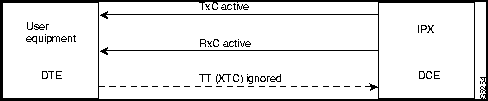
DCE-Configured IPX/IGX Data Port: Normal Clocking
When the data port is configured as DCE, selecting a clocking type of "n" (for normal) results in clocking as illustrated below. The IPX or IGX, acting as DCE, provides both the transmit and receive data clocks to the user equipment.
Figure 8-1 :
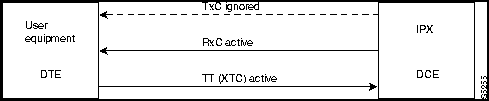
DCE-Configured IPX/IGX Data Port: Split Clocking
When the data port is configured as DCE, selecting a clocking type of "s" (for split) results in clocking as illustrated below. In "split" clocking, TT may be generated independently of RxC. The maximum data rate for split clocking is 112 kbps.
Figure 8-2 :
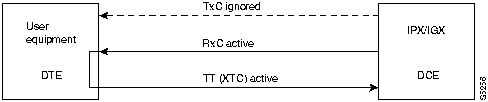
DCE-Configured IPX/IGX Data Port: Looped Clocking
When the data port is configured as DCE, selecting a clocking type of "l" (for looped) results in clocking as illustrated below. The "Terminal Timing" signal, called TT or XTC, is simply RxC looped back from the user equipment. In this configuration, it is important that the two clocks (RxC and TT) be frequency locked. This clocking configuration is supported for all data rates.
Figure 8-3 :
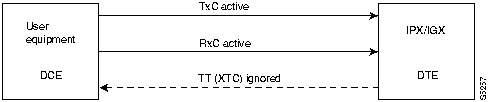
DTE-Configured IPX/IGX Data Port: Normal Clocking
When the data port is configured as DTE, selecting a clocking type of "n" (for normal) results in clocking as illustrated below. The IPX, acting as DTE, receives both the transmit and receive data clocks from the user equipment. When the user equipment is not referenced to the network clock, the maximum data rate for this configuration is 112 kbps. The two clocks must be frequency-locked for proper operation.
Figure 8-4 :
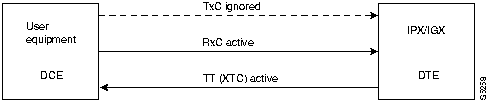
DTE-Configured IPX/IGX Data Port: Split Clocking
When the data port is configured as DTE, selecting a clocking type of "s" (for split) results in the clocking as illustrated below. When the user equipment is not referenced to the network clock, the maximum data rate for this configuration is 112 kbps. The two clocks must be frequency-locked for proper operation.
Figure 8-5 :
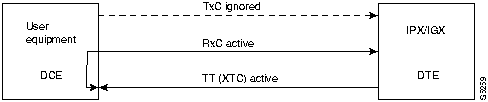
DTE Configured IPX Data Port: Looped Clocking
If you specify clocking type of "l" (looped) when the data port is in DTE mode, the result is the clocking arrangement shown in Figure 8-6. The RxC clock signal is the TT(XTC) signal looped back to the IPX or IGX by the user equipment. The network supports this clocking configuration for all data rates. The restrictions to the data clocking schemes are:
- Except for special cases, isochronous clocking is limited to data rates of 112 Kbps or less. For higher data rates, all clocks must be frequency-locked to the network.
- For any port there must be only one isochronous clock in a direction. Any situation where user equipment provides two clock signals that are not locked is subject to slippage.
- Slippage may also occur in any situation where there are opposing user clocks for a single direction of data.
Figure 8-6 :
Full Name
Configure data channel clocking type
Syntax
cnfdclk <channel> <normal/split/looped>
Related Commands
none
Attributes
| Privilege
|
1--2
|
| Jobs
|
Yes
|
| Log
|
Yes
|
| Node
|
IPX, IGX
|
| Lock
|
Yes
|
Example 1
cnfdclk 5.1 n
Description
Configure the clocking for channel 5.1 to normal
System Response
alpha          TRM   YourID:1        IPX 16    8.2    Mar. 23 1996 10:41 PST

Data Channel:      5.1
Interface:         V35   DCE
Clocking:          Normal

            Interface Control Template for Connection while ACTIVE

 Lead  Output Value      Lead  Output Value
 RI  (J) OFF      DSR (E)  ON
 CTS  (D) ON       TM  (K)  OFF
 DCD  (F) ON


Last Command: cnfdclk 5.1 n


Next Command:
Table 8-11 : cnfdclk -- Parameters
| channel
|
Specifies the channel to configure in the format <slot>. <port>.
|
| normal/split/looped
|
Specifies the clocking type to assign to the channel. Valid clocking types are:
n Normal.
s Split.
l Looped.
|
cnfict
Sets the interface control template signals. The signals that can be set using cnfict depend on the type of back card used and whether the hardware is configured for DCE or DTE. On an IPX, the applicable front cards are the SDP, LDP, FRP, CDP (for data), and FTC (for data). On an IGX, the applicable front cards are the LDM, HDM, FRM, CVM (for data), and FTM (for data). Each data channel has a default interface control template for its active, conditioned, and looped near and far states. The cnfict command is used to change a control template. Each interface control lead in each template is individually configured.
When Y-cable redundancy is in effect, the control template configuration for the data channels terminating at the primary slot is also applied to the data channels of the secondary slot. Any configuration information for the secondary slot is ignored. The list below shows the configurable leads. The leads are configurable for each type of data interface supported by the IPX or IGX. The entries under the "IPX/IGX Name" column indicate the abbreviations to use when specifying input or output leads on the command line. The leads listed below show the equivalence between RS-232C, RS-232D, RS-449,V.35, and X.21 interfaces. The IPX treats leads impartially for non-interleaved connections. Any signal received on an EIA pin at one end may be transmitted to any pin at the other end, up to the maximum of 12 EIA leads on any interface type. For interleaved EIA connections, refer to the "Fast EIA" column. The column shows which leads are carried in the interleaved bytes in the data packets. All remaining leads are carried in traditional control lead packets.
Table 8-12 :
| DTE
|
RTS
|
CA
|
CA
|
RS
|
C
|
|
F4
|
Request to Send
|
| DCE
|
CTS
|
CB
|
CB
|
CS
|
D
|
|
F4
|
Clear to Send
|
| DCE
|
DSR
|
CC
|
CC
|
DM
|
E
|
|
F3
|
Data Set Ready
|
| DCE
|
DCD
|
CF
|
CF
|
RR
|
F
|
|
F7
|
Data Carrier Detect (RLSD)
|
| DCE
|
QM
|
QM
|
QM
|
|
|
|
|
Equalizer Mode
|
| DTE
|
pin 11
|
11
|
11
|
|
|
|
|
Sometimes used for Data
|
| DCE
|
SDCD
|
SCF
|
SCF
|
|
|
|
|
Secondary Data Carrier Detect
|
| DCE
|
SCTS
|
SCB
|
SCB
|
|
|
|
|
Secondary Clear to Send
|
| DTE
|
STxD
|
SBA
|
SBA
|
|
|
|
F5
|
Secondary Transmit Data
|
| DTE
|
NS
|
|
|
NS
|
|
|
F7
|
New Sync
|
| DCE
|
SRxD
|
SBB
|
SBB
|
|
|
|
F5
|
Secondary Receive Data
|
| DCE
|
DCR
|
DCR
|
|
|
|
|
|
Divided Receiver Clock
|
| DTE
|
RL
|
|
RL
|
RL
|
|
|
F6
|
Remote Loopback
|
| DTE
|
SRTS
|
SCA
|
SCA
|
|
|
|
|
Secondary Request to Send
|
| DTE
|
DTR
|
CD
|
CD
|
TR
|
H
|
|
F3
|
Data Terminal Ready
|
| DCE
|
SQ
|
CG
|
CG
|
SQ
|
|
|
|
Signal Quality Detect
|
| DCE
|
RI
|
CE
|
CE
|
IC
|
J**
|
|
|
Ring Indicator
|
| DTE
|
SF
|
CH
|
CH
|
SF
|
|
|
|
Signal Rate Select (to DCE)
|
| DCE
|
SI
|
CI
|
CI
|
SI
|
|
|
|
Signaling Rate Select. (to DTE)
|
| DTE
|
BSY
|
BSY
|
|
IS
|
|
|
F1
|
Busy (In Service)
|
| DCE
|
SB
|
|
TST
|
SB
|
|
|
F1
|
Test Indicator
|
| DTE
|
LL
|
|
|
LL
|
|
|
F2
|
Local Loopback
|
| DCE
|
TM
|
|
|
TM
|
K1
|
|
F6
|
Test Mode
|
| DTE
|
SS
|
|
|
SS
|
|
|
|
Select Standby
|
| DTE
|
C
|
|
|
|
|
C
|
|
Control
|
| DCE
|
I
|
|
|
|
|
I
|
|
Indicator
|
1 Applicable to SDP cards only.
Note that pins 11 and 23 on an RS-232 port are bi-directional, and their default direction is input. See the cnfcldir command for information on changing the direction of these pins. The cpyict command can be used to copy an interface control template from one data channel to another. It can then be edited using the cnfict command. The dspbob command displays the state of leads at specified intervals.
Full Name
Configure interface control templates
Syntax
cnfict <port> <template> <output> <source>
Related Commands
addextp, dspict, tstport
Attributes
| Privilege
|
1--2
|
| Jobs
|
Yes
|
| Log
|
Yes
|
| Node
|
IPX, IGX
|
| Lock
|
Yes
|
Example 1
cnfict 31.1 c SB on
Description
Configure the conditioned interface control template for channel 31.1 to SB on (DDS).
System Response
beta           TRM   YourID:1        IPX 32    8.2    Mar. 15 1996 17:30 MST

Data Channel:      31.1
Interface:         DDS-4   OCU Config
Clocking:          Looped

            Interface Control Template for Connection while CONDITIONED

Lead  Output Value        Lead  Output Value
SB  ON         RI  OFF
DSR  OFF        CTS  ON
DCD  OFF


Last Command: cnfict 31.1 c   sb  on


Next Command:
Example 2
cnfict 25.1 a CTS on
Description
Configure the active interface control template for channel 25.1 to CTS on (RS-232).
System Response
beta           TRM   YourID:1        IPX 32    8.2    Mar. 15 1996 17:36 MST

Data Channel:      25.1
Interface:         RS232   DCE
Clocking:          Normal

            Interface Control Template for Connection while ACTIVE

 Lead    Output Value                  Lead    Output Value
 RI      OFF                            DSR     ON
 CTS     ON                             SRxD    ON
 DCR     OFF                            DCD     ON
 SCTS    ON                             SDCD    ON
 SQ      ON


Last Command: cnfict 25.1 a cts on


Next Command:
Example 3
cnfict 5.1 active CTS on
Description
Configure the active interface control template for channel 5.1 to CTS on (V.35).
System Response
lpha          TRM   YourID:1        IPX 16    8.2    Mar. 23 1996 10:29 PST

Data Channel:      5.1
Interface:         V35   DCE
Clocking:          Normal

            Interface Control Template for Connection while ACTIVE

 Lead    Output Value                  Lead     Output Value
 RI  (J) OFF                            DSR (E) ON
 CTS (D) ON                             TM  (K) OFF
 DCD (F) ON


Last Command: cnfict 5.1 a cts on


Next Command:
Table 8-13 : cnfict -- Parameters
| port
|
Specifies the data channel or frame relay port whose interface control template is to be configured. Entered as <slot.port>. On an IPX, the applicable cards are the SDP, LDP, FRP, CDP, and FTC. On an IGX, the applicable cards are the LDM, HDM, FRM, CVM, and FTM.
|
| template
|
Specifies which interface control template to configure for the channel and has the format <a/c/l/n/f>. Valid entries are listed below: The only valid template for a frame relay port, X.21 or V.35, is the ACTIVE template. Also, all the output leads have steady state values and do not follow local or remote inputs
|
|
|
Entry
|
Template
|
Description
|
|
|
|
a
|
Active
|
The "active" control template is in effect while the data channel is active (normal operation) i.e. when the connection is routed and not failed.
|
|
|
c
|
Conditioned
|
The "conditioned" control template is in effect when conditioning is applied to the data channel. The conditioned template is used when the network detects that it cannot maintain the connection because of card failures or lack of bandwidth (The connection is failed.)
|
|
|
l
|
Looped
|
The "looped" template is in effect when the data channel is being looped back in either direction. The looped template is used when addloclp or addrmtlp has been used to loop the connection within the network.
|
|
|
n
|
Near loopback
|
The "near" template is in effect when running a tstport n or an addextlp n on a port. The port is configured such that the external near modem is placed in a loopback.
|
|
|
f
|
Far loopback
|
The "far" template is in effect when running a tstport f or an addextlp f on a port. The port is configured such that the external far-end modem is placed in a loopback.
|
| output
|
Specifies the output lead to configure. Refer to the Configurable Lead information in the command description for valid abbreviations. Configurable output leads vary depending on the type of data interface: RS-232, V.35, X.21, or RS-449.
|
| source
|
Specifies how the lead is to be configured and has the format <on | off |local|remote> <input> [delay]. Valid source choices follow:
|
|
|
Source Options
|
|
|
|
|
on
|
The output lead is asserted.
|
|
|
off
|
The output lead is inhibited.
|
|
|
l
|
(for local) indicates that the output follows a local lead.
|
|
|
r
|
(for remote) indicates that the output follows a remote lead.
|
|
|
input
|
The name of the local or remote input lead that the output lead follows.
|
|
|
delay
|
The time in milliseconds that separates the "off" to "on" lead transitions. Delay is valid only when the output lead is CTS and the input lead is local RTS. "On" to "Off" lead transitions are not subject to this delay.
|
cpyict
Copies all control template information associated with a given channel: the active template information, the conditioned template information, and the looped template information for near and far ends. Once copied, the control template information may be edited with the cnfict command. See the cnfict command for more information on interface control templates.
On an IPX, the applicable front cards are the SDP, LDP, FRP, CDP (for data), and FTC (for data). On an IGX, the applicable front cards are the LDM, HDM, FRM, CVM (for data), and FTM (for data).
Full Name
Copy interface control templates
Syntax
cpyict <source_port> <destination_port>
Related Commands
cnfict, dspict
Attributes
| Privilege
|
1--2
|
| Jobs
|
Yes
|
| Log
|
Yes
|
| Node
|
IPX, IGX
|
| Lock
|
Yes
|
Example 1
cnfict 25.1 25.2
Description
Copy the interface control template for data channel 25.1 to channel 25.2
System Response
beta           TRM   YourID:1        IPX 32    8.2   Mar. 15 1996 17:40 MST

Data Channel:      25.2
Interface:         RS232   DCE
Clocking:          Normal

            Interface Control Template for Connection while ACTIVE

 Lead   Output Value     Lead   Output Value
 RI   OFF   DSR   ON
 CTS   ON   SRxD  ON
 DCR   OFF   DCD   ON
 SCTS   ON   SDCD  ON
 SQ   ON


Last Command: cpyict 25.1 25.2


Next Command:
Table 8-14 : cpyict -- Parameters
| source channel
|
Specifies the data channel or frame relay port whose interface control template information to copy.
|
| designating channel
|
Specifies the data channel or frame relay port that will receive the copied control template information.
|
delcon
Removes connections from the network. After entry of the channel or range of channels to delete, a prompt requests confirmation of the selection. Connections can be deleted from the node at either end of the connection. Do not delete a connection when the node at the other end of the connection is unreachable. The unreachable node does not recognize the deletion. It is especially important not to delete a connection to an unreachable node and then connect that channel to another node.
Full Name
Delete connections
Syntax
delcon <channel(s)>
Related Commands
addcon, dspcon, dspcons
Attributes
| Privilege
|
1--2
|
| Jobs
|
Yes
|
| Log
|
Yes
|
| Node
|
IPX, IGX
|
| Lock
|
Yes
|
Example 1
delcon 3.1
Description
Delete connection 3.1.
System Response
pubsipx1       TN    StrataCom       IPX 16    8.2       Aug. 14 1996 00:53 GMT

 Local          Remote      Remote
 Channel        NodeName    Channel         State  Type      Compress  Code COS
 3.1            pubsipx1    3.2             Ok     64                  7/8
 3.2            pubsipx1    3.1             Ok     64                  7/8
 5.1.101        pubsipx1    5.1.102         Ok     fr
 5.1.102        pubsipx1    5.1.101         Ok     fr
 5.1.111        pubsipx1    8.5.1           Ok     atfr
 5.1.203        pubsipx1    5.1.204         Ok     fst
 5.1.204        pubsipx1    5.1.203         Ok     fst
 5.1.222        pubsipx1    8.5.2           Ok     atfst
 5.1.223        pubsipx1    8.5.3           Ok     atfst
 8.5.1          pubsipx1    5.1.111         Ok     atfr
 8.5.2          pubsipx1    5.1.222         Ok     atfst
 8.5.3          pubsipx1    5.1.223         Ok     atfst
 13.1           pubsipx1    13.2            Failed p

This Command: delcon 3.1


Delete these connections (y/n)?
Table 8-15 : delcon -- Parameters
| channel
|
Specifies the data channel or channels to delete. The format is slot.port.
|
dspchcnf
Displays configuration details for data channels. This command provides information for voice, Frame Relay, ATM, and data channels. For data channels, the following information displays: maximum EIA update rate, percentage utilization, DFM pattern length, and DFM status. If the channel specified is a data channel, the display includes configuration details for all channels on the specified data card (CDP, SDP or LDP) starting with the specified channel.
Full Name
Display channel configurations
Syntax
dspchcnf <start_channel>
Related Commands
cnfchadv, cnfchdfm, cnfchdl, cnfcheia, cnfchgn, cnfchtp, cnfchutl, cnffrcon
Attributes
| Privilege
|
1--6
|
| Jobs
|
No
|
| Log
|
No
|
| Node
|
IPX, IGX
|
| Lock
|
No
|
Example 1
dspchcnf 25.1
Description
Display the configuration values for data channel 25.1
System Response
beta           TRM   YourID:1        IPX 32    8.2    Mar. 15 1996 17:42 MST

            Maximum EIA     %      DFM Pattern     DFM
Channels    Update Rate    Util      Length       Status
25.1-4            2         100         8          Enabled


Last Command: dspchcnf 25.1


Next Command:
Table 8-16 : dspchcnf -- Parameters
| start channel
|
Specifies the channel with which to start the display and in the following format: slot.port
|
dspcon
Displays connection information for a specified channel. The information displayed includes:
- The channel numbers for both the local and remote ends of the connection.
- The node names at both ends of the connection.
- The routing restriction.
- The class of service (COS) of the connection.
- The connection route. listing the end nodes and any intermediate nodes.
- The preferred route for the connection (if configured).
- The status of the cards associated with the connection.
- Any Y-cable conflicts (CIP, CDP).
- The compression status (VAD on or off, ADPCM on or off, DFM on or off, frame relay
compression on or off).
- The connection descriptor (if configured).
The status that may be displayed includes:
|
|
OK
|
Connection OK
|
|
|
FAILED
|
Connection failed
|
Full Name
Display connection
Syntax
dspcon <channel>
Related Commands
cnfchec
Attributes
| Privilege
|
1--6
|
| Jobs
|
No
|
| Log
|
No
|
| Node
|
IPX, IGX
|
| Lock
|
No
|
Example 1
dspcon 13.1
Description
Display information for data channel 13.1. This connection is FAILED and "off hook."
System Response
pubsipx1       TN    StrataCom       IPX 16    8.2       Aug. 14 1996 00:20 GMT

Conn:  13.1              pubsipx1    13.2               p
Desc: bogus                                                     Status:Failed


Path:   Route information not applicable for local connections


pubsipx1  Line 13: Failed        OFFHK pubsipx1  Line 13: Failed        OFFHK


Last Command: dspcon 13.1


Next Command:
Table 8-17 : dspcon -- Parameters
| channel
|
Specifies the channel. The command displays connection information for one channel at a time. The format for channel specification is <slot.channel>.
|
dspcons
Displays a summary of the connections on an IPX or IGX node. Status that may be displayed includes:
|
|
OK
|
Connection OK
|
|
|
FAILED
|
Connection failed
|
The following fields appear in the dspcons screens:
Table 8-18 :
| Local Channel
|
The connection's channel at this node.
|
| Remote Node Name
|
The name of the node at the other end of the connection.
|
| Remote Channel
|
The connection's channel at the remote node.
|
| State
|
The state of the connection(s) as follows:
OK Routed
Down Downed
OK Downed Waiting for onhook to occur to allow courtesy down to take place for connection(s) that have been courtesy downed using the dncon command.
Failed Unrouted, but trying
|
| Type
|
The type of connection (v = voice, d = data, fr = frame relay, atfr = ATM to frame relay interworking, atfst = ATM to frame relay interworking with ForeSight, -fail = failed connections; data rate in kbps for data)
|
| Route Avoid
|
The type of lines to avoid when routing (satellite lines, terrestrial lines, lines with zero code suppression).
|
| Compression
|
The type of compression applied to the connection (PCM, PCM and VAD, ADPCM, VAD and ADPCM for voice connections), (DFM for data connections).
|
| COS
|
The Class Of Service.
|
| Owner
|
The end of the connection in control of re-routing.
|
| Descriptor
|
The connection descriptor string (if +d option specified).
|
| Loopback
|
A connection with a local loopback is indicated by a right parenthesis symbol between the "Local Channel" and "Remote NodeName" columns. A frame relay connection with a port loopback is indicated by a right bracket symbol between the "Local Channel" and "Remote NodeName" columns. A connection with a remote loopback is indicated by a right parenthesis symbol before the channel number in the "Remote Channel" column.
|
Full Name
Display connections
Syntax
dspcons [start_channel] [nodename] [connection type] [+d]
Related Commands
addcon, cnfchadv, chfchdfm
Attributes
| Privilege
|
1--6
|
| Jobs
|
No
|
| Log
|
No
|
| Node
|
IPX, IGX
|
| Lock
|
No
|
Example 1
dspcons
Description
Display a summary of all connections.
System Response
alpha  TRM  YourID:1  IPX 16  Rev:8.2  Mar. 16 1996 09:42 PST

 Local      Remote      Remote                                      Route
 Channel    NodeName    Channel    State  Type    Compression  Code Avoid COS O
 5.1  beta  25.1  Ok  256  7/8  0  L
 9.1  gamma  8.1  Ok  v    0  L
 9.2  beta  19.2  Ok  v    0  L
 14.1  gamma  15.1  Ok  v  VAD  2  L


Last Command: dspcons


Next Command:
Example 2
dspcons +d
Description
Display the connection with descriptors.
System Response
pubsipx1       TN    StrataCom       IPX 16    8.2    July 25 1996 06:40 PDT

 Local          Remote      Remote
 Channel        NodeName    Channel         State  Type      Descriptor
 5.1.100        pubsipx3    5.1.200         Ok     fr
 6.1            pubsipx2    11.1            Ok     56


Last Command: dspcons +d


Next Command:
Table 8-19 : dspcons -- Optional Parameters
| start channel
|
Specifies the channel to begin the display. The start channel is specified as follows:
slot.channel | slot.port.dlci | slot.vpi.vci
|
| node name
|
Specifies that only connections to this remote node from the local note be displayed. If no "nodename" is designated, connections from the local node to all other nodes are displayed.
|
| connection type
|
Specifies that only connections of this type be displayed. If no "connection type" is designated, all connections appear. When you enter the connection type on the command line, precede it with a hyphen (-). Valid connection types to display are:
-v Displays only voice connections.
-d Display only data connections.
-f Displays frame relay connections.
-abit Shows A-bit (nni) status.
-fabit Shows connections with failed A-bit (nni) status.
|
| +d
|
Specifies that the display should show the connection descriptor string in place of the usual compression and ownership fields.
|
dspict
Displays interface control template information for data channels and frame relay ports. Displayed information includes:
- The specified channel.
- The type of template: a, c, l, n, or f.
- The associated output leads and their status:
- ON.
OFF.
Following a local input.
Following a remote input.
For frame relay ports, the entire port configuration screen is displayed (see dspfrport command). The input being followed, where applicable, is specified. Any RTS to CTS delay is also shown.
Full Name
Display interface control template
Syntax
dspict <port> <template>
Related Commands
cnfict, cpyict
Attributes
| Privilege
|
1--2
|
| Jobs
|
No
|
| Log
|
No
|
| Node
|
IPX, IGX
|
| Lock
|
No
|
Example 1
dspict 25.1
Description
Display the active interface control template for 25.1.
System Response
beta           TRM   YourID:1        IPX 32    8.2    Mar. 15 1996 17:33 MST

Data Channel:      25.1
Interface:         RS232   DCE
Clocking:          Normal

            Interface Control Template for Connection while ACTIVE

 Lead    Output Value                  Lead    Output Value
 RI      OFF                            DSR     ON
 CTS     ON                             SRxD    ON
 DCR     OFF                            DCD     ON
 SCTS    ON                             SDCD    ON
 SQ      ON


Last Command: dspict 25.1


Next Command:
Table 8-20 : dspict -- Parameters
| channel
|
Specifies the channel. The format of the channel specification is slot.port.
|
| template
|
Specifies which control template to display for the channel. There are three templates available for data channels and one available (a only) for frame relay ports. You also specify which end of the circuit.
a Active control template (normal operation). The only choice for a frame relay port.
c Conditioned control template (when connection fails).
l Looped control template (with local or remote loopback).
n Near.
f Far.
|
prtchcnf
Prints the configuration details for voice channels or data channels. This command uses the same syntax, and prints the same information as the dspchcnf command. See the dspchcnf description for syntax and output information.
Full Name
Print channel configurations
Syntax
prtchcnf <start_channel>
Related Commands
dspchcnf
Attributes
| Privilege
|
1--6
|
| Jobs
|
Yes
|
| Log
|
No
|
| Node
|
IPX, IGX
|
| Lock
|
Yes
|
Example 1
prtchcnf 14.1
Description
Print the configuration values of circuit line 14.1.
System Response
None available as this command produces hardcopy.
Table 8-21 : prtchcnf -- Parameters
| start channel
|
Specifies the channel at which the printout begins. The format is slot.channel.
|
prtcons
Prints a summary of connections terminated at the IPX or IGX node.
Full Name
Print connections
Syntax
prtcons [start_channel] [nodename] [type] [+d]
Related Commands
dspcons
Attributes
| Privilege
|
1--6
|
| Jobs
|
Yes
|
| Log
|
No
|
| Node
|
IPX, IGX
|
| Lock
|
Yes
|
Example 1
prtcons
Description
Print a summary of all connections.
System Response
None available as this command produces hardcopy.
Table 8-22 : prtcons -- Optional Parameters
| start channel
|
Specifies the channel to begin the display. The start channel is specified as follows: slot.channel
|
| node name
|
Specifies that only connections to this remote node from the local note be displayed. If no "nodename" is designated, connections from the local node to all other nodes are displayed.
|
| connection type
|
Specifies that only connections of this type be displayed. If no "connection type" is designated, all connections display. When you enter the connection type on the command line, it must be preceded with a hyphen (-). Valid connection types to display are:
-v Displays only voice connections.
-d Display only data connections.
-f Displays frame relay connections.
-nni Displays frame relay network to network connections for failed
connections only.
|
| +d
|
Specifies that the display should show the connection descriptor string in place of the usual compression and ownership fields.
|
prtict
Prints the configuration details for voice channels or data channels. This command uses the same syntax, and prints the same information as is displayed using the dspchcnf command. See the dspchcnf command for syntax and output information.
Full Name
Print interface control template
Syntax
prtict <port> <template>
Related Commands
cnfict, cpyict
Attributes
| Privilege
|
1--2
|
| Jobs
|
Yes
|
| Log
|
No
|
| Node
|
IPX, IGX
|
| Lock
|
Yes
|
Example 1
prtict 25.1
Description
Print the active interface control template for 25.1.
System Response
None as this command produces hardcopy.
Table 8-23 : prtict -- Parameters
| channel
|
Specifies the channel containing the data card. The start channel is specified as follows: slot.port
|
| template
|
Specifies which control template to display for the channel. There are three templates available for data channels and one available (a only) for frame relay ports. You also specify which end of the circuit.
a Active control template (normal operation). The only choice for a frame relay port.
c Conditioned control template (when connection fails).
l Looped control template (with local or remote loopback).
n Near.
f Far.
|
Copyright 1988-1996 © Cisco Systems Inc.