


|
|

Overview and Quick Installation
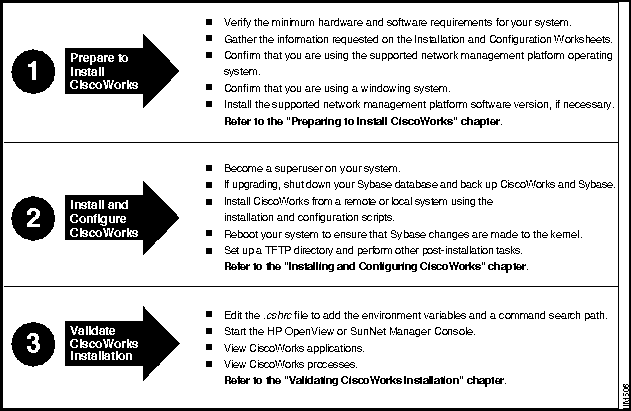
Figure 1-1 provides a visual overview of the tasks necessary for installing CiscoWorks, including preparing to install, installing, configuring, and validating the installation. After reviewing Figure 1-1, you may prefer to perform a quick installation, without completing the installation and configuration worksheets. If so, continue with the next section, "Quick Installation."
If you are installing CiscoWorks for the first time from a local CD-ROM drive, and if you are an experienced network administrator, you may wish to perform a quick installation using the steps described in this section.
If you are installing from a remote CD-ROM drive, if you are unfamiliar with UNIX commands or with your system, or if you want to use values other than the defaults given by the installation and configuration scripts, follow the instructions in Chapter 2, "Preparing to Install CiscoWorks on HP-UX" and Chapter 3, "Installing and Configuring CiscoWorks on HP-UX."
To install CiscoWorks, perform the following steps:
This completes the quick installation process. You are now ready to start using CiscoWorks on HP OpenView according to the instructions in Chapter 4, "Validating CiscoWorks Installation on HP-UX."
Copyright 1988-1996 © Cisco Systems Inc.


hostname%
root

Password? <rootpassword>
hostname#
mkdir
/cdrom
hostname#
/etc/mount -rt cdfs
/dev/device_filename /cdrom
/dev/dsk/c9d0s2
or something similar, instead of
/dev/device_filename
.
hostname#
mkdir
/usr/nms
hostname#
/etc/update -s
/cdrom/
cw.tar -d
/usr/nms
CWIC
hostname#
/usr/nms/
install/bin/ncsinstall -s
/cdrom/
cw.tar -d
/usr/nms

hostname#
/usr/nms/
install/bin/ncsconfigure
hostname#
cd /

hostname#
umount
/cdrom
hostname#
source
/usr/nms/
etc/install.cshrc
hostname#
printenv | more
