Your Cisco uBR7246 universal broadband router went through extensive testing before leaving the factory. However, if you encounter problems starting the Cisco uBR7246, or with the connection to the HFC network, use the information in this chapter to help isolate the cause of the problems. This chapter contains the following sections:
The procedures in this chapter assume that you are troubleshooting the initial system startup, and that the Cisco uBR7246 is in the original factory configuration. If you have removed or replaced components or changed any default settings, the recommendations in this chapter might not apply. Make sure to review the safety warnings listed in the the publication Regulatory Compliance and Safety Information for the Cisco uBR7246 Universal Broadband Router (Document Number 78-4977-xx).
If you are unable to easily solve the problem, contact a customer service representative for assistance and further instructions. Provide the representative with the following information:
- Date you received the Cisco uBR7246
- Chassis serial number
- Type of software and release number
- Brief description of the problem you are having
- Brief explanation of the steps you have taken to isolate and resolve the problem
- Maintenance agreement or warranty information
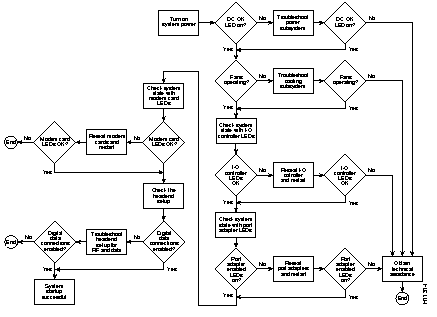
shows the general troubleshooting strategy described in this chapter. Refer to this chart, as necessary, to follow the steps to isolate problems to a specific subsystem; then resolve the problem if possible.
Figure 6-1: Troubleshooting Strategy for Startup Problems
This section describes the troubleshooting methods used in this chapter and describes how the Cisco uBR7246 is divided into subsystems for more efficient problem solving.
The key to solving problems with the system is isolating the problem to a specific subsystem. The first step in solving startup problems is to compare what the system is doing to what it should be doing. Because a startup problem is usually caused by a single component, it is more efficient to first isolate the problem to a subsystem rather than troubleshoot each component in the system. For these troubleshooting procedures, consider the following subsystems:
The following sections will help you isolate a problem to one of these subsystems and direct you to the appropriate troubleshooting section.
Startup problems are commonly due to the source power or to a board (network processing engine, I/O controller, port adapter, or modem card) that is dislodged from the midplane. Although an overtemperature condition is unlikely at initial startup, the environmental monitoring functions are included in this chapter because they also monitor internal voltages.
When you start up the Cisco uBR7246 for the first time, you should observe the startup sequence described in the section "Starting the Cisco uBR7246" in the chapter "Installing the Cisco uBR7246." This section contains a more detailed description of the normal startup sequence and describes the steps to take if the system does not perform that sequence as expected.
With the exception of the fan tray and network processing engine, LEDs indicate all system states in the startup sequence. By checking the state of the LEDs, you can determine when and where the system failed in the startup sequence. Use the following descriptions to isolate the problem to a subsystem, then proceed to the appropriate sections to try to resolve the problem.
When you start up the system by turning on the power supply switch, the following should occur:
- If the green power OK LED does not come on, proceed to the section "Troubleshooting the Power Subsystem."
- The LEDs on the I/O controller should come on as follows:
- The IO power OK LED comes on immediately and indicates that the I/O controller is receiving DC power from the universal broadband router midplane. This LED comes on during a successful boot and remains on during normal operation of the Cisco uBR7246.
- If this LED remains off when starting the Cisco uBR7246, either there is a problem with the power supply (it is damaged or not connected to the Cisco uBR7246 midplane), or the network processing engine or the I/O controller are not connected to the Cisco uBR7246 midplane. Proceed to the section "Troubleshooting the I/O Controller, " later in this chapter.
- The enabled LED comes on after the IO power OK LED and indicates that the network processing engine and the I/O controller are enabled for operation by the system; however, it does not mean that the Fast Ethernet port on the I/O controller is functional or enabled. This LED comes on during a successful boot and remains on during normal operation of the Cisco uBR7246.
- If this LED remains off when starting the Cisco uBR7246, it is probably a problem with the network processing engine or the I/O controller (they are damaged or not connected to the Cisco uBR7246 midplane), or the Fast Ethernet port is in shutdown mode. Proceed to the section "Troubleshooting the I/O Controller," later in this chapter.
- The FE enabled LED comes on after the enabled LED and indicates that the Fast Ethernet port on the I/O controller is initialized and enabled for operation by the system. This LED comes on during a successful boot and remains on during normal operation of the Cisco uBR7246.
- If this LED remains off when starting the Cisco uBR7246, it is probably a problem with the Fast Ethernet port on the I/O controller. Proceed to the section "Troubleshooting the I/O Controller," later in this chapter.
- The FE link LED comes on when only when the Fast Ethernet port on the I/O controller is receiving a carrier signal from the network. This LED remains off during normal operation of the Cisco uBR7246 unless there is an incoming carrier signal, and does not indicate startup problems.
- The slot 1 and slot 2 LEDs come after the enabled LED and indicate which PCMCIA slot is in use. During a successful boot, these LEDs come on and remain on if a Flash memory card is present in the slot. These LEDs also blink when either slot is being accessed by the system. These LEDs do not indicate startup problems.
- The enabled LED on each port adapter comes on when the network processing engine completes its initialization of the port adapter for operation. The enabled LED indicates that the port adapter is receiving power and has been recognized by the network processing engine; it does not indicate the state of the individual interfaces on the port adapters. If an enabled LED fails to come on, proceed to the section "Troubleshooting the Port Adapters," later in this chapter.
- The enabled LED on each cable modem card comes on when the network processing engine completes its initialization of the port adapter for operation. The enabled LED indicates that the cable modem card is receiving power and has been recognized by the network processing engine; it does not indicate the state of the individual interfaces on the cable modem card. If an enabled LED fails to come on, proceed to the section "Troubleshooting the Modem Cards," later in this chapter.
- When all LEDs come on to indicate that the system has booted successfully, the initial system banner should be displayed on the console screen. If it is not displayed, refer to the section "Console and Auxiliary Port Connection Equipment" in the chapter "Installing the Cisco uBR7246" to verify that the terminal is set correctly and that it is properly connected to the I/O controller's console port.
Check the following to help isolate a problem with the power subsystem:
 | Caution When the power switch on a Cisco uBR7246 power supply is turned to the off position, the power supply will enter a reset cycle for ninety (90) seconds.
Wait at least ninety (90) seconds before turning the power switch back to the on position. If you do not wait the full ninety (90) seconds, the power supply will not restart. |
- On the first power supply, is the power OK LED on?
- If yes, the power source is good, and the power supply is functional.
- If no, make sure the power cable is connected at both ends. Remember to wait at least ninety (90) seconds to turn the power switch on from the off position.
- If the power OK LED remains off, and the power switch is set correctly, suspect the power source or the power cable. Turn the switch off, connect the power cable to another power source, if available, and turn the switch back on. If the LED comes on, the problem is the first power source.
- If the power OK LED fails to come on after you connect the power supply to a new power source, replace the power cord, and turn the switch back on. If the AC power (or input power) LED then comes on, return the first power cable for replacement.
- If the LED still fails to come on when the power supply is connected to a different power source with a new power cable, the power supply is probably faulty. If a second power supply is available, install it in the other power supply bay and contact a service representative for further instructions.
- Is the power OK LED on for the second (redundant) power supply?
If you are unable to resolve the problem or you determine that either a power supply or chassis connector is faulty, contact a service representative for instructions.
Check the following to help isolate a problem with the cooling system:
- When you start up the system, do the fans start operating?
- To determine if the fans are operating, listen for them. In noisy environments, place your hand on the left side of the chassis (when viewing the chassis from the front) to feel for air being forced out the vents.
- If yes, the power to the fan tray is good.
- If no, there is a problem with the fan tray or power. Refer to the section "Troubleshooting the Power Subsystem" in this chapter.
- The following message, if displayed, indicates that the system has detected an overtemperature condition or out-of-tolerance power inside the chassis.
Queued messages:
%ENVM-1-SHUTDOWN: Environmental Monitor initiated shutdown
- If an environmental shutdown results from an out-of-tolerance power condition, the power OK LED will go off and the system shuts down. (Refer to the section "Troubleshooting the Power Subsystem" in this chapter.) Although an overtemperature condition is unlikely at initial startup, ensure that heated exhaust air from other equipment is not entering the Cisco uBR7246's inlet vent, and that there is sufficient clearance around the sides of the chassis to allow cooling air to flow. Refer to the section "Preventive Site Configuration: Maintaining Normal Operation" in the chapter "Preparing for Installation" for preventive site configurations.
- The above message could also indicate a faulty component or temperature sensor. Before the system shuts down, use the show environment or show environment table command to display the internal chassis environment. (Refer to the section "Functional Overview" in the chapter "Product Overview" for descriptions of the show environment and show environment table commands.)
The processor subsystem comprises the I/O controller, network processing engine, all port adapters and all cable modem cards. The I/O controller and network processing engine are required system components. The system cannot operate unless the I/O controller and network processing engine are installed properly; however, the system can operate without any port adapters or cable modem cards installed as long as none are in partial contact with the midplane pins. A port adapter or cable modem card that is partially connected to the midplane will send incomplete signals to the processor, which will fault the PCI bus and cause the system to hang. Therefore, first ensure that the I/O controller and the network processing engine are installed properly and the system software has initialized successfully. Then, if necessary, you can troubleshoot individual port adapters and cable modem cards.
These procedures assume that the I/O controller, network processing engine, and universal broadband router itself are in the original factory configuration, and that you have not made changes to your configuration file.
If the I/O controller LEDs do not go on as expected (refer to the section "Identifying Startup Problems" in this chapter), check the following items to help isolate the problem.
- Do all of the I/O controller LEDs remain off when the system power switch is turned on?
- If the LEDs stay off, first refer to the sections "Troubleshooting the Power Subsystem" and "Troubleshooting the Cable Headend Subsystem" in this chapter to ensure that both the fans and the power supply are functioning properly.
- If the power supply and fans appear operational but none of the I/O controller LEDs are on, suspect that an improperly connected I/O controller or port adapter has hung the system. Tighten all captive installation screws, and then restart the system.
- With the power supply turned off, reseat the I/O controller in its slot and restart the Cisco uBR7246.
| Caution When the power switch on a Cisco uBR7246 power supply is turned to the off position, the power supply will enter a reset cycle for ninety (90) seconds.
Wait at least ninety (90) seconds before turning the power switch back to the on position. If you do not wait the full ninety (90) seconds, the power supply will not restart. |
- Is the I/O controller enabled LED on?
These procedures assume that the I/O controller, network processing engine, and Cisco uBR7246 itself are in the original factory configuration, and that you have not made changes to your configuration file.
If the I/O controller enabled LED does not go on as expected, make sure the power to the universal broadband router is turned off, reseat the network processing engine in its slot, and restart the Cisco uBR7246.
If the enabled LED remains off, the system detected a processor hardware failure. (This LED should be on in normal operation.) Contact a service representative for instructions.
Check the following to help isolate a problem with the port adapters:
- Are all port adapter enabled LEDs on?
- If yes, the system is operational.
- Are any port adapter enabled LEDs off?
- If the enabled LED on an individual port adapter is off, suspect that the port adapter has pulled away from the midplane. Reseat the port adapter in its slot (you do not have to turn off the system power when removing or replacing port adapters). After the system reinitializes the interfaces, the enabled LED on the port adapter should go on.
- If the enabled LED remains off, the system detected a processor hardware failure. (This LED should be on in normal operation.) Contact a service representative for instructions.
Check the following to help isolate a problem with the modem cards:
- Are all modem card enabled LEDs on?
- If yes, the system is operational.
- Are all modem card enabled LEDs off?
- If yes, verify that you are running a version of Cisco IOS software that supports the cable modem cards. You should be running Cisco IOS Release 11.3(3)P or a later release.
- Are any modem card enabled LEDs off?
- If the enabled LED on an individual modem card is off, suspect that the modem card has pulled away from the midplane. Reseat the modem card in its slot (you do not have to turn off the system power when removing or replacing modem cards). After the system reinitializes the interfaces, the enabled LED on the modem card should go on.
- If the enabled LED remains off, the system detected a processor hardware failure. (This LED should be on in normal operation.) Contact a service representative for instructions.
If the headend has not been properly setup for the introduction of digital data into the HFC network, the Cisco uBR7246 universal broadband router might start up but fail to enable digital data connections.
Refer to the chapter "CATV Headend Considerations," earlier in this guide, for detailed information on the setup of the headend and tuning of the HFC network for the introduction of digital data.



