


|
|

The planning worksheets on the following pages can be photocopied and used for planning the installation and configuration of the Catalyst 2600.
The worksheets in this section correspond with the information in "Planning for Installation."
Figure D-1 : Rack Inventory Chart
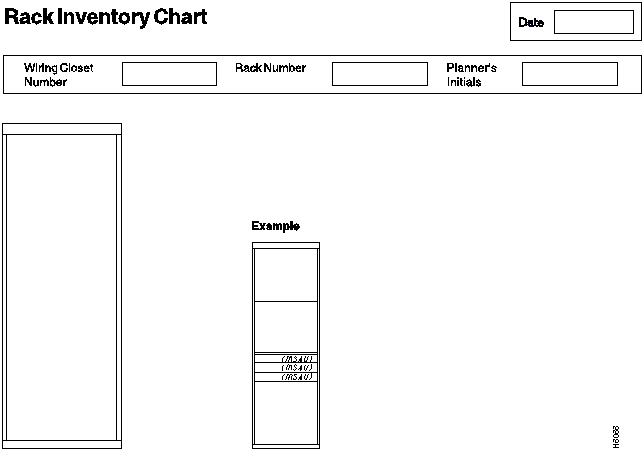
Figure D-2 : Cabling Chart
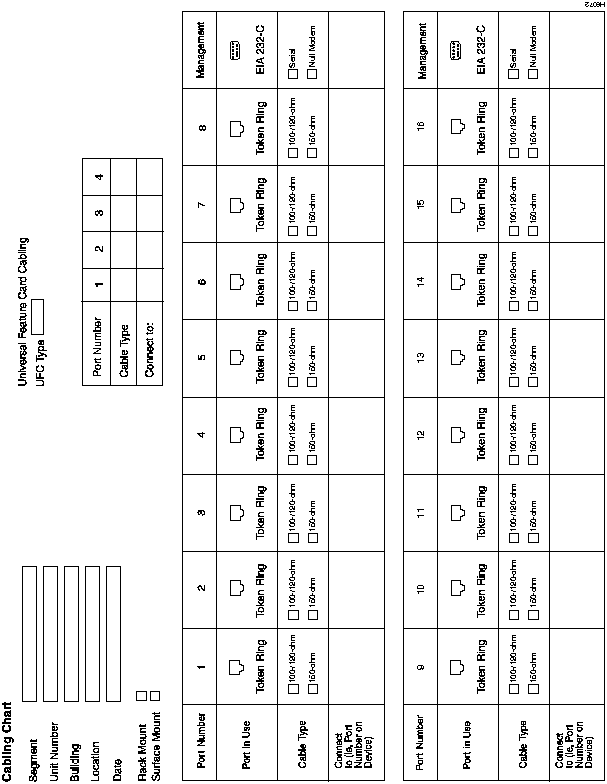
Table D-1 : Adapter Address to Physical Location Locator Chart
| Adapter Address | Physical Location | Device Identification | Segment Number | Hub/Switch Unit No. |
|---|---|---|---|---|
Table D-2 : Physical Location to Adapter Address Locator Chart
| Physical Location | Adapter Address | Device Identification | Segment Number | Hub/Switch Unit No. |
|---|---|---|---|---|
This worksheet corresponds to the Switch Information panel described in "Configuring Basic Switch Parameters."
Table D-3 : Switch Information Worksheet
| System Name |
| System Location |
| System Contact |
This worksheet corresponds to the Domain Configuration panel described in "Configuring Multiple Domains." Record the name of the domain associated with each port.
Table D-4 : Domain Configuration Worksheet
| Port | Domain Name | Ports | Domain Name |
|---|---|---|---|
| 1 | UFC 1-1 | ||
| 2 | UFC 1-2 | ||
| 3 | UFC 1-3 | ||
| 4 | UFC 1-4 | ||
| 5 | UFC 2-1 | ||
| 6 | UFC 2-2 | ||
| 7 | UFC 2-3 | ||
| 8 | UFC 2-4 | ||
| 9 | UFC 1-1 | ||
| 10 | UFC 1-2 | ||
| 11 | |||
| 12 | |||
| 13 | |||
| 14 | |||
| 15 | |||
| 16 |
This worksheet corresponds to the Domain Names panel described in "Changing Domain Names." Record the name assigned to each domain.
Table D-5 : Domain Names Worksheet
| Index | Domain Name |
|---|---|
| 0 | |
| 1 | |
| 2 | |
| 3 | |
| 4 | |
| 5 | |
| 6 | |
| 7 |
This worksheet corresponds to the IP Configuration panel described in "Configuring IP Information."
Table D-6 : IP Configuration Worksheet
| Domain | Parameter | Value |
|---|---|---|
| IP Address | _____._____._____._____ | |
| Default Gateway | _____._____._____._____ | |
| Subnet Mask | _____._____._____._____ | |
| IP State | ______________________ | |
| IP Address | _____._____._____._____ | |
| Default Gateway | _____._____._____._____ | |
| Subnet Mask | _____._____._____._____ | |
| IP State | ______________________ | |
| IP Address | _____._____._____._____ | |
| Default Gateway | _____._____._____._____ | |
| Subnet Mask | _____._____._____._____ | |
| IP State | ______________________ | |
| IP Address | _____._____._____._____ | |
| Default Gateway | _____._____._____._____ | |
| Subnet Mask | _____._____._____._____ | |
| IP State | ______________________ | |
| IP Address | _____._____._____._____ | |
| Default Gateway | _____._____._____._____ | |
| Subnet Mask | _____._____._____._____ | |
| IP State | ______________________ | |
| IP Address | _____._____._____._____ | |
| Default Gateway | _____._____._____._____ | |
| Subnet Mask | _____._____._____._____ | |
| IP State | ______________________ | |
| IP Address | _____._____._____._____ | |
| Default Gateway | _____._____._____._____ | |
| Subnet Mask | _____._____._____._____ | |
| IP State | ______________________ | |
| IP Address | _____._____._____._____ | |
| Default Gateway | _____._____._____._____ | |
| Subnet Mask | _____._____._____._____ | |
| IP State | ______________________ |
This worksheet corresponds to the SNMP Configuration panel described in "Configuring SNMP Parameters."
Table D-7 : SNMP Configuration Worksheet
| Send Authentication-Failure Traps |
|---|
| Yes |
| No |
This worksheet corresponds to the Community Strings panel described in "Specifying Community Names."
Table D-8 : SNMP Community Names Worksheet
| Index | Community Name | R (Read) |
W (Read/ Write) |
|---|---|---|---|
| 1 | |||
| 2 | |||
| 3 | |||
| 4 | |||
| 5 | |||
| 6 | |||
| 7 | |||
| 8 | |||
| 9 | |||
| 10 |
This worksheet corresponds to the Trap Receivers panel described in "Specifying Trap Receivers." Make additional copies of this page if you have more than five domains.
Table D-9 : SNMP Trap Receivers Worksheet
| Domain Name | Index | IP Address | Trap Community Name |
|---|---|---|---|
| 1 | _____._____._____._____ | ||
| 2 | _____._____._____._____ | ||
| 3 | _____._____._____._____ | ||
| 4 | _____._____._____._____ | ||
| 5 | _____._____._____._____ | ||
| 6 | _____._____._____._____ | ||
| 1 | _____._____._____._____ | ||
| 2 | _____._____._____._____ | ||
| 3 | _____._____._____._____ | ||
| 4 | _____._____._____._____ | ||
| 5 | _____._____._____._____ | ||
| 6 | _____._____._____._____ | ||
| 1 | _____._____._____._____ | ||
| 2 | _____._____._____._____ | ||
| 3 | _____._____._____._____ | ||
| 4 | _____._____._____._____ | ||
| 5 | _____._____._____._____ | ||
| 6 | _____._____._____._____ | ||
| 1 | _____._____._____._____ | ||
| 2 | _____._____._____._____ | ||
| 3 | _____._____._____._____ | ||
| 4 | _____._____._____._____ | ||
| 5 | _____._____._____._____ | ||
| 6 | _____._____._____._____ | ||
| 1 | _____._____._____._____ | ||
| 2 | _____._____._____._____ | ||
| 3 | _____._____._____._____ | ||
| 4 | _____._____._____._____ | ||
| 5 | _____._____._____._____ | ||
| 6 | _____._____._____._____ |
This worksheet corresponds to the Spanning Tree panel described in "Configuring Spanning-Tree Parameters." Make additional copies of this page if you have more than six domains.
Table D-10 : Spanning-Tree Configuration Worksheet
| Domain | Parameter | Value |
|---|---|---|
| Participate in Spanning Tree | 802.1d ____ No _____ | |
| Switch Priority | ||
| Switch Hello Time | ||
| Switch Maximum Message Age | ||
| Switch Forward Delay | ||
| Participate in Spanning Tree | 802.1d _____ No _____ | |
| Switch Priority | ||
| Switch Hello Time | ||
| Switch Maximum Message Age | ||
| Switch Forward Delay | ||
| Participate in Spanning Tree | 802.1d _____ No _____ | |
| Switch Priority | ||
| Switch Hello Time | ||
| Switch Maximum Message Age | ||
| Switch Forward Delay | ||
| Participate in Spanning Tree | 802.1d _____ No _____ | |
| Switch Priority | ||
| Switch Hello Time | ||
| Switch Maximum Message Age | ||
| Switch Forward Delay | ||
| Participate in Spanning Tree | 802.1d _____ No _____ | |
| Switch Priority | ||
| Switch Hello Time | ||
| Switch Maximum Message Age | ||
| Switch Forward Delay | ||
| Participate in Spanning Tree | 802.1d _____ No _____ | |
| Switch Priority | ||
| Switch Hello Time | ||
| Switch Maximum Message Age | ||
| Switch Forward Delay |
Spanning-Tree---Port Priority and Port Path Cost
This worksheet corresponds to the Port Priority and Port Path Cost panel described in "Specifying Port Priority and Port Path Cost." Record the cost of each port.
Table D-11 : Port Priority and Path Cost Worksheet
| Port: | 1 | 2 | 3 | 4 | 5 | 6 | 7 | 8 |
|---|---|---|---|---|---|---|---|---|
| Cost | ||||||||
| Priority |
| Port: | 9 | 10 | 11 | 12 | 13 | 14 | 15 | 16 |
|---|---|---|---|---|---|---|---|---|
| Cost | ||||||||
| Priority |
| Port: | UFC 1-1 | UFC 1-2 | UFC 1-3 | UFC 1-4 | UFC 2-1 | UFC 2-2 | UFC 2-3 | UFC 2-4 |
|---|---|---|---|---|---|---|---|---|
| Cost | ||||||||
| Priority |
This worksheet corresponds to the Port Configuration panel described in "Configuring Port Parameters." Fill in the appropriate boxes to define the characteristics of each port.
Table D-12 : Port Configuration Worksheet
| Port: | 1 | 2 | 3 | 4 | 5 | 6 | 7 | 8 |
|---|---|---|---|---|---|---|---|---|
| Switching Mode | ||||||||
| Enabled/Disabled | ||||||||
| Config Type | ||||||||
| Speed | ||||||||
| Mode | ||||||||
| Duplex | ||||||||
| Config Loss |
| Port: | 9 | 10 | 11 | 12 | 13 | 14 | 15 | 16 |
|---|---|---|---|---|---|---|---|---|
| Switching Mode | ||||||||
| Enabled/Disabled | ||||||||
| Config Type | ||||||||
| Speed | ||||||||
| Mode | ||||||||
| Duplex | ||||||||
| Config Loss |
| Port: | UFC 1-1 | UFC 1-2 | UFC 1-3 | UFC 1-4 | UFC 2-1 | UFC 2-2 | UFC 2-3 | UFC 2-4 |
|---|---|---|---|---|---|---|---|---|
| Switching Mode | ||||||||
| Enabled/Disabled | ||||||||
| Config Type | ||||||||
| Speed | ||||||||
| Mode | ||||||||
| Duplex | ||||||||
| Config Loss |
This worksheet corresponds to the Configure Filters panel described in "Filtering Data Based on MAC Address." Make additional copies of this page if you have more than 30 filters.
Table D-13 : MAC Filter Configuration Worksheet
| Filter Number | MAC Address | Filter Type | Applied Ports | Exit Ports |
|---|---|---|---|---|
| 1 | ||||
| 2 | ||||
| 3 | ||||
| 4 | ||||
| 5 | ||||
| 6 | ||||
| 7 | ||||
| 8 | ||||
| 9 | ||||
| 10 | ||||
| 11 | ||||
| 12 | ||||
| 13 | ||||
| 14 | ||||
| 15 | ||||
| 16 | ||||
| 17 | ||||
| 18 | ||||
| 19 | ||||
| 20 | ||||
| 21 | ||||
| 22 | ||||
| 23 | ||||
| 24 | ||||
| 25 | ||||
| 26 | ||||
| 27 | ||||
| 28 | ||||
| 29 | ||||
| 30 |
This worksheet corresponds to the Configure Port Security Mode panel described in "Securing Ports." Record the security mode for each port.
Table D-14 : Port Security Mode Worksheet
| Port | Security Mode | Port | Security Mode |
|---|---|---|---|
| 1 | UFC 1-1 | ||
| 2 | UFC 1-2 | ||
| 3 | UFC 1-3 | ||
| 4 | UFC 1-4 | ||
| 5 | UFC 2-1 | ||
| 6 | UFC 2-2 | ||
| 7 | UFC 2-3 | ||
| 8 | UFC 2-4 | ||
| 9 | |||
| 10 | |||
| 11 | |||
| 12 | |||
| 13 | |||
| 14 | |||
| 15 | |||
| 16 |
This worksheet corresponds to the TokenChannel Configuration panel described in "Configuring TokenChannels." Write the port numbers in each TokenChannel in the table.
Table D-15 : TokenChannel Configuration Worksheet
| TokenChannel | Ports |
|---|---|
| 1 | |
| 2 | |
| 3 | |
| 4 |
This worksheet corresponds to the Port Address Table Aging panel described in "Defining Address Aging Limits by Port." Record the aging time and demand aging level for each port.
Table D-16 : Port Address Table Aging Worksheet
| Port | Aging Time | Demand Aging Level |
|---|---|---|
| 1 | ||
| 2 | ||
| 3 | ||
| 4 | ||
| 5 | ||
| 6 | ||
| 7 | ||
| 8 | ||
| 9 | ||
| 10 | ||
| 11 | ||
| 12 | ||
| 13 | ||
| 14 | ||
| 15 | ||
| 16 | ||
| UFC 1-1 | ||
| UFC 1-2 | ||
| UFC 1-3 | ||
| UFC 1-4 | ||
| UFC 2-1 | ||
| UFC 2-2 | ||
| UFC 2-3 | ||
| UFC 2-4 |
This worksheet corresponds to the Master Address Table Aging panel described in "Defining Address Aging Limits for the Master Address Table."
Table D-17 : Master Address Table Aging Worksheet
| Address Aging Time, Range (in minutes): |
| Demand Aging Level, Range: |
This worksheet corresponds to the Switching Mode Threshold panel described in "Configuring Switching Mode Thresholds."
Table D-18 : Switching Mode Threshold Worksheet
| Error rate high threshold: |
| Error rate low threshold: |
| Error rate trend: |
| Error rate sample: |
This worksheet corresponds to the Password panel described in "Setting a Password."
Table D-19 : Password Worksheet
| Current Password: |
| New Password: |
This worksheet corresponds to the Serial Link Configuration panel described in "Using a Serial Link Connection."
Table D-20 : Serial Link Configuration Worksheet
| Hardware Flow Control | ||||||||
| Software Flow Control | ||||||||
| Autobaud upon Break | ||||||||
| Console Baud Rate | 1200 | 2400 | 4800 | 9600 | 19200 | 38400 | 57600 | Autobaud |
This worksheet corresponds to the Telnet Configuration panel described in "Using a Telnet Session."
Table D-21 : Telnet Worksheet
| Number of Telnet Sessions Allowed: |
| Disallow New Telnet Session: |

|
Copyright 1988-1996 © Cisco Systems Inc.